
ആമുഖം
This manual provides detailed instructions for the setup, operation, and maintenance of your PUTRIMS P66 Smart 4K Projector. The P66 model offers a versatile and immersive entertainment experience with its built-in Google TV system, WiFi 6, Bluetooth 5.3, and HDR10 support, delivering high-quality visuals and audio with flexible projection options.
ബോക്സിൽ എന്താണുള്ളത്
പാക്കേജിൽ എല്ലാ ഇനങ്ങളും ഉണ്ടെന്ന് ദയവായി പരിശോധിക്കുക:
- PUTRIMS P66 Smart Projector (1 unit)
- റിമോട്ട് കൺട്രോൾ (1 യൂണിറ്റ്)
- Power Cord (1 unit)
- HDMI കേബിൾ (1 യൂണിറ്റ്)
- Projector Lens Cover (1 unit)
- Cleaning Kit (1 unit)
ഉൽപ്പന്നം കഴിഞ്ഞുview
Familiarize yourself with the main components and ports of your PUTRIMS P66 projector.

The PUTRIMS P66 Smart Projector, showcasing its compact design and integrated 360-degree rotating stand.

എ വിശദമായി view of the projector's lens, featuring the autofocus sensor and accessible control buttons.
പ്രധാന ഘടകങ്ങൾ:
- പ്രൊജക്ഷൻ ലെൻസ്: The primary component for image output, equipped with an autofocus sensor.
- പവർ ബട്ടൺ: Located on the device for manual power control.
- ഇൻപുട്ട്/ഔട്ട്പുട്ട് പോർട്ടുകൾ: Includes USB, HDMI (with CEC/ARC support), and a 3.5mm Audio Jack for various connections.
- ഐആർ റിസീവർ: റിമോട്ട് കൺട്രോൾ സിഗ്നലുകൾക്കായി.
- പവർ ഇൻപുട്ട്: പവർ കോർഡ് പ്രൊജക്ടറുമായി ബന്ധിപ്പിക്കുന്നു.
- 360° തിരിക്കാവുന്ന സ്റ്റാൻഡ്: An integrated stand allowing flexible adjustment of projection angles.
- 1/4" സ്ക്രൂ ദ്വാരം: Located on the base for compatibility with ceiling mounts, tripods, or wall brackets.
ഔദ്യോഗിക ഉൽപ്പന്ന വീഡിയോ:
ഈ വീഡിയോ ഒരു പൊതു വിശദീകരണം നൽകുന്നുview of the PUTRIMS P66 Smart Projector, highlighting its design and key features.
സജ്ജമാക്കുക
Follow these steps to set up your PUTRIMS P66 projector for the first time.
- അൺപാക്കിംഗും പ്ലേസ്മെൻ്റും: Carefully remove the projector from its packaging. Place the projector on a stable, flat surface. The integrated 360° rotatable stand allows for flexible projection onto various surfaces, including walls and ceilings. For alternative mounting, utilize the 1/4" screw hole on the base for compatibility with ceiling mounts, tripods, or wall brackets.
- പവർ കണക്ഷൻ: Connect the provided power cord to the projector's power input port, then plug the other end into a standard electrical outlet.
- പ്രാരംഭ പവർ ഓൺ: Press the power button on the projector or remote control. The projector will automatically initiate its AI auto-setup sequence, which includes auto-focus and auto-keystone correction, to project a clear and properly aligned image.
- റിമോട്ട് കൺട്രോൾ സജ്ജീകരണം: Insert two AAA batteries (not included) into the remote control.
- ഫേംവെയർ അപ്ഡേറ്റ്: For optimal performance and audio quality, it is highly recommended to update the projector's firmware before initial use. Navigate to Settings > Advanced Settings > Online Upgrade അപ്ഡേറ്റ് നടത്താൻ.
ഔദ്യോഗിക ഉൽപ്പന്ന വീഡിയോ:
This video demonstrates the process of updating the system firmware on the PUTRIMS P66 projector.
പ്രവർത്തന നിർദ്ദേശങ്ങൾ
Learn how to navigate and control your PUTRIMS P66 projector.
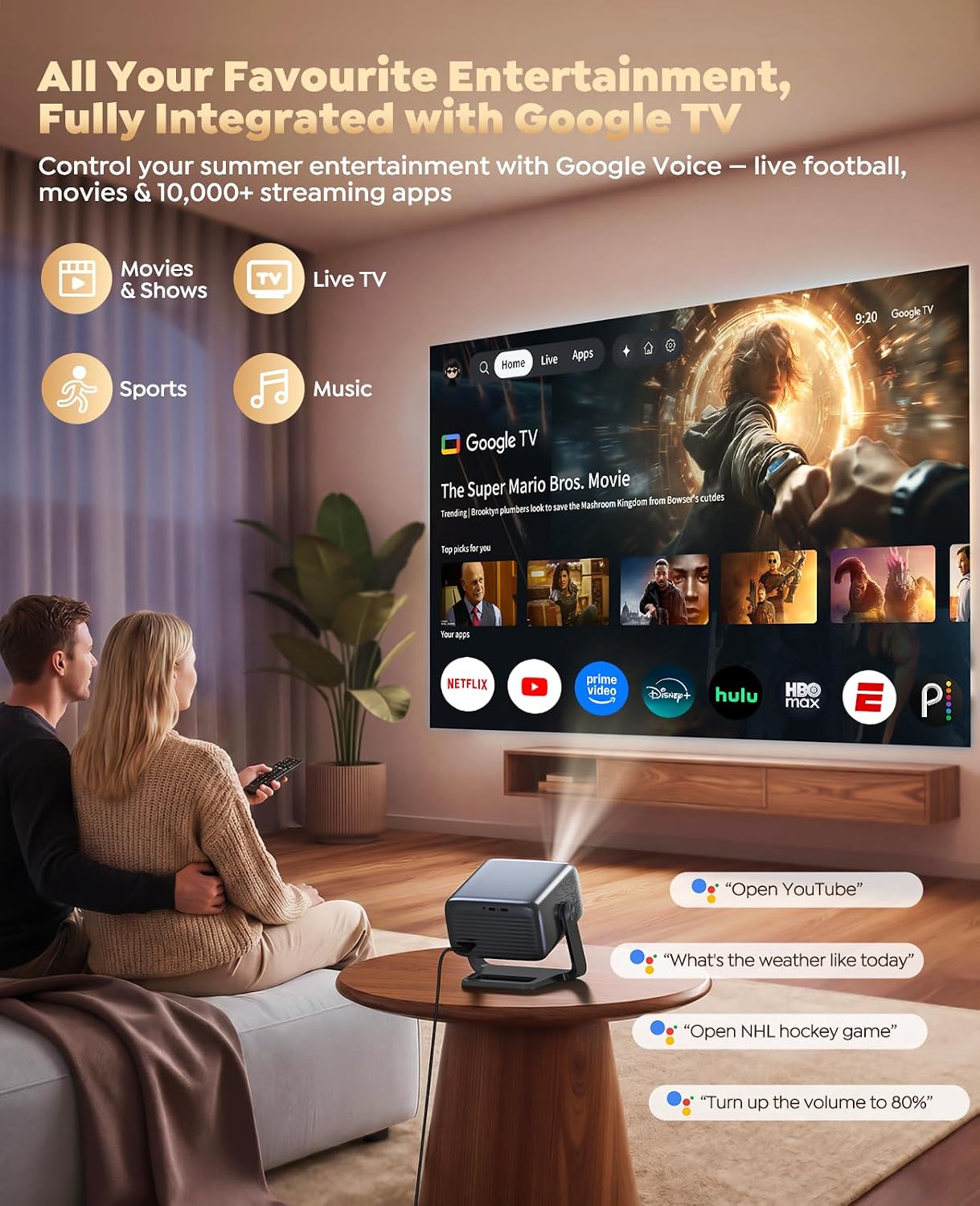
A couple enjoying content via Google TV on the PUTRIMS P66 projector, illustrating the voice command feature.

ഒരു കുടുംബം viewing projected content on both a wall and the ceiling, highlighting the versatility of the 360-degree rotating stand.
അടിസ്ഥാന പ്രവർത്തനം:
- ഗൂഗിൾ ടിവി ഇന്റർഫേസ്: The projector integrates Google TV, providing a user-friendly interface for accessing streaming applications and live television channels.
- നാവിഗേഷൻ: Use the provided remote control to navigate through the Google TV home screen, menus, and applications.
- ശബ്ദ നിയന്ത്രണം: The remote control includes a built-in Google Assistant. Press the voice control button and speak commands to search for content, control playback, or inquire about information.
ചിത്ര ക്രമീകരണം:
- AI Auto-Setup: The projector features AI auto-focus and auto-keystone correction, which automatically adjust the image for optimal clarity and correct any distortion.
- മാനുവൽ അഡ്ജസ്റ്റ്മെൻ്റ്: For fixed installations, you can disable Auto Focus and Auto Keystone in the settings menu. Once adjusted manually, the projector will retain these settings for future use.
- സൂം പ്രവർത്തനം: Utilize the 50%–100% zoom feature to adjust the screen size without physically moving the projector.
- തെളിച്ച ക്രമീകരണങ്ങൾ: Multiple brightness levels are available to optimize viewing in various ambient light conditions, from bright daytime environments to dark rooms.
ഗൂഗിൾ ടിവി സവിശേഷതകൾ
The PUTRIMS P66 projector comes with Google TV built-in, offering a comprehensive entertainment hub.
- Extensive App Access: Enjoy instant access to over 10,000 applications, including popular streaming services like Netflix, YouTube, Prime Video, and Disney+.
- Live TV Channels: Access more than 800 live TV channels, covering sports (ESPN, Fox Sports), news (CNN, NBC), and more.
- Integrated Home Screen: All content is seamlessly integrated into one easy-to-use home screen for convenient navigation.
- Google അസിസ്റ്റൻ്റ്: Use voice commands via the remote control to search for content, manage playback, and get information.
കണക്റ്റിവിറ്റി
The PUTRIMS P66 offers multiple connectivity options for a versatile entertainment setup.

The projector displaying content, with visual indicators for WiFi 6 and Bluetooth connectivity, emphasizing audio output.
വയർലെസ് കണക്ഷനുകൾ:
- വൈഫൈ 6: Ensures stable, buffer-free streaming and lag-free gaming, even when handling 4K content.
- Bluetooth 5.3 (Bidirectional): Allows connection to external Bluetooth speakers or headphones for enhanced audio. The projector can also function as a standalone Bluetooth speaker, streaming music directly from your smartphone.
- സ്ക്രീൻ മിററിംഗ്: Supports casting content from iOS, Android devices, and laptops directly to the projector.
വയർഡ് കണക്ഷനുകൾ:
- HDMI (ARC/CEC): Connect gaming consoles, soundbars, Blu-ray players, or other HDMI-enabled devices. ARC (Audio Return Channel) and CEC (Consumer Electronics Control) features are supported.
- USB 2.0: For media playback from USB drives or connecting other compatible peripherals.
- 3.5mm ഓഡിയോ ജാക്ക്: Provides an option for wired audio output to external speakers or headphones.
Image and Audio Settings
നിങ്ങളുടെ ഒപ്റ്റിമൈസ് ചെയ്യുക viewing and listening experience with the PUTRIMS P66 projector's advanced settings.

The PUTRIMS P66 projector displaying a vibrant football match on a large outdoor screen, demonstrating its visual capabilities.

An illustration comparing the throw distances required for various screen sizes, highlighting the projector's short throw capability.
ചിത്രത്തിന്റെ നിലവാരം:
- പ്രാദേശിക റെസലൂഷൻ: The projector features a native 1080P resolution, providing clear and detailed images.
- 4K Decoding Support: Supports 4K video decoding, though content will be displayed at the native 1080P resolution.
- HDR10: High Dynamic Range 10 enhances contrast and color accuracy, resulting in more vivid and lifelike visuals.
- തെളിച്ചം: Delivers true 500 ISO-standard ANSI brightness, ensuring visible images even in rooms with some ambient light.
ഓഡിയോ നിലവാരം:
- 30W Hi-Fi Stereo Speakers: Equipped with a powerful built-in 30W stereo speaker system, providing clear dialogue, deep bass, and immersive audio.
- AI Audio Balance & AI Noise Reduction: These features optimize sound output for a balanced and clear listening experience.
മെയിൻ്റനൻസ്
Proper maintenance ensures the longevity and optimal performance of your PUTRIMS P66 projector.
- പൊടി വൃത്തിയാക്കൽ: Regularly clean any accumulated dust from the projector's interior and exterior. Use the supplied cleaning kit for this purpose. Dust accumulation can affect image quality and lamp ജീവിതം.
- ലെൻസ് കെയർ: Always use the provided projector lens cover when the device is not in use to protect the lens from dust and scratches.
- Side Vent Cleaning: Clean the side vent monthly to ensure proper airflow and prevent overheating, which helps extend the lamp's operating life.
ഔദ്യോഗിക ഉൽപ്പന്ന വീഡിയോ:
This video demonstrates the correct procedure for cleaning dust from the interior of the PUTRIMS P66 projector.
ട്രബിൾഷൂട്ടിംഗ്
This section addresses common issues you might encounter with your PUTRIMS P66 projector.
ചിത്രമില്ല അല്ലെങ്കിൽ മോശം ചിത്രത്തിന്റെ ഗുണനിലവാരം:
- പവർ പരിശോധിക്കുക: Ensure the projector is properly connected to a power source and turned on.
- ലെൻസ് കവർ: Verify that the projector lens cover has been removed.
- ഫോക്കസും കീസ്റ്റോണും: Allow the AI auto-setup to complete, or manually adjust focus and keystone correction in the settings menu if auto-correction is disabled.
- ഇൻപുട്ട് ഉറവിടം: Confirm that the correct input source (e.g., HDMI, a streaming app) is selected.
- ആംബിയൻ്റ് ലൈറ്റ്: Adjust the projector's brightness settings to suit the ambient light conditions of your viewപരിസ്ഥിതി.
ശബ്ദമില്ല അല്ലെങ്കിൽ മോശം ശബ്ദ നിലവാരം:
- വോളിയം ലെവലുകൾ: Check the volume settings on both the projector and any connected external audio devices.
- ബ്ലൂടൂത്ത് കണക്ഷൻ: If using external Bluetooth speakers, ensure they are correctly paired and connected to the projector.
- ഓഡിയോ ഔട്ട്പുട്ട്: Verify that the correct audio output (internal speakers, Bluetooth, 3.5mm jack) is selected in the projector's settings.
കണക്റ്റിവിറ്റി പ്രശ്നങ്ങൾ:
- വൈഫൈ: Restart your WiFi router and the projector. Re-enter WiFi credentials if necessary.
- ബ്ലൂടൂത്ത്: Attempt to re-establish the Bluetooth connection with your device.
- എച്ച്ഡിഎംഐ/യുഎസ്ബി: എല്ലാ കേബിളുകളും അവയുടെ ബന്ധപ്പെട്ട പോർട്ടുകളുമായി സുരക്ഷിതമായി ബന്ധിപ്പിച്ചിട്ടുണ്ടെന്ന് ഉറപ്പാക്കുക.
System Lag or Performance Issues:
- ഫേംവെയർ അപ്ഡേറ്റ്: Ensure the projector's firmware is up to date. Refer to the Setup section for instructions.
- അപ്ലിക്കേഷനുകൾ അടയ്ക്കുക: Close any unused applications running in the background to free up system resources.
സ്പെസിഫിക്കേഷനുകൾ
Detailed technical specifications for the PUTRIMS P66 Smart 4K Projector.
| ഫീച്ചർ | സ്പെസിഫിക്കേഷൻ |
|---|---|
| ബ്രാൻഡ് | PUTRIMS |
| മോഡൽ നമ്പർ | P66 |
| നേറ്റീവ് റെസല്യൂഷൻ | 1920 x 1080 (1080P) |
| പരമാവധി ഡിസ്പ്ലേ റെസല്യൂഷൻ | 3840 x 2160 pixels (4K Supported) |
| തെളിച്ചം | True 500 ISO ANSI |
| കണക്റ്റിവിറ്റി ടെക്നോളജി | WiFi 6, Bluetooth 5.3 (Bidirectional), HDMI (CEC/ARC), USB 2.0, 3.5mm Jack, AV |
| ഓഡിയോ ഔട്ട്പുട്ട് | 30W Hi-Fi Stereo Speakers |
| ലൈറ്റ് സോഴ്സ് ഓപ്പറേറ്റിംഗ് ലൈഫ് | 100,000 മണിക്കൂർ |
| ത്രോ അനുപാതം | 1.17:1 (Ultra Short Throw) |
| പരമാവധി ഇമേജ് വലുപ്പം | 300 ഇഞ്ച് |
| ഏറ്റവും കുറഞ്ഞ ചിത്ര വലുപ്പം | 35 ഇഞ്ച് |
| മൗണ്ടിംഗ് തരം | Ceiling / Floor / Tabletop / Tripod / Wall Mount |
| അളവുകൾ (L x W x H) | 8.93"L x 7.75"W x 7.67"H |
| ഇനത്തിൻ്റെ ഭാരം | 2.2 പൗണ്ട് |
| കൺട്രോളർ തരം | Voice Control, Remote Control, Button Control, App Control |
വാറൻ്റിയും പിന്തുണയും
Your PUTRIMS P66 projector is backed by comprehensive support and warranty services.
- വാറൻ്റി: A 2-year warranty covers manufacturing defects and ensures product reliability.
- മാറ്റിസ്ഥാപിക്കൽ നയം: Enjoy a 1-year replacement policy for added peace of mind.
- സാങ്കേതിക സഹായം: Lifetime technical support is available to assist you with any product-related queries or issues.
- കസ്റ്റമർ സർവീസ്: Our 24/7 customer service team is ready to provide assistance with setup, troubleshooting, and general inquiries.
- ബന്ധപ്പെടാനുള്ള വിവരങ്ങൾ: For support, please contact us at support@putrims.com.