
1. ആമുഖം
This manual provides detailed instructions for the installation, operation, and maintenance of your Surakey 9.7-inch Android Car Stereo Radio. Please read this manual thoroughly before installation and use to ensure proper functionality and to avoid damage.
2 അനുയോജ്യത
This car stereo radio is designed for compatibility with Jeep Compass models from 2009 to 2017. Before proceeding with your order and installation, it is crucial to verify your vehicle's specific model year. If you are uncertain about compatibility, please provide a complete image of the plugs on the back of your vehicle's center console and the original main unit to the manufacturer for confirmation regarding wiring harnesses or adapters.
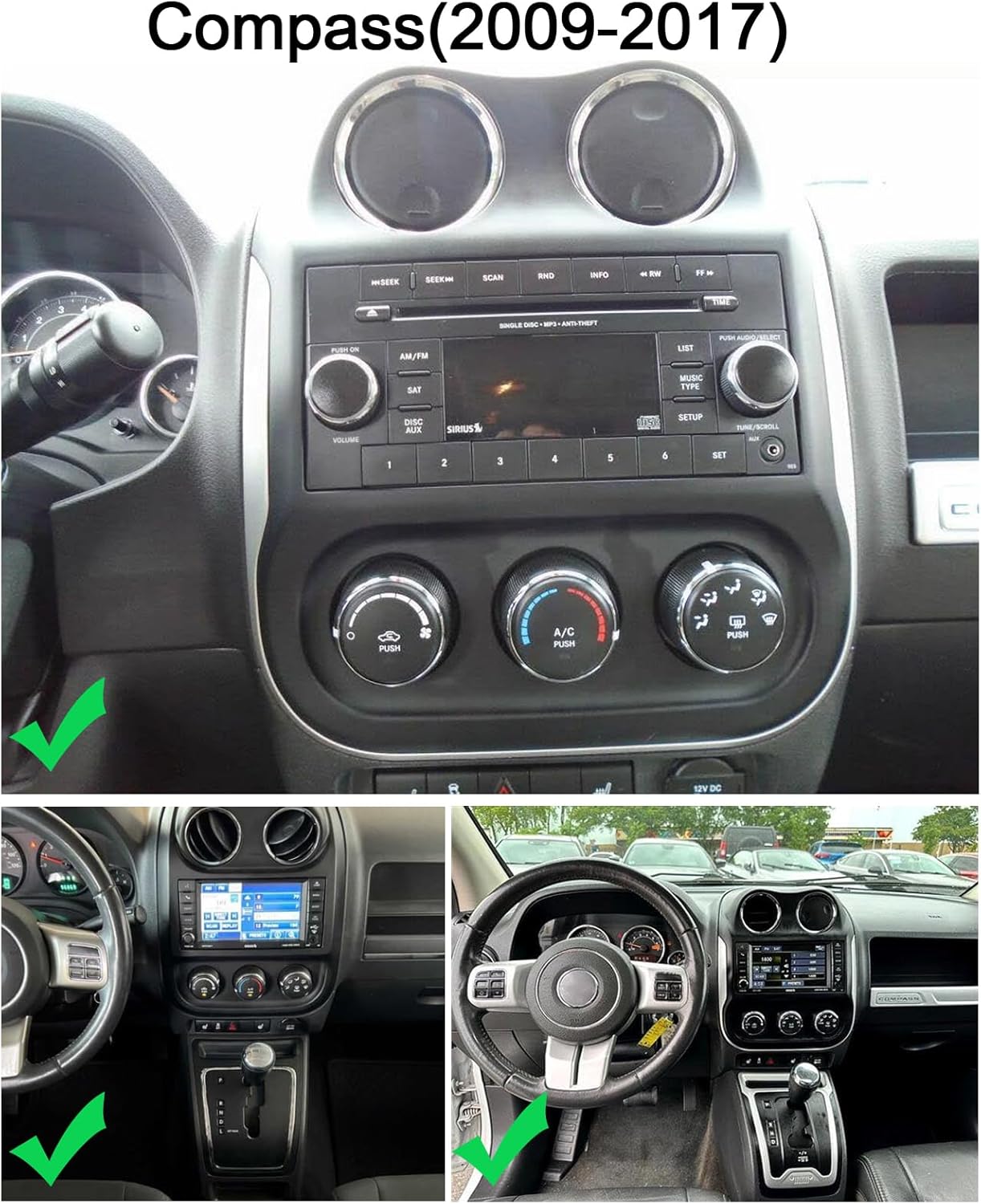
Figure 2.1: Dashboard compatibility for Jeep Compass (2009-2017).
3. സജ്ജീകരണവും ഇൻസ്റ്റാളേഷനും
3.1 പ്രീ-ഇൻസ്റ്റലേഷൻ പരിശോധന
Always confirm the correct wiring diagram for your specific vehicle model. Depending on the vehicle, different power cords and protocols may be required. Ensure you have the appropriate components before beginning installation.
3.2 ഉൽപ്പന്ന വയറിംഗ്
Refer to the wiring diagram provided to correctly connect the car stereo to your vehicle's electrical system. This includes connections for power, speakers, and other accessories.

ചിത്രം 3.1: ഉൽപ്പന്ന വയറിംഗ് ഡയഗ്രം.
3.3 റിവേഴ്സിംഗ് ക്യാമറ ഇൻസ്റ്റാളേഷൻ
The unit supports OEM CVBS 720P backup cameras. 360-degree panoramic cameras are not supported. If your OEM camera is incompatible, use the included backup camera. The reversing input must be connected even if the camera is not used.
- ക്യാമറയുടെ പോസിറ്റീവ് വയർ കാറിന്റെ റിവേഴ്സിംഗ് ലൈറ്റിന്റെ പോസിറ്റീവ് പോളുമായി ബന്ധിപ്പിക്കുക.
- ക്യാമറയുടെ നെഗറ്റീവ് വയർ കാറിന്റെ റിവേഴ്സിംഗ് ലൈറ്റിന്റെ നെഗറ്റീവ് പോളുമായി ബന്ധിപ്പിക്കുക.
- The reversing trigger is controlled by the stereo and does not require a separate connection.
പ്രധാന കുറിപ്പ്: The white plug must be connected to the main device for Bluetooth and Wi-Fi signals to function correctly.

Figure 3.2: Reversing Camera Wiring Diagram.
3.4 Backup Camera Format and Resolution Setup
To configure the backup camera settings:
- Tap the settings icon to open the settings menu.
- Select "Factory Settings" and enter the password "8888".
- Navigate to "Protocol Parameter Settings".
- Select "Reverse video resolution settings".
- Choose the correct setting based on your camera type: NTSC/PAL for OEM cameras, or AHD/25 for the included camera.


Figure 3.3: Backup Camera Resolution Setup Steps.
Video 3.1: Demonstration of accessing reversing settings for the car stereo. This video shows how to navigate through the system menus to find and adjust settings related to the backup camera, including options for reverse track, radar, image, color, and video resolution.
4. പ്രവർത്തന നിർദ്ദേശങ്ങൾ
4.1 Wireless Apple CarPlay and Android Auto
Connect your iOS or Android smartphone wirelessly via Bluetooth and Wi-Fi, or using a wired USB cable, to access CarPlay or Android Auto. This allows integration with your phone's address book, mail, notifications, map navigation, music, calls, and voice control features.

Figure 4.1: Wireless CarPlay and Android Auto Interface.
4.2 മിറർ ലിങ്ക്
The unit supports screen mirroring from both iOS and Android smartphones via Wi-Fi, allowing you to display your phone's content directly on the car stereo screen.

ചിത്രം 4.2: മിറർ ലിങ്ക് പ്രവർത്തനം.
4.3 സ്പ്ലിറ്റ് സ്ക്രീൻ ഡിസ്പ്ലേ
Utilize the split-screen feature to display two applications simultaneously, such as navigation and music playback. This enhances multitasking and provides a safer driving experience.

Figure 4.3: Split Screen Display.
4.4 ജിപിഎസ് നാവിഗേഷൻ
The car stereo offers both offline and online navigation options. You can use offline navigation by connecting the included GPS module or download online navigation apps via Wi-Fi/WLAN connection.

ചിത്രം 4.4: ജിപിഎസ് നാവിഗേഷൻ ഇന്റർഫേസ്.
4.5 സ്റ്റിയറിംഗ് വീൽ നിയന്ത്രണം (SWC)
The steering wheel control function allows you to manage calls, change music tracks, and adjust volume directly from your steering wheel buttons, promoting safer driving.

Figure 4.5: Steering Wheel Control Function.
4.6 Built-in DSP (Digital Signal Processor)
The integrated DSP enhances audio quality by reducing noise, distortion, and interference, offering personalized audio settings and an optimized soundstage.

Figure 4.6: Built-in DSP Interface.
4.7 എഫ്എം റേഡിയോ ഫംഗ്ഷൻ
Enjoy comprehensive FM and RDS channel support for easy access to news, music, and real-time traffic updates, enriching your driving experience.

Figure 4.7: FM Radio Interface.
4.8 ബ്ലൂടൂത്ത് കണക്റ്റിവിറ്റി
The unit features Bluetooth with A2DP for hands-free calls, phone book access, caller ID, voice calls, and Bluetooth music playback.

Figure 4.8: Bluetooth Interface.
4.9 വൈഫൈ കണക്ഷൻ
Connect to Wi-Fi for online maps, app downloads, streaming online content, and browsing the web. The built-in Bluetooth also allows for hands-free phone calls and music playback.

Figure 4.9: Wi-Fi Connectivity and Online Features.
5. പരിപാലനം
To ensure the longevity and optimal performance of your car stereo, follow these general maintenance guidelines:
- വൃത്തിയാക്കൽ: സ്ക്രീനും പുറം പ്രതലങ്ങളും വൃത്തിയാക്കാൻ മൃദുവായതും ഉണങ്ങിയതുമായ തുണി ഉപയോഗിക്കുക. ഫിനിഷിന് കേടുവരുത്തുന്ന ഉരച്ചിലുകൾ ഉണ്ടാക്കുന്ന ക്ലീനറുകളോ ലായകങ്ങളോ ഉപയോഗിക്കരുത്.
- താപനില: യൂണിറ്റ് ദീർഘനേരം ചൂടും തണുപ്പും ഉൾപ്പെടുന്ന തീവ്രമായ താപനിലയിൽ തുറന്നുകാട്ടുന്നത് ഒഴിവാക്കുക.
- സോഫ്റ്റ്വെയർ അപ്ഡേറ്റുകൾ: Periodically check for and install any available software updates to ensure the system runs efficiently and securely.
- കേബിൾ കണക്ഷനുകൾ: എല്ലാ കേബിളുകളും സുരക്ഷിതമായി ബന്ധിപ്പിച്ചിട്ടുണ്ടെന്നും കേടുപാടുകൾ കൂടാതെയാണെന്നും ഉറപ്പാക്കുക. അയഞ്ഞ കണക്ഷനുകൾ ഇടയ്ക്കിടെ പ്രശ്നങ്ങൾക്ക് കാരണമാകും.
6. പ്രശ്നപരിഹാരം
6.1 Backup Camera Issues
If your backup camera is not functioning correctly:
- അനുയോജ്യത: Ensure your camera is an OEM CVBS 720P type. 360-degree panoramic cameras are not supported.
- Included Camera: If your OEM camera is incompatible, use the backup camera provided with the unit.
- വയറിംഗ്: Double-check all camera wiring connections as per the installation diagram (Section 3.3). Ensure the reversing input is connected.
- ക്രമീകരണങ്ങൾ: Verify the backup camera format and resolution settings in the system menu (Section 3.4).
- White Plug: Confirm the white plug is securely connected to the main device, as this affects signal reception.
6.2 പൊതു പ്രശ്നങ്ങൾ
- ശക്തിയില്ല: എല്ലാ പവർ കണക്ഷനുകളും ഫ്യൂസുകളും പരിശോധിക്കുക. വാഹനത്തിന്റെ ഇഗ്നിഷൻ ഓണാണെന്ന് ഉറപ്പാക്കുക.
- ശബ്ദമില്ല: Verify speaker connections, volume levels, and audio source selection. Check DSP settings if applicable.
- ടച്ച്സ്ക്രീൻ പ്രതികരിക്കുന്നില്ല: Try restarting the unit. If the issue persists, a factory reset might be necessary (consult support).
- ജിപിഎസ് സിഗ്നൽ നഷ്ടം: ജിപിഎസ് ആന്റിന ശരിയായി ഇൻസ്റ്റാൾ ചെയ്തിട്ടുണ്ടെന്നും വ്യക്തമായ ഒരു ലൈൻ ഉണ്ടെന്നും ഉറപ്പാക്കുക. view ആകാശത്തിൻ്റെ.
- Bluetooth/Wi-Fi Connectivity: Check that the white plug is connected to the main device. Ensure Bluetooth and Wi-Fi are enabled in settings.
7 സ്പെസിഫിക്കേഷനുകൾ
| ഫീച്ചർ | വിശദാംശങ്ങൾ |
|---|---|
| മോഡൽ | 9.7-inch Android Car Stereo Radio (2+32G) |
| ഓപ്പറേറ്റിംഗ് സിസ്റ്റം | ആൻഡ്രോയിഡ് 15 |
| റാം | 2 ജിബി |
| ROM | 32 ജിബി |
| സ്ക്രീൻ വലിപ്പം | 9.7 ഇഞ്ച് |
| ഡിസ്പ്ലേ തരം | 2.5D HD Touch Screen |
| കണക്റ്റിവിറ്റി | Wireless Apple CarPlay, Wireless Android Auto, Bluetooth, Wi-Fi, USB |
| നാവിഗേഷൻ | GPS (Offline/Online) |
| ഓഡിയോ സവിശേഷതകൾ | Built-in DSP, FM/RDS Radio |
| അധിക സവിശേഷതകൾ | Mirror Link, Split Screen, Steering Wheel Control, Rearview Camera Support (OEM CVBS 720P), External MIC, APP Download, MP3/AUX/USB |
| പാക്കേജ് അളവുകൾ | 1.97 x 1.18 x 1.18 ഇഞ്ച് |
| ഇനത്തിൻ്റെ ഭാരം | 1.6 ഔൺസ് |
| നിർമ്മാതാവ് | Surakey |
| ASIN | B0GV5PMVYS |
8. പിന്തുണയും വാറണ്ടിയും
For any questions regarding product installation, wiring diagrams, or specific vehicle compatibility, please contact Surakey customer support. Our team is available to assist you with technical inquiries and troubleshooting.
8.1 ഉപഭോക്തൃ പിന്തുണ
ഇമെയിൽ: Fuyatongus@outlook.com
We offer 24-hour customer support to address your concerns.

Figure 8.1: Surakey Customer Support.
8.2 വാറൻ്റി വിവരങ്ങൾ
Specific warranty details are typically provided with your purchase documentation. Please retain your proof of purchase for any warranty claims. For issues related to backup camera compatibility or other product malfunctions, please reach out to customer support for assistance.