
ആമുഖം
This manual provides detailed instructions for the operation and maintenance of your RadioShack Portable CD Player Boombox. Please read this manual thoroughly before using the device to ensure proper function and to maximize your listening experience. This boombox combines classic CD playback with modern connectivity options including Bluetooth, FM radio, USB, and AUX input.
ബോക്സിൽ എന്താണുള്ളത്

Figure 1: Box Contents. This image displays the items included with your purchase: the boombox unit, AC power cord, remote control, and telescopic antenna.
- 1x RadioShack Portable CD Player Boombox Unit
- 1x എസി പവർ കോർഡ്
- 1x റിമോട്ട് കൺട്രോൾ
- 1x Telescopic Antenna (pre-attached)
- 1x ഉപയോക്തൃ മാനുവൽ (ഈ പ്രമാണം)
Note: 4 C batteries are required for portable operation and are not included.
ഉൽപ്പന്നം കഴിഞ്ഞുview ഫീച്ചറുകളും
The RadioShack Portable CD Player Boombox offers multiple audio playback options and user-friendly controls.

Figure 2: Key Features. This diagram highlights the boombox's main functionalities including Bluetooth 5.0, various CD formats, USB MP3 playback, FM radio, AUX input, and playback modes.
- സിഡി പ്ലേബാക്ക്: Supports CD, CD-R, CD-RW, and CD-MP3 formats.
- ബ്ലൂടൂത്ത് കണക്റ്റിവിറ്റി: അനുയോജ്യമായ ഉപകരണങ്ങളിൽ നിന്ന് വയർലെസ് ആയി ഓഡിയോ സ്ട്രീം ചെയ്യുക.
- എഫ്എം റേഡിയോ: Built-in tuner with telescopic antenna and 18 preset stations.
- യുഎസ്ബി പ്ലേബാക്ക്: MP3 പ്ലേ ചെയ്യുക fileഒരു USB ഡ്രൈവിൽ നിന്ന് നേരിട്ട്.
- AUX ഇൻപുട്ട്: ഒരു 3.5mm കേബിൾ വഴി ബാഹ്യ ഓഡിയോ ഉപകരണങ്ങൾ ബന്ധിപ്പിക്കുക.
- പ്ലേബാക്ക് മോഡുകൾ: Includes random, repeat, and program play functions.
- റിമോട്ട് കൺട്രോൾ: ദൂരെ നിന്ന് സൗകര്യപ്രദമായ പ്രവർത്തനത്തിന്.
സജ്ജമാക്കുക
1. ഉപകരണം പവർ ചെയ്യുന്നു

Figure 3: Power Options. The boombox can be powered by the included AC cord or by 4 C batteries for portable use.
Your boombox can be powered in two ways:
- എസി പവർ: Connect the included AC power cord to the AC input jack on the back of the boombox and then plug it into a standard wall outlet (110V-240V).
- ബാറ്ററി പവർ: For portable use, open the battery compartment on the bottom of the unit and insert 4 "C" size batteries (not included), ensuring correct polarity (+/-). Close the compartment securely.
2. Antenna Setup (FM Radio)
For optimal FM radio reception, fully extend the telescopic antenna located on the back of the unit. Adjust its position for the best signal.
പ്രവർത്തന നിർദ്ദേശങ്ങൾ
പൊതു നിയന്ത്രണങ്ങൾ
- പവർ ബട്ടൺ (⏻): യൂണിറ്റ് ഓണാക്കാനോ ഓഫാക്കാനോ അമർത്തുക.
- വോളിയം നോബ്: ശബ്ദം കൂട്ടാൻ ഘടികാരദിശയിലും, കുറയ്ക്കാൻ എതിർ ഘടികാരദിശയിലും തിരിക്കുക.
- Function (FUNC) Button: Press to cycle through playback modes: CD, Bluetooth, FM, USB, AUX.
- പ്ലേ/താൽക്കാലികമായി നിർത്തുക (⏸ ⏸ മിനിമലിസ്റ്റ്/⏸ ⏸ മിനിമലിസ്റ്റ്) ബട്ടൺ: പ്ലേബാക്ക് ആരംഭിക്കുകയോ താൽക്കാലികമായി നിർത്തുകയോ ചെയ്യുന്നു.
- നിർത്തുക (⏹ ⏹ മിനിസ്റ്റർ) ബട്ടൺ: പ്ലേബാക്ക് നിർത്തുന്നു.
- Skip/Search (⏮ ⏮ по видео 🇮🇳 / ⏭कालिक समाल�) Buttons: Press briefly to skip tracks. Press and hold to search within a track.
സിഡി പ്ലേബാക്ക്
- സിഡി കമ്പാർട്ട്മെന്റ് ലിഡ് തുറക്കുക.
- Place a CD (CD, CD-R, CD-RW, or CD-MP3) onto the spindle with the label side facing up.
- സിഡി കമ്പാർട്ട്മെന്റ് ലിഡ് സുരക്ഷിതമായി അടയ്ക്കുക.
- അമർത്തുക ജീവനക്കാരൻ "CD" മോഡ് തിരഞ്ഞെടുക്കുന്നതുവരെ ബട്ടൺ അമർത്തുക.
- സിഡി യാന്ത്രികമായി പ്ലേ ചെയ്യാൻ തുടങ്ങും. ഇല്ലെങ്കിൽ, അമർത്തുക പ്ലേ/താൽക്കാലികമായി നിർത്തുക ബട്ടൺ.
ബ്ലൂടൂത്ത് ജോടിയാക്കൽ

Figure 4: Bluetooth Streaming. Easily stream audio from your smartphone or tablet to the boombox.
- അമർത്തുക ജീവനക്കാരൻ "BT" (Bluetooth) മോഡ് തിരഞ്ഞെടുക്കുന്നതുവരെ ബട്ടൺ അമർത്തുക. ഡിസ്പ്ലേ "BT" കാണിക്കുകയും ഫ്ലാഷ് കാണിക്കുകയും ചെയ്യും, ഇത് ജോടിയാക്കൽ മോഡിലാണെന്ന് സൂചിപ്പിക്കുന്നു.
- On your Bluetooth-enabled device (smartphone, tablet), go to its Bluetooth settings and search for available devices.
- Select "RadioShack Boombox" from the list.
- Once paired, the "BT" indicator on the boombox display will stop flashing and remain solid.
- You can now play audio from your device through the boombox.
എഫ്എം റേഡിയോ ഓപ്പറേഷൻ

Figure 5: FM Presets and Programmed Playback. Use the SCAN button to automatically save FM stations and REP/PROG for custom playback sequences.
- അമർത്തുക ജീവനക്കാരൻ "FM" മോഡ് തിരഞ്ഞെടുക്കുന്നത് വരെ ബട്ടൺ.
- Auto Scan and Save Presets: അമർത്തിപ്പിടിക്കുക സ്കാൻ ചെയ്യുക button (often combined with Play/Pause). The radio will automatically scan for and save up to 18 available FM stations.
- സ്വമേധയാലുള്ള ട്യൂണിംഗ്: ചുരുക്കത്തിൽ അമർത്തുക ഒഴിവാക്കുക/തിരയുക ബട്ടണുകൾ (⏮ ⏮ по видео 🇮🇳 / ⏭कालिक समाल�) to fine-tune the frequency.
- പ്രീസെറ്റുകൾ തിരഞ്ഞെടുക്കുന്നു: ചുരുക്കത്തിൽ അമർത്തുക PROG button (often combined with Repeat) to cycle through saved preset stations.
USB പ്ലേബാക്ക്
- MP3 അടങ്ങിയ യുഎസ്ബി ഫ്ലാഷ് ഡ്രൈവ് ചേർക്കുക fileയുഎസ്ബി പോർട്ടിലേക്ക് എസ്.
- അമർത്തുക ജീവനക്കാരൻ button until "USB" mode is selected.
- The boombox will automatically detect and begin playing MP3 fileയുഎസ്ബി ഡ്രൈവിൽ നിന്നുള്ള ങ്ങൾ.
- ഉപയോഗിക്കുക പ്ലേ/താൽക്കാലികമായി നിർത്തുക, നിർത്തുക, ഒപ്പം ഒഴിവാക്കുക/തിരയുക പ്ലേബാക്ക് നിയന്ത്രിക്കുന്നതിനുള്ള ബട്ടണുകൾ.
AUX ഇൻപുട്ട്
- 3.5mm ഓഡിയോ കേബിളിന്റെ ഒരു അറ്റം (ഉൾപ്പെടുത്തിയിട്ടില്ല) ബൂംബോക്സിലെ AUX IN ജാക്കുമായി ബന്ധിപ്പിക്കുക.
- കേബിളിന്റെ മറ്റേ അറ്റം ഹെഡ്ഫോൺ ജാക്കുമായോ നിങ്ങളുടെ ബാഹ്യ ഓഡിയോ ഉപകരണത്തിന്റെ (ഉദാ: MP3 പ്ലെയർ, സ്മാർട്ട്ഫോൺ) ഓഡിയോ ഔട്ട്പുട്ടുമായോ ബന്ധിപ്പിക്കുക.
- അമർത്തുക ജീവനക്കാരൻ "AUX" മോഡ് തിരഞ്ഞെടുക്കുന്നതുവരെ ബട്ടൺ അമർത്തുക.
- Control playback and volume from your external audio device.
റിമോട്ട് കൺട്രോൾ ഉപയോഗം
The included remote control allows for convenient operation of most functions from a distance. Ensure the remote has working batteries (typically 2x AAA, not included) and point it towards the front of the boombox.
- ശക്തി: യൂണിറ്റ് ഓൺ/ഓഫ് ചെയ്യുക.
- FUNC: Select input mode (CD, BT, FM, USB, AUX).
- വോളിയം +/-: വോളിയം ലെവൽ ക്രമീകരിക്കുക.
- പ്ലേ/താൽക്കാലികമായി നിർത്തുക, നിർത്തുക, ഒഴിവാക്കുക/തിരയുക: പ്ലേബാക്ക് നിയന്ത്രിക്കുക.
- REP/PROG: Access repeat and program functions.
- സ്കാൻ: Auto-scan FM stations.
- EQ/SLEEP: Adjust equalizer settings or set sleep timer (refer to specific remote markings for details).
Playback Modes (CD/USB)
- Repeat (REP): അമർത്തുക REP button (on unit or remote) to cycle through repeat modes:
- Repeat One: Repeats the current track.
- Repeat All: Repeats all tracks on the CD/USB.
- Repeat Folder (for MP3 CDs/USB): Repeats all tracks in the current folder.
- Program (PROG): Allows you to program a specific order of tracks for CD or USB playback.
- In CD or USB mode, with playback stopped, press the PROG ബട്ടൺ.
- ഉപയോഗിക്കുക ഒഴിവാക്കുക/തിരയുക buttons to select your desired track.
- അമർത്തുക PROG again to confirm and add the track to the program list.
- Repeat steps 2-3 to add more tracks.
- അമർത്തുക പ്ലേ/താൽക്കാലികമായി നിർത്തുക പ്രോഗ്രാം ചെയ്ത പ്ലേബാക്ക് ആരംഭിക്കാൻ.
- Random/Shuffle: Some models may have a dedicated shuffle button (often labeled "RDM" or "SHUF") or it may be part of the REP/PROG cycle. This plays tracks in a random order.
മെയിൻ്റനൻസ്
- വൃത്തിയാക്കൽ: Use a soft, dry cloth to clean the exterior of the boombox. Do not use abrasive cleaners or solvents. For the CD lens, use a specialized CD lens cleaner disc.
- സംഭരണം: When not in use for extended periods, remove batteries to prevent leakage. Store the unit in a cool, dry place away from direct sunlight and extreme temperatures.
- ബാറ്ററി മാറ്റിസ്ഥാപിക്കൽ: Replace all 4 "C" batteries simultaneously when they are depleted. Do not mix old and new batteries or different types of batteries.
- സിഡി കെയർ: സിഡികളുടെ അരികുകളിൽ തന്നെ പിടിക്കുക. അവ വൃത്തിയായും പോറലുകൾ ഇല്ലാതെയും സൂക്ഷിക്കുക. ഉപയോഗത്തിലില്ലാത്തപ്പോൾ അവയുടെ കവറുകളിൽ തന്നെ സൂക്ഷിക്കുക.
ട്രബിൾഷൂട്ടിംഗ്
| പ്രശ്നം | സാധ്യമായ കാരണം | പരിഹാരം |
|---|---|---|
| ശക്തിയില്ല | എസി കോർഡ് ബന്ധിപ്പിച്ചിട്ടില്ല; ബാറ്ററികൾ തീർന്നു അല്ലെങ്കിൽ തെറ്റായി ചേർത്തിരിക്കുന്നു. | Ensure AC cord is securely plugged in. Replace batteries with new ones, checking polarity. |
| ശബ്ദമില്ല | Volume too low; Incorrect input mode; Headphones connected. | Increase volume. Press FUNC to select correct mode. Disconnect headphones. |
| സിഡി ഒഴിവാക്കുകയോ പ്ലേ ചെയ്യാതിരിക്കുകയോ ചെയ്യുന്നു | സിഡി വൃത്തികേടായതോ പോറലുള്ളതോ ആണ്; സിഡി തെറ്റായി ചേർത്തിരിക്കുന്നു; സിഡി കമ്പാർട്ട്മെന്റ് അടച്ചിട്ടില്ല. | Clean CD. Reinsert CD correctly. Close lid firmly. Try another CD. |
| ബ്ലൂടൂത്ത് ജോടിയാക്കുന്നില്ല | Boombox not in BT mode; Device too far; Device already paired to another unit. | Ensure boombox is in BT mode and flashing. Move device closer. Disconnect from other devices. |
| മോശം എഫ്എം സ്വീകരണം | ആന്റിന നീട്ടിയിട്ടില്ല അല്ലെങ്കിൽ ശരിയായി സ്ഥാപിച്ചിട്ടില്ല; ദുർബലമായ സിഗ്നൽ ഏരിയ. | ടെലിസ്കോപ്പിക് ആന്റിന പൂർണ്ണമായും നീട്ടി ക്രമീകരിക്കുക. യൂണിറ്റ് മറ്റൊരു സ്ഥലത്തേക്ക് മാറ്റാൻ ശ്രമിക്കുക. |
| യുഎസ്ബി പ്ലേ ചെയ്യുന്നില്ല | USB drive not inserted correctly; Files not MP3 format; USB drive corrupted. | Reinsert USB drive. Ensure files are MP3. Try a different USB drive. |
സ്പെസിഫിക്കേഷനുകൾ
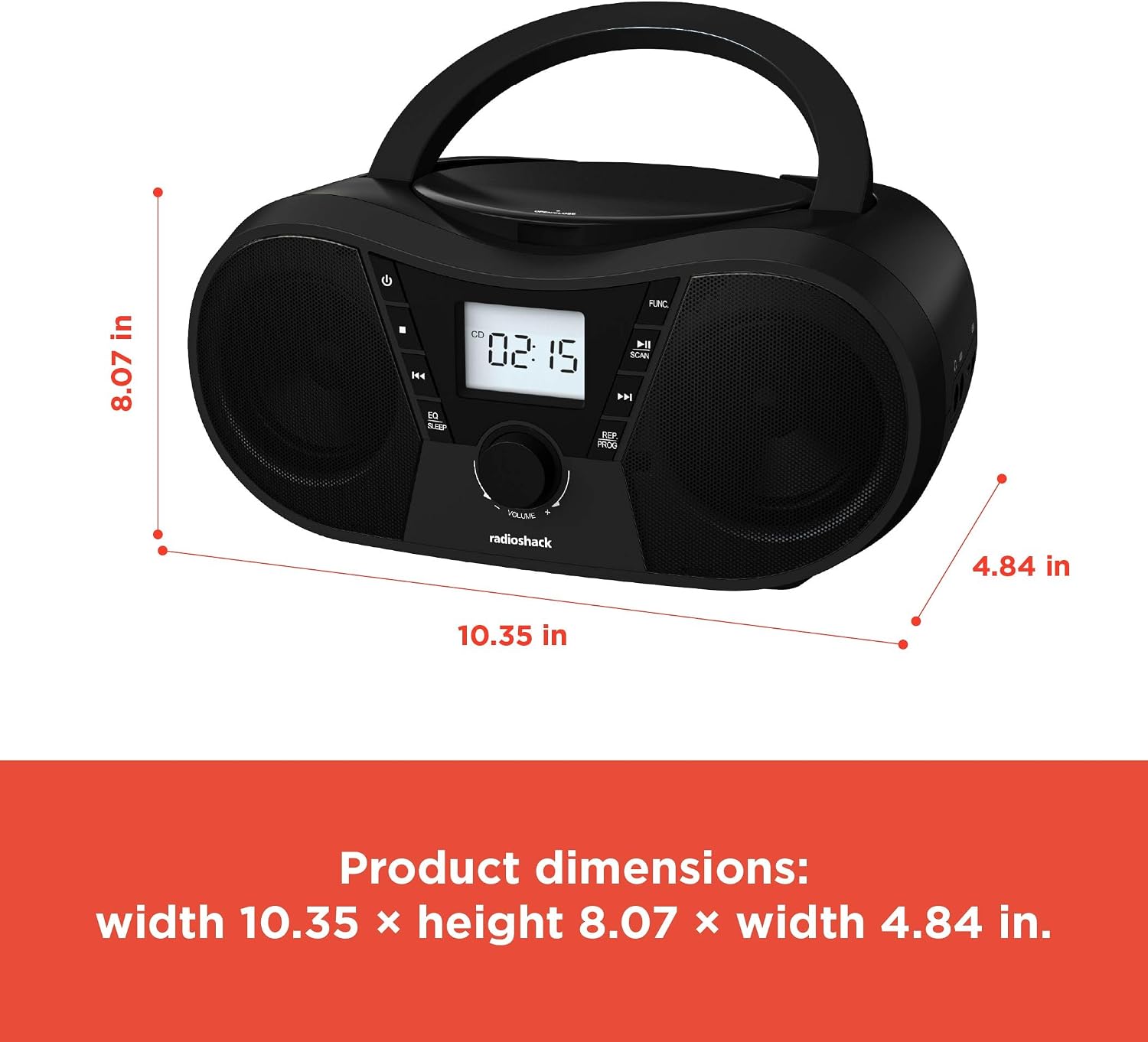
ചിത്രം 6: ഉൽപ്പന്ന അളവുകൾ. The boombox measures approximately 10.35 inches wide, 8.07 inches high, and 4.84 inches deep.
| ഫീച്ചർ | വിശദാംശങ്ങൾ |
|---|---|
| മോഡൽ നമ്പർ | 1402010 |
| പവർ ഉറവിടം | AC 110V-240V ~ 50/60Hz or 4 x "C" Batteries (DC 6V) |
| പിന്തുണയ്ക്കുന്ന മീഡിയ | CD, CD-R, CD-RW, CD-MP3, USB (MP3), Bluetooth, FM Radio, AUX Input |
| ബ്ലൂടൂത്ത് പതിപ്പ് | 5.0 (Compatible) |
| എഫ്എം ഫ്രീക്വൻസി റേഞ്ച് | 87.5 - 108 മെഗാഹെട്സ് |
| ഓഡിയോ put ട്ട്പുട്ട് മോഡ് | സ്റ്റീരിയോ |
| സ്പീക്കറുകളുടെ എണ്ണം | 2 (Built-in Stereo Speakers) |
| വാട്ട്tage | 10 വാട്ട്സ് |
| ഫ്രീക്വൻസി പ്രതികരണം | 20 ഹെർട്സ് - 20000 ഹെർട്സ് |
| അളവുകൾ (W x H x D) | ഏകദേശം 10.35 x 8.07 x 4.84 ഇഞ്ച് |
| നിറം | കറുപ്പ് |
വാറൻ്റിയും പിന്തുണയും
This RadioShack Portable CD Player Boombox (Model 1402010) comes with a 1-വർഷ പരിമിത വാറൻ്റി വാങ്ങിയ തീയതി മുതൽ. സാധാരണ ഉപയോഗത്തിലുള്ള മെറ്റീരിയലുകളിലെയും വർക്ക്മാൻഷിപ്പുകളിലെയും നിർമ്മാണ വൈകല്യങ്ങൾ ഈ വാറന്റി ഉൾക്കൊള്ളുന്നു.
For warranty claims, technical support, or customer service inquiries, please contact RadioShack customer support through their official webസൈറ്റ് അല്ലെങ്കിൽ നിങ്ങളുടെ വാങ്ങൽ ഡോക്യുമെന്റേഷനോടൊപ്പം നൽകിയിരിക്കുന്ന ബന്ധപ്പെടാനുള്ള വിവരങ്ങൾ.
വാറന്റി ആവശ്യങ്ങൾക്കായി നിങ്ങളുടെ വാങ്ങിയതിന്റെ തെളിവ് സൂക്ഷിക്കുക.