
1. ആമുഖം
Thank you for choosing the Metz 43MQH7000Z 43-inch Smart TV. This manual provides essential information for the safe and efficient use of your television. Please read it thoroughly before operating the device and retain it for future reference.
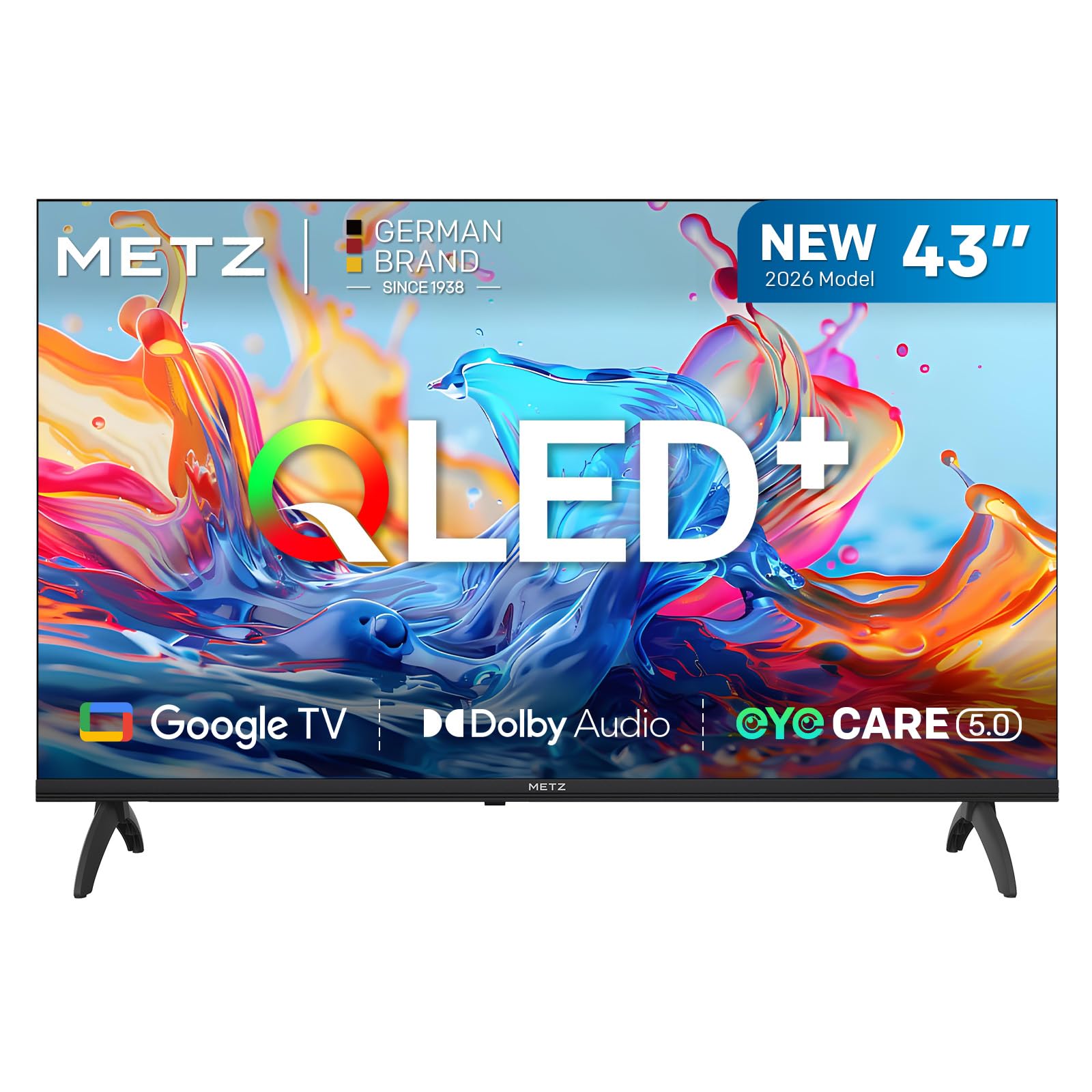
Figure 1: Metz 43MQH7000Z 43-inch Smart TV, front view സ്റ്റാൻഡിനൊപ്പം.
2 സുരക്ഷാ വിവരങ്ങൾ
Always observe the following basic safety precautions when using your television:
- തീയോ വൈദ്യുതാഘാതമോ ഒഴിവാക്കാൻ ടിവി മഴയിലോ ഈർപ്പത്തിലോ തുറന്നുകാട്ടരുത്.
- കാബിനറ്റ് തുറക്കരുത്. എല്ലാ സേവനങ്ങളും യോഗ്യതയുള്ള ഉദ്യോഗസ്ഥർക്ക് റഫർ ചെയ്യുക.
- ശരിയായ വായുസഞ്ചാരം ഉറപ്പാക്കുക. വായുസഞ്ചാര ദ്വാരങ്ങൾ തടയരുത്.
- പവർ കോർഡ് നടക്കുകയോ നുള്ളുകയോ ചെയ്യുന്നതിൽ നിന്ന് സംരക്ഷിക്കുക.
- ഇടിമിന്നൽ ഉണ്ടാകുമ്പോഴോ ദീർഘനേരം ഉപയോഗിക്കാതിരിക്കുമ്പോഴോ ടിവി പ്ലഗ് ഊരിവയ്ക്കുക.
- ടിവി നേരിട്ട് സൂര്യപ്രകാശം, താപ സ്രോതസ്സുകൾ, ശക്തമായ കാന്തികക്ഷേത്രങ്ങൾ എന്നിവയിൽ നിന്ന് അകറ്റി നിർത്തുക.
3. ബോക്സിൽ എന്താണുള്ളത്?
Carefully unpack your Metz 43MQH7000Z TV and check that all items are present:
- Metz 43MQH7000Z Smart TV
- റിമോട്ട് കൺട്രോൾ
- പവർ കേബിൾ
- ഉപയോക്തൃ മാനുവൽ (ഈ പ്രമാണം)
- TV Bases (2 units)
- Screws for Bases (4 units)
- AAA Batteries (2 units)

Figure 2: TV dimensions and included components.
4. സജ്ജീകരണം
4.1 സ്റ്റാൻഡ് അറ്റാച്ചുചെയ്യുന്നു
- സ്ക്രീൻ കേടുപാടുകൾ തടയുന്നതിന് ടിവി മുഖം മൃദുവായതും പരന്നതുമായ പ്രതലത്തിൽ വയ്ക്കുക.
- ടിവിയുടെ അടിയിലുള്ള അനുബന്ധ സ്ലോട്ടുകളുമായി ടിവി ബേസുകൾ വിന്യസിക്കുക.
- Secure each base with the provided screws.
4.2 വാൾ മൗണ്ടിംഗ് (ഓപ്ഷണൽ)
The TV supports VESA standard 200 x 100 mm. Use a compatible wall mount kit (sold separately) and follow its instructions carefully. Ensure the wall can support the TV's weight.
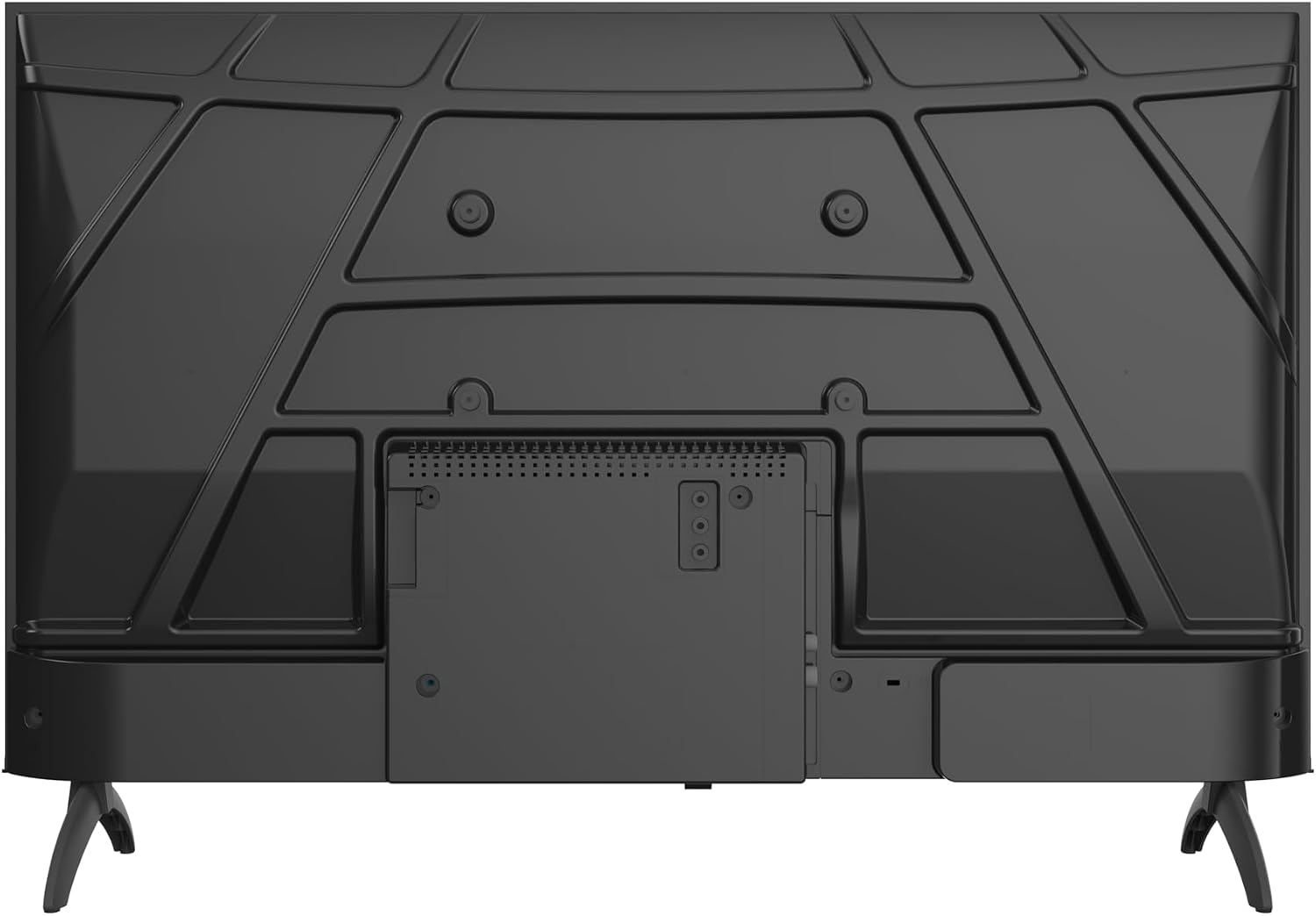
ചിത്രം 3: പിൻഭാഗം view of the TV, showing VESA mounting points.
4.3 പെരിഫറലുകൾ ബന്ധിപ്പിക്കുന്നു
Connect your external devices to the appropriate ports on the TV. The TV features:
- 2 x HDMI ports: For connecting Blu-ray players, game consoles, etc.
- 2 x USB പോർട്ടുകൾ: മീഡിയ പ്ലേബാക്കിനായി USB ഡ്രൈവുകൾ ബന്ധിപ്പിക്കുന്നതിന്.
- LAN പോർട്ട്: വയർഡ് ഇന്റർനെറ്റ് കണക്ഷന്.
- Antenna/Cable input: For DVB-T/T2/C/S/S2 signals.
- CI+ slot: കണ്ടീഷണൽ ആക്സസ് മൊഡ്യൂളുകൾക്കായി.
- ഹെഡ്ഫോൺ ഔട്ട്പുട്ട്: സ്വകാര്യ ശ്രവണത്തിനായി.

ചിത്രം 4: വശം view of the TV, illustrating connectivity ports.
4.4 പവർ ഓണും പ്രാരംഭ സജ്ജീകരണവും
- പവർ കേബിൾ ടിവിയിലേക്കും തുടർന്ന് ഒരു പവർ ഔട്ട്ലെറ്റിലേക്കും ബന്ധിപ്പിക്കുക.
- റിമോട്ട് കൺട്രോളിലോ ടിവിയിലോ പവർ ബട്ടൺ അമർത്തുക.
- Follow the on-screen instructions to complete the initial setup, including language selection, network connection (Wi-Fi or LAN), and channel scanning.
- Google TV ഫീച്ചറുകളും ആപ്പുകളും ആക്സസ് ചെയ്യാൻ നിങ്ങളുടെ Google അക്കൗണ്ട് ഉപയോഗിച്ച് സൈൻ ഇൻ ചെയ്യുക.
5. നിങ്ങളുടെ ടിവി പ്രവർത്തിപ്പിക്കുന്നു
5.1 റിമോട്ട് കൺട്രോൾ ഓവർview
The remote control allows you to navigate the TV's interface, adjust settings, and access smart features. Insert the two AAA batteries into the remote control, ensuring correct polarity.
5.2 ഗൂഗിൾ ടിവി ഇന്റർഫേസ്
Your Metz TV runs on Google TV, providing a personalized home screen with content recommendations from your streaming services. Use the remote's navigation buttons to browse and select content.

Figure 5: Google TV interface displaying various streaming content.
5.3 ചിത്ര ക്രമീകരണങ്ങൾ
Your TV features advanced picture technologies for an optimal viewഅനുഭവം:
- Gen 6 QLED+: Delivers vibrant colors and enhanced brightness.
- HDR10 & HLG: Provides superior contrast and color accuracy for compatible content.
- നേത്ര പരിചരണ രീതി: Reduces eye strain during prolonged viewing. This includes Low Blue Light and Flicker-Free technologies.

ചിത്രം 6: ഉദാample of vibrant colors on a Metz QLED+ display.

Figure 7: Visual comparison of HDR10 & HLG vs. standard display.

Figure 8: Eye Care features: Low Blue Light and Flicker-Free technology.
5.4 ശബ്ദ ക്രമീകരണങ്ങൾ
Experience rich and clear audio with your TV's sound features:
- ഡോൾബി ഓഡിയോ: Provides immersive surround sound for movies, series, and music.
- അഡാപ്റ്റീവ് ഓഡിയോ: Adjusts sound modes (Standard, Cinema, Music, Concert, News, Personal) to suit your content.
- സംഭാഷണ വ്യക്തത: Enhances spoken words, making conversations clearer even in noisy scenes.

Figure 9: Dolby Audio creating an immersive sound environment.
5.5 കണക്റ്റിവിറ്റി
- വൈഫൈ: ഇന്റർനെറ്റ് ആക്സസിനും സ്ട്രീമിംഗിനും നിങ്ങളുടെ ഹോം നെറ്റ്വർക്കിലേക്ക് കണക്റ്റുചെയ്യുക.
- ബ്ലൂടൂത്ത് 5.1: വയർലെസ് ഹെഡ്ഫോണുകൾ, സൗണ്ട്ബാറുകൾ അല്ലെങ്കിൽ മറ്റ് ബ്ലൂടൂത്ത് ഉപകരണങ്ങൾ ബന്ധിപ്പിക്കുക.
- കാസ്റ്റിംഗ്: Easily cast content from your smartphone or laptop to the TV using Chromecast built-in.

Figure 10: Bluetooth 5.1 for faster, smarter, and more reliable connections.

Figure 11: Multi-screen casting for an immersive experience.
5.6 സ്മാർട്ട് സവിശേഷതകൾ
- സ്ട്രീമിംഗ് ആപ്പുകൾ: Access popular services like Netflix, YouTube, Prime Video, and Disney+.
- ഗെയിം മോഡ്: ഗെയിമിംഗിനായി ഡിസ്പ്ലേ ക്രമീകരണങ്ങൾ ഒപ്റ്റിമൈസ് ചെയ്യുന്നു, ഇൻപുട്ട് കാലതാമസം കുറയ്ക്കുന്നു.
- Auto Volume Leveller: Maintains consistent volume levels across different channels and content.
6. പരിപാലനം
6.1 വൃത്തിയാക്കൽ
- സ്ക്രീൻ: മൃദുവായതും ലിന്റ് രഹിതവുമായ ഒരു തുണി ഉപയോഗിച്ച് സ്ക്രീൻ സൌമ്യമായി തുടയ്ക്കുക. സ്ഥിരമായ പാടുകൾ ഉണ്ടെങ്കിൽ, ടിവികൾക്കായി പ്രത്യേകം രൂപകൽപ്പന ചെയ്ത ഒരു സ്ക്രീൻ ക്ലീനർ ഉപയോഗിക്കുക, സ്ക്രീനിൽ നേരിട്ട് പ്രയോഗിക്കുന്നതിനു പകരം തുണിയിൽ പുരട്ടുക.
- ശരീരം: Wipe the TV's frame and stand with a soft, dry cloth. Do not use abrasive cleaners or solvents.
വൃത്തിയാക്കുന്നതിന് മുമ്പ് എല്ലായ്പ്പോഴും പവർ ഔട്ട്ലെറ്റിൽ നിന്ന് ടിവി അഴിക്കുക.
6.2 സോഫ്റ്റ്വെയർ അപ്ഡേറ്റുകൾ
Your Smart TV may receive software updates to improve performance and add new features. Ensure your TV is connected to the internet to receive these updates. You can usually check for updates in the TV's settings menu.
7. പ്രശ്നപരിഹാരം
നിങ്ങളുടെ ടിവിയിൽ പ്രശ്നങ്ങൾ നേരിടുകയാണെങ്കിൽ, ഇനിപ്പറയുന്ന പൊതുവായ പരിഹാരങ്ങൾ പരിശോധിക്കുക:
| പ്രശ്നം | സാധ്യമായ പരിഹാരം |
|---|---|
| ശക്തിയില്ല | Check if the power cable is securely connected and the power outlet is working. Try a different outlet. |
| ചിത്രമില്ല, പക്ഷേ ശബ്ദം ഉണ്ട് | ശരിയായ ഇൻപുട്ട് ഉറവിടം തിരഞ്ഞെടുത്തിട്ടുണ്ടെന്ന് ഉറപ്പാക്കുക. ബാഹ്യ ഉപകരണങ്ങളിലേക്കുള്ള കേബിൾ കണക്ഷനുകൾ പരിശോധിക്കുക. |
| ശബ്ദമില്ല, പക്ഷേ ചിത്രം ഉണ്ട് | വോളിയം ലെവലും മ്യൂട്ട് സ്റ്റാറ്റസും പരിശോധിക്കുക. ഓഡിയോ ക്രമീകരണങ്ങളും ബാഹ്യ സ്പീക്കർ കണക്ഷനുകളും പരിശോധിക്കുക. |
| റിമോട്ട് കൺട്രോൾ പ്രവർത്തിക്കുന്നില്ല | ബാറ്ററികൾ മാറ്റിസ്ഥാപിക്കുക. റിമോട്ടിനും ടിവിക്കും ഇടയിൽ തടസ്സങ്ങളൊന്നുമില്ലെന്ന് ഉറപ്പാക്കുക. |
| Wi-Fi-യിലേക്ക് കണക്റ്റുചെയ്യാൻ കഴിയില്ല | വൈഫൈ പാസ്വേഡ് പരിശോധിക്കുക. നിങ്ങളുടെ റൂട്ടറും ടിവിയും പുനരാരംഭിക്കുക. ടിവി റൂട്ടറിന്റെ പരിധിക്കുള്ളിലാണെന്ന് ഉറപ്പാക്കുക. |
For more detailed troubleshooting, please refer to the full User Manual PDF or contact customer support.
8 സ്പെസിഫിക്കേഷനുകൾ
| ഫീച്ചർ | വിശദാംശങ്ങൾ |
|---|---|
| മോഡലിൻ്റെ പേര് | MQH7000 |
| മോഡൽ നമ്പർ | 43MQH7000Z |
| സ്ക്രീൻ വലിപ്പം | 43 ഇഞ്ച് (108 സെ.മീ) |
| ഡിസ്പ്ലേ ടെക്നോളജി | ക്യുഎൽഇഡി |
| റെസലൂഷൻ | 1080p (1920 x 1080) |
| പുതുക്കിയ നിരക്ക് | 60 Hz |
| HDR ഫോർമാറ്റ് പിന്തുണയ്ക്കുന്നു | HDR10 |
| ഇമേജ് എൻഹാൻസ്മെൻ്റ് ടെക്നോളജി | ക്യുഎൽഇഡി+ |
| ഓപ്പറേറ്റിംഗ് സിസ്റ്റം | Google TV |
| ഓഡിയോ ടെക്നോളജി | Dolby Audio, Dolby Digital, Dolby Digital Plus |
| ബ്ലൂടൂത്ത് പതിപ്പ് | 5.1 |
| HDMI പോർട്ടുകൾ | 2 |
| USB പോർട്ടുകൾ | 2 |
| കണക്റ്റിവിറ്റി | Bluetooth, USB, Wi-Fi, LAN, DVB-T/T2/C/S/S2, CI+ |
| പ്രത്യേക സവിശേഷതകൾ | Auto Volume Leveller, Bezel-Less Design, Chromecast, Eye Comfort Mode, Game Mode |
| അളവുകൾ (സ്റ്റാൻഡിനൊപ്പം) | 21.4P x 95.5L x 61.1H cm |
| ഭാരം (സ്റ്റാൻഡിനൊപ്പം) | 5.5 കി.ഗ്രാം |
| VESA മൗണ്ടിംഗ് സ്റ്റാൻഡേർഡ് | 200 x 100 മി.മീ |
| മെമ്മറി സ്റ്റോറേജ് കപ്പാസിറ്റി | 1.5 ജിബി |
| മോഡൽ വർഷം | 2026 |
| മാതൃരാജ്യം | പോളണ്ട് |
For detailed energy efficiency information, please refer to the EU Energy Label:

Figure 12: EU Energy Label for the 43MQH7000Z.
You can also find more information at: https://eprel.ec.europa.eu/qr/2590947
9. വാറൻ്റിയും പിന്തുണയും
9.1 വാറൻ്റി വിവരങ്ങൾ
Your Metz 43MQH7000Z Smart TV comes with a 2 വർഷത്തെ വാറൻ്റി വാങ്ങിയ തീയതി മുതൽ. വാറന്റി ക്ലെയിമുകൾക്കായി നിങ്ങളുടെ വാങ്ങിയതിന്റെ തെളിവ് സൂക്ഷിക്കുക. സാധാരണ ഉപയോഗ സാഹചര്യങ്ങളിൽ നിർമ്മാണ വൈകല്യങ്ങൾ വാറന്റി ഉൾക്കൊള്ളുന്നു.
9.2 ഉപഭോക്തൃ പിന്തുണ
For technical assistance, troubleshooting, or warranty inquiries, please contact Metz customer support:
- നിർമ്മാതാവ്: METZ DISPLAY POLSKA SP.Z O.O.
- വിലാസം: UL. RYSZARDA CHOMICZA 13A/DC2, 55-080 NOWA WIES WROCŁAWSKA, POLAND
- ഇമെയിൽ: metzpoland@skyworth.com
You can also download the complete User Manual in PDF format for more detailed information: