
1. ആമുഖം
Thank you for choosing the Mxmoonant CC-2 Multifunctional Electric Vegetable Slicer. This commercial-grade appliance is designed to streamline food preparation in professional kitchens, offering versatile cutting options with efficiency and durability. Constructed from high-quality 304 stainless steel, it ensures hygiene and longevity. Please read this manual thoroughly before operation to ensure safe and optimal performance.
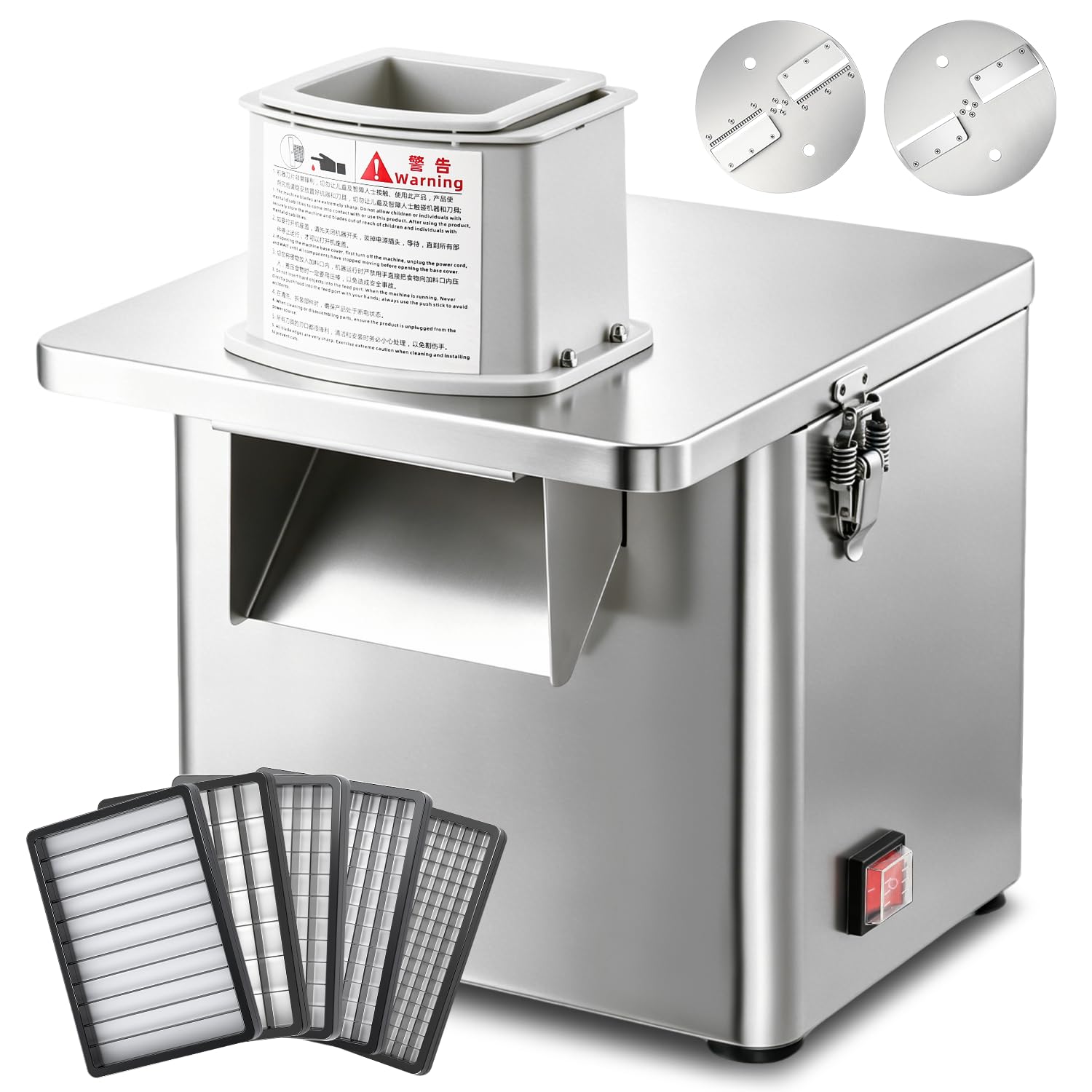
Figure 1: Mxmoonant CC-2 Electric Vegetable Slicer. This image displays the main unit of the slicer, highlighting its stainless steel construction and compact size suitable for various kitchen environments.
2. സുരക്ഷാ നിർദ്ദേശങ്ങൾ
Always follow these safety precautions to prevent injury or damage to the appliance.
- എല്ലാ നിർദ്ദേശങ്ങളും വായിക്കുക: Familiarize yourself with the operation and safety features before use.
- ഇലക്ട്രിക്കൽ സുരക്ഷ: Ensure the power supply matches the appliance's requirements (110V, with adapter for 100V Japan). Do not operate with a damaged cord or plug.
- ബ്ലേഡ് സുരക്ഷ: Blades are extremely sharp. Handle with extreme care during installation, removal, and cleaning. Always use the provided wrench for blade changes.
- കൈകൾ വൃത്തിയായി സൂക്ഷിക്കുക: Never insert hands or utensils into the feeding chute or discharge opening while the machine is operating. Use the pusher provided.
- മുങ്ങരുത്: The main motor unit of the slicer must അല്ല be immersed in water or other liquids for cleaning. Wipe with a damp തുണി.
- മേൽനോട്ടം: Do not leave the appliance unattended during operation. Keep out of reach of children.
- സ്ഥിരതയുള്ള ഉപരിതലം: Operate the slicer on a stable, flat, and dry surface.
- ഉപയോഗത്തിലില്ലാത്തപ്പോൾ അൺപ്ലഗ് ചെയ്യുക: ഉപകരണം കൂട്ടിച്ചേർക്കുന്നതിനോ, വേർപെടുത്തുന്നതിനോ, വൃത്തിയാക്കുന്നതിനോ, ഉപയോഗത്തിലില്ലാത്തപ്പോഴോ മുമ്പ് എല്ലായ്പ്പോഴും പവർ ഔട്ട്ലെറ്റിൽ നിന്ന് അൺപ്ലഗ് ചെയ്യുക.
3. ഉൽപ്പന്ന ഘടകങ്ങൾ
The Mxmoonant CC-2 slicer comes with the following components:
- Electric Slicer Main Unit
- 7 Blades (various types for slicing, dicing, julienne, stick cut)
- Pusher (2 sizes)
- ബ്ലേഡ് മാറ്റങ്ങൾക്കുള്ള റെഞ്ച്
- ഇൻസ്ട്രക്ഷൻ മാനുവൽ
- 100V Conversion Adapter (for Japan use)

ചിത്രം 2: ഓവർview of included components. This image shows the main unit, various blades (thin slice, julienne, dicing grids, stick cut), the pusher, and the wrench.
4. സജ്ജീകരണം
- അൺപാക്ക്: പാക്കേജിംഗിൽ നിന്ന് എല്ലാ ഘടകങ്ങളും ശ്രദ്ധാപൂർവ്വം നീക്കം ചെയ്യുക. ഭാവിയിലെ സംഭരണത്തിനോ ഗതാഗതത്തിനോ വേണ്ടി പാക്കേജിംഗ് സൂക്ഷിക്കുക.
- വൃത്തിയാക്കുക: Before first use, wash all removable parts (blades, pusher) with warm soapy water. Wipe the main unit with a damp തുണി. അസംബ്ലി ചെയ്യുന്നതിന് മുമ്പ് എല്ലാ ഭാഗങ്ങളും ഉണങ്ങിയെന്ന് ഉറപ്പാക്കുക.
- യൂണിറ്റ് സ്ഥാപിക്കുക: Position the slicer on a stable, level, and dry countertop. Ensure there is enough space around the unit for ventilation and operation.
- Install Blade: Select the desired blade type for your cutting task. Using the provided wrench, securely attach the chosen blade to the motor shaft. Ensure the blade is firmly locked in place with the side latches.
- പവർ കണക്ഷൻ: Connect the power cord to the slicer. If using in Japan, attach the 100V conversion adapter to the plug before inserting it into a wall outlet.

Figure 3: Key components for setup and operation. This image highlights the powerful motor, secure side latches for blade exchange, the food pusher, and the simple one-touch power switch.
5. പ്രവർത്തന നിർദ്ദേശങ്ങൾ
- ഭക്ഷണം ഉണ്ടാക്കുക: Wash and peel vegetables or fruits as needed. Cut larger items into pieces that fit comfortably into the feeding chute.
- പ്ലേസ് കണ്ടെയ്നർ: Position a suitable container or tray beneath the discharge opening to collect the processed food.
- ലോഡ് ഫുഡ്: Place the prepared food into the feeding chute. Do not overfill.
- Start Slicer: ഉപകരണം ഓണാക്കാൻ പവർ സ്വിച്ച് അമർത്തുക.
- Use Pusher: Gently and firmly press the food down using the appropriate size pusher. Do not force the food. Allow the blades to do the work.
- Stop Slicer: Once all food is processed, turn off the slicer using the power switch. Unplug the unit from the power outlet.

Figure 4: Slicer in action. This image demonstrates the slicer processing cucumbers, producing uniform slices into a collection tray, alongside other prepared vegetables.
6. Blade Types and Functions
The Mxmoonant CC-2 offers four primary cutting functions using its interchangeable blades:
- Thin Slicing: Achieves 2-4mm adjustable slices. Ideal for cucumbers, potatoes, and other vegetables requiring thin, uniform cuts.
- Julienne (4mm): Produces fine, long strips. Perfect for carrots, potatoes, or burdock for salads and stir-fries.
- ഡൈസിംഗ്: Available in multiple sizes (6x6mm, 8x8mm, 10x10mm, 13x15mm) for precise cubing of vegetables like onions, carrots, or bell peppers.
- Stick Cut (80x10mm): Creates thicker, elongated sticks, suitable for French fries or vegetable sticks.

Figure 5: Four-in-one multi-function. This image illustrates the different blade types and the resulting cuts: thin slices (2-4mm adjustable), 4mm julienne, various dicing sizes (6x6mm, 8x8mm, 10x10mm, 13x15mm), and 80x10mm stick cuts.

ചിത്രം 6: ഉദാample of thin slicing. This image displays uniformly thin cucumber slices, achievable with the adjustable slicing blade.

ചിത്രം 7: ഉദാample of 4mm julienne cut. This image shows potatoes cut into fine, consistent julienne strips.

ചിത്രം 8: ഉദാample of dicing. This image illustrates red onions cut into small, uniform cubes using one of the dicing grid blades.

ചിത്രം 9: ഉദാample of stick cut. This image shows sweet potatoes processed into thick, even sticks using the 80x10mm stick cut blade.

Figure 10: Suitable and unsuitable foods. This graphic indicates that the slicer is designed for hard vegetables and fruits like potatoes, carrots, cucumbers, and eggplant, but not for meat, leafy greens, or soft tofu.
7. പരിപാലനവും ശുചീകരണവും
Regular cleaning and maintenance will ensure the longevity and hygienic operation of your slicer.
- അൺപ്ലഗ്: Always unplug the slicer from the power outlet before cleaning.
- ഡിസ്അസംബ്ലിംഗ്: Using the provided wrench, loosen the screws and carefully remove all blades (cutter disk, crossbar blade, etc.) and the pusher.
- നീക്കം ചെയ്യാവുന്ന ഭാഗങ്ങൾ കഴുകുക: Hand wash all blades and the pusher with warm, soapy water. Rinse thoroughly and dry immediately to prevent water spots or corrosion.
- പ്രധാന യൂണിറ്റ് വൃത്തിയാക്കുക: പ്രധാന യൂണിറ്റിന്റെ പുറംഭാഗവും ഉൾഭാഗവും പരസ്യം ഉപയോഗിച്ച് തുടയ്ക്കുക.amp തുണി. ആവശ്യമെങ്കിൽ മിതമായ ഡിറ്റർജന്റ് ഉപയോഗിക്കുക. പ്രധാന യൂണിറ്റ് വെള്ളത്തിൽ മുക്കരുത്.
- നന്നായി ഉണക്കുക: Ensure all parts are completely dry before reassembling or storing the slicer.
- സംഭരണം: Store the slicer and its components in a clean, dry place.

Figure 11: Easy cleaning process. This image demonstrates how to clean the slicer by rinsing removable parts and wiping the main unit. It emphasizes not immersing the main body in water.
8. പ്രശ്നപരിഹാരം
If you encounter issues with your Mxmoonant CC-2 slicer, refer to the following common problems and solutions:
| പ്രശ്നം | സാധ്യമായ കാരണം | പരിഹാരം |
|---|---|---|
| സ്ലൈസർ ഓണാകുന്നില്ല | No power supply; Power switch off; Damaged cord/plug | Check power outlet and connection; Ensure switch is ON; Inspect cord/plug for damage (contact support if damaged). |
| മോശം കട്ടിംഗ് പ്രകടനം | Dull or incorrect blade; Food too large/hard; Blade not securely installed | Ensure correct blade for food type; Sharpen or replace blade if dull; Cut food into smaller pieces; Verify blade is securely latched. |
| അസാധാരണമായ ശബ്ദം അല്ലെങ്കിൽ വൈബ്രേഷൻ | Loose blade; Foreign object; Unit not on stable surface | Turn off and unplug. Check blade installation; Remove any foreign objects; Place unit on a stable, flat surface. |
| Food gets stuck in chute | Overfilling chute; Food too soft/sticky; Insufficient pressure on pusher | Do not overfill; Use firmer vegetables; Apply steady, firm pressure with the pusher. |
If the problem persists after attempting these solutions, please contact Mxmoonant customer support.
9 സ്പെസിഫിക്കേഷനുകൾ
Detailed technical specifications for the Mxmoonant CC-2 Electric Vegetable Slicer:
| ഫീച്ചർ | സ്പെസിഫിക്കേഷൻ |
|---|---|
| ബ്രാൻഡ് | Mxmoonant |
| മോഡലിൻ്റെ പേര് | CC-2 |
| അളവുകൾ (L x W x H) | 22 x 32 x 37.5 സെ.മീ |
| മെറ്റീരിയൽ | 304 സ്റ്റെയിൻലെസ്സ് സ്റ്റീൽ |
| നിറം | വെള്ളി |
| ശക്തി | 250W |
| പ്രോസസ്സിംഗ് ശേഷി | 120 കിലോഗ്രാം/മണിക്കൂർ വരെ |
| ഭാരം | 11 കി.ഗ്രാം |
| വാല്യംtage | 110V (US standard plug), includes conversion adapter for 100V Japan |
| ഉൾപ്പെടുത്തിയ ഘടകങ്ങൾ | Electric slicer main unit, 7 blades, instruction manual, wrench, 100V adapter |
| പരിചരണ നിർദ്ദേശങ്ങൾ | Hand wash only (main unit not submersible) |
10. വാറൻ്റിയും പിന്തുണയും
For warranty information, technical support, or service inquiries, please contact Mxmoonant customer service through the retailer where you purchased the product or visit the official Mxmoonant website. Please have your model number (CC-2) and purchase date available when contacting support.