
ആമുഖം
Thank you for choosing the iScooter DX5 Electric Scooter. This manual provides essential information for the safe assembly, operation, maintenance, and troubleshooting of your scooter. Please read it thoroughly before your first ride to ensure optimal performance and safety.
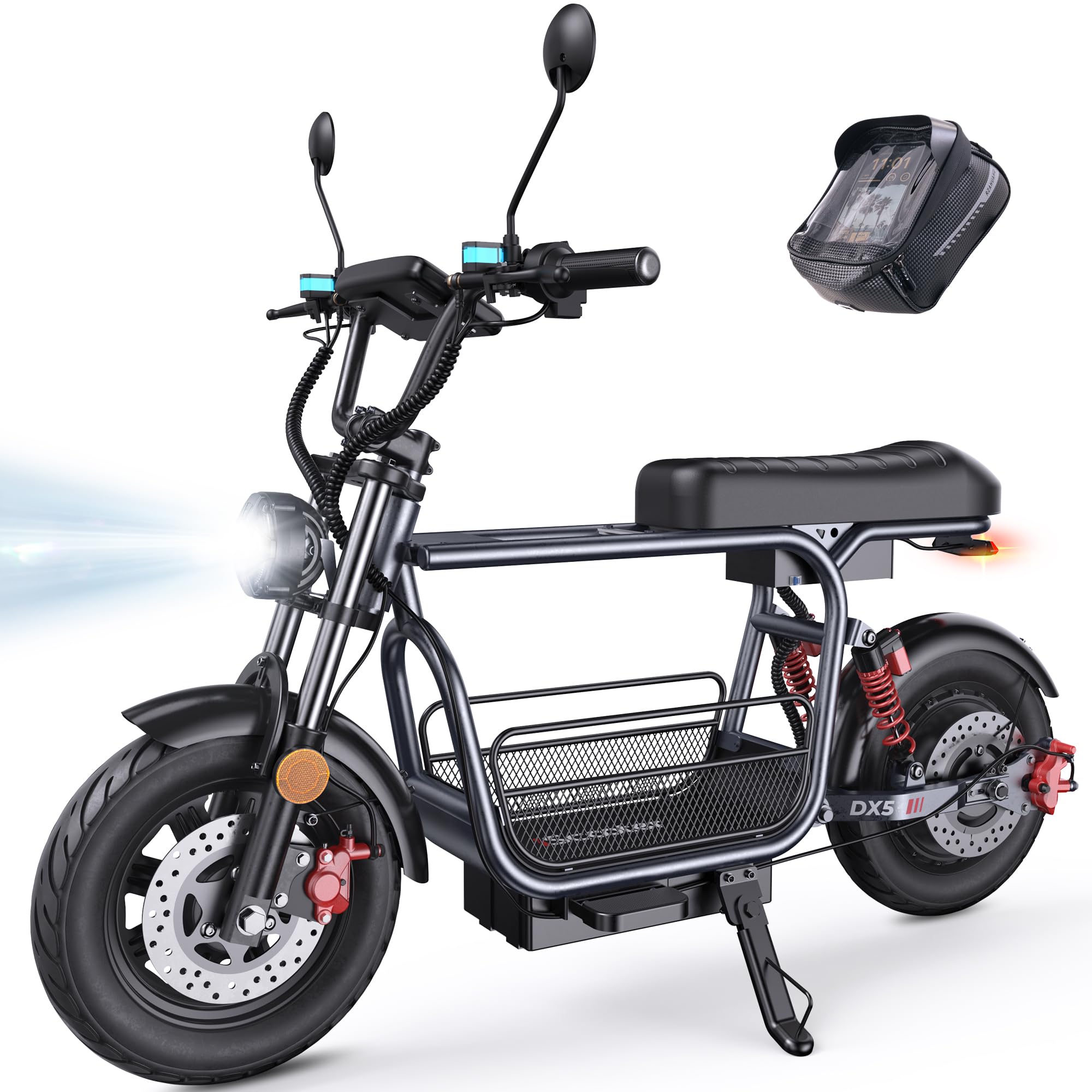
Figure 1: iScooter DX5 Electric Scooter with key features highlighted.
സുരക്ഷാ വിവരങ്ങൾ
Always prioritize safety when operating your electric scooter. Failure to follow safety guidelines can result in serious injury or damage to the product.
- എല്ലായ്പ്പോഴും ഹെൽമെറ്റും ഉചിതമായ സുരക്ഷാ ഗിയറും ധരിക്കുക.
- നനഞ്ഞ സാഹചര്യങ്ങളിലോ വഴുക്കലുള്ള പ്രതലങ്ങളിലോ വാഹനമോടിക്കരുത്.
- പ്രാദേശിക ഗതാഗത നിയമങ്ങളും ചട്ടങ്ങളും പാലിക്കുക.
- ഓരോ ഉപയോഗത്തിനും മുമ്പായി ഒരു പ്രീ-റൈഡ് പരിശോധന നടത്തുക, ബ്രേക്കുകൾ, ടയറുകൾ, എല്ലാ കണക്ഷനുകളും പരിശോധിക്കുക.
- 16 വയസ്സിന് താഴെയുള്ള കുട്ടികളെ സ്കൂട്ടർ ഓടിക്കാൻ അനുവദിക്കരുത്.
- മറ്റ് വാഹനങ്ങളിൽ നിന്നും കാൽനടയാത്രക്കാരിൽ നിന്നും സുരക്ഷിതമായ അകലം പാലിക്കുക.
സജ്ജീകരണവും അസംബ്ലിയും
Your iScooter DX5 comes partially assembled. Follow these steps to complete the setup.
1. അൺബോക്സിംഗും ഘടക തിരിച്ചറിയലും
പാക്കേജിംഗിൽ നിന്ന് എല്ലാ ഘടകങ്ങളും ശ്രദ്ധാപൂർവ്വം നീക്കം ചെയ്യുക. പാക്കിംഗ് ലിസ്റ്റ് അനുസരിച്ച് എല്ലാ ഭാഗങ്ങളും ഉണ്ടെന്ന് ഉറപ്പാക്കുക.

Figure 2: All components of the iScooter DX5 Electric Scooter laid out for assembly.
2. അസംബ്ലി വീഡിയോ ഗൈഡ്
For a detailed visual guide on assembling your iScooter DX5, please watch the official installation video below.
Video 1: Official installation guide for the iScooter DX5 Electric Scooter with Seat.
3. പ്രധാന അസംബ്ലി ഘട്ടങ്ങൾ
Refer to the video for detailed instructions. Key steps include:
- ഹാൻഡിൽബാർ ഇൻസ്റ്റലേഷൻ: Secure the handlebars to the stem using the provided tools.
- മിറർ അറ്റാച്ച്മെന്റ്: പിൻഭാഗം ഇൻസ്റ്റാൾ ചെയ്യുകview mirrors on both sides of the handlebars.
- Headlight Mounting: Attach the front LED headlight to the designated position.
- ഫ്രണ്ട് വീൽ അസംബ്ലി: Carefully install the front wheel, ensuring the brake rotor aligns correctly with the caliper.
- ഫെൻഡർ ഇൻസ്റ്റാളേഷൻ: Secure the front and rear fenders.
- Footrest and Seat: Attach the footrests and ensure the seat is securely fastened.
- സ്റ്റോറേജ് ആക്സസറികൾ: Install the removable storage basket and scooter bag as desired.

Figure 3: Detachable front basket for convenient storage.

Figure 4: Scooter bag for carrying small essentials.
പ്രവർത്തന നിർദ്ദേശങ്ങൾ
1. Powering On/Off and NFC Unlocking
To power on your scooter, ensure the battery disconnect switch is in the 'ON' position. The DX5 features NFC unlocking for convenience and security. Simply tap your NFC card to the designated area on the display to unlock and activate the scooter.
2. സ്പീഡ് മോഡുകൾ
The iScooter DX5 offers four adjustable speed modes to suit various riding conditions:
- ഗിയർ 1: 15 MPH (Easy start, energy-saving mode)
- ഗിയർ 2: 21 MPH (Urban commuting, steady speed)
- ഗിയർ 3: 28 MPH (Balanced power, faster ride)
- ഗിയർ 4: 35 MPH (Turbo sprint, full power)

Figure 5: Four speed modes for versatile riding.
3. Smart Display and Controls
Monitor your ride with the full-color 9-inch LCD screen, which displays speed, battery level, and system alerts. The handlebars feature intuitive controls:
- ടേൺ സിഗ്നൽ ബട്ടൺ: Quick toggle for safe left/right turns.
- ഹെഡ്ലൈറ്റ് സ്വിച്ച്: Control front light with a single press.
- ഹോൺ ബട്ടൺ: Instant alert to pedestrians or traffic.
- 'S' Gear Button: Easily shift between 4 speed modes.
- NFC അൺലോക്ക്: Tap to unlock for fast, secure, keyless operation.

Figure 6: Handlebar controls and LCD display.
4. ബ്രേക്കിംഗ് സിസ്റ്റം
The scooter is equipped with dual hydraulic disc brakes for reliable stopping power. The system also includes a power cut-off when braking for added safety.

Figure 7: Dual hydraulic disc brakes for instant control.
5. ലൈറ്റിംഗ് സിസ്റ്റം
For enhanced visibility and safety, especially during night rides, the DX5 features:
- Bright LED headlights.
- Integrated turn signals.
- Brake lights on the taillight.

Figure 8: Advanced lighting system for safe rides.
6. Anti-Theft Alarm
The DX5 includes a built-in anti-theft alarm system for added security. Refer to the display for system alerts.
മെയിൻ്റനൻസ്
Regular maintenance ensures the longevity and safe operation of your iScooter DX5.
1 ബാറ്ററി ചാർജ് ചെയ്യുന്നു
The scooter features a high-capacity 48V 15.6Ah (748.8Wh) lithium battery. Charge time is approximately 6-8 hours. Always use the provided charger.

Figure 9: Battery specifications and charging information.
2. ടയർ കെയർ
The DX5 is equipped with durable 15" x 3.0" vacuum pneumatic e-motorcycle tires. Regularly check tire pressure and inspect for wear or damage.

Figure 10: Rugged 15-inch tires for grip and stability.
3. സസ്പെൻഷൻ സിസ്റ്റം
The advanced dual suspension system (front hydraulic and rear air spring) provides a comfortable ride. Periodically inspect the suspension components for proper function.

Figure 11: Advanced dual suspension system.
4 ജനറൽ ക്ലീനിംഗ്
പരസ്യത്തിലൂടെ നിങ്ങളുടെ സ്കൂട്ടർ പതിവായി വൃത്തിയാക്കുക.amp തുണി. ഉയർന്ന മർദ്ദത്തിലുള്ള വാട്ടർ ജെറ്റുകൾ നേരിട്ട് ഇലക്ട്രിക്കൽ ഘടകങ്ങളിൽ ഉപയോഗിക്കുന്നത് ഒഴിവാക്കുക.
ട്രബിൾഷൂട്ടിംഗ്
If you encounter any issues with your iScooter DX5, please refer to the following basic troubleshooting steps:
- സ്കൂട്ടർ ഓണാക്കുന്നില്ല: Check the battery disconnect switch is in the 'ON' position. Ensure the battery is charged.
- സവാരി ചെയ്യുമ്പോൾ പവർ നഷ്ടപ്പെടൽ: Check battery level. Ensure all electrical connections are secure.
- ബ്രേക്കുകൾ പ്രതികരിക്കുന്നില്ല: Inspect brake levers and calipers for any obstructions or damage.
- അസാധാരണമായ ശബ്ദങ്ങൾ: ഉടൻ തന്നെ റൈഡിംഗ് നിർത്തി സ്കൂട്ടറിന്റെ ഭാഗങ്ങൾ അയഞ്ഞിട്ടുണ്ടോ അല്ലെങ്കിൽ കേടുപാടുകളുണ്ടോ എന്ന് പരിശോധിക്കുക.
കൂടുതൽ സങ്കീർണ്ണമായ പ്രശ്നങ്ങൾക്ക്, ദയവായി ഉപഭോക്തൃ പിന്തുണയുമായി ബന്ധപ്പെടുക.
സ്പെസിഫിക്കേഷനുകൾ
Below are the key specifications for the iScooter DX5 Electric Scooter:
| ഫീച്ചർ | സ്പെസിഫിക്കേഷൻ |
|---|---|
| മോഡലിൻ്റെ പേര് | DX5 |
| മോട്ടോർ | 1500W (Peak) / 1000W (Rated) Brushless Motor |
| ബാറ്ററി | 48V 15.6Ah (748.8Wh) ലിഥിയം ബാറ്ററി |
| പരമാവധി വേഗത | 35 MPH (56 km/h) |
| പരമാവധി ശ്രേണി | 38-45 മൈൽ |
| ടയറുകൾ | 15" x 3.0" Vacuum Pneumatic E-Motorcycle Tires |
| ബ്രേക്കുകൾ | ഡ്യുവൽ ഹൈഡ്രോളിക് ഡിസ്ക് ബ്രേക്കുകൾ |
| സസ്പെൻഷൻ | Front Hydraulic Suspension & Rear Air Spring Suspension |
| പരമാവധി ലോഡ് കപ്പാസിറ്റി | 330 പൗണ്ട് |
| ഉൽപ്പന്ന അളവുകൾ | 58.27"L x 26.8"W x 55.1"H |
| ഇനത്തിൻ്റെ ഭാരം | 100 പൗണ്ട് |
| ജല പ്രതിരോധം | IPX4 |

Figure 12: iScooter DX5 dimensions.
വാറൻ്റി
iScooter offers a limited warranty. We provide a 360-day or 180-day warranty on different parts. Please refer to your purchase documentation for specific warranty terms and conditions.
ഉപഭോക്തൃ പിന്തുണ
For any inquiries, technical assistance, or warranty claims, please contact iScooter customer support:
- കോൾ സെൻ്റർ: +1 (855) 696-2888
- തത്സമയ ചാറ്റ്/ഇമെയിൽ: support@iscooterglobal.com

Figure 13: iScooter Customer Support.