
1. ഉൽപ്പന്നം കഴിഞ്ഞുview
This manual provides instructions for the assembly, operation, and maintenance of your SEDETA L-Shaped Electric Standing Desk. This desk is designed to offer a versatile workspace with adjustable height, integrated storage, and convenient power access.
പ്രധാന സവിശേഷതകൾ:
- വിശാലമായ L-ആകൃതിയിലുള്ള ഡെസ്ക്ടോപ്പ്: നൽകുന്നു ample surface area for multiple monitors and office equipment.
- സംയോജിത സംഭരണം: Features 6 large drawers (3 on each side) for organized storage of documents and supplies.
- ഇലക്ട്രിക് ഉയരം ക്രമീകരിക്കൽ: Smooth and quiet motor for effortless transitions between sitting and standing positions (28.3" to 47.2").
- മെമ്മറി പ്രീസെറ്റുകൾ: Three programmable memory height settings for quick adjustments.
- അന്തർനിർമ്മിത പവർ ഔട്ട്ലെറ്റുകൾ: Includes 4 AC outlets (120V/12A) and 2 USB ports (5V/2A) with a 6.5-foot power cord.
- നീണ്ടുനിൽക്കുന്ന നിർമ്മാണം: Heavy-duty steel frame supports up to 200 lbs, with a scratch-resistant, FSC-certified engineered wood desktop.

Image 1.1: The SEDETA L-Shaped Electric Standing Desk in a home office environment.
2 സുരക്ഷാ വിവരങ്ങൾ
- അസംബ്ലിക്കും ഉപയോഗത്തിനും മുമ്പ് എല്ലാ നിർദ്ദേശങ്ങളും ശ്രദ്ധാപൂർവ്വം വായിക്കുക.
- ജോലി സമയത്ത് കുട്ടികളെയും വളർത്തുമൃഗങ്ങളെയും മേശയിൽ നിന്ന് അകറ്റി നിർത്തുക.
- Ensure all cables are properly managed to prevent tripping hazards and entanglement during height adjustments.
- Do not overload the desk. The maximum load capacity is 200 lbs (90.7 kg).
- Avoid placing liquids directly on the desk surface, especially near power outlets.
- Do not attempt to disassemble or repair the motor or control system yourself. Contact customer support for assistance.
- ഡെസ്ക് ഒരു ലെവൽ പ്രതലത്തിൽ സ്ഥാപിച്ചിട്ടുണ്ടെന്ന് ഉറപ്പാക്കുക.
3. അസംബ്ലി നിർദ്ദേശങ്ങൾ
The SEDETA L-Shaped Electric Standing Desk ships in two boxes and includes all necessary hardware and an installation manual. Follow the detailed instructions provided in the separate installation manual for proper assembly.
3.1. നിങ്ങൾ ആരംഭിക്കുന്നതിന് മുമ്പ്:
- Unpack all components and verify against the parts list in the installation manual.
- അസംബ്ലിക്ക് മതിയായ ഇടമുണ്ടെന്ന് ഉറപ്പാക്കുക.
- ആവശ്യമായി വന്നേക്കാവുന്ന അധിക ഉപകരണങ്ങൾ (ഉദാ: സ്ക്രൂഡ്രൈവർ, ഉൾപ്പെടുത്തിയിട്ടില്ലെങ്കിൽ) ശേഖരിക്കുക.
3.2. Key Assembly Steps (Refer to separate manual for details):
- Assemble the desk frame components.
- Attach the lifting columns to the frame.
- Mount the desktop sections onto the frame.
- Install the 6 drawers into their respective cabinets.
- Connect the motor and control panel cables.
- Install the built-in power outlet unit.

Image 3.1: Product dimensions and drawer sizes. The desk ships in two boxes.

Image 3.2: Detail of the heavy-coated steel tube frame, indicating durability and load capacity.
4. പ്രവർത്തന നിർദ്ദേശങ്ങൾ
4.1. നിയന്ത്രണ പാനൽ ഓവർview
The desk features a multi-function control panel for height adjustment and memory presets.

Image 4.1: Multi-Function Control Panel.
- ഡിജിറ്റൽ സ്ക്രീൻ: നിലവിലെ മേശയുടെ ഉയരം പ്രദർശിപ്പിക്കുന്നു.
- മുകളിലേക്കും താഴേക്കുമുള്ള അമ്പടയാളങ്ങൾ (▲ / ▼): ഡെസ്കിന്റെ ഉയരം സ്വമേധയാ ക്രമീകരിക്കാൻ അമർത്തിപ്പിടിക്കുക. നിർത്താൻ വിടുക.
- Memory Buttons (1, 2, 3): ഇഷ്ടപ്പെട്ട ഉയര ക്രമീകരണങ്ങൾ സംഭരിക്കുകയും തിരിച്ചുവിളിക്കുകയും ചെയ്യുക.
- 'എസ്' ബട്ടൺ (സെറ്റ്): Used to save memory presets.
- 'RST' Button (Reset): Used for resetting the desk (see Troubleshooting).
4.2. മേശയുടെ ഉയരം ക്രമീകരിക്കൽ
- മാനുവൽ അഡ്ജസ്റ്റ്മെൻ്റ്: Press and hold the Up (▲) or Down (▼) arrow button to move the desk to your desired height. Release the button to stop. The desk height ranges from 28.3 inches to 47.2 inches.
- മെമ്മറി പ്രീസെറ്റുകൾ ഉപയോഗിക്കുന്നു:
- To save a height: Adjust the desk to your desired height using the Up/Down arrows. Press the 'S' button, then press one of the memory buttons (1, 2, or 3) within 3 seconds. The display will show "S-1", "S-2", or "S-3" to confirm the setting is saved.
- To recall a height: Simply press the corresponding memory button (1, 2, or 3). The desk will automatically move to the saved height.
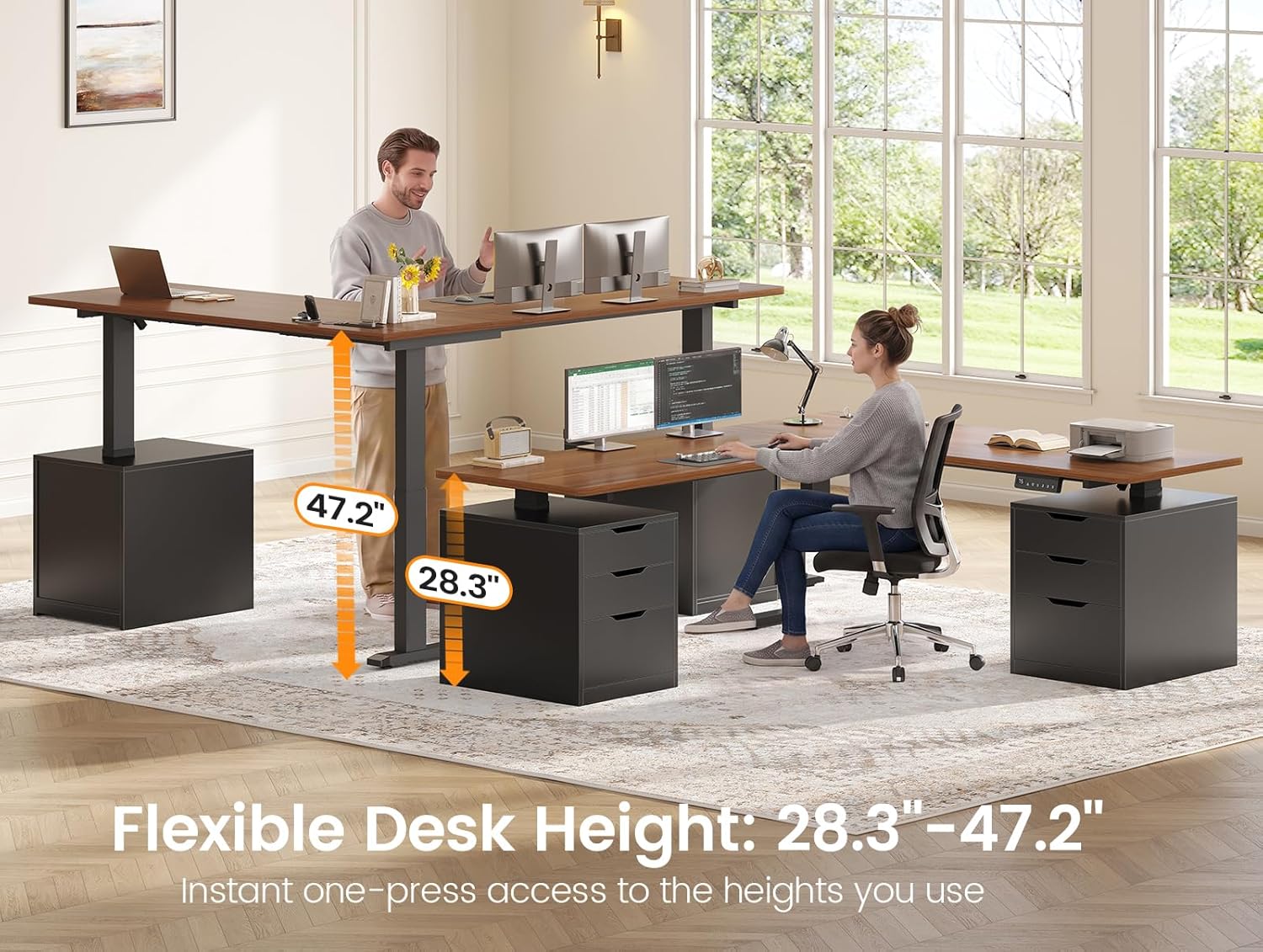
Image 4.2: Flexible desk height adjustment from 28.3" to 47.2".
Video 4.1: Demonstration of the SEDETA L-Shaped Electric Standing Desk's smooth height adjustment and stability.
4.3. Using Built-in Power Outlets
The desk includes an integrated power strip for convenient device charging.

Image 4.3: Built-in power outlet with 4 AC outlets and 2 USB ports.
- The power strip features 4 standard AC outlets (120V/12A) and 2 USB charging ports (5V/2A).
- Use the integrated switch to turn the power outlets on or off.
- Connect the desk's main power cord (6.5-foot) to a wall outlet.
4.4. ഡ്രോയർ ഉപയോഗം
The desk features 6 spacious drawers for organizing your workspace.

Image 4.4: Organized workspace with open drawers.
- Each side of the L-shaped desk includes three drawers.
- Ensure drawers are closed before adjusting desk height to prevent items from falling.
5. പരിപാലനം
- വൃത്തിയാക്കൽ: പരസ്യം ഉപയോഗിച്ച് ഡെസ്ക് ഉപരിതലം തുടയ്ക്കുകamp cloth for general cleaning. For stubborn marks, use a mild cleaner. Dry immediately with a clean, dry cloth.
- പരിശോധന: എല്ലാ സ്ക്രൂകളും കണക്ഷനുകളും ഇറുകിയതാണെന്ന് ഉറപ്പാക്കാൻ ഇടയ്ക്കിടെ പരിശോധിക്കുക. ആവശ്യമെങ്കിൽ വീണ്ടും മുറുക്കുക.
- കേബിൾ മാനേജുമെന്റ്: Regularly inspect power cords and cables for any signs of wear or damage. Replace if necessary. Ensure cables are not pinched or stretched during height adjustments.
- മോട്ടോർ കെയർ: The electric motor is designed for long-term use. Avoid continuous operation for extended periods without rest.
6. പ്രശ്നപരിഹാരം
If you encounter issues with your SEDETA Electric Standing Desk, refer to the following common troubleshooting steps:
| പ്രശ്നം | സാധ്യമായ കാരണം | പരിഹാരം |
|---|---|---|
| ഡെസ്ക് അനങ്ങുന്നില്ല. |
|
|
| Display shows an error code (e.g., E01, E02). | Specific error detected by the control system. |
|
| മേശ അസമമായി നീങ്ങുന്നു അല്ലെങ്കിൽ അസാധാരണമായ ശബ്ദങ്ങൾ ഉണ്ടാക്കുന്നു. |
|
|
| പവർ ഔട്ട്ലെറ്റുകൾ പ്രവർത്തിക്കുന്നില്ല. |
|
|
6.1. നടപടിക്രമം പുനഃസജ്ജമാക്കുക
If the desk is not functioning correctly, a reset may resolve the issue:
- Press and hold the 'RST' button on the control panel until the desk moves to its lowest position and then slightly rises.
- Release the button. The desk is now reset.
- If the reset fails, unplug the desk from the wall outlet for 10-15 minutes, then plug it back in and attempt the reset procedure again.
7 സ്പെസിഫിക്കേഷനുകൾ
| ഫീച്ചർ | വിശദാംശങ്ങൾ |
|---|---|
| ബ്രാൻഡ് | SEDETA |
| മോഡലിൻ്റെ പേര് | സ്റ്റാൻഡിംഗ് ഡെസ്ക് |
| നിറം | കറുപ്പ് + തവിട്ട് |
| ആകൃതി | എൽ-ആകൃതി |
| ഉൽപ്പന്ന അളവുകൾ (D x W x H) | 57.1" x 66.9" x 28.3" |
| ക്രമീകരിക്കാവുന്ന ഉയരം പരിധി | 28.3" - 47.2" |
| ഇനത്തിൻ്റെ ഭാരം | 162 പൗണ്ട് (73.5 കി.ഗ്രാം) |
| പരമാവധി ലോഡ് കപ്പാസിറ്റി | 200 പൗണ്ട് (90.7 കി.ഗ്രാം) |
| ഡ്രോയറുകളുടെ എണ്ണം | 6 |
| അടിസ്ഥാന മെറ്റീരിയൽ | എഞ്ചിനീയേർഡ് വുഡ്, സ്റ്റീൽ ഫ്രെയിം |
| മികച്ച മെറ്റീരിയൽ തരം | Engineered Wood (FSC-certified) |
| പവർ lets ട്ട്ലെറ്റുകൾ | 4 എസി (120V/12A), 2 യുഎസ്ബി (5V/2A) |
| ശബ്ദ നില (പ്രവർത്തനം) | <30dB |
| അസംബ്ലി ആവശ്യമാണ് | അതെ (എല്ലാ ഉപകരണങ്ങളും ഉൾപ്പെടുത്തിയിട്ടുണ്ട്) |
8. വാറൻ്റിയും പിന്തുണയും
SEDETA is committed to providing quality products and customer satisfaction.
- വാറൻ്റി: This product comes with a 3-year service commitment. For detailed warranty terms and conditions, please refer to the documentation included with your purchase or contact customer support.
- ഉപഭോക്തൃ പിന്തുണ: If you have any questions, require assistance with assembly, or experience any issues with your desk, please contact the seller, goodgoodsstore, through your purchase platform or refer to the contact information provided in your product packaging.
- Please have your purchase details and model number (Standing Desk) ready when contacting support.