
1. ആമുഖം
Thank you for choosing the LIQUIPEL Powertek Power Bank. This compact and portable power bank is designed to provide reliable and fast charging for your smartphone, tablet, and other electronic devices. With its 10,000 mAh capacity and dual USB outputs, it ensures your devices stay powered on the go.
പ്രധാന സവിശേഷതകൾ:
- Compact and portable design, weighing approximately 0.39 pounds.
- 10,000 mAh capacity for multiple device charges.
- Fast Charging Dual USB Outputs.
- Micro USB and USB Type C Inputs for versatile recharging.
- Built-in battery life display.

Image 1.1: The LIQUIPEL Powertek Power Bank, showcasing its compact form factor and the included Micro USB charging cable.
2. സജ്ജീകരണം
2.1 പവർ ബാങ്കിന്റെ പ്രാരംഭ ചാർജിംഗ്
Before first use, fully charge your LIQUIPEL Powertek Power Bank. Connect the included USB Type-C charging cable or a Micro USB cable to the corresponding input port on the power bank. Connect the other end of the cable to a USB wall adapter (not included) or a computer's USB port. The LED indicators on the power bank will illuminate to show the charging progress. All four LEDs will be solid when fully charged.
2.2 നിങ്ങളുടെ ഉപകരണങ്ങൾ ബന്ധിപ്പിക്കുന്നു
The power bank features dual USB outputs. Use your device's charging cable and connect it to one of the USB output ports on the power bank. Then, connect the other end of the cable to your smartphone, tablet, or other compatible electronic device. The power bank will automatically begin charging your device.

ചിത്രം 2.1: വിശദമായ view of the power bank's side, highlighting the dual USB-A output ports, and the USB-C and Micro USB input ports.
2.3 ഉൽപ്പന്നം കഴിഞ്ഞുview വീഡിയോ
വീഡിയോ 2.1: ഈ വീഡിയോ ഒരു ദൃശ്യാവിഷ്കാരം നൽകുന്നുview of the LIQUIPEL Powertek Power Bank, demonstrating its compact size, multiport compatibility, charging capabilities, battery life display, and integrated safeguard technologies.
3. പവർ ബാങ്ക് പ്രവർത്തിപ്പിക്കൽ
3.1 നിങ്ങളുടെ ഉപകരണങ്ങൾ ചാർജ് ചെയ്യുന്നു
Once your device is connected to the power bank via a USB cable, the power bank will automatically detect the device and begin charging. The LED indicators will show the remaining battery level of the power bank.
3.2 ബാറ്ററി നില പരിശോധിക്കുന്നു
To check the remaining battery level of the power bank, briefly press the power button located on the side. The LED indicators will light up, with each light representing approximately 25% of the battery capacity. Four solid lights indicate a full charge.
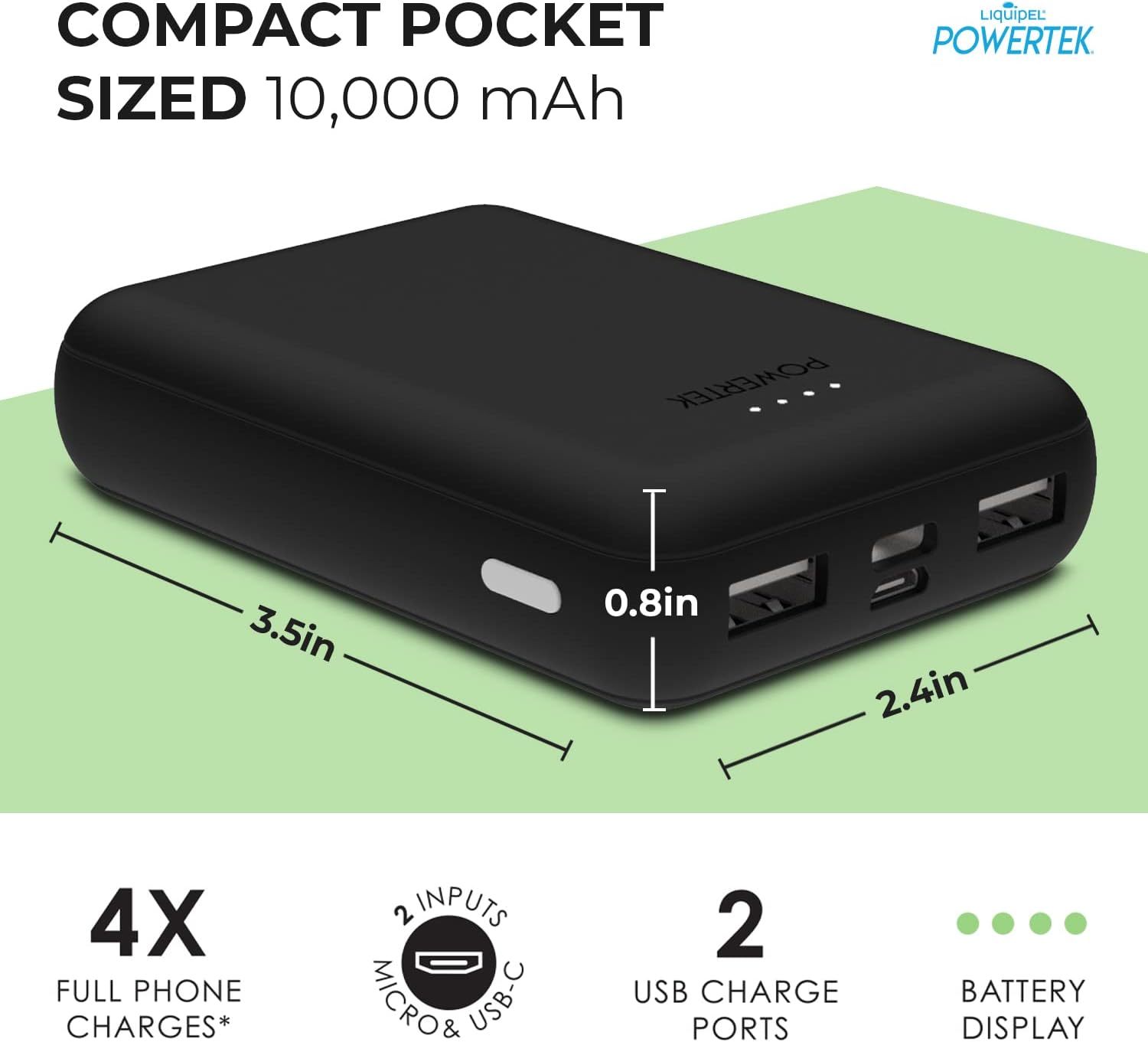
Image 3.1: A user connecting a smartphone to the LIQUIPEL Powertek Power Bank, illustrating the ease of use for charging on the go.
4. പരിപാലനം
To ensure the longevity and optimal performance of your LIQUIPEL Powertek Power Bank, please follow these maintenance guidelines:
- നേരിട്ടുള്ള സൂര്യപ്രകാശവും കടുത്ത താപനിലയും ഏൽക്കാത്ത തണുത്തതും വരണ്ടതുമായ സ്ഥലത്ത് പവർ ബാങ്ക് സൂക്ഷിക്കുക.
- ശക്തമായ ആഘാതങ്ങൾക്ക് പവർബാങ്ക് വീഴ്ത്തുകയോ വിധേയമാക്കുകയോ ചെയ്യരുത്.
- പവർ ബാങ്ക് വെള്ളത്തിലോ മറ്റ് ദ്രാവകങ്ങളിലോ തുറന്നിടരുത്.
- മൃദുവായതും ഉണങ്ങിയതുമായ തുണി ഉപയോഗിച്ച് പുറംഭാഗം വൃത്തിയാക്കുക. കഠിനമായ രാസവസ്തുക്കളോ ഉരച്ചിലുകളോ ഉള്ള വസ്തുക്കൾ ഉപയോഗിക്കരുത്.
- For long-term storage, charge the power bank to about 50% capacity every three months to preserve battery health.
5. പ്രശ്നപരിഹാരം
5.1 പവർ ബാങ്ക് ചാർജ് ചെയ്യുന്നില്ല
- പവർ ബാങ്കിന്റെ ഇൻപുട്ട് പോർട്ടിലേക്കും പവർ സ്രോതസ്സിലേക്കും ചാർജിംഗ് കേബിൾ സുരക്ഷിതമായി ബന്ധിപ്പിച്ചിട്ടുണ്ടെന്ന് ഉറപ്പാക്കുക.
- Verify that the wall adapter or USB port is functioning correctly. Try a different adapter or port.
- Check if the charging cable is damaged. Try using a different cable.
5.2 പവർ ബാങ്കിൽ നിന്ന് ഉപകരണം ചാർജ് ചെയ്യുന്നില്ല.
- പവർ ബാങ്കിൽ ആവശ്യത്തിന് ചാർജ് ഉണ്ടെന്ന് ഉറപ്പാക്കുക. LED ഇൻഡിക്കേറ്ററുകൾ പരിശോധിക്കുക.
- Verify that your device's charging cable is securely connected to both the power bank's output port and your device.
- Try using a different USB output port on the power bank.
- Test with a different charging cable or device to rule out cable or device issues.
5.3 സ്ലോ ചാർജിംഗ്
- ഉയർന്ന നിലവാരമുള്ള ചാർജിംഗ് കേബിൾ ഉപയോഗിക്കുന്നുണ്ടെന്ന് ഉറപ്പാക്കുക.
- Some devices may draw more power than others. Ensure the power bank's output meets your device's requirements for fast charging.
- Environmental factors like extreme temperatures can affect charging speed.
The LIQUIPEL Powertek Power Bank incorporates safeguard technologies including overcharge protection, over-discharge protection, temperature protection, and short circuit protection to ensure safe operation.
6 സ്പെസിഫിക്കേഷനുകൾ
| ഫീച്ചർ | വിശദാംശങ്ങൾ |
|---|---|
| ബ്രാൻഡ് | ലിക്വിപെൽ |
| മോഡൽ നമ്പർ | 802564 |
| ബാറ്ററി ശേഷി | 10000 മില്ലിamp മണിക്കൂർ (mAh) |
| കണക്റ്റർ തരം | USB Type C, Micro USB (Inputs) |
| ഔട്ട്പുട്ട് പോർട്ടുകൾ | Dual USB (Type-A) |
| വാല്യംtage | 5 വോൾട്ട് |
| ഇനത്തിൻ്റെ ഭാരം | 0.39 പൗണ്ട് |
| പാക്കേജ് അളവുകൾ | 7.44 x 4.29 x 1.06 ഇഞ്ച് |
| പ്രത്യേക സവിശേഷതകൾ | Fast Charging, Indicator, Portable Charger |
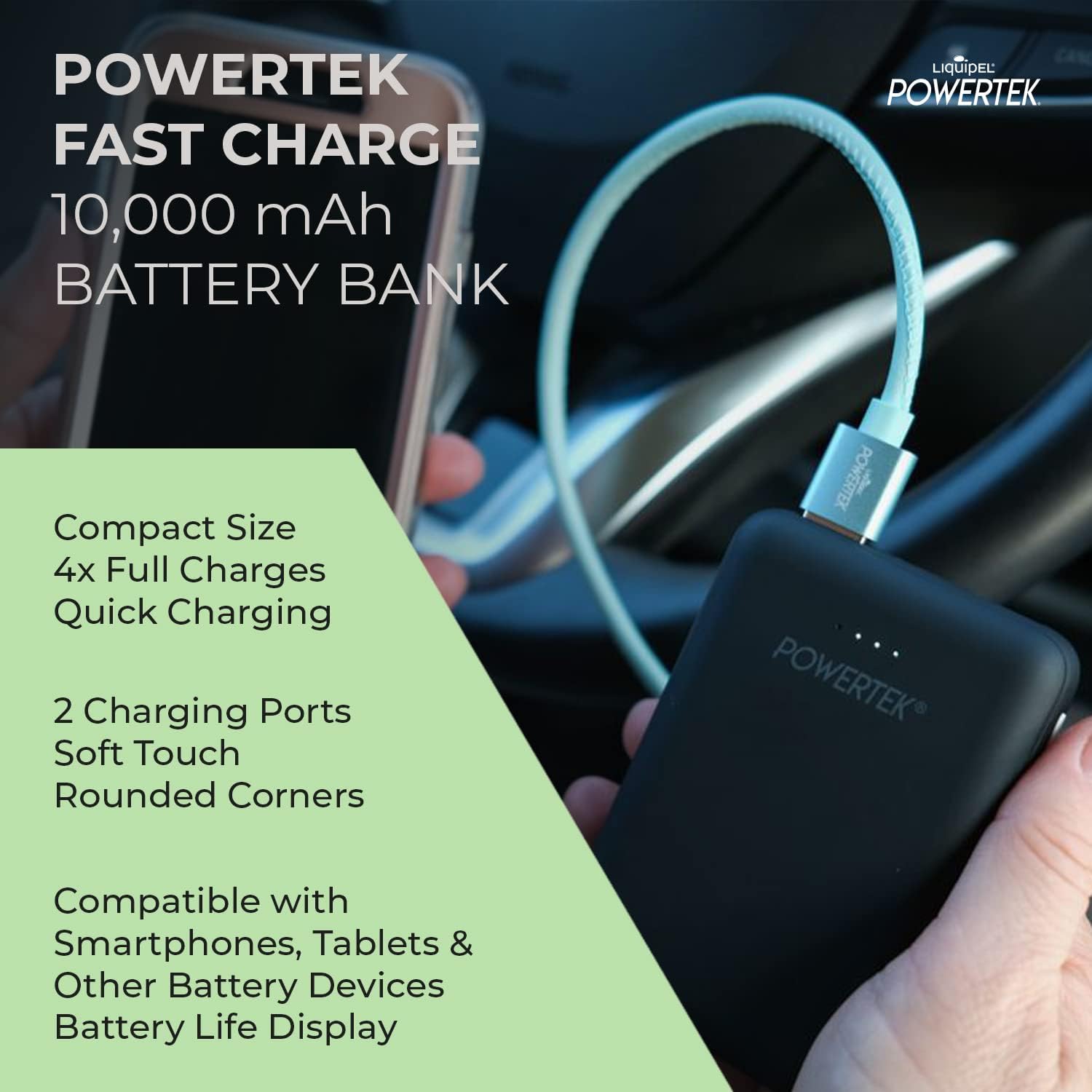
Image 6.1: Visual representation of the compact dimensions of the LIQUIPEL Powertek Power Bank.

Image 6.2: A comparison table highlighting the advantages of the Powertek Compact Battery Bank over standard and value battery chargers.
7. വാറൻ്റിയും പിന്തുണയും
For warranty information and customer support, please refer to the packaging or contact LIQUIPEL customer service directly. Keep your purchase receipt as proof of purchase for any warranty claims.