1. ആമുഖം
The WONDOM ICP5 is a versatile in-circuit programmer designed for use with WONDOM products integrated with Digital Signal Processors (DSPs). It facilitates various functions including programming with SigmaStudio, PC User Interface (UI) control, and online firmware upgrades. The ICP5 features an auto-identification system that automatically recognizes connected target products, simplifying the setup process. It is particularly useful for users who wish to quickly implement remote control and basic programming, such as equalization (EQ), for their audio systems, even without extensive SigmaStudio experience.

2. സജ്ജീകരണം
2.1 പാക്കേജ് ഉള്ളടക്കം
നിങ്ങളുടെ പാക്കേജിൽ ഇനിപ്പറയുന്ന ഇനങ്ങൾ അടങ്ങിയിട്ടുണ്ടെന്ന് പരിശോധിക്കുക:
- 1x DB-DP11226 ICP5 Board
- 1x PH-2mm-6Pos Cable, 20cm / 7.87''
- 1x PH-2mm-4Pos Cable, 20cm / 7.87''

2.2 പവർ സപ്ലൈ
The ICP5 is powered via a 5V USB Type-C connection. When connected to compatible target products, the ICP5 will be powered directly by those boards, eliminating the need for a separate power supply for the ICP5 itself.
2.3 Board Layout and Connections
Familiarize yourself with the key components and connection points on the ICP5 board:


കണക്ഷൻ പോർട്ടുകൾ:
- J1 (IIC/SPI): Connection port for WONDOM products integrated with Analog DSP (ADAU1701).
- J2 (IIC/SPI): Connection port for WONDOM products integrated with other DSPs (e.g., ADAU1452).
- UART: Used for PC UI control.
- USB Type-C (U1): 5V power supply and data connection.
സ്വിച്ചുകൾ:
The ICP5 features several switches to configure its operation mode:
| മാറുക | മോഡ് | ഫംഗ്ഷൻ |
|---|---|---|
| SW1 | USB | സിഗ്മ സ്റ്റുഡിയോ പ്രോഗ്രാമിംഗ് |
| SW1 | റിമോട്ട് | PC UI / APP Control |
| SW2 | ഐ.ഐ.സി | For WONDOM products with ADAU1701 |
| SW2 | എസ്.പി.ഐ | For WONDOM products with ADAU1452 |
| SW4 | ബൂട്ട്ലോഡർ | ഫേംവെയർ അപ്ഡേറ്റ് സ്വിച്ച് |
പ്രധാനപ്പെട്ടത്: For SigmaStudio programming, set SW1 to "USB". For PC UI control, set SW1 to "Remote". For ADAU1701 DSPs, set SW2 to "IIC". For ADAU1452 DSPs, set SW2 to "SPI".

3. പ്രവർത്തന നിർദ്ദേശങ്ങൾ
3.1 SigmaStudio Programming
The ICP5 includes an on-board self-boot EEPROM, allowing it to operate independently of the Analog Devices, Inc., SigmaStudio™ software once programmed. This feature is compatible with various WONDOM products, including APM2, JAB3, JAB3+, JAB4, and JAB5.

3.2 PC UI Control
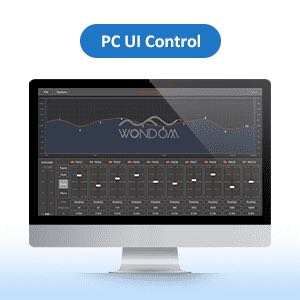
Utilizing the integrated USB UART, the ICP5 enables PC UI control for your audio systems. After connecting the ICP5, you can adjust parameters such as frequency, volume, gain, 3D effects, and equalization (EQ) to achieve desired audio characteristics. Currently, PC UI functionality is available for JAB2v2, with support for additional products planned for future releases. The online firmware update feature ensures compatibility with new PC UI versions.
3.3 Online Firmware Upgrade
The ICP5 supports online firmware updates, ensuring its compatibility with all current and future WONDOM products. Firmware updates can be performed with a single click, making the process convenient for users to adapt the ICP5 for different products as needed.

4. പരിപാലനം
The WONDOM ICP5 is designed for durability and requires minimal maintenance. Keep the board clean and free from dust and moisture. Avoid exposing it to extreme temperatures or direct sunlight. Do not attempt to open the casing or modify the internal components, as this will void any potential warranty and may damage the device.
5. പ്രശ്നപരിഹാരം
5.1 ഇൻഡിക്കേറ്റർ ലൈറ്റുകൾ
The ICP5 board includes indicator lights to provide status feedback:
- RUN ഇൻഡിക്കേറ്റർ (പച്ച):
- ON: ICP5 is powered up and running normally.
- OFF: ICP5 is powered off.
- BLINKING: ICP5 is in bootloader mode (e.g., during firmware update).
- ERR Indicator (Red):
- ON: Indicates a hardware connection problem or a firmware mismatch between the ICP5 and the connected target product.
5.2 പൊതുവായ പ്രശ്നങ്ങൾ
- ICP5 not recognized by PC/Software: Ensure the USB Type-C cable is securely connected. Verify that SW1 is set to the correct mode (USB for SigmaStudio, Remote for PC UI). Check device drivers on your PC.
- Programming/Control failure: Confirm that the correct SW2 setting (IIC/SPI) is selected based on the target DSP (ADAU1701 for IIC, ADAU1452 for SPI). Check the ERR indicator for firmware mismatch.
- No power to ICP5: Ensure the USB Type-C cable is connected to a 5V power source or a compatible WONDOM DSP board.
6 സ്പെസിഫിക്കേഷനുകൾ
| ആട്രിബ്യൂട്ട് | മൂല്യം |
|---|---|
| ബ്രാൻഡ് നാമം | WONDOM |
| മോഡൽ നമ്പർ | DB-DP11226 (ICP5) |
| ഉത്ഭവം | മെയിൻലാൻഡ് ചൈന |
| സർട്ടിഫിക്കേഷൻ | RoHS |
| ഓരോ ചാനലിനും പരമാവധി പവർ | NO POWER (Programmer) |
| പാക്കേജ് അളവുകൾ (L x W x H) | 8 സെ.മീ x 7 സെ.മീ x 2 സെ.മീ |
| പാക്കേജ് ഭാരം | 0.058 കി.ഗ്രാം |
6.1 പ്രധാന സവിശേഷതകൾ
- Multiple Purpose Programmer
- Supports all WONDOM products integrated with DSP
- SigmaStudio Programming capability
- UART for PC UI Control
- Online Firmware Upgrade functionality
- Remote Control of Audio Systems
6.2 Product Compatibility
The ICP5 supports programming and control for various WONDOM DSP-integrated products:

7. വാറൻ്റിയും പിന്തുണയും
For detailed user guides, technical documentation, and support, please refer to the official WONDOM resources:
- ICP5 User Manual (PDF): https://files.sure-electronics.com/download/ICP5.pdf
- SigmaStudio Guide (PDF): http://files.sure-electronics.com/download/SigmaStudioGuide.pdf
- ICP5 PC UI Documentation (DOCX): http://files.sure-electronics.com/download/ICP5_PCUI.docx
For further assistance, please contact WONDOM customer support through their official channels.


