ആമുഖം
The BOBLOV A8 WIFI Mini Body Camera is a versatile and compact recording device designed for various security and monitoring applications. Featuring HD 1080P video recording, 12MP photos, and invisible night vision, it offers reliable performance in diverse environments. Its 180-degree rotating lens and super-wider 120-degree angle provide flexible coverage, while built-in WiFi allows for remote control and monitoring via your smartphone. The camera also includes features like loop recording, motion detection, and strong magnetic adsorption for easy placement.

പാക്കേജ് ഉള്ളടക്കം
എല്ലാ ഇനങ്ങളും ഉണ്ടെന്ന് ഉറപ്പാക്കാൻ പാക്കേജ് ശ്രദ്ധാപൂർവ്വം പരിശോധിക്കുക:
- 1 x BOBLOV A8 Mini Body Camera
- 1 x ഇംഗ്ലീഷ് ഉപയോക്തൃ മാനുവൽ
- 1 x യുഎസ്ബി ഡാറ്റ കേബിൾ

ഉൽപ്പന്നം കഴിഞ്ഞുview
ക്യാമറയുടെ ഘടകങ്ങളും നിയന്ത്രണങ്ങളും പരിചയപ്പെടുക:

- Power/Photo Button: Used to power the device on/off and take photos.
- Rec/Video Button: Used to start and stop video recording.
- Lamp ഓഫ്/ഓൺ സ്വിച്ച്: Controls the infrared night vision lights.
- റീസെറ്റ് ബട്ടൺ: Used to reset the device in case of malfunction.
- മൈക്രോ എസ്ഡി സ്ലോട്ട്: മെമ്മറി കാർഡ് ഇടുന്നതിന്.
- USB കണക്റ്റർ: Micro USB / Mini USB port for charging and data transfer.
- ബാക്ക് ക്ലിപ്പ്: For attaching the camera to clothing or other surfaces.
- കാന്തിക അടിത്തറ: ലോഹ പ്രതലങ്ങളിൽ എളുപ്പത്തിൽ ഘടിപ്പിക്കാൻ അനുവദിക്കുന്നു.
- Rotating Lens: The camera head can rotate 180 degrees for flexible viewകോണുകൾ.
സ്പെസിഫിക്കേഷനുകൾ
| ഫീച്ചർ | വിശദാംശങ്ങൾ |
|---|---|
| മോഡൽ നമ്പർ | A8 |
| ഹൈ ഡെഫനിഷൻ പിന്തുണ | 1080P (പൂർണ്ണ-എച്ച്ഡി) |
| വീഡിയോ റെസല്യൂഷൻ | 1080P/720P |
| വീഡിയോ കോഡ് | H.264 |
| വീഡിയോ ഫോർമാറ്റ് | MKV, MP4 |
| ഫ്രെയിം റേറ്റ് | 16FPS |
| സെൻസർ ടെക്നോളജി | CMOS |
| മെമ്മറി കാർഡ് തരം | MicroSD / TF (8GB to 128GB, FAT32) |
| Built-in Memory Size | അല്ല |
| ബാറ്ററി ശേഷി | 3.7V/1800MA lithium battery |
| Recording Time (WIFI Off) | 7 മണിക്കൂർ വരെ |
| Recording Time (WIFI On) | ഏകദേശം 5 മണിക്കൂർ |
| രാത്രി കാഴ്ച ദൂരം | 5 meters (invisible & silent IR) |
| മോഷൻ ഡിറ്റക്ഷൻ ഡിസ്റ്റൻസ് | നേർരേഖ 5 മീറ്റർ |
| ലെൻസ് റൊട്ടേഷൻ | 180 ഡിഗ്രി |
| വൈഡ് ആംഗിൾ | 120 ഡിഗ്രി |
| അളവുകൾ (MM) | 93 x 36 x 15 |
| ഭാരം | 60 ഗ്രാം |
| യുഎസ്ബി കണക്റ്റർ | Micro USB, Mini USB |
| പ്രവർത്തന താപനില | -5 മുതൽ 40 സെൽഷ്യസ് വരെ |
| അനുയോജ്യത | Android/iOS |
| പ്ലേബാക്ക് സോഫ്റ്റ്വെയർ | QQPlayer/Kmplayer/VLCmedia |
സജ്ജമാക്കുക
1. ക്യാമറ ചാർജ് ചെയ്യുന്നു
Before first use, fully charge the camera. Connect the provided USB data cable to the camera's USB port and to a power source (e.g., computer USB port, USB wall adapter). The camera can record while charging.

2. മെമ്മറി കാർഡ് ചേർക്കുന്നു
The camera does not have built-in memory and requires a MicroSD/TF card (8GB to 128GB, formatted to FAT32). Carefully insert the memory card into the Micro SD slot until it clicks into place.
3. Synchronizing System Time
കൃത്യമായ സമയം ഉറപ്പാക്കാൻamps on your recordings, synchronize the camera's system time. This is typically done through the companion mobile application after connecting via WiFi.
4. Mobile App Connection (WIFI)
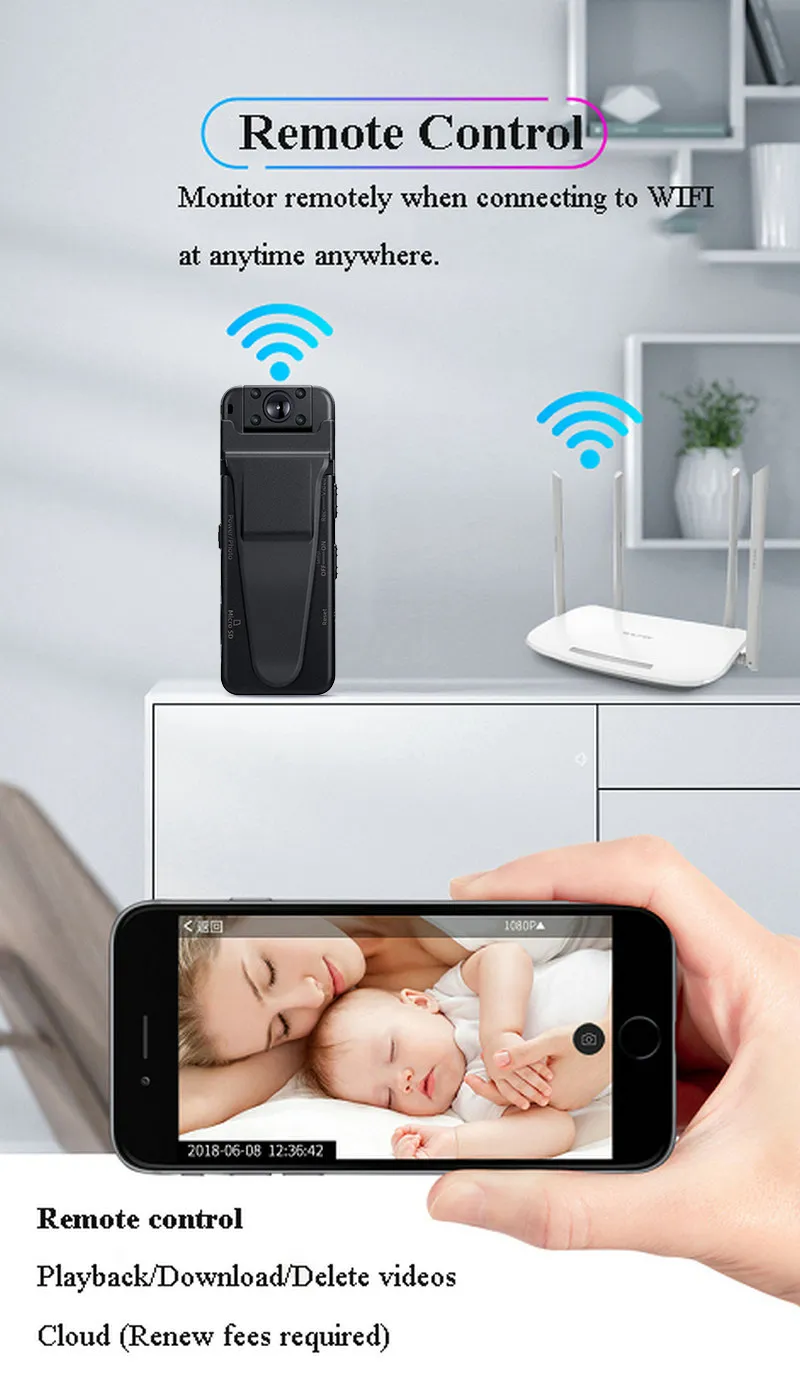
Download the dedicated mobile application (refer to the English manual for app name/QR code). Power on the camera and enable its WiFi. On your smartphone, connect to the camera's WiFi network. Once connected, you can use the app for remote control, live view, and settings adjustments.

പ്രവർത്തന നിർദ്ദേശങ്ങൾ
പവർ ഓൺ/ഓഫ്
അമർത്തിപ്പിടിക്കുക Power/Photo button for a few seconds to turn the camera on or off.
വീഡിയോ റെക്കോർഡിംഗ്
ക്യാമറ ഓൺ ചെയ്തിരിക്കുമ്പോൾ, അമർത്തുക Rec/Video button once to start recording. Press it again to stop recording. Videos are saved to the Micro SD card.
ഫോട്ടോകൾ എടുക്കുന്നു
With the camera powered on, short press the Power/Photo button to take a still photo. Photos are saved to the Micro SD card.
നൈറ്റ് വിഷൻ
To activate or deactivate night vision, use the Lamp ഓഫ്/ഓൺ switch. The camera features 4pcs 940 red infrared lights for invisible and silent recording up to 5 meters in dark conditions.

ലൂപ്പ് റെക്കോർഡിംഗ്
The camera supports loop recording, which means when the memory card is full, the oldest files will be overwritten by new recordings. This ensures continuous operation without manual deletion.
മോഷൻ ഡിറ്റക്ഷൻ
Enable motion detection through the mobile app. When motion is detected within a 5-meter range, the camera will automatically start recording, conserving battery life and storage space.
വിദൂര നിയന്ത്രണവും നിരീക്ഷണവും
Using the mobile app connected via WiFi, you can:
- View തത്സമയ വീഡിയോ ഫീഡ്.
- റെക്കോർഡിംഗ് ആരംഭിക്കുക/നിർത്തുക.
- ഫോട്ടോകൾ എടുക്കുക.
- Adjust video resolutions.
- Playback, download, or delete recorded videos.
- Receive mobile phone alarms or SMS alerts.
ക്ലൗഡ് സംഭരണം
The camera supports cloud storage functionality. You can upload video files to the cloud for remote access and backup. This feature allows you to check recorded videos even if the camera is offline or the memory card is damaged. Please note that cloud storage services may require a subscription.

ലെൻസ് റൊട്ടേഷൻ
The camera's lens can be manually rotated 180 degrees, allowing you to adjust the viewമുഴുവൻ ഉപകരണത്തിന്റെയും സ്ഥാനം മാറ്റാതെ തന്നെ ആംഗിൾ ക്രമീകരിക്കുക.
മെയിൻ്റനൻസ്
- വൃത്തിയാക്കൽ: Use a soft, dry cloth to clean the camera body and lens. Avoid using harsh chemicals or abrasive materials.
- സംഭരണം: ഉപയോഗിക്കാത്തപ്പോൾ നേരിട്ടുള്ള സൂര്യപ്രകാശവും ഉയർന്ന താപനിലയും ഏൽക്കാത്ത തണുത്തതും വരണ്ടതുമായ സ്ഥലത്ത് ക്യാമറ സൂക്ഷിക്കുക.
- ബാറ്ററി കെയർ: ബാറ്ററി ലൈഫ് വർദ്ധിപ്പിക്കാൻ, ബാറ്ററി ഇടയ്ക്കിടെ പൂർണ്ണമായും ഡിസ്ചാർജ് ചെയ്യുന്നത് ഒഴിവാക്കുക. സജീവ ഉപയോഗത്തിലല്ലെങ്കിൽ പോലും ക്യാമറ പതിവായി ചാർജ് ചെയ്യുക.
- ഫേംവെയർ അപ്ഡേറ്റുകൾ: നിർമ്മാതാവ് പരിശോധിക്കുക website or mobile app periodically for any available firmware updates to ensure optimal performance and new features.
ട്രബിൾഷൂട്ടിംഗ്
- ക്യാമറ ഓണാക്കുന്നില്ല: ബാറ്ററി ചാർജ്ജ് ചെയ്തിട്ടുണ്ടെന്ന് ഉറപ്പാക്കുക. ഒരു പവർ സ്രോതസ്സിലേക്ക് കണക്റ്റ് ചെയ്ത് വീണ്ടും ശ്രമിക്കുക.
- റെക്കോർഡ് ചെയ്യാൻ കഴിയില്ല: Check if a Micro SD card is inserted and if it has sufficient free space. Ensure the card is formatted to FAT32.
- വൈഫൈ കണക്ഷൻ പ്രശ്നങ്ങൾ: Make sure the camera's WiFi is enabled. Try restarting both the camera and your smartphone's WiFi. Ensure you are within range of the camera's WiFi signal.
- മോശം വീഡിയോ നിലവാരം: Ensure the lens is clean. Check the video resolution settings in the mobile app.
- Camera unresponsive: ഒരു നേർത്ത വസ്തു (പേപ്പർക്ലിപ്പ് പോലുള്ളവ) ഉപയോഗിച്ച് അമർത്തുക. പുനഃസജ്ജമാക്കുക button. This will restart the camera without deleting data.
- ഹ്രസ്വ ബാറ്ററി ലൈഫ്: Ensure WiFi is turned off when not needed, as it consumes more power. Reduce recording resolution if possible.
ഉപയോക്തൃ ടിപ്പുകൾ
- Format SD Card Regularly: To maintain optimal performance and prevent data corruption, it's recommended to format your Micro SD card periodically, especially after transferring important files.
- Test Before Critical Use: Always perform a short test recording before using the camera for important events to ensure it's functioning correctly and the settings are as desired.
- Optimal WiFi Signal: For stable remote control and live viewing, ensure your smartphone is close to the camera and has a strong WiFi signal.
- പാസ്വേഡ് സംരക്ഷണം: Utilize the camera's password protection feature to secure your recordings and settings from unauthorized access.
വാറൻ്റി & പിന്തുണ
For warranty information, technical support, or service inquiries, please refer to the contact details provided with your purchase documentation or visit the official BOBLOV webസൈറ്റ്. വാറന്റി ക്ലെയിമുകൾക്കായി നിങ്ങളുടെ വാങ്ങലിന്റെ തെളിവ് സൂക്ഷിക്കുക.


