1. ആമുഖം
The Radiolink F722 Flight Controller is a high-performance flight control unit designed for FPV drones, RC quadcopters, aircraft, and airplanes. It offers robust features and supports both Betaflight and INAV firmware, providing versatility for various flight applications. This manual provides essential information for the proper setup, operation, and maintenance of your F722 Flight Controller.
പ്രധാന സവിശേഷതകൾ:
- Main Processor: STM32F722RET6
- Gyroscope: ICM42688
- ബാരോമീറ്റർ: SPL06-001
- Integrated OSD Module
- 128MB Blackbox for flight data recording
- Supports Betaflight and INAV Firmware
- Optimal PCB layout for high current and low noise, ensuring sensor accuracy


2. പാക്കേജ് ഉള്ളടക്കം
നിങ്ങളുടെ പാക്കേജിൽ എല്ലാ ഇനങ്ങളും ഉണ്ടെന്ന് ഉറപ്പാക്കുക:

- F722 Flight Controller (x1)
- ESC Connect Cable (x2)
- Camera Connect Cable (x1)
- ELRS Receiver Connect Cable (x1)
- Analog Video Transmission Connect Cable (x1)
- GPS Connect Cable (x1)
- Receiver Connect Cable (x2)
- ഇൻസ്ട്രക്ഷൻ മാനുവൽ (x1)
- Package Box (x1)
3 സ്പെസിഫിക്കേഷനുകൾ
| ആട്രിബ്യൂട്ട് | മൂല്യം |
|---|---|
| ബ്രാൻഡ് നാമം | റേഡിയോ ലിങ്ക് |
| മോഡൽ നമ്പർ | RADIOLINKF722 |
| ഉത്ഭവം | മെയിൻലാൻഡ് ചൈന |
| വാഹന തരത്തിന് | വിമാനങ്ങൾ |
| വലിപ്പം | 30.5*30.5 മി.മീ |
| അളവ് | 1 പീസുകൾ |
| Four-wheel Drive Attributes | മോട്ടോറുകൾ |
| പ്രായം ശുപാർശ ചെയ്യുക | 14+വയസ്സ് |
| ആർസി പാർട്സും അക്കൗണ്ടുകളും | സ്പീഡ് കൺട്രോളറുകൾ |
| സർട്ടിഫിക്കേഷൻ | CE,FCC,RoHS,weee |
| ഉപയോഗിക്കുക | വാഹനങ്ങളും റിമോട്ട് കൺട്രോൾ കളിപ്പാട്ടങ്ങളും |
| ഫേംവെയർ തരം | BETAFLIGHT or INAV |
| മിഷൻ പ്ലാനർ | BETAFLIGHT or INAV |
| ഫേംവെയർ പേര് | RADIOLINKF722 |
| പ്രോസസ്സർ | STM32F722RET6 |
| ബാരോമീറ്റർ | SPL06-001 |
| ഗൈറോ | ICM42688 |
| OSD Module | AT7456E |
| RC In Signal Input | SBUS/CRSF |
| ഇൻപുട്ട് വോളിയംtage | 3-6എസ് |
| ബി.ഇ.സി | 3.3V/300mA 4.5V/500mA 5V/3A 12V/3A |
| 12V BEC Switch | Support(USER1) |
| ചാനൽ ഔട്ട്പുട്ട് | M1 - M8 |
| HD Digital Video Transmission | Support plug-and-play |
| അനലോഗ് വീഡിയോ ട്രാൻസ്മിഷൻ | Support plug-and-play |
| ബാറ്ററി സ്കെയിൽ | 110 |
| UART പോർട്ട് | 5 |
| USB പോർട്ട് | 1(Type-C) |
| ESC Features/I2C | പിന്തുണ |
| LED സ്ട്രിപ്പ് | Support, have LED strip soldering pads |
| ബസർ | Support, have a buzzer soldering pads |
| അഡാപ്റ്റബിൾ മോഡലുകൾ | 2-8 axis multi-rotor including X8 models, Airplane, A-tail Quad, Bicopter, Custom Airplane, Custom Tricopter, Dualcopter, Flying-wing, Gimbal, Helicopter120, HEL+, HEX H, HEX X, OCTO FLAT+, OCTO FLAT X, OCTO X8, OCTO X8+, PPM to Servo, Quad+, Quad X, Quad X 1234, Singlecopter, Tricopter, V-tail Quad, Y4, Y6 |
| ഭാരം | 9.5 ഗ്രാം |
| അളവ് | 30.5*30.5 മി.മീ |
4. സജ്ജീകരണം
4.1 ഹാർഡ്വെയർ ഇൻസ്റ്റലേഷൻ
Carefully mount the F722 Flight Controller onto your drone frame using appropriate standoffs and screws. Ensure it is securely fastened and oriented correctly according to your drone's configuration and the chosen firmware's requirements.
4.2 വയറിംഗ് കണക്ഷനുകൾ
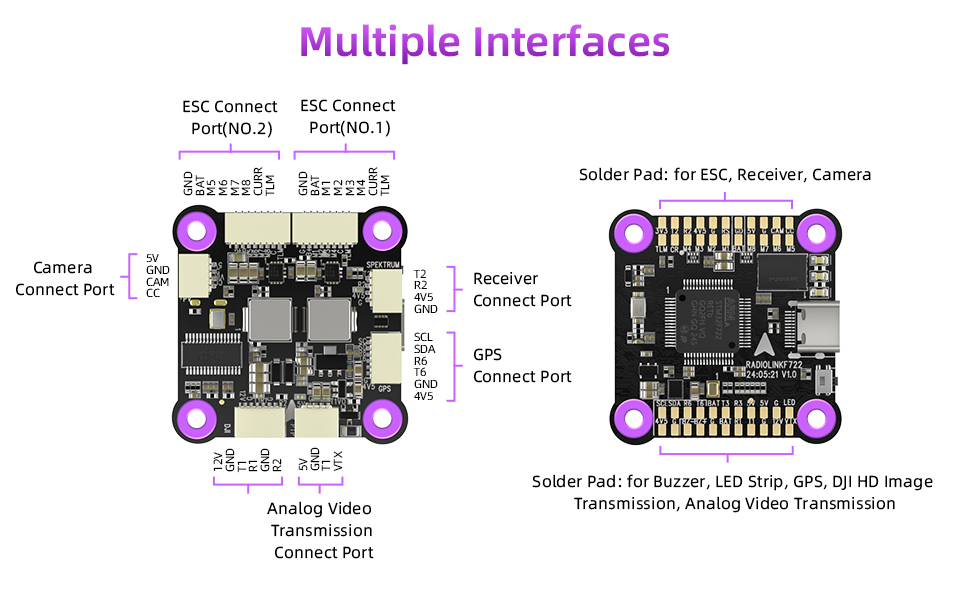
The F722 Flight Controller features multiple interfaces and solder pads for connecting various peripherals. Refer to the diagrams below for proper connection of ESCs, cameras, receivers, GPS modules, and video transmission systems.
Video Transmission Wiring:
The F722 supports both DJI HD Digital and Analog Video Transmission systems. Connect your VTX module as shown in the diagram below.

4.3 ഫേംവെയർ ഫ്ലാഷിംഗ്
The Radiolink F722 Flight Controller supports both Betaflight and INAV firmware. You can specify your preferred firmware (Betaflight or INAV) when ordering. If no specific firmware is requested, the default factory firmware will be pre-flashed.

For manual firmware updates or changes, download the latest firmware from the official Radiolink webസൈറ്റ്:
- INAV firmware download: https://www.radiolink.com/f722_firmware
Follow the instructions provided by the Betaflight or INAV configurator software for flashing the firmware.
5. പ്രവർത്തിക്കുന്നു
5.1 പ്രാരംഭ കോൺഫിഗറേഷൻ
After successful hardware installation and firmware flashing, connect your F722 Flight Controller to a computer or mobile device running the Betaflight or INAV configurator software. This software allows you to calibrate sensors, configure flight modes, adjust PID settings, and set up other flight parameters.

5.2 Throttle Signal Support
The F722 Flight Controller supports various mainstream throttle signals, including two-way DShot, OneShot, and PWM signals for ESCs. It also supports ESC Information Telemetry, allowing you to monitor ESC data during flight.
5.3 OSD Functionality
The integrated OSD (On-Screen Display) module allows the F722 to graphically display critical flight information directly on your FPV feed. This includes flight mode, distance, GPS satellite count, longitude and latitude, home direction, GPS speed, and battery voltage. This feature provides pilots with real-time data for enhanced situational awareness during flight.

5.4 Flight Demonstration
6. പരിപാലനം
6.1 ഫേംവെയർ അപ്ഡേറ്റുകൾ
Regularly check the official Radiolink website for the latest firmware versions for Betaflight or INAV. Keeping your firmware updated ensures optimal performance, bug fixes, and access to new features. Follow the provided instructions carefully when performing firmware updates.
6.2 വൃത്തിയാക്കലും പരിശോധനയും
Periodically inspect the flight controller for any signs of damage, loose connections, or debris. Gently clean the board with a soft, dry brush or compressed air to remove dust and dirt. Avoid using liquids or harsh chemicals.
6.3 വിമാനയാത്രയ്ക്ക് മുമ്പുള്ള പരിശോധനകൾ
Before each flight, perform a thorough pre-flight check of your drone, including all connections to the flight controller, propeller integrity, battery levels, and proper functioning of all control surfaces and motors.
7. പ്രശ്നപരിഹാരം
If you encounter issues with your Radiolink F722 Flight Controller, consider the following general troubleshooting steps:
- കണക്ഷനുകൾ പരിശോധിക്കുക: Ensure all wires are securely connected to the correct ports and solder pads.
- Verify Firmware: Confirm that the correct firmware (Betaflight or INAV) is flashed and that it is the latest stable version.
- സോഫ്റ്റ്വെയർ കോൺഫിഗറേഷൻ: Double-check all settings in the Betaflight or INAV configurator, including sensor calibration, motor output, and flight modes.
- വൈദ്യുതി വിതരണം: Ensure the flight controller is receiving stable and correct voltage.
Radiolink utilizes a unique automation software testing system to ensure product quality. If you suspect a hardware issue, this system can aid in diagnostics.

For more detailed troubleshooting guides and technical support, please visit the official Radiolink webസൈറ്റ്: https://www.radiolink.com/f722
8 ഉപയോക്തൃ നുറുങ്ങുകൾ
- Consider Connectors: For users who prefer less soldering, explore options for F722 versions or accessories that offer pre-soldered connectors for easier installation.
- Optimal PCB Layout: The F722 features an optimized PCB layout designed for high current and low noise. When integrating into your build, ensure proper spacing and avoid placing noise-generating components too close to the flight controller to maintain sensor accuracy.
- Cost-Effective Solutions: The F722 is designed to work seamlessly with a range of Radiolink components (e.g., T16D Transmitter, R16F receiver, TS100 GPS) and third-party systems (DJI/CADDX HD VTX, ELRS modules). This allows for flexible and cost-effective drone builds for various applications like aerial photography or racing.

9. വാറൻ്റിയും പിന്തുണയും
For detailed warranty information, technical support, and further resources, please visit the official Radiolink webസൈറ്റ്:
https://www.radiolink.com/f722
Radiolink is committed to providing comprehensive support for its products. Please refer to their website for the most up-to-date information regarding product support and service.


