1. ആമുഖം
Thank you for choosing the Cambridge SoundWorks FPS1600 FourPointSurround Speakers. This high-performance audio system is designed to deliver immersive surround sound for your gaming, music, and movie experiences. Please read this manual thoroughly to ensure proper setup, operation, and maintenance of your speaker system.
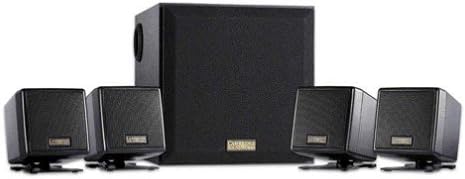
Image 1.1: The Cambridge SoundWorks FPS1600 FourPointSurround Speaker System, showing the central subwoofer unit and four compact satellite speakers.
2 പ്രധാനപ്പെട്ട സുരക്ഷാ വിവരങ്ങൾ
- ഊർജ്ജ സ്രോതസ്സ്: Only use the power adapter supplied with the system. Ensure the voltagഇ നിങ്ങളുടെ പ്രാദേശിക വൈദ്യുതി വിതരണവുമായി പൊരുത്തപ്പെടുന്നു.
- വെൻ്റിലേഷൻ: വെന്റിലേഷൻ തുറസ്സുകളൊന്നും തടയരുത്. നിർമ്മാതാവിന്റെ നിർദ്ദേശങ്ങൾക്കനുസൃതമായി ഇൻസ്റ്റാൾ ചെയ്യുക.
- ജലവും ഈർപ്പവും: ഈ ഉപകരണം തുള്ളികളിലേക്കോ തെറിക്കുന്നതിനോ തുറന്നുകാട്ടരുത്, കൂടാതെ പാത്രങ്ങൾ പോലുള്ള ദ്രാവകങ്ങൾ നിറച്ച വസ്തുക്കളൊന്നും ഉപകരണത്തിൽ സ്ഥാപിച്ചിട്ടില്ലെന്ന് ഉറപ്പാക്കുക.
- ചൂട്: റേഡിയറുകൾ, ഹീറ്റ് രജിസ്റ്ററുകൾ, സ്റ്റൗകൾ, അല്ലെങ്കിൽ മറ്റ് ഉപകരണങ്ങൾ (ഉൾപ്പെടെ) പോലെയുള്ള താപ സ്രോതസ്സുകൾക്ക് സമീപം ഇൻസ്റ്റാൾ ചെയ്യരുത്. ampലൈഫയറുകൾ) ചൂട് ഉത്പാദിപ്പിക്കുന്നത്.
- വൃത്തിയാക്കൽ: ഉണങ്ങിയ തുണി ഉപയോഗിച്ച് മാത്രം വൃത്തിയാക്കുക.
- സേവനം: ഈ ഉൽപ്പന്നം സ്വയം സേവിക്കാൻ ശ്രമിക്കരുത്. യോഗ്യതയുള്ള സേവന ഉദ്യോഗസ്ഥർക്ക് എല്ലാ സേവനങ്ങളും റഫർ ചെയ്യുക.
3. പാക്കേജ് ഉള്ളടക്കം
താഴെ കൊടുത്തിരിക്കുന്ന എല്ലാ ഇനങ്ങളും നിങ്ങളുടെ പാക്കേജിൽ ഉണ്ടെന്ന് ഉറപ്പാക്കുക:
- 1 x Cambridge SoundWorks FPS1600 Subwoofer
- 4 x Compact Satellite Speakers (2 front, 2 rear)
- 1 x In-line Remote Control
- 1 x പവർ അഡാപ്റ്റർ
- 1 x ഉപയോക്തൃ മാനുവൽ (ഈ പ്രമാണം)
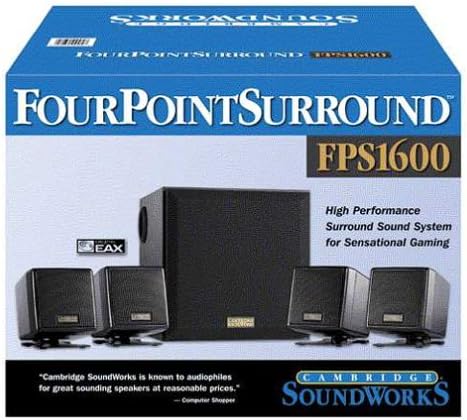
Image 3.1: The retail packaging for the Cambridge SoundWorks FPS1600, illustrating the system components and branding.
4. സജ്ജീകരണ ഗൈഡ്
4.1 സ്പീക്കർ പ്ലേസ്മെന്റ്
Optimal speaker placement is crucial for achieving the best surround sound experience.
- Front Satellite Speakers: Place the two front satellite speakers equidistant from your listening position, typically on either side of your monitor or TV. Use the 6.5-foot cables for these.
- പിൻഭാഗത്തെ സാറ്റലൈറ്റ് സ്പീക്കറുകൾ: Place the two rear satellite speakers behind your listening position, ideally slightly to the sides. Use the 13-foot cables for these to allow for wider placement.
- സബ്വൂഫർ: Position the subwoofer on the floor, preferably near a wall or in a corner, to enhance bass response. Avoid placing it directly against a wall or in a cabinet, which can muffle the sound.
4.2 സിസ്റ്റം ബന്ധിപ്പിക്കുന്നു
- Connect the four satellite speakers to the corresponding ports on the back of the subwoofer. Ensure the front and rear speakers are connected to their designated ports.
- Connect the in-line remote control cable to the designated port on the subwoofer.
- Connect the audio input cable from the in-line remote control to the audio output (e.g., sound card, game console, TV) of your source device.
- Connect the power adapter to the subwoofer's power input, then plug the adapter into a wall outlet.
Once all connections are secure, the system is ready for operation.
5. പ്രവർത്തന നിർദ്ദേശങ്ങൾ
5.1 പവർ ഓൺ/ഓഫ്
The system powers on automatically when connected to a power source and an audio signal is detected. There is no separate power button on the system itself; power is controlled via the main power outlet.
5.2 വോളിയം നിയന്ത്രണം
Use the large rotary dial on the in-line remote control to adjust the overall volume of the speaker system. Rotate clockwise to increase volume and counter-clockwise to decrease volume.
5.3 Audio Source Control
The FPS1600 system receives audio from a single source connected via the in-line remote control. Ensure your audio source (computer, game console, etc.) is playing sound and its volume is set to an appropriate level.
6. പരിപാലനവും പരിചരണവും
- വൃത്തിയാക്കൽ: Wipe the speaker surfaces with a soft, dry cloth. Do not use liquid cleaners or aerosol sprays, as they may damage the finish or internal components.
- വെൻ്റിലേഷൻ: Ensure that the subwoofer and satellite speakers have adequate airflow around them to prevent overheating.
- കേബിൾ മാനേജുമെന്റ്: Keep cables tidy and untangled to prevent damage and ensure optimal performance.
- സംഭരണം: If storing the system for an extended period, disconnect it from the power outlet and store it in a cool, dry place.
7. പ്രശ്നപരിഹാരം
| പ്രശ്നം | സാധ്യമായ കാരണം | പരിഹാരം |
|---|---|---|
| സ്പീക്കറുകളിൽ നിന്ന് ശബ്ദമില്ല. |
|
|
| വികലമായ അല്ലെങ്കിൽ വ്യക്തമല്ലാത്ത ശബ്ദം. |
|
|
| Only some speakers are working. |
|
|
8 സാങ്കേതിക സവിശേഷതകൾ
- മോഡൽ: SPF1600
- സ്പീക്കർ തരം: 4.1 FourPointSurround System with Subwoofer
- ആകെ ആർഎംഎസ് പവർ: 41 Watts (24W RMS Satellites, 17W RMS Subwoofer)
- സാറ്റലൈറ്റ് സ്പീക്കറുകൾ: Four compact cube satellite speakers
- സബ്വൂഫർ: Wood enclosure for deep bass
- കണക്റ്റിവിറ്റി: Wired (3.5mm stereo input via in-line remote)
- നിയന്ത്രണം: In-line master volume control
- Front Satellite Cable Length: 6.5 അടി (ഏകദേശം 2 മീറ്റർ)
- Rear Satellite Cable Length: 13 അടി (ഏകദേശം 4 മീറ്റർ)
- ഊർജ്ജ സ്രോതസ്സ്: എസി പവർ അഡാപ്റ്റർ
- അളവുകൾ (പാക്കേജ്): 34.54 x 27.69 x 25.4 സെ.മീ (13.6 x 10.9 x 10 ഇഞ്ച്)
- ഭാരം (പാക്കേജ്): 5.58 കി.ഗ്രാം (12.3 പൗണ്ട്)
- അനുയോജ്യമായ ഉപകരണങ്ങൾ: PCs, Laptops, Gaming Consoles, MP3 Players, Tablets, Smartphones, TVs, Home Theater Systems.
9. വാറൻ്റിയും പിന്തുണയും
This product is manufactured by Creative. For warranty information and technical support, please refer to the documentation provided at the time of purchase or visit the official Creative website. Please note that this product has been discontinued by the manufacturer, which may affect support availability.
For further assistance, you may contact Creative customer support through their official channels.