ആമുഖം
The BRIO Remote Control Train offers an interactive play experience, allowing users to control the train's movement and features with a wireless remote. This manual provides essential information for setting up, operating, maintaining, and troubleshooting your BRIO Remote Control Train.

This image shows the product in its packaging, highlighting the remote control and the train itself. The packaging indicates it is suitable for ages 3 and up.
സജ്ജമാക്കുക
1 അൺപാക്ക് ചെയ്യുന്നു
- പാക്കേജിംഗിൽ നിന്ന് എല്ലാ ഘടകങ്ങളും ശ്രദ്ധാപൂർവ്വം നീക്കം ചെയ്യുക.
- Verify that all parts are present: one remote control train, one remote control unit.
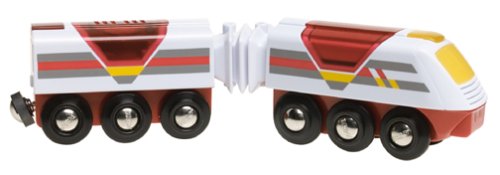
This image displays the two-part BRIO Remote Control Train, ready for track placement. It shows the main engine unit connected to a second car.
2. ബാറ്ററി ഇൻസ്റ്റാളേഷൻ
The BRIO Remote Control Train and its remote require batteries for operation. Ensure you have the correct type and quantity as specified below.
- For the Train: Requires 4 x AA 1.5V batteries.
- റിമോട്ട് കൺട്രോളിനായി: Requires 2 x AA 1.5V batteries.
- Locate the battery compartment on the underside of the train and the back of the remote control.
- ഒരു ചെറിയ സ്ക്രൂഡ്രൈവർ ഉപയോഗിച്ച് (ഉൾപ്പെടുത്തിയിട്ടില്ല), ബാറ്ററി കമ്പാർട്ട്മെന്റ് കവർ തുറക്കുക.
- Insert the batteries, ensuring correct polarity (+/-) as indicated inside the compartment.
- ബാറ്ററി കമ്പാർട്ട്മെന്റ് കവർ മാറ്റി സ്ക്രൂ ഉപയോഗിച്ച് സുരക്ഷിതമാക്കുക.
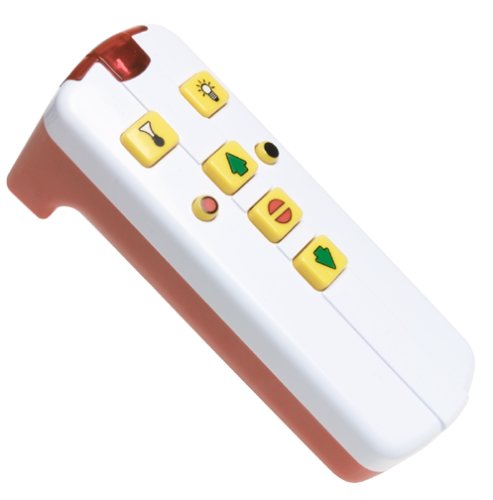
This image shows the handheld remote control with its various buttons for controlling the train's functions.
പ്രവർത്തന നിർദ്ദേശങ്ങൾ
1. പവർ ചെയ്യുന്നു
- Ensure batteries are correctly installed in both the train and the remote.
- Place the train on a compatible BRIO wooden track.
- The train should be ready to receive commands from the remote control.
2. വിദൂര നിയന്ത്രണ പ്രവർത്തനങ്ങൾ
The remote control allows for various actions:
- ഫോർവേഡ്: Press the designated button to make the train move forward.
- വിപരീതം: Press the designated button to make the train move backward.
- നിർത്തുക: Press the stop button to halt the train's movement.
- വെളിച്ചം: Activate the train's headlight by pressing the light button.
- Horn/Sound: Press the horn button to sound the train's horn.
The train operates using infrared signals from the remote control. Ensure a clear line of sight between the remote and the train for optimal performance.
3. ഓട്ടോമാറ്റിക് ഷട്ട്-ഓഫ്
The train features an automatic shut-off function to conserve battery life. If inactive for approximately 10 minutes, the train will power down automatically.
മെയിൻ്റനൻസ്
1. വൃത്തിയാക്കൽ
- Wipe the train and remote control with a clean, damp തുണി.
- Do not submerge the product in water or use harsh cleaning agents.
- Ensure the product is completely dry before storing or using again.
2. ബാറ്ററി മാറ്റിസ്ഥാപിക്കൽ
When the train or remote control's performance diminishes (e.g., slower movement, weak lights, unresponsive controls), it is time to replace the batteries. Follow the battery installation steps outlined in the "Setup" section.
- Always use new batteries of the specified type.
- പഴയതും പുതിയതുമായ ബാറ്ററികളോ വ്യത്യസ്ത തരം ബാറ്ററികളോ മിക്സ് ചെയ്യരുത്.
- ഉപയോഗിച്ച ബാറ്ററികൾ പ്രാദേശിക നിയന്ത്രണങ്ങൾ അനുസരിച്ച് ഉത്തരവാദിത്തത്തോടെ നീക്കം ചെയ്യുക.
ട്രബിൾഷൂട്ടിംഗ്
| പ്രശ്നം | സാധ്യമായ കാരണം | പരിഹാരം |
|---|---|---|
| Train does not move or respond to remote. |
|
|
| Train moves slowly or lights are dim. | കുറഞ്ഞ ബാറ്ററികൾ. | Replace batteries in the train. |
| റിമോട്ട് കൺട്രോൾ ബട്ടണുകൾ പ്രതികരിക്കുന്നില്ല. |
|
|
സ്പെസിഫിക്കേഷനുകൾ
- മോഡൽ നമ്പർ: 33221
- ഉൽപ്പന്ന അളവുകൾ: 23 x 5 x 6 സെ.മീ; 680.39 ഗ്രാം
- Material Type(s): മരം
- ആവശ്യമായ ബാറ്ററികൾ: അതെ
- ബാറ്ററികൾ ഉൾപ്പെടുന്നു: Yes (for initial use)
- Train Batteries: 4 x AA 1.5V (included)
- റിമോട്ട് കൺട്രോൾ ബാറ്ററികൾ: 2 x AA 1.5V (included)
- റിമോട്ട് കൺട്രോൾ ഉൾപ്പെടുന്നു: അതെ
- Radio Control Number of Bands: 2
- നിർമ്മാതാവ്: റാവൻസ്ബർഗർ
- ശുപാർശ ചെയ്യുന്ന പ്രായം: 3 വയസ്സും അതിനുമുകളിലും
വാറൻ്റിയും പിന്തുണയും
For information regarding product warranty, returns, or technical support, please refer to the official BRIO webസൈറ്റിൽ ബന്ധപ്പെടുകയോ അവരുടെ ഉപഭോക്തൃ സേവനവുമായി നേരിട്ട് ബന്ധപ്പെടുകയോ ചെയ്യുക. ഏതെങ്കിലും വാറന്റി ക്ലെയിമുകൾക്കായി നിങ്ങളുടെ വാങ്ങലിന്റെ തെളിവ് സൂക്ഷിക്കുക.
Official BRIO Webസൈറ്റ്: www.brio.net


