1. ആമുഖം
വാങ്ങിയതിന് നന്ദി.asing the ROYAL EX310 Exacta Shipping and Postal Scale. This manual provides comprehensive instructions for the proper installation, operation, and maintenance of your new scale. Please read these instructions carefully before use and retain them for future reference.
2 സുരക്ഷാ വിവരങ്ങൾ
To ensure safe and effective operation, please observe the following safety guidelines:
- Ensure the scale is placed on a stable, flat, and level surface to guarantee accurate measurements.
- Do not overload the scale beyond its maximum capacity of 310 pounds (140 kg). Overloading can damage the internal sensors.
- Keep the scale away from extreme temperatures, high humidity, and direct sunlight.
- Avoid dropping the scale or subjecting it to strong impacts, as this can affect its accuracy and functionality.
- Use only the specified power adapter (120VAC to 3VDC) for operation. Using an incorrect adapter may cause damage or malfunction.
- Do not attempt to disassemble or repair the scale yourself. Refer to qualified service personnel for any repairs.
3. പാക്കേജ് ഉള്ളടക്കം
പാക്കേജിൽ എല്ലാ ഇനങ്ങളും ഉണ്ടെന്ന് ഉറപ്പാക്കുക:
- ROYAL EX310 Exacta Shipping and Postal Scale Unit (Platform and Display)
- Power Adapter (120VAC to 3VDC)
- ഉപയോക്തൃ മാനുവൽ (ഈ പ്രമാണം)
4. സജ്ജീകരണം
Follow these steps to set up your ROYAL EX310 scale:
- പാക്കേജിംഗിൽ നിന്ന് എല്ലാ ഘടകങ്ങളും ശ്രദ്ധാപൂർവ്വം അൺപാക്ക് ചെയ്യുക.
- Place the scale platform on a firm, level, and stable surface. Ensure there are no vibrations or drafts that could affect readings.
- Connect the coiled cable from the digital display unit to the designated port on the scale platform.
- Connect the power adapter to the scale's power input port, then plug the adapter into a standard electrical outlet.
- Position the display unit for easy viewing. The coiled cable allows for flexible placement.
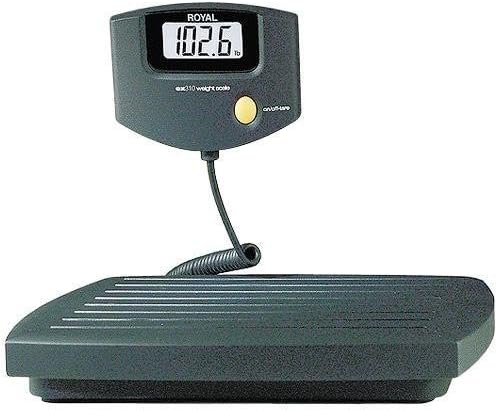
ചിത്രം 1: The ROYAL EX310 Exacta Shipping and Postal Scale. This image shows the complete scale unit, featuring a dark gray platform with a ribbed surface and a separate digital display unit connected by a coiled cable. The display unit shows '102.6 lb' and has a yellow 'on/off/tare' button.
5. പ്രവർത്തന നിർദ്ദേശങ്ങൾ
Learn how to use your scale for accurate measurements:
- പവർ ഓൺ/ഓഫ്: Press the yellow 'on/off/tare' button briefly to turn the scale on. To turn the scale off, press and hold the 'on/off/tare' button until the display turns off.
- സ്കെയിൽ പൂജ്യമാക്കൽ: Before placing any item on the scale, ensure the display reads '0.0'. If it does not, press the 'on/off/tare' button briefly to zero the scale. This ensures accurate measurement.
- Weighing an Item: Gently place the item to be weighed on the center of the scale platform. Wait for the digital display to stabilize and show the final weight.
- ടാരെ പ്രവർത്തനം: To weigh items in a container, first place the empty container on the scale. Press the 'on/off/tare' button to zero the display. Then, place the items to be weighed into the container. The display will now show only the net weight of the items, excluding the container's weight.
- യൂണിറ്റ് പരിവർത്തനം: The scale can measure in pounds (lb) or kilograms (kg). The display will indicate the current unit. If a dedicated unit conversion button is present (not explicitly visible in the main image), press it to switch between 'lb' and 'kg'.
6. പരിപാലനം
Proper care will extend the life and accuracy of your scale:
- വൃത്തിയാക്കൽ: മൃദുവായ, ചെറുതായി ഡി ഉപയോഗിച്ച് സ്കെയിൽ വൃത്തിയാക്കുകamp cloth. Do not use abrasive cleaners, solvents, or immerse the scale in water.
- സംഭരണം: Store the scale in a dry, cool place away from direct sunlight and extreme temperatures when not in use.
- പവർ അഡാപ്റ്റർ: Periodically inspect the power adapter and its cable for any signs of damage. Discontinue use if damage is found and replace with an approved adapter.
7. പ്രശ്നപരിഹാരം
നിങ്ങളുടെ സ്കെയിലിൽ പ്രശ്നങ്ങൾ നേരിടുകയാണെങ്കിൽ, ഇനിപ്പറയുന്ന പൊതുവായ പ്രശ്നങ്ങളും പരിഹാരങ്ങളും പരിശോധിക്കുക:
- സ്കെയിൽ ഓണാക്കുന്നില്ല:
- Ensure the power adapter is securely connected to both the scale and a working electrical outlet.
- മറ്റൊരു ഉപകരണം പ്ലഗ് ഇൻ ചെയ്ത് പവർ ഔട്ട്ലെറ്റ് പ്രവർത്തനക്ഷമമാണോ എന്ന് പരിശോധിക്കുക.
- കൃത്യമല്ലാത്തതോ ചാഞ്ചാടുന്നതോ ആയ വായനകൾ:
- Verify that the scale is placed on a completely stable, level, and vibration-free surface.
- Ensure no objects are touching the scale platform or the display unit other than the item being weighed.
- Perform a zeroing operation before weighing.
- Display shows 'Err' or 'OL':
- This typically indicates an overload. Remove the item from the scale immediately. The scale's maximum capacity is 310 pounds.
- If the error persists after removing the item, power cycle the scale (turn off, then on).
8 സ്പെസിഫിക്കേഷനുകൾ
| ബ്രാൻഡ് | റോയൽ |
| മോഡൽ | EX310 (17022C) |
| പരമാവധി ശേഷി | 310 പൗണ്ട് (ഏകദേശം 140 കി.ഗ്രാം) |
| വായനാ കൃത്യത | 0.1 pound (approximately 0.05 kg) |
| ഡിസ്പ്ലേ തരം | ഡിജിറ്റൽ, വലിയ ഡിസ്പ്ലേ |
| അളക്കൽ യൂണിറ്റുകൾ | പൗണ്ട് (lb), കിലോഗ്രാം (കിലോ) |
| നിറം | കറുപ്പ് |
| ഇനത്തിൻ്റെ ഭാരം | 6.4 പൗണ്ട് (ഏകദേശം 2.9 കിലോഗ്രാം) |
| പാക്കേജ് അളവുകൾ | 18.5 x 14 x 2.1 ഇഞ്ച് (ഏകദേശം 47 x 35.6 x 5.3 സെ.മീ) |
| യു.പി.സി | 022447170221 |
| ASIN | B00006IA9Z |
9. വാറൻ്റിയും പിന്തുണയും
For warranty information, technical support, or service inquiries, please refer to the documentation included with your original purchase or visit the official Royal webസൈറ്റ്. വാറന്റി ക്ലെയിമുകൾക്കായി നിങ്ങളുടെ വാങ്ങലിന്റെ തെളിവ് സൂക്ഷിക്കുക.


