ആമുഖം
വാങ്ങിയതിന് നന്ദി.asing the Nyko AirFlo EX Controller for PlayStation 2. This controller is designed to enhance your gaming experience with its unique airflow feature, providing comfort during extended gameplay sessions. Please read this manual thoroughly before use to ensure proper setup and operation.
പാക്കേജ് ഉള്ളടക്കം
- Nyko AirFlo EX Controller for PlayStation 2
- ഉപയോക്തൃ മാനുവൽ (ഈ പ്രമാണം)
കൺട്രോളർ സവിശേഷതകൾ
The Nyko AirFlo EX Controller integrates several features for an optimized gaming experience:
- AirFlo Cooling System: An integrated fan provides airflow to help keep hands dry and comfortable during intense gaming.
- എർഗണോമിക് ഡിസൈൻ: Shaped for comfortable grip and extended play.
- Standard PlayStation 2 Controls: Includes directional pad, action buttons (Triangle, Circle, Cross, Square), L1/R1/L2/R2 shoulder buttons, START, SELECT, and analog sticks (L3/R3 functionality).
- വൈബ്രേഷൻ ഫീഡ്ബാക്ക്: Supports in-game vibration effects for enhanced immersion.
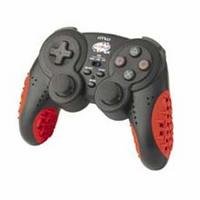
Image: Nyko AirFlo EX Controller for PlayStation 2. This image displays the front view of the controller, highlighting its button layout and ergonomic shape.
സജ്ജമാക്കുക
- പ്ലേസ്റ്റേഷൻ 2-ലേക്ക് കണക്റ്റുചെയ്യുക: Locate an available controller port on your PlayStation 2 console.
- കണക്റ്റർ ചേർക്കുക: Firmly insert the controller's connector cable into the chosen port. Ensure it is fully seated.
- കൺസോൾ പവർ ഓൺ ചെയ്യുക: നിങ്ങളുടെ പ്ലേസ്റ്റേഷൻ 2 കൺസോൾ ഓണാക്കുക. കൺട്രോളർ യാന്ത്രികമായി തിരിച്ചറിയപ്പെടും.
- ടെസ്റ്റ് പ്രവർത്തനം: Navigate the PlayStation 2 menu or start a game to confirm all buttons and analog sticks are responsive.
പ്രവർത്തന നിർദ്ദേശങ്ങൾ
The Nyko AirFlo EX Controller operates similarly to standard PlayStation 2 controllers, with the added AirFlo feature.
- അടിസ്ഥാന നിയന്ത്രണങ്ങൾ: Use the directional pad or left analog stick for movement, and the action buttons (Triangle, Circle, Cross, Square) for in-game actions.
- Analog Stick Functionality: Pressing the analog sticks down activates L3 and R3 functions, if supported by the game.
- AirFlo Fan Activation: The AirFlo fan is typically activated by a switch or button on the controller itself. Refer to the controller's physical layout for the exact location of the fan control. Toggle this control to turn the fan on or off.
- വൈബ്രേഷൻ ഫീഡ്ബാക്ക്: Vibration effects will automatically engage during gameplay when supported by the software.
മെയിൻ്റനൻസ്
- വൃത്തിയാക്കൽ: Use a soft, dry cloth to clean the controller's surface. For stubborn dirt, a slightly damp cloth can be used, ensuring no moisture enters openings. Do not use harsh chemicals or abrasive cleaners.
- സംഭരണം: Store the controller in a cool, dry place away from direct sunlight and extreme temperatures. Avoid wrapping the cable tightly around the controller to prevent damage.
- തുള്ളികൾ ഒഴിവാക്കുക: ആന്തരിക ഘടകങ്ങളെ തകരാറിലാക്കുന്ന വീഴ്ചകളിൽ നിന്നും ആഘാതങ്ങളിൽ നിന്നും കൺട്രോളറെ സംരക്ഷിക്കുക.
ട്രബിൾഷൂട്ടിംഗ്
| പ്രശ്നം | സാധ്യമായ പരിഹാരം |
|---|---|
| കൺട്രോളർ പ്രതികരിക്കുന്നില്ല. |
|
| AirFlo fan not working. |
|
| Buttons or analog sticks are unresponsive or stiff. |
|
സ്പെസിഫിക്കേഷനുകൾ
- മോഡൽ: AirFlo EX
- അനുയോജ്യത: പ്ലേസ്റ്റേഷൻ 2
- ഇനത്തിൻ്റെ ഭാരം: 9.6 ഔൺസ് (ഏകദേശം 272 ഗ്രാം)
- പാക്കേജ് അളവുകൾ: 6 x 4.8 x 2.7 ഇഞ്ച് (ഏകദേശം 15.2 x 12.2 x 6.9 സെ.മീ)
- കണക്റ്റിവിറ്റി: വയർഡ്
- പ്രത്യേക സവിശേഷതകൾ: Integrated AirFlo cooling fan
വാറൻ്റിയും പിന്തുണയും
For warranty information, technical support, or service inquiries regarding your Nyko AirFlo EX Controller, please contact Nyko customer support directly. Details can typically be found on the official Nyko webസൈറ്റ് അല്ലെങ്കിൽ ഉൽപ്പന്ന പാക്കേജിംഗ്.
നൈക്കോ ഒഫീഷ്യൽ Webസൈറ്റ്: www.nyko.com (കുറിപ്പ്: ഇതൊരു പ്ലെയ്സ്ഹോൾഡറാണ് URL. Please refer to your product packaging or official Nyko documentation for the most current support information.)