ആമുഖം
This manual provides comprehensive instructions for the proper use and maintenance of your Sharp EL-2125C Desktop Calculator. Please read this manual thoroughly before using the calculator to ensure correct operation and to maximize its features. Keep this manual for future reference.
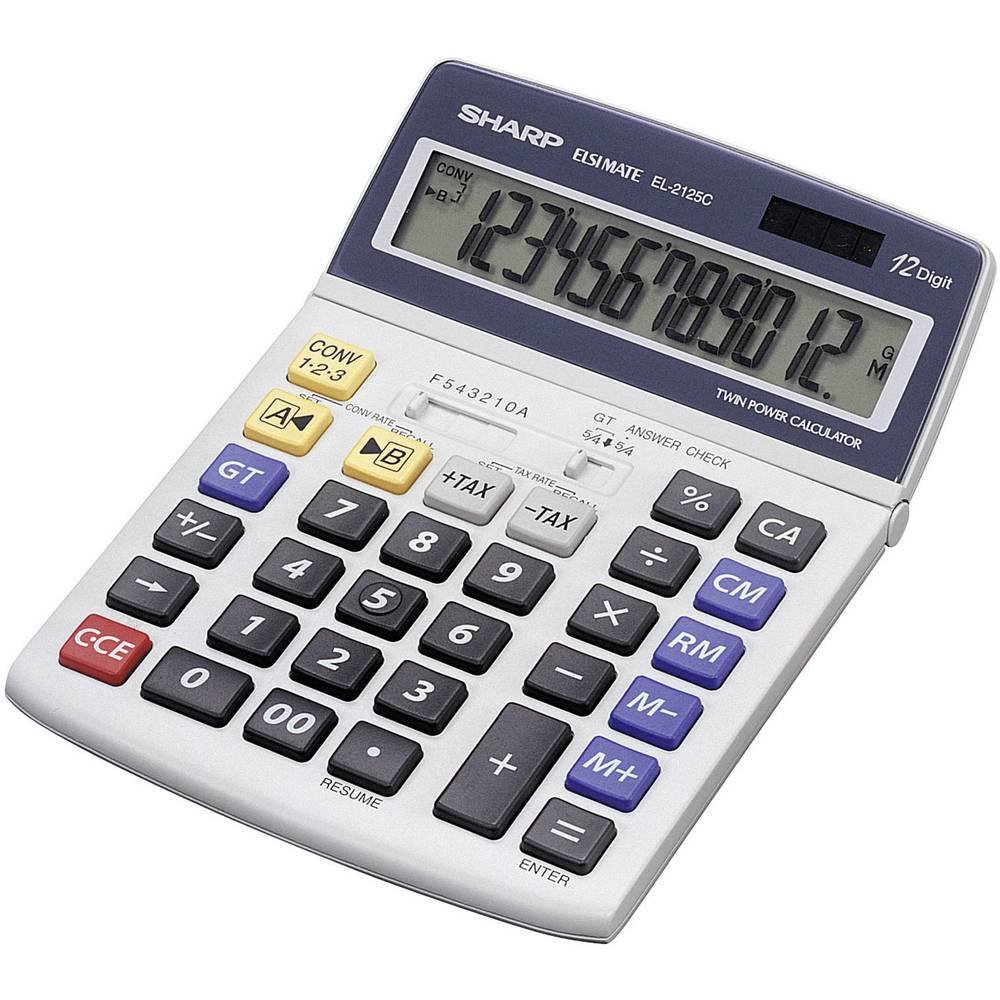
ഒരു കോണാകൃതിയിലുള്ള view of the Sharp EL-2125C desktop calculator, showcasing its large LCD display, numeric keypad, and dedicated function buttons for tax calculation, memory, and conversion. The display shows "123456789012."
സജ്ജമാക്കുക
പവർ ഉറവിടം
The Sharp EL-2125C calculator operates using a dual power system: solar power and battery power. For optimal performance, ensure adequate lighting for solar operation. A backup battery (1 x LR44) is included and pre-installed to ensure continuous operation in low-light conditions.
ബാറ്ററി ഇൻസ്റ്റാളേഷൻ/മാറ്റിസ്ഥാപിക്കൽ
The calculator comes with an LR44 battery pre-installed. If battery replacement is necessary:
- Turn the calculator off or ensure it is in a well-lit area to utilize solar power.
- യൂണിറ്റിന്റെ പിൻഭാഗത്ത് ബാറ്ററി കമ്പാർട്ട്മെന്റ് കവർ കണ്ടെത്തുക.
- Remove the cover and carefully replace the old LR44 battery with a new one, observing the correct polarity (+/-).
- ബാറ്ററി കമ്പാർട്ട്മെന്റ് കവർ സുരക്ഷിതമായി മാറ്റിസ്ഥാപിക്കുക.
കുറിപ്പ്: ഉപയോഗിച്ച ബാറ്ററികൾ പ്രാദേശിക ചട്ടങ്ങൾക്കനുസൃതമായി നീക്കം ചെയ്യുക.
പ്രവർത്തന നിർദ്ദേശങ്ങൾ
This section details the various functions and operations of your EL-2125C calculator.
അടിസ്ഥാന കണക്കുകൂട്ടലുകൾ
- കൂട്ടിച്ചേർക്കൽ (+): ആദ്യത്തെ നമ്പർ നൽകി, +, രണ്ടാമത്തെ നമ്പർ നൽകി, =.
- കുറയ്ക്കൽ (-): ആദ്യത്തെ നമ്പർ നൽകി, -, രണ്ടാമത്തെ നമ്പർ നൽകി, =.
- ഗുണനം (x): ആദ്യത്തെ നമ്പർ നൽകി, x, രണ്ടാമത്തെ നമ്പർ നൽകി, =.
- ഡിവിഷൻ (÷): ആദ്യത്തെ നമ്പർ നൽകി, ÷, രണ്ടാമത്തെ നമ്പർ നൽകി, =.
- ശതമാനംtagഇ (%): Enter the number, press x, enter the percentage value, press %.
മെമ്മറി പ്രവർത്തനങ്ങൾ
The calculator features a 4-button memory system:
- M+ (മെമ്മറി പ്ലസ്): പ്രദർശിപ്പിച്ചിരിക്കുന്ന മൂല്യം മെമ്മറിയിലേക്ക് ചേർക്കുന്നു.
- M- (മെമ്മറി മൈനസ്): മെമ്മറിയിൽ നിന്ന് പ്രദർശിപ്പിച്ച മൂല്യം കുറയ്ക്കുന്നു.
- ആർഎം (റീകോൾ മെമ്മറി): മെമ്മറിയിൽ സൂക്ഷിച്ചിരിക്കുന്ന മൂല്യം ഡിസ്പ്ലേയിലേക്ക് തിരിച്ചുവിളിക്കുന്നു.
- സിഎം (ക്ലിയർ മെമ്മറി): മെമ്മറിയിൽ സംഭരിച്ചിരിക്കുന്ന മൂല്യം മായ്ക്കുന്നു.
നികുതി കണക്കുകൂട്ടൽ പ്രവർത്തനം
The EL-2125C includes dedicated keys for tax calculations:
- SET TAX RATE: നികുതി നിരക്ക് നിശ്ചയിക്കാൻ, അമർത്തുക സെറ്റ്, പിന്നെ നികുതി നിരക്ക്, നികുതി ശതമാനം നൽകുകtage, and press സെറ്റ് വീണ്ടും.
- +TAX: Adds the calculated tax to the displayed value.
- -TAX: Subtracts the calculated tax from the displayed value.
പരിവർത്തന പ്രവർത്തനം
The calculator supports conversion between different rates (e.g., currency conversion):
- SET CONV RATE: To set conversion rates, press സെറ്റ്, പിന്നെ CONV RATE, enter the conversion factor, and press സെറ്റ്.
- CONV A / CONV B: Use these keys to apply the set conversion rates.
ദശാംശ, റൗണ്ടിംഗ് ക്രമീകരണങ്ങൾ
Adjust how results are displayed using the F543210A slider switch:
- എഫ് (ഫ്ലോട്ടിംഗ്): Displays all available decimal places.
- 5, 4, 3, 2, 1, 0: Specifies the number of decimal places to be displayed.
- A (മോഡ് ചേർക്കുക): Automatically adds two decimal places for currency calculations.
Rounding settings are controlled by the 5/4 switch:
- 5/4 (Round Up/Down): Rounds up if the next digit is 5 or greater, rounds down if less than 5.
- Round (No Rounding): Truncates the result without rounding.
മറ്റ് പ്രവർത്തനങ്ങൾ
- GT (ഗ്രാൻഡ് ടോട്ടൽ): Accumulates the results of individual calculations. Press GT ആകെത്തുക പ്രദർശിപ്പിക്കാൻ.
- ANSWER CHECK: Allows verification of previous calculations.
- +/- (അടയാളം മാറ്റം): പ്രദർശിപ്പിച്ചിരിക്കുന്ന സംഖ്യയുടെ ചിഹ്നം മാറ്റുന്നു.
- CCE (Clear Current Entry): Clears the last entered number or calculation.
- CA (എല്ലാം മായ്ക്കുക): Clears all entries and calculations, resetting the calculator.
- 00 (ഇരട്ട പൂജ്യം): രണ്ട് പൂജ്യങ്ങൾ ഒരേസമയം നൽകുന്നു.
- പുനരാരംഭിക്കുക: Recalls the last calculation result.
മെയിൻ്റനൻസ്
വൃത്തിയാക്കൽ
To maintain the calculator's appearance and functionality, wipe the unit with a soft, dry cloth. For stubborn dirt, a slightly damp cloth can be used, followed by a dry cloth. Avoid using abrasive cleaners, solvents, or harsh chemicals, as these can damage the casinജി, ഡിസ്പ്ലേ എന്നിവ ഉപയോഗിക്കുക.
സംഭരണം
When not in use for extended periods, store the calculator in a cool, dry place away from direct sunlight and extreme temperatures. Avoid placing heavy objects on top of the calculator to prevent damage to the keys or display.
ട്രബിൾഷൂട്ടിംഗ്
If you encounter issues with your Sharp EL-2125C calculator, refer to the following common problems and solutions:
| പ്രശ്നം | സാധ്യമായ കാരണം | പരിഹാരം |
|---|---|---|
| ഡിസ്പ്ലേ ശൂന്യമോ മങ്ങിയതോ ആണ്. | സൗരോർജ്ജത്തിന് ആവശ്യത്തിന് വെളിച്ചമില്ല, അല്ലെങ്കിൽ ബാറ്ററി കുറവാണ്. | Move the calculator to a brighter area. If the issue persists, replace the LR44 backup battery. |
| തെറ്റായ കണക്കുകൂട്ടൽ ഫലങ്ങൾ. | Incorrect decimal or rounding settings, or previous calculation error. | Check the F543210A and 5/4 switches. Press CA to clear all previous operations and start a new calculation. |
| കീകൾ പ്രതികരിക്കുന്നില്ല. | താക്കോലുകൾക്കടിയിൽ പൊടിയോ അവശിഷ്ടങ്ങളോ, അല്ലെങ്കിൽ ആന്തരിക തകരാറുകൾ. | Gently clean around the keys. If the problem continues, contact customer support. |
സ്പെസിഫിക്കേഷനുകൾ
- മോഡൽ: EL-2125C
- ഡിസ്പ്ലേ: 12-digit LCD, movable
- ഊർജ്ജ സ്രോതസ്സ്: സോളാറും 1 x LR44 ബാറ്ററിയും (ഉൾപ്പെടുത്തിയിരിക്കുന്നു)
- അളവുകൾ: ഏകദേശം 19.5 x 14 x 2.2 സെ.മീ (L x W x H)
- ഭാരം: ഏകദേശം 215 ഗ്രാം
- മെറ്റീരിയൽ: പ്ലാസ്റ്റിക്
- പ്രവർത്തനങ്ങൾ: Basic arithmetic, Memory (M+, M-, RM, CM), Tax Calculation (+TAX, -TAX), Conversion, Percentage (%), Grand Total (GT), Answer Check, Decimal Selector (F, 5, 4, 3, 2, 1, 0, A), Rounding Selector (5/4, Round), Sign Change (+/-), Clear Entry (CCE), Clear All (CA), Double Zero (00), Resume.
വാറൻ്റിയും പിന്തുണയും
For warranty information or technical support, please refer to the documentation provided with your purchase or contact Sharp customer service. Keep your proof of purchase for warranty claims.
നിർമ്മാതാവ്: മൂർച്ചയുള്ള


