ആമുഖം
This manual provides essential information for the proper use and care of your JVC 4.7GB DVD+R Media 30-Pack Spindle. These high-quality recordable DVD+R discs offer 4.7 GB or 120 minutes of storage capacity, making them ideal for video recording, digital photo storage, and general data archiving. The 30-pack spindle provides a convenient and economical solution for your storage needs. JVC DVD+R media is designed for reliability and broad compatibility with most DVD players and DVD drives.
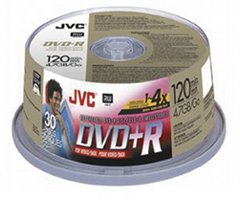
Image showing a spindle of JVC 4.7GB DVD+R discs, typically used for data storage or video recording.
സജ്ജീകരണ നിർദ്ദേശങ്ങൾ
The JVC DVD+R discs are ready for use directly from the spindle. Follow these guidelines for initial handling:
- അൺപാക്ക് ചെയ്യുന്നു: Carefully remove discs from the spindle one at a time to avoid scratching.
- കൈകാര്യം ചെയ്യൽ: Always hold the disc by its edges or by the center hole. Avoid touching the recording surface (the shiny side) or the label side to prevent fingerprints, dust, or scratches.
- സംഭരണം: Store unused discs back on the spindle or in a protective case to shield them from dust, direct sunlight, and extreme temperatures.
പ്രവർത്തന നിർദ്ദേശങ്ങൾ
To record data or video onto your JVC DVD+R discs, you will need a compatible DVD+R recorder drive and appropriate recording software. These discs support a maximum recording speed of 4X.
- ഡിസ്ക് ചേർക്കുക: Gently place a JVC DVD+R disc into your computer's DVD+R recorder drive, ensuring the label side is facing up.
- സോഫ്റ്റ്വെയർ സമാരംഭിക്കുക: Open your preferred DVD recording software (e.g., Nero, Roxio, Windows Media Player, macOS Disk Utility).
- പ്രോജക്റ്റ് തരം തിരഞ്ഞെടുക്കുക: Choose the type of project you wish to create (e.g., Data Disc, Video DVD, Audio CD, Backup Disc).
- ചേർക്കുക Files: വലിച്ചിടുക files or folders you want to record onto the disc into the software interface. Ensure the total size does not exceed 4.7 GB.
- ക്രമീകരണങ്ങൾ കോൺഫിഗർ ചെയ്യുക: Select the recording speed (it is recommended to use the maximum supported speed of 4X for these discs, or a lower speed if your drive or software suggests it for better compatibility).
- റെക്കോർഡിംഗ് ആരംഭിക്കുക: Initiate the recording process. Do not interrupt the recording until it is complete.
- ഡിസ്ക് അന്തിമമാക്കുക: Most software will automatically finalize the disc after recording, making it readable on other DVD players and drives. Confirm this step if prompted.
- ഡിസ്ക് എജക്റ്റ് ചെയ്യുക: റെക്കോർഡിംഗ് പൂർത്തിയായി പരിശോധിച്ചുറപ്പിച്ചുകഴിഞ്ഞാൽ, ഡ്രൈവിൽ നിന്ന് ഡിസ്ക് പുറത്തെടുക്കുക.
For optimal performance and compatibility, ensure your DVD recorder drive's firmware is up to date and use reliable recording software.
പരിചരണവും പരിപാലനവും
Proper care of your JVC DVD+R media will ensure data longevity and reliable playback.
- വൃത്തിയാക്കൽ: If a disc becomes dirty, gently wipe it with a soft, lint-free cloth from the center outwards. Do not use abrasive materials or harsh chemical cleaners.
- സംഭരണം: Store discs in their original spindle or in individual jewel cases to protect them from dust, scratches, and physical damage. Keep discs away from direct sunlight, high humidity, and extreme temperatures.
- ലേബലിംഗ്: Use a soft, felt-tip marker specifically designed for optical discs to label the non-recording side. Avoid using ballpoint pens or sharp objects, as they can damage the disc's data layer.
- വളയുന്നത് ഒഴിവാക്കുക: Do not bend or flex the discs, as this can cause irreparable damage.
ട്രബിൾഷൂട്ടിംഗ്
If you encounter issues while using your JVC DVD+R media, consider the following common solutions:
- ഡിസ്ക് തിരിച്ചറിഞ്ഞില്ല: Ensure the disc is inserted correctly into the drive. Check if your drive supports DVD+R media. Clean the disc if it appears dirty or smudged.
- റെക്കോർഡിംഗ് പിശകുകൾ: Reduce the recording speed in your software. Ensure there is enough free space on the disc. Close other applications running in the background to free up system resources. Update your DVD recorder drive's firmware.
- പ്ലേബാക്ക് പ്രശ്നങ്ങൾ: Ensure the playback device (DVD player, computer drive) is compatible with DVD+R discs. Clean the disc. Try playing the disc on a different device to rule out a player-specific issue.
- മന്ദഗതിയിലുള്ള പ്രകടനം: Verify that your drive is operating at its rated speed. Ensure the disc is clean and free from damage.
If problems persist, consult your DVD recorder drive's manual or the support resources for your recording software.
ഉൽപ്പന്ന സവിശേഷതകൾ
| ഫീച്ചർ | സ്പെസിഫിക്കേഷൻ |
|---|---|
| ബ്രാൻഡ് | ജെ.വി.സി |
| മോഡൽ നമ്പർ | VPR47DU30 |
| സംഭരണ ശേഷി | 4.7 GB / 120 Minutes |
| ഡിസ്ക് തരം | DVD+R |
| പരമാവധി എഴുത്ത് വേഗത | 4x |
| പാക്കേജിംഗ് | 30-Pack Spindle |
| ഉൽപ്പന്ന അളവുകൾ | 5.7 x 5.5 x 2.4 ഇഞ്ച് |
| ഇനത്തിൻ്റെ ഭാരം | 1 പൗണ്ട് (16 ഔൺസ്) |
| യു.പി.സി | 046838014833 |
വാറൻ്റിയും ഉപഭോക്തൃ പിന്തുണയും
JVC products are manufactured to high-quality standards. For specific warranty information regarding your JVC DVD+R media, please refer to the packaging or contact JVC customer support directly. While blank media typically has limited warranty coverage, JVC stands by the quality and reliability of its products.
For further assistance, technical support, or to inquire about product information, please visit the official JVC website or contact their customer service department. You may also find helpful resources and FAQs on the ആമസോണിലെ ജെവിസി സ്റ്റോർ.


