1. ആമുഖം
This manual provides essential instructions for the proper installation, operation, and maintenance of your Bogen Classic Series Amp C20. Please read this manual thoroughly before using the product to ensure safe and efficient performance. Retain this manual for future reference.
2 സുരക്ഷാ വിവരങ്ങൾ
മുന്നറിയിപ്പ്: കാൻസറിനും ജനന വൈകല്യങ്ങൾക്കും അല്ലെങ്കിൽ മറ്റ് പ്രത്യുൽപാദന ദോഷങ്ങൾക്കും കാരണമാകുന്ന കാലിഫോർണിയ സംസ്ഥാനത്തിന് അറിയപ്പെടുന്ന രാസവസ്തുക്കൾ ഈ ഉൽപ്പന്നത്തിൽ അടങ്ങിയിരിക്കുന്നു.
Always observe basic safety precautions when using electrical equipment to reduce the risk of fire, electric shock, and injury to persons.
- ഈ ഉപകരണം മഴയിലോ ഈർപ്പത്തിലോ തുറന്നുകാട്ടരുത്.
- വെന്റിലേഷൻ തുറസ്സുകളൊന്നും തടയരുത്. നിർമ്മാതാവിന്റെ നിർദ്ദേശങ്ങൾക്കനുസൃതമായി ഇൻസ്റ്റാൾ ചെയ്യുക.
- റേഡിയറുകൾ, ഹീറ്റ് രജിസ്റ്ററുകൾ, സ്റ്റൗകൾ, അല്ലെങ്കിൽ മറ്റ് ഉപകരണങ്ങൾ (ഉൾപ്പെടെ) പോലെയുള്ള താപ സ്രോതസ്സുകൾക്ക് സമീപം ഇൻസ്റ്റാൾ ചെയ്യരുത്. ampലൈഫയറുകൾ) ചൂട് ഉത്പാദിപ്പിക്കുന്നത്.
- നിർമ്മാതാവ് വ്യക്തമാക്കിയ അറ്റാച്ച്മെൻ്റുകൾ/ആക്സസറികൾ മാത്രം ഉപയോഗിക്കുക.
- എല്ലാ സേവനങ്ങളും യോഗ്യതയുള്ള സേവന ഉദ്യോഗസ്ഥർക്ക് റഫർ ചെയ്യുക.
3. ഉൽപ്പന്നം കഴിഞ്ഞുview
The Bogen Classic Series Amp C20 is a single-channel amplifier designed for various audio applications. It features robust construction and reliable performance.
3.1 പ്രധാന സവിശേഷതകൾ
- സിംഗിൾ-ചാനൽ ampജീവപര്യന്തം
- Surface Mount design
- ഇൻപുട്ട് വോളിയംtage: 120 വോൾട്ട്
- ഔട്ട്പുട്ട് പവർ: 20 വാട്ട്സ്
3.2 പാക്കേജ് ഉള്ളടക്കം
അൺപാക്ക് ചെയ്യുമ്പോൾ, ഇനിപ്പറയുന്ന ഇനങ്ങൾ ഉൾപ്പെടുത്തിയിട്ടുണ്ടെന്ന് ഉറപ്പാക്കുക:
- ബോഗൻ ക്ലാസിക് സീരീസ് Amp C20
- ഫണൽ
- നിർദ്ദേശ മാനുവൽ (ഈ പ്രമാണം)
3.3 ഫ്രണ്ട് പാനൽ നിയന്ത്രണങ്ങളും സൂചകങ്ങളും

Image 1: Front panel of the Bogen Classic Series Amp C20. This image displays the MIC1, MIC2, AUX, and TREBLE control knobs, along with the POWER switch and the "Classic Series" branding.
- MIC1 Input Level Control: Adjusts the volume for Microphone Input 1.
- MIC2 Input Level Control: Adjusts the volume for Microphone Input 2.
- AUX Input Level Control: Adjusts the volume for the Auxiliary input.
- ട്രെബിൾ നിയന്ത്രണം: Adjusts the high-frequency response of the audio output.
- വൈദ്യുതി സ്വിച്ച്: ടോഗിൾ ചെയ്യുന്നു amplifier's power on and off.
3.4 പിൻ പാനൽ കണക്ഷനുകൾ
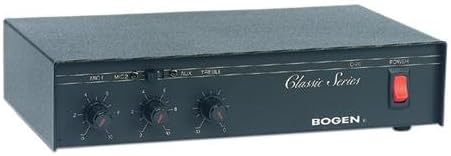
Image 2: Rear panel of the Bogen Classic Series Amp C20. This image shows the various input and output connections, including power input and speaker terminals.
The rear panel contains connections for power, microphone inputs, auxiliary inputs, and speaker outputs. Specific details on these connections are provided in the Setup section.
4. സജ്ജീകരണവും ഇൻസ്റ്റാളേഷനും
4.1 മൗണ്ടിംഗ്
The Bogen Classic Series Amp C20 is designed for surface mounting. Ensure the mounting surface is stable and capable of supporting the unit's weight (approximately 4.5 pounds). Allow adequate ventilation around the unit to prevent overheating.
4.2 ഇലക്ട്രിക്കൽ കണക്ഷൻ
- Ensure the POWER switch on the front panel is in the OFF position.
- Connect the power cord to a standard 120 Volt AC outlet.
4.3 ഓഡിയോ ഇൻപുട്ട് കണക്ഷനുകൾ
Connect your audio sources to the appropriate inputs on the rear panel:
- മൈക്രോഫോണുകൾ: Connect microphones to the MIC1 and MIC2 input jacks.
- സഹായ ഉപകരണങ്ങൾ: Connect line-level audio sources (e.g., CD player, media player) to the AUX input jacks.
4.4 സ്പീക്കർ ഔട്ട്പുട്ട് കണക്ഷനുകൾ
Connect your speakers to the speaker output terminals on the rear panel. Ensure correct polarity (+ to + and - to -) for all speaker connections. Refer to your speaker's manual for impedance matching requirements.
5. ഓപ്പറേഷൻ
5.1 പവർ ഓൺ/ഓഫ്
- പവർ ചെയ്യാൻ amplifier, press the POWER switch on the front panel to the ON position. The power indicator (if present) will illuminate.
- To power off, press the POWER switch to the OFF position.
5.2 ഇൻപുട്ട് ലെവലുകൾ ക്രമീകരിക്കൽ
- Start with all input level controls (MIC1, MIC2, AUX) set to their minimum position.
- Begin playing audio from your desired source.
- Slowly increase the corresponding input level control until the desired volume is achieved.
- Adjust the TREBLE control to fine-tune the high-frequency response to your preference.
5.3 പൊതുവായ ഉപയോഗ നുറുങ്ങുകൾ
- Avoid setting volume levels too high, which can cause distortion and potentially damage speakers.
- Ensure all connections are secure before operating the ampജീവൻ.
6. പരിപാലനം
6.1 വൃത്തിയാക്കൽ
യുടെ പുറംഭാഗം തുടയ്ക്കുക amplifier with a soft, dry cloth. Do not use liquid cleaners or aerosol cleaners, as they may damage the finish or internal components.
6.2 വെന്റിലേഷൻ
Regularly check that the ventilation openings are clear of dust and debris to ensure proper airflow and prevent overheating.
6.3 സേവനം
ഉള്ളിൽ ഉപയോക്തൃ സേവനയോഗ്യമായ ഭാഗങ്ങളില്ല ampലിഫയർ. എല്ലാ സേവനങ്ങളും യോഗ്യതയുള്ള സേവന ഉദ്യോഗസ്ഥർക്ക് റഫർ ചെയ്യുക.
7. പ്രശ്നപരിഹാരം
If you experience issues with your Bogen Classic Series Amp C20, consult the following table before contacting support.
| പ്രശ്നം | സാധ്യമായ കാരണം | പരിഹാരം |
|---|---|---|
| ശബ്ദ ഔട്ട്പുട്ട് ഇല്ല. |
|
|
| വികലമായ ശബ്ദം. |
|
|
| Static or crackling from knobs. | Dust or oxidation on control potentiometers. | Consult qualified service personnel for cleaning or replacement of potentiometers. |
| Unit becomes excessively warm or emits odor. |
|
|
8 സ്പെസിഫിക്കേഷനുകൾ
| ഫീച്ചർ | വിശദാംശങ്ങൾ |
|---|---|
| ബ്രാൻഡ് | ബോഗൻ |
| മോഡൽ | C20 |
| ഇനം മോഡൽ നമ്പർ | C20 |
| നിർമ്മാതാവിൻ്റെ ഭാഗം നമ്പർ | C20 |
| ഇനത്തിന്റെ അളവുകൾ (L x W x H) | 11.37 x 7.37 x 2.87 ഇഞ്ച് |
| ഉൽപ്പന്ന അളവുകൾ | 11.37 x 7.37 x 2.87 ഇഞ്ച് |
| ഇനത്തിൻ്റെ ഭാരം | 4.5 പൗണ്ട് |
| വാല്യംtage | 120 വോൾട്ട് |
| വാട്ട്tage | 50 വാട്ട്സ് |
| ഔട്ട്പുട്ട് പവർ | 20 വാട്ട്സ് |
| ചാനലുകളുടെ എണ്ണം | 1 |
| മൗണ്ടിംഗ് തരം | ഉപരിതല മൗണ്ട് |
| നിർമ്മാതാവ് | ബോഗൻ |
| യു.പി.സി | 765368330250 |
| ആദ്യ തീയതി ലഭ്യമാണ് | ജൂലൈ 16, 2004 |
കുറിപ്പ്: അറിയിപ്പുകൾ കൂടാതെ സവിശേഷതകൾ മാറ്റത്തിന് വിധേയമാണ്.
9. വാറൻ്റിയും പിന്തുണയും
For warranty information and technical support, please refer to the official Bogen webസൈറ്റിൽ ബന്ധപ്പെടുകയോ അവരുടെ ഉപഭോക്തൃ സേവന വിഭാഗവുമായി ബന്ധപ്പെടുകയോ ചെയ്യുക. വാറന്റി ക്ലെയിമുകൾക്കുള്ള വാങ്ങലിന്റെ തെളിവായി നിങ്ങളുടെ വാങ്ങൽ രസീത് സൂക്ഷിക്കുക.
ബന്ധപ്പെടാനുള്ള വിവരങ്ങൾ:
- Webസൈറ്റ്: www.bogen.com (Placeholder, actual URL വ്യത്യാസപ്പെടാം)
- കസ്റ്റമർ സർവീസ്: റഫർ ചെയ്യുക webപ്രാദേശിക കോൺടാക്റ്റ് വിശദാംശങ്ങൾക്കായി സൈറ്റ്.


