ആമുഖം
This manual provides comprehensive instructions for the setup, operation, maintenance, and troubleshooting of your Logitech G Cordless Rumblepad 2. Please read this manual thoroughly before using the device to ensure optimal performance and longevity.
The Logitech Cordless Rumblepad 2 offers a wireless gaming experience with vibration feedback, designed for PC and Mac compatibility. It features 2.4 GHz cordless technology for a 30-foot range and dual vibration motors for immersive gameplay.
പാക്കേജ് ഉള്ളടക്കം
ആരംഭിക്കുന്നതിന് മുമ്പ്, എല്ലാ ഇനങ്ങളും പാക്കേജിൽ ഉണ്ടെന്ന് ഉറപ്പാക്കുക:
- Logitech Cordless Rumblepad 2
- 2.4 GHz വയർലെസ് റിസീവർ
- Two (2) AA Batteries
- ഉപയോക്തൃ ഡോക്യുമെന്റേഷൻ (ഈ മാനുവൽ)
- Gaming Software CD (or download instructions)
- വാറൻ്റി വിവരങ്ങൾ
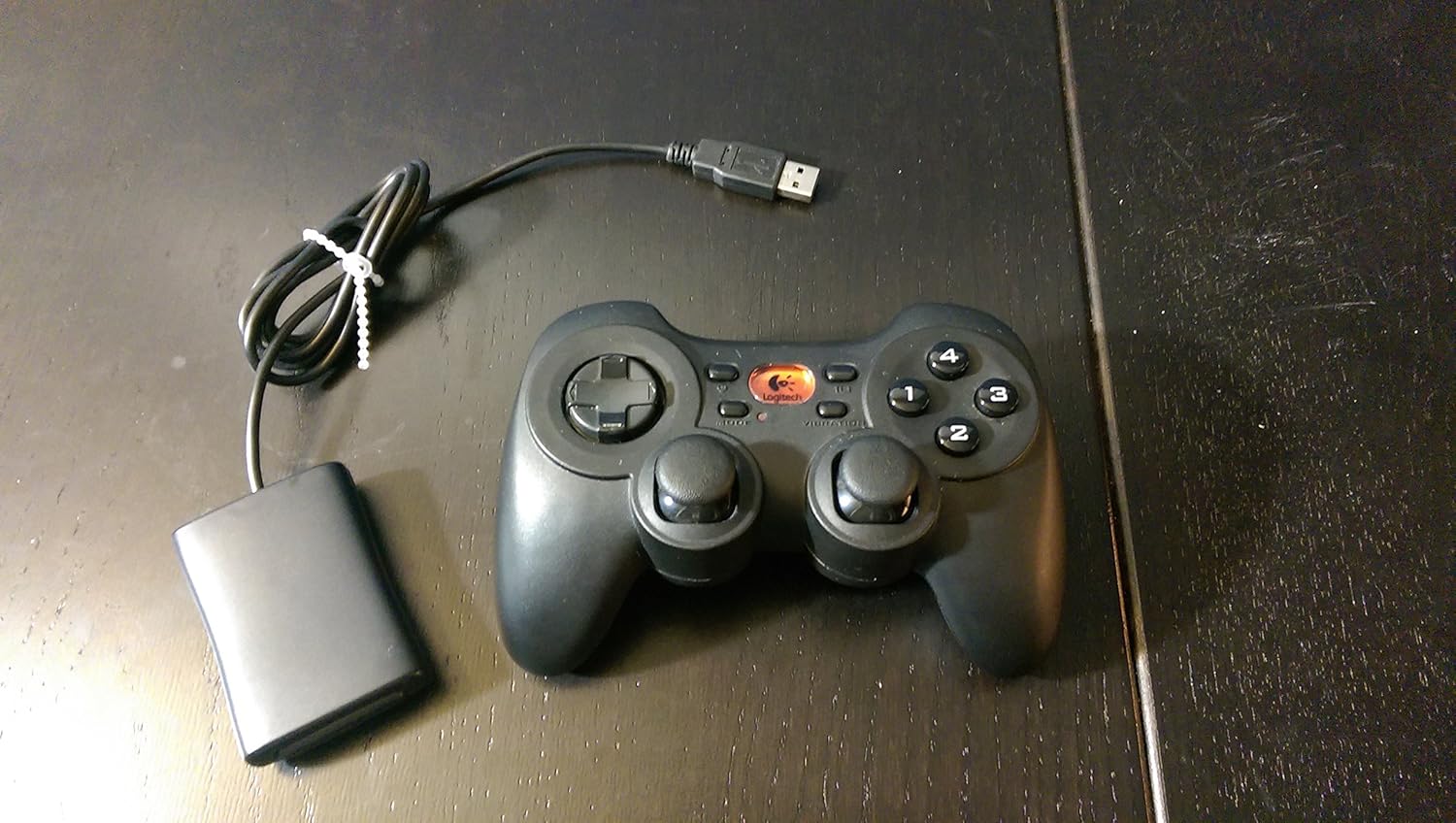
Image: The Logitech G Cordless Rumblepad 2 gamepad shown alongside its compact USB wireless receiver.
സജ്ജമാക്കുക
1. ബാറ്ററി ഇൻസ്റ്റാളേഷൻ
- Locate the battery compartment on the underside of the Cordless Rumblepad 2.
- ബാറ്ററി കമ്പാർട്ട്മെൻ്റ് കവർ തുറക്കുക.
- കമ്പാർട്ടുമെന്റിനുള്ളിൽ സൂചിപ്പിച്ചിരിക്കുന്നതുപോലെ ശരിയായ പോളാരിറ്റി (+/-) ഉറപ്പാക്കിക്കൊണ്ട് രണ്ട് (2) AA ബാറ്ററികൾ തിരുകുക.
- ബാറ്ററി കമ്പാർട്ട്മെൻ്റ് കവർ സുരക്ഷിതമായി അടയ്ക്കുക.
2. Connecting the Wireless Receiver
- Plug the 2.4 GHz wireless receiver into an available USB port on your PC or Mac.
- Allow your operating system to detect and install the necessary drivers. This process may take a few moments.

ചിത്രം: ഒരു ക്ലോസ്-അപ്പ് view of the compact Logitech 2.4 GHz wireless receiver, which connects to a computer's USB port.
3. Software Installation (Optional, Recommended)
For full functionality, including button customization and game profiles, install the Logitech gaming software:
- Insert the provided gaming software CD into your computer's optical drive.
- ഇൻസ്റ്റാളേഷൻ പൂർത്തിയാക്കാൻ ഓൺ-സ്ക്രീൻ നിർദ്ദേശങ്ങൾ പാലിക്കുക.
- Alternatively, download the latest software from the official Logitech support webസൈറ്റ്.
Operating the Cordless Rumblepad 2
കൺട്രോളർ ലേഔട്ടും പ്രവർത്തനങ്ങളും

ചിത്രം: ഒരു സൈഡ് പ്രോfile view of the Logitech G Cordless Rumblepad 2, highlighting its ergonomic design and button placement.
The Cordless Rumblepad 2 features a familiar button layout for intuitive control:
- Dual Analog Sticks: Provide smooth 360-degree control for precise movement and camera control.
- 8-വേ ഡി-പാഡ്: For directional input, commonly used in fighting games or menu navigation.
- 10 Programmable Action Buttons: Customizable buttons for in-game actions.
- മോഡ് ബട്ടൺ: Toggles between different controller modes or profiles.
- Vibration Selector: Activates or deactivates the dual vibration feedback motors.
വൈബ്രേഷൻ ഫീഡ്ബാക്ക്
The dual vibration feedback motors provide tactile sensations for in-game events such as hits, crashes, and explosions. Ensure the Vibration Selector is enabled for this feature to function.
പവർ മാനേജ്മെൻ്റ്
The Cordless Rumblepad 2 is designed for extended battery life, offering up to 100 hours of gameplay. To conserve battery power, the gamepad will enter a low-power state after a period of inactivity. Press any button to reactivate it.
മെയിൻ്റനൻസ്
- വൃത്തിയാക്കൽ: ഗെയിംപാഡിന്റെ ഉപരിതലം വൃത്തിയാക്കാൻ മൃദുവായതും ഉണങ്ങിയതുമായ തുണി ഉപയോഗിക്കുക. കഠിനമായ അഴുക്കിന്, അല്പം ഡി.amp തുണി ഉപയോഗിക്കാം, പക്ഷേ ഉപകരണത്തിനുള്ളിൽ ഈർപ്പം കയറുന്നില്ലെന്ന് ഉറപ്പാക്കുക. അബ്രസിവ് ക്ലീനറുകളോ ലായകങ്ങളോ ഒഴിവാക്കുക.
- ബാറ്ററി മാറ്റിസ്ഥാപിക്കൽ: Replace AA batteries when the gamepad's performance degrades or it fails to power on. Always use fresh, high-quality batteries.
- സംഭരണം: When not in use for extended periods, remove the batteries to prevent leakage and store the gamepad and receiver in a cool, dry place away from direct sunlight.
ട്രബിൾഷൂട്ടിംഗ്
| പ്രശ്നം | സാധ്യമായ കാരണം | പരിഹാരം |
|---|---|---|
| Gamepad not responding. | Low or dead batteries. Receiver not connected or recognized. Out of range. | Replace batteries. Ensure receiver is securely plugged into a USB port. Move closer to the receiver (within 30 feet). |
| Vibration feedback not working. | Vibration feature disabled. Game does not support vibration. Software issue. | Check the Vibration Selector button on the gamepad. Verify game compatibility. Reinstall Logitech gaming software. |
| Buttons or analog sticks are unresponsive or sticky. | Dirt or debris under buttons. Hardware malfunction. | Clean the gamepad thoroughly. If problem persists, contact Logitech support. |
| Interference or lag. | Other wireless devices nearby. Obstructions. | Move the receiver to a different USB port, preferably one with a clear line of sight to the gamepad. Minimize other 2.4 GHz wireless devices in the area. |
സ്പെസിഫിക്കേഷനുകൾ
- മോഡലിൻ്റെ പേര്: കോർഡ്ലെസ് റംബിൾപാഡ് 2
- മോഡൽ നമ്പർ: 963326-0403
- കണക്റ്റിവിറ്റി: 2.4 GHz വയർലെസ്
- വയർലെസ് ശ്രേണി: 30 അടി വരെ (10 മീറ്റർ)
- ബാറ്ററി തരം: 2 x AA ബാറ്ററികൾ
- കണക്കാക്കിയ ബാറ്ററി ലൈഫ്: 100 മണിക്കൂർ വരെ
- വൈബ്രേഷൻ ഫീഡ്ബാക്ക്: Dual motors
- നിയന്ത്രണങ്ങൾ: 2 Analog Sticks, 8-Way D-Pad, 10 Programmable Action Buttons, Mode Button, Vibration Selector
- അനുയോജ്യമായ ഉപകരണങ്ങൾ: പിസി, മാക്
- ഉൽപ്പന്ന അളവുകൾ: 9 x 8.5 x 3.25 ഇഞ്ച് (ഏകദേശം)
- ഇനത്തിൻ്റെ ഭാരം: 8.8 ഔൺസ് (ഏകദേശം)
- നിർമ്മാതാവ്: ലോജിടെക് ജി
- ആദ്യം ലഭ്യമായത്: നവംബർ 20, 2006
വാറൻ്റി വിവരങ്ങൾ
The Logitech G Cordless Rumblepad 2 comes with a limited hardware warranty. Please refer to the warranty information included in your product package or visit the official Logitech support website for detailed terms and conditions, including warranty period and claim procedures.
പിന്തുണ
കൂടുതൽ സഹായത്തിനോ സാങ്കേതിക പിന്തുണയ്ക്കോ ഏറ്റവും പുതിയ ഡ്രൈവറുകളും സോഫ്റ്റ്വെയറും ഡൗൺലോഡ് ചെയ്യുന്നതിനോ, ദയവായി ഔദ്യോഗിക ലോജിടെക് പിന്തുണ സന്ദർശിക്കുക. webസൈറ്റ്. നിങ്ങൾക്ക് അവിടെ പതിവുചോദ്യങ്ങളും കമ്മ്യൂണിറ്റി ഫോറങ്ങളും കണ്ടെത്താനാകും.
ലോജിടെക് പിന്തുണ Webസൈറ്റ്: www.logitech.com/support


