ആമുഖം
This manual provides detailed instructions for the installation, operation, and maintenance of your Western Digital 80 GB External USB 2.0 Hard Drive, model WDXUB800BBNN. This external storage device offers high-speed data transfer and convenient backup features, designed for both PC and Macintosh systems.

ചിത്രം: മുൻഭാഗം view of the Western Digital 80 GB External USB 2.0 Hard Drive.
ഉൽപ്പന്ന സവിശേഷതകൾ
- Dual-option Backup: Select between automatic or on-the-spot data backup methods.
- യുഎസ്ബി 2.0 ഇന്റർഫേസ്: Provides a high-speed connection for efficient data transfer.
- Safe Shutdown Feature: Ensures all data is safely transferred before the drive powers off, activated via the front-mounted power button.
- ഭ്രമണ വേഗത: Operates at 7200 RPM for fast performance.
- Preformatted: Ready for use immediately upon connection.
- ശാന്തമായ പ്രവർത്തനം: Engineered for near-silent performance.
- ഫ്ലെക്സിബിൾ പ്ലേസ്മെൻ്റ്: Can be positioned vertically or horizontally and is stackable.
- താപ വിസർജ്ജനം: Designed with a cool, heat-dissipating case.
പാക്കേജ് ഉള്ളടക്കം
നിങ്ങളുടെ പാക്കേജിൽ ഇനിപ്പറയുന്ന ഇനങ്ങൾ അടങ്ങിയിട്ടുണ്ടെന്ന് പരിശോധിക്കുക:
- 80 GB USB 2.0 External Hard Drive
- 6-foot (1.8m) USB 2.0 Certified Cable
- Software CD (includes Dantz Retrospect Express backup software)
- പവർ കോർഡ് ഉള്ള എസി അഡാപ്റ്റർ
- Vertical Stands
- Feet for Horizontal Placement
- ദ്രുത ഇൻസ്റ്റാളേഷൻ ഗൈഡ്
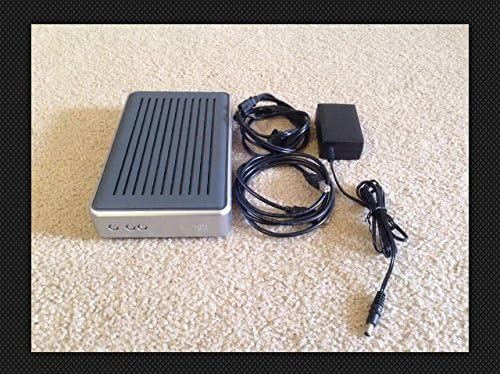
Image: Contents of the Western Digital 80 GB External USB 2.0 Hard Drive package, including the drive, cables, and power adapter.
സിസ്റ്റം ആവശ്യകതകൾ
പിസി ഉപയോക്താക്കൾ
- USB പോർട്ട് ലഭ്യമാണ്
- Windows 98SE, Me, 2000, or XP
Macintosh Users
- USB പോർട്ട് ലഭ്യമാണ്
- Mac OS v9.2.2 or Mac OS X v10.2.8+
സജ്ജീകരണ നിർദ്ദേശങ്ങൾ
- പവർ ബന്ധിപ്പിക്കുക: Connect the AC adapter to the drive and then plug it into a power outlet.
- USB കേബിൾ ബന്ധിപ്പിക്കുക: Connect one end of the USB 2.0 cable to the drive and the other end to an available USB port on your computer.
- പവർ ഓൺ: Press the front-mounted power button on the drive. The drive is preformatted and should be recognized automatically by your operating system.
- സോഫ്റ്റ്വെയർ ഇൻസ്റ്റാളേഷൻ (ഓപ്ഷണൽ): Insert the included Software CD into your computer's optical drive. Follow the on-screen instructions to install Dantz Retrospect Express backup software if desired. This software provides advanced backup functionalities.

Image: Front panel of the drive, highlighting the power and backup buttons.
പ്രവർത്തന നിർദ്ദേശങ്ങൾ
ഡാറ്റ കൈമാറ്റം
Once connected and recognized by your computer, the drive will appear as a removable storage device. You can drag and drop files to and from the drive, or use your operating system's copy/paste functions to manage data.
ബാക്കപ്പ് ഓപ്ഷനുകൾ
- മാനുവൽ ബാക്കപ്പ്: Simply copy files to the drive as needed.
- Software-Assisted Backup: Utilize the Dantz Retrospect Express software (if installed) to configure automatic backup schedules or perform on-the-spot backups with advanced options.
സുരക്ഷിതമായ ഷട്ട്ഡൗൺ
To prevent data corruption, always use the Safe Shutdown feature. Press the front-mounted power button to initiate a safe shutdown. This ensures all data transfers are complete before the drive powers down.
പ്ലേസ്മെൻ്റ്
The drive can be placed vertically using the included stands or horizontally using the provided feet. Ensure adequate ventilation around the drive to maintain optimal operating temperature.
മെയിൻ്റനൻസ്
- വൃത്തിയാക്കൽ: ഡ്രൈവിന്റെ പുറംഭാഗം വൃത്തിയാക്കാൻ മൃദുവായതും ഉണങ്ങിയതുമായ തുണി ഉപയോഗിക്കുക. ലിക്വിഡ് ക്ലീനറുകളോ ലായകങ്ങളോ ഉപയോഗിക്കരുത്.
- പരിസ്ഥിതി: Operate the drive in a clean, dry environment, away from direct sunlight, extreme temperatures, and strong magnetic fields.
- വെൻ്റിലേഷൻ: Ensure the ventilation slots are not obstructed to allow for proper heat dissipation.
- ഡാറ്റ സമഗ്രത: Regularly back up critical data to multiple locations to prevent data loss.
ട്രബിൾഷൂട്ടിംഗ്
- ഡ്രൈവ് കണ്ടെത്തിയില്ല:
- Ensure the power adapter is securely connected to both the drive and a working power outlet.
- Verify the USB cable is firmly connected to both the drive and your computer's USB port. Try a different USB port or cable if available.
- നിങ്ങളുടെ കമ്പ്യൂട്ടർ പുനരാരംഭിക്കുക.
- Check your computer's Disk Management (Windows) or Disk Utility (Mac) to see if the drive is listed but not assigned a drive letter or mounted.
- മന്ദഗതിയിലുള്ള പ്രകടനം:
- Ensure you are using a USB 2.0 port for optimal speed. Connecting to a USB 1.1 port will result in slower transfer rates.
- പശ്ചാത്തലത്തിൽ പ്രവർത്തിക്കുന്ന അനാവശ്യ ആപ്ലിക്കേഷനുകൾ അടയ്ക്കുക.
- Clicking Sounds:
Unusual clicking sounds may indicate a potential hardware issue. Immediately back up any critical data and contact Western Digital support if this occurs.
സ്പെസിഫിക്കേഷനുകൾ
| മോഡൽ നമ്പർ | WDXUB800BBNN |
| ഡിജിറ്റൽ സ്റ്റോറേജ് കപ്പാസിറ്റി | 80 ജിബി |
| ഹാർഡ് ഡിസ്ക് ഇന്റർഫേസ് | USB 2.0 |
| കണക്റ്റിവിറ്റി ടെക്നോളജി | USB |
| ഹാർഡ് ഡിസ്ക് റൊട്ടേഷണൽ സ്പീഡ് | 7200 ആർപിഎം |
| അനുയോജ്യമായ ഉപകരണങ്ങൾ | ഡെസ്ക്ടോപ്പ് കമ്പ്യൂട്ടറുകൾ |
| ഉൽപ്പന്ന അളവുകൾ | 12.75 x 6.44 x 7.88 ഇഞ്ച് |
| ഇനത്തിൻ്റെ ഭാരം | 4.35 പൗണ്ട് |
| നിർമ്മാതാവ് | വെസ്റ്റേൺ ഡിജിറ്റൽ |
| ആദ്യം ലഭ്യമായ തീയതി | ഒക്ടോബർ 8, 2004 |
വാറൻ്റിയും പിന്തുണയും
For information regarding warranty coverage, technical support, or service, please refer to the warranty card included with your product or visit the official Western Digital support webസൈറ്റ്. വാറൻ്റി ക്ലെയിമുകൾക്കായി നിങ്ങളുടെ വാങ്ങൽ രസീത് സൂക്ഷിക്കുക.
ഓൺലൈൻ പിന്തുണ: www.westerndigital.com/support (www.westerndigital.com/support) എന്ന വെബ്സൈറ്റ് വഴി ബന്ധപ്പെടുക.


