ആമുഖം
The Logitech Z-5500 Digital THX 5.1 PC Multimedia Speaker System is designed to deliver high-fidelity audio for various entertainment needs, including PC gaming, movies, and music. This THX-certified system features a powerful subwoofer and five satellite speakers, providing immersive 5.1 surround sound. The integrated Digital SoundTouch control center allows for precise control over audio settings and input sources. This manual provides essential information for setting up, operating, maintaining, and troubleshooting your Z-5500 speaker system.
പാക്കേജ് ഉള്ളടക്കം
Upon unpacking your Logitech Z-5500 system, please verify that all components listed below are present:
- Four Satellite Speakers
- One Center Channel Speaker
- One Subwoofer (integrated ampജീവപര്യന്തം)
- ഡിജിറ്റൽ സൗണ്ട്ടച്ച് നിയന്ത്രണ കേന്ദ്രം
- Wireless Remote Control (with batteries)
- 6-Channel Direct Cable
- ഉപയോക്തൃ മാനുവൽ (ഈ പ്രമാണം)

Image: All components of the Logitech Z-5500 system, including the subwoofer, five satellite speakers, the SoundTouch control center, remote, and various cables, laid out next to the packaging box.
സജ്ജമാക്കുക
1. സ്പീക്കർ പ്ലേസ്മെൻ്റ്
Optimal speaker placement is crucial for achieving the best surround sound experience. Consider the following guidelines:
- Front Left and Right Satellites: ഈ സ്പീക്കറുകൾ നിങ്ങളുടെ ശ്രവണ സ്ഥാനത്ത് നിന്ന് തുല്യ അകലത്തിൽ, സാധാരണയായി നിങ്ങളുടെ മോണിറ്ററിന്റെയോ ടിവിയുടെയോ ഇരുവശത്തും സ്ഥാപിക്കുക.
- Center Channel Satellite: ഈ സ്പീക്കർ നിങ്ങളുടെ ശ്രവണ സ്ഥാനത്തിന് നേരെ മുന്നിൽ വയ്ക്കുക, സാധാരണയായി നിങ്ങളുടെ മോണിറ്ററിന്/ടിവിക്ക് മുകളിലോ താഴെയോ ആകട്ടെ, സംഭാഷണം വ്യക്തവും കേന്ദ്രീകൃതവുമാണെന്ന് ഉറപ്പാക്കുക.
- Rear Left and Right Satellites: Place these speakers behind your listening position, ideally slightly to the sides, to create an enveloping surround effect.
- സബ്വൂഫർ: The subwoofer can be placed anywhere in the room, but often performs best when positioned in a corner or near a wall to enhance bass response. Ensure it is at least 2 feet away from your PC or monitor due to its powerful magnet.

ചിത്രം: ഒരു ക്ലോസ്-അപ്പ് view of the five satellite speakers (four standard, one center channel) of the Logitech Z-5500 system, showcasing their design and arrangement.
2. Connecting Speakers to the Subwoofer
Connect each satellite speaker to the corresponding spring clip terminals on the rear of the subwoofer. Ensure that the positive (+) wire (often marked with a stripe or color) from the speaker connects to the red (+) terminal on the subwoofer, and the negative (-) wire connects to the black (-) terminal. Incorrect polarity can result in poor sound quality.

Image: The rear panel of the Z-5500 subwoofer, highlighting the spring clip terminals for connecting the satellite speakers (Right Front, Left Front, Right Rear, Left Rear, Center) and the dedicated port for the SoundTouch control center.
3. Connecting the SoundTouch Control Center
Connect the SoundTouch control center to the dedicated port on the rear of the subwoofer using the provided cable. This cable carries both power and audio signals for the control center.
4. ഓഡിയോ ഉറവിടങ്ങൾ ബന്ധിപ്പിക്കുന്നു
The Z-5500 offers multiple input options for various devices:
- 6-Channel Direct (Analog): Use the included 6-channel direct cable to connect to a 5.1-channel sound card on your PC. Match the green (front), black (rear), and orange (center/sub) jacks from your sound card to the corresponding inputs on the control center.
- ഡിജിറ്റൽ കോക്സിയൽ: Connect devices with a digital coaxial output (e.g., DVD player, game console) using a single coaxial cable.
- ഡിജിറ്റൽ ഒപ്റ്റിക്കൽ: Connect devices with a digital optical output (e.g., DVD player, game console, some TVs) using a TOSLINK optical cable.
- Stereo (Auxiliary): Use the stereo input for connecting MP3 players, CD players, or other devices with a standard 3.5mm stereo output.
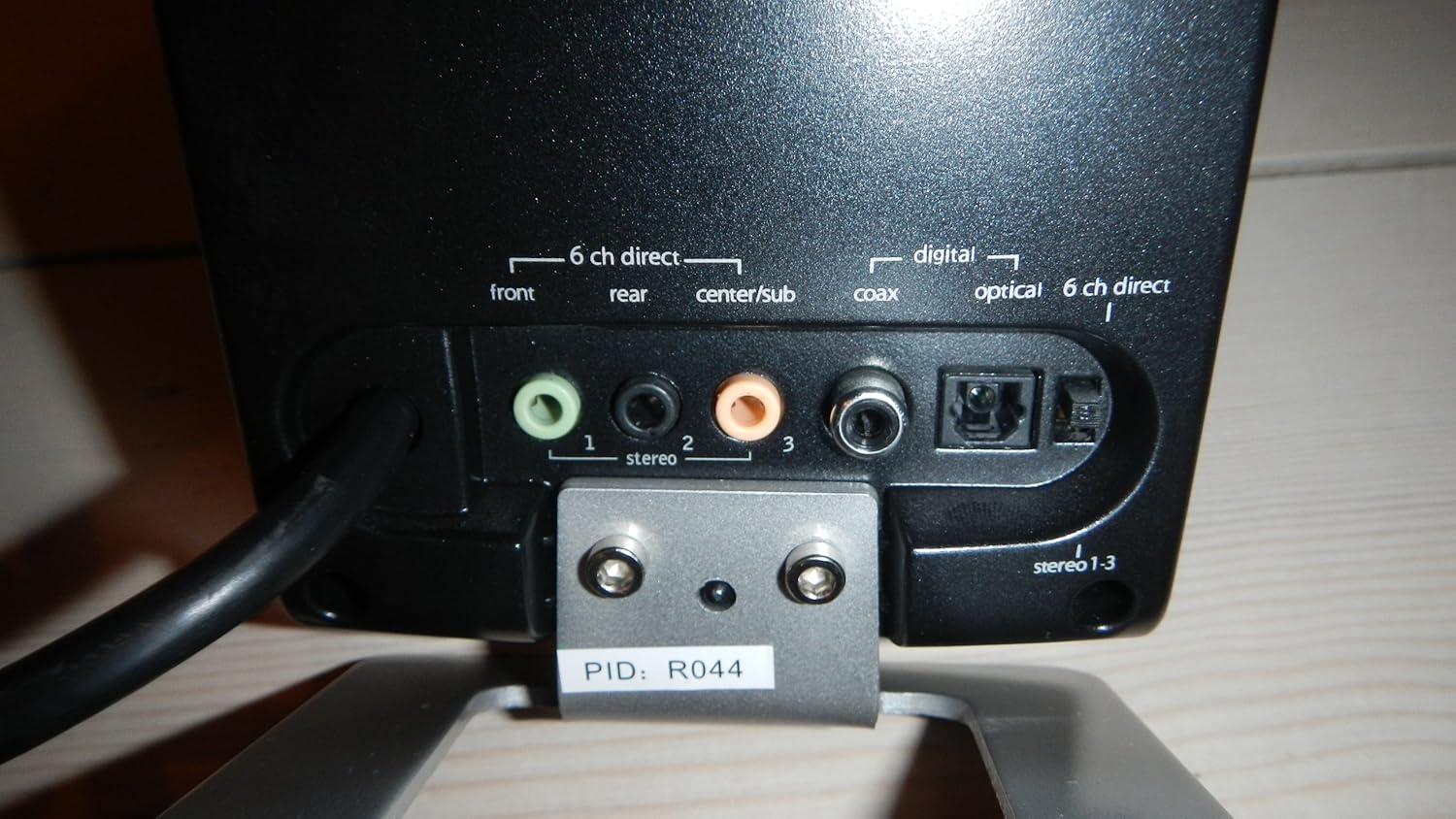
Image: The rear panel of the SoundTouch control center, displaying the various input options: 6-channel direct analog inputs (front, rear, center/sub), digital coaxial, and digital optical inputs.
5. പവർ ചെയ്യുന്നു
Once all connections are secure, plug the subwoofer's power cord into a wall outlet. Turn on the master power switch located on the rear of the subwoofer. The SoundTouch control center display should illuminate.
പ്രവർത്തിക്കുന്നു
SoundTouch Control Center

Image: The SoundTouch control center, featuring a large volume knob, input selection buttons, effect modes, level adjustments, and a digital display.
The SoundTouch control center provides comprehensive control over your Z-5500 system:
- പവർ ബട്ടൺ: Turns the system on or off (standby mode).
- ഇൻപുട്ട് ബട്ടൺ: Cycles through available audio inputs (6-Channel Direct, Digital Coaxial, Digital Optical, Stereo).
- ഇഫക്റ്റ് ബട്ടൺ: Selects various audio effects and decoding modes, including:
- സ്റ്റീരിയോ: Standard stereo playback.
- Stereo x2: Duplicates stereo audio to rear speakers for a fuller sound.
- Dolby Pro Logic II Movie/Music: Converts stereo sources into simulated 5.1 surround sound for movies or music.
- THX: Engages THX-certified sound processing for optimal cinematic audio reproduction (when a THX-certified source is detected).
- Dolby Digital/DTS: Automatically decodes Dolby Digital or DTS signals from digital inputs for true 5.1 surround sound.
- ക്രമീകരണ ബട്ടൺ: Accesses advanced settings such as display brightness and contrast.
- ലെവൽ ബട്ടൺ: Allows individual adjustment of volume levels for the subwoofer, center, and surround speakers relative to the main volume.
- നിശബ്ദ ബട്ടൺ: Temporarily mutes all audio output.
- വോളിയം നോബ്: മൊത്തത്തിലുള്ള സിസ്റ്റം വോളിയം ക്രമീകരിക്കുന്നു.
വയർലെസ് റിമോട്ട് കൺട്രോൾ
The included wireless remote control duplicates most functions of the SoundTouch control center, offering convenient operation from your listening position. It allows you to adjust volume, select inputs, change effects, and mute the system without needing to access the control center directly.
മെയിൻ്റനൻസ്
To ensure the longevity and optimal performance of your Logitech Z-5500 speaker system, follow these maintenance guidelines:
- വൃത്തിയാക്കൽ: Use a soft, dry cloth to wipe down the surfaces of the speakers, subwoofer, and control center. Avoid using liquid cleaners, aerosols, or abrasive materials, as these can damage the finish or internal components.
- വെൻ്റിലേഷൻ: Ensure that the subwoofer's cooling fins and speaker grilles are not obstructed. Adequate airflow prevents overheating and maintains performance.
- കേബിൾ മാനേജുമെന്റ്: Keep cables organized and untangled to prevent damage and ensure proper signal transmission. Avoid placing heavy objects on cables.
- പരിസ്ഥിതി വ്യവസ്ഥകൾ: Operate the system in a dry environment, away from direct sunlight, excessive heat, or extreme cold. Avoid exposing the system to moisture or humidity.
ട്രബിൾഷൂട്ടിംഗ്
If you encounter issues with your Z-5500 system, refer to the following common troubleshooting steps:
| പ്രശ്നം | സാധ്യമായ കാരണം / പരിഹാരം |
|---|---|
| No sound from any speaker. |
|
| No sound from specific speakers (e.g., rear, center). |
|
| വികലമായ അല്ലെങ്കിൽ വ്യക്തമല്ലാത്ത ശബ്ദം. |
|
| റിമോട്ട് കൺട്രോൾ പ്രവർത്തിക്കുന്നില്ല. |
|
സ്പെസിഫിക്കേഷനുകൾ
| ഫീച്ചർ | വിശദാംശങ്ങൾ |
|---|---|
| സ്പീക്കർ തരം | Center Channel, Subwoofer, Surround Sound |
| സറൗണ്ട് സൗണ്ട് ചാനൽ കോൺഫിഗറേഷൻ | 5.1 |
| ആകെ RMS പവർ | 505 വാട്ട്സ് ആർഎംഎസ് |
| സാറ്റലൈറ്റ് ആർഎംഎസ് പവർ | 317 Watts RMS (2 x 62W front, 2 x 62W rear, 69W center) |
| സബ് വൂഫർ ആർഎംഎസ് പവർ | 188 വാട്ട്സ് ആർഎംഎസ് |
| മൊത്തം പീക്ക് പവർ | 1010 വാട്ട്സ് |
| ഫ്രീക്വൻസി പ്രതികരണം | 33 Hz - 20 kHz |
| സിഗ്നൽ-ടു-നോയിസ് അനുപാതം | >93.5 dB, typical 100 |
| ഇൻപുട്ട് ഇംപെഡൻസ് | 8,000 ഓം |
| കണക്റ്റിവിറ്റി ടെക്നോളജി | Wired (3.5 mm stereo jack, Digital Coaxial, Digital Optical) |
| അനുയോജ്യമായ ഉപകരണങ്ങൾ | Gaming Console, Personal Computer, CD/MP3 Players, DVD Players |
| ഇനത്തിൻ്റെ ഭാരം | 55.1 പൗണ്ട് (25 കി.ഗ്രാം) |
| ഉൽപ്പന്ന അളവുകൾ | 277.56 x 234.25 x 372.05 inches (Subwoofer) |
| മോഡൽ നമ്പർ | 966196 |
| നിർമ്മാതാവ് | ലോജിടെക് |
വാറൻ്റി വിവരങ്ങൾ
The Logitech Z-5500 Digital THX 5.1 PC Multimedia Speaker System comes with a 12-month parts and labor limited warranty from the date of original purchase. This warranty covers defects in materials and workmanship under normal use. For specific terms and conditions, please refer to the warranty card included with your product or visit the official Logitech support webസൈറ്റ്.
പിന്തുണ
For further assistance, technical support, or to access updated drivers and software for your Logitech Z-5500 system, please visit the official Logitech support website. You may also find frequently asked questions (FAQs) and community forums that can provide additional help.
പിന്തുണയുമായി ബന്ധപ്പെടുമ്പോൾ, ദയവായി നിങ്ങളുടെ ഉൽപ്പന്ന മോഡൽ നമ്പറും (966196) വാങ്ങിയതിന്റെ തെളിവും കൈവശം വയ്ക്കുക.


