1 പ്രധാനപ്പെട്ട സുരക്ഷാ വിവരങ്ങൾ
Please read all safety instructions before using the AJA DWP Universal Power Supply. Retain this manual for future reference.
- ഇൻഡോർ ഉപയോഗത്തിന് മാത്രം: This power supply is designed for indoor use in dry locations. Do not expose to rain, moisture, or extreme temperatures.
- ശരിയായ വാല്യംtage: മതിൽ outട്ട്ലെറ്റ് വോളിയം ഉറപ്പാക്കുകtage matches the requirements of the power supply. The unit accepts input voltag240V വരെ എസി.
- വെൻ്റിലേഷൻ: Do not block any ventilation openings. Ensure adequate airflow around the power supply.
- കേബിൾ സമഗ്രത: Regularly inspect the power cord and connector for any damage. Do not use if damaged.
- സുരക്ഷിത കണക്ഷനുകൾ: Always ensure all connections are secure before applying power.
- വൃത്തിയാക്കൽ: വൃത്തിയാക്കുന്നതിന് മുമ്പ് വൈദ്യുതി ബന്ധം വിച്ഛേദിക്കുക. ഉണങ്ങിയതും മൃദുവായതുമായ തുണി ഉപയോഗിക്കുക. ലിക്വിഡ് ക്ലീനറുകൾ ഉപയോഗിക്കരുത്.
- നിർദ്ദേശം 65 മുന്നറിയിപ്പ്: This product may contain chemicals known to the State of California to cause cancer and birth defects or other reproductive harm. Handle with care and wash hands after handling.
2. ഉൽപ്പന്നം കഴിഞ്ഞുview
The AJA DWP Universal Power Supply is designed to provide reliable 12V DC power to compatible AJA video and audio equipment. It features a robust design with interchangeable plug adapters for international use.
പ്രധാന സവിശേഷതകൾ:
- Universal power supply with 12V DC output.
- Compatible with AJA converters and other devices requiring 12V DC input.
- Four interchangeable plug adapters for global compatibility.
- Molded, latching circular connector with gold pins for secure and stable connection.
- Compact and durable design suitable for studio and field use.
3. സജ്ജീകരണ നിർദ്ദേശങ്ങൾ
3.1 അൺപാക്കിംഗും പരിശോധനയും
Carefully remove the power supply and its components from the packaging. Inspect all items for any signs of damage. If any damage is found, do not use the product and contact your vendor.
3.2 ഘടകങ്ങൾ തിരിച്ചറിയൽ
പാക്കേജിൽ അടങ്ങിയിരിക്കണം:
- AJA DWP Universal Power Supply unit with attached DC cable.
- Multiple interchangeable AC plug adapters (e.g., US, EU, UK, AU types).

Image 1: AJA DWP Universal Power Supply unit shown with several interchangeable international plug adapters.
3.3 Attaching the Correct Plug Adapter
- Identify the appropriate AC plug adapter for your region.
- Align the chosen plug adapter with the receptacle on the main power supply unit.
- Gently push and twist (if applicable) the adapter until it securely locks into place. Ensure it is firmly seated and does not wobble.
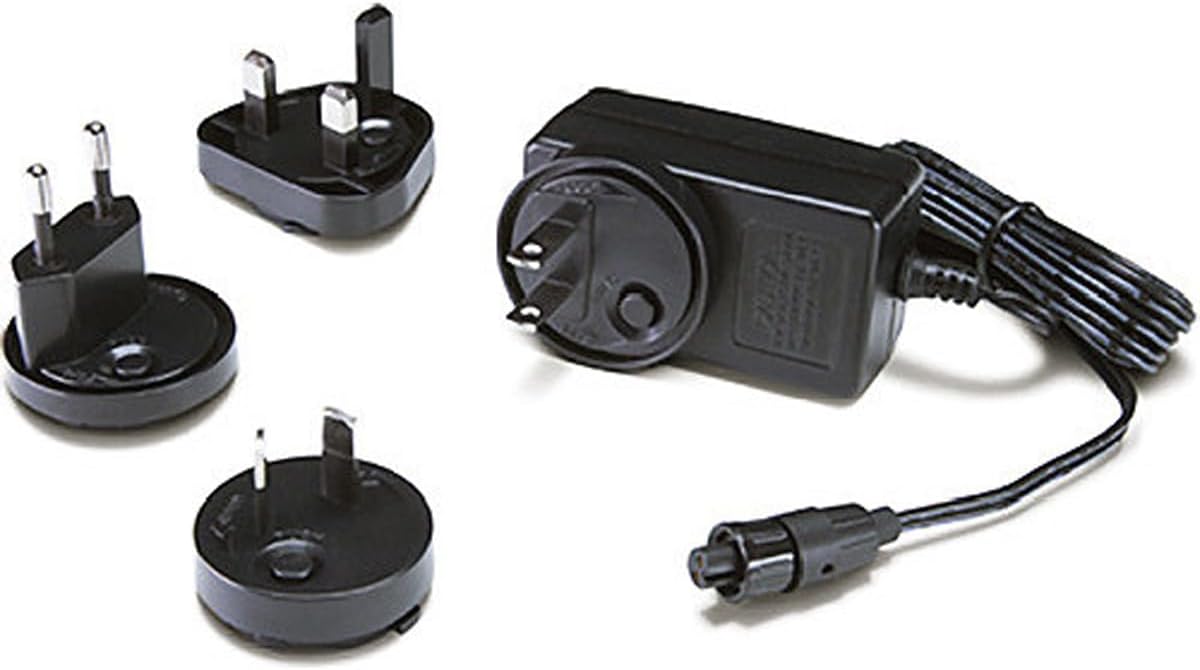
ചിത്രം 2: ക്ലോസ്-അപ്പ് view of three distinct international plug adapters (UK, EU, US/AU types) for the power supply.
3.4 നിങ്ങളുടെ ഉപകരണത്തിലേക്ക് കണക്റ്റുചെയ്യുന്നു
- Locate the 12V DC power input port on your AJA converter or compatible device.
- Connect the circular DC connector from the AJA DWP power supply into the device's power input port. Ensure the connection is firm and the latching mechanism (if present on your device) engages.
3.5 Connecting to Power Outlet
Once the plug adapter is securely attached and the power supply is connected to your device, plug the power supply into a suitable AC wall outlet.
4. പ്രവർത്തന നിർദ്ദേശങ്ങൾ
The AJA DWP Universal Power Supply operates automatically once connected. It provides a stable 12V DC output to your connected device.
- പവർ ഓൺ: After connecting to a power outlet, the power supply will immediately begin providing power to the connected device. There are no external power switches on the unit itself.
- Verify Device Operation: Confirm that your connected AJA converter or device powers on and functions as expected.
- വിച്ഛേദിക്കുന്നു: To disconnect power, first unplug the power supply from the wall outlet, then disconnect the DC connector from your device.
5. പരിപാലനം
- വൃത്തിയാക്കൽ: Keep the power supply clean and free of dust. Use a dry, soft, lint-free cloth to wipe the exterior. Do not use abrasive cleaners, solvents, or spray directly onto the unit.
- സംഭരണം: When not in use, store the power supply in a cool, dry place, away from direct sunlight and extreme temperatures. Ensure cables are not kinked or strained.
- പരിശോധന: Periodically inspect the power supply unit, cables, and connectors for any signs of wear, cuts, or damage. Replace the unit if any damage is observed.
6. പ്രശ്നപരിഹാരം
6.1 No Power to Device
- വാൾ ഔട്ട്ലെറ്റ് പരിശോധിക്കുക: Ensure the wall outlet is functional by plugging in another known working device.
- കണക്ഷനുകൾ പരിശോധിക്കുക: Confirm that the interchangeable plug adapter is securely attached to the power supply and that the DC connector is firmly plugged into your device.
- കേബിളുകൾ പരിശോധിക്കുക: Check the power cable and DC cable for any visible damage.
- ഉപകരണ അനുയോജ്യത: Ensure your device requires 12V DC input and is compatible with the AJA DWP power supply.
6.2 Intermittent Power
- സുരക്ഷിത കണക്ഷനുകൾ: Re-check all connections, ensuring they are tight and not loose. A loose connection can cause intermittent power.
- കേബിൾ കേടുപാടുകൾ: Inspect cables for any internal breaks or fraying that might not be immediately visible.
If troubleshooting steps do not resolve the issue, discontinue use and contact AJA support or your product vendor for assistance.
7 സ്പെസിഫിക്കേഷനുകൾ
| മോഡൽ നമ്പർ | DWP |
| Putട്ട്പുട്ട് വോളിയംtage | 12V DC |
| ഔട്ട്പുട്ട് Ampഉന്മേഷം | 2.6 Amps |
| ഔട്ട്പുട്ട് വാട്ട്tage | 7.5 വാട്ട്സ് |
| ഇൻപുട്ട് വോളിയംtage (പരമാവധി) | 240 വോൾട്ട് എസി |
| കണക്റ്റർ തരം | DC Barrel Jack (Latching) |
| അനുയോജ്യമായ ഉപകരണങ്ങൾ | AJA Mini-Converters, other devices requiring 12V DC |
| ഉൽപ്പന്ന അളവുകൾ | 4.1 x 3.4 x 2.5 ഇഞ്ച് |
| ഇനത്തിൻ്റെ ഭാരം | 7.2 ഔൺസ് |
| നിറം | കറുപ്പ് |
| പ്രത്യേക ഫീച്ചർ | Travel (with interchangeable adapters) |
8. വാറൻ്റിയും പിന്തുണയും
For information regarding product warranty, please refer to the official AJA Video Systems webസൈറ്റ് അല്ലെങ്കിൽ നിങ്ങളുടെ വാങ്ങലിൽ ഉൾപ്പെടുത്തിയിരിക്കുന്ന വാറന്റി ഡോക്യുമെന്റേഷൻ.
For technical support or further assistance, please visit the AJA Video Systems support page or contact their customer service directly. Contact details are typically available on the manufacturer's official webസൈറ്റ്.
നിർമ്മാതാവ്: എജെഎ വീഡിയോ സിസ്റ്റംസ്


