1. ആമുഖം
This manual provides comprehensive instructions for the setup, operation, maintenance, and troubleshooting of the Cisco CISCO1811/K9 Integrated Services Router. This fixed-configuration security router is designed with IOS Advanced IP Services Image, featuring Dual Ethernet with V.92 Modem backup, 32MB Flash, and 128MB DRAM.
പ്രധാന സവിശേഷതകളിൽ ഇവ ഉൾപ്പെടുന്നു:
- 2 10/100 FE WAN Ports
- 8-പോർട്ട് മാനേജ്ഡ് സ്വിച്ച്
- V.92 Analog Modem Dial Backup
2. ഉൽപ്പന്ന ഘടകങ്ങളും കൂടുതലുംview
The Cisco CISCO1811/K9 router comes with essential components for network integration. Familiarize yourself with the device's physical layout and included accessories.

Figure 2.1: The Cisco CISCO1811/K9 router shown with its power cable and a light blue console cable, indicating the complete package for initial setup.
ഫ്രണ്ട് പാനൽ ഓവർview
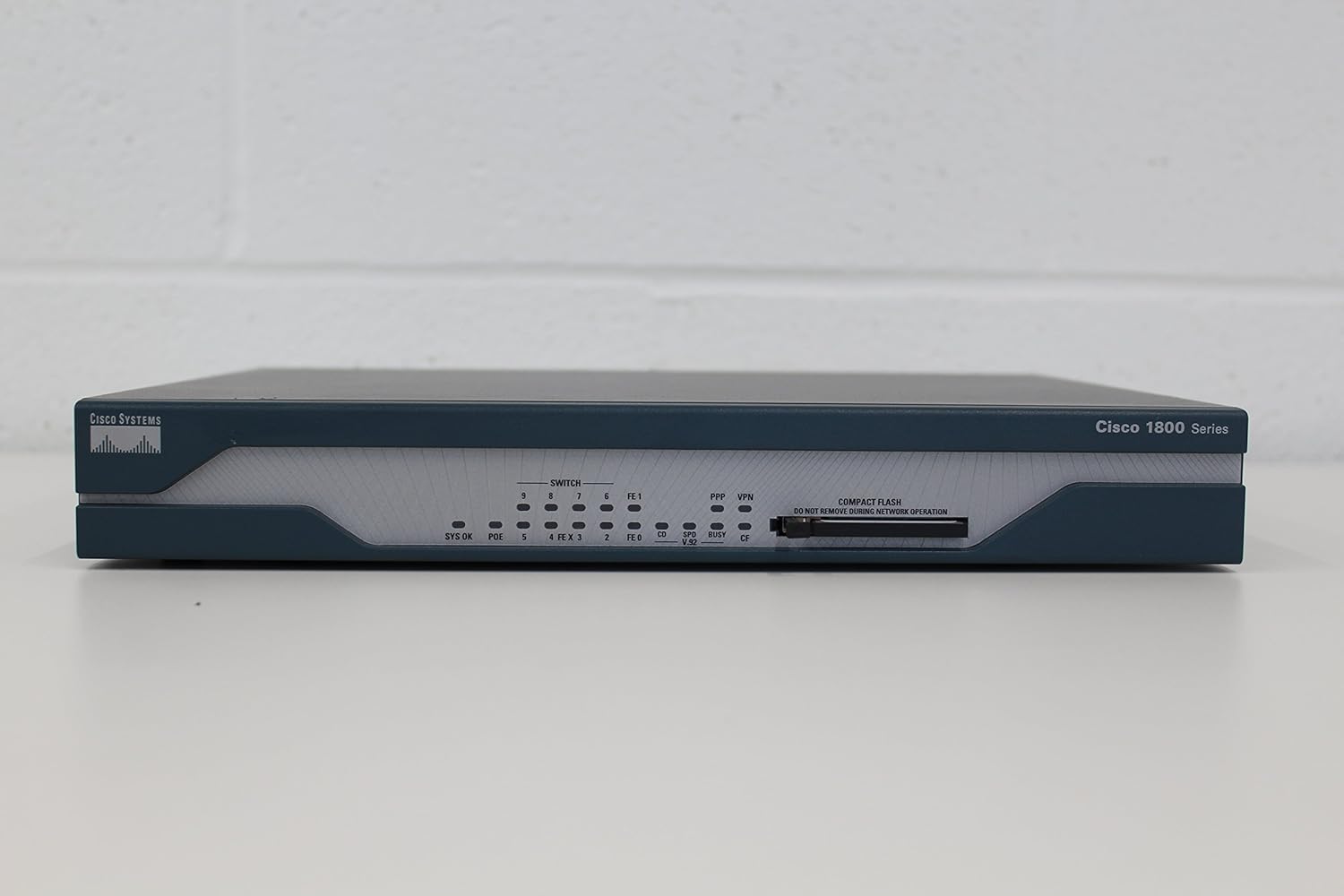
Figure 2.2: Front panel of the router, displaying various status LEDs for system, PoE, and Ethernet ports, along with the Compact Flash slot.
The front panel provides visual indicators for the router's operational status and network activity. It also houses the Compact Flash slot for memory expansion or IOS image storage.

ചിത്രം 2.3: ക്ലോസപ്പ് view of the "Cisco 1800 Series" branding on the front panel, identifying the product line.
പിൻ പാനൽ ഓവർview

Figure 2.4: Rear panel of the router, featuring the V.92 modem port, 8-port managed switch, two Fast Ethernet WAN ports, console port, auxiliary port, power switch, and AC power input.
The rear panel contains all connectivity ports, including WAN, LAN, console, and auxiliary ports, as well as the power input and switch.

ചിത്രം 2.5: വിശദമായി view of the power input section on the rear panel, showing the AC input (100-240 VAC, 50/60 Hz, 1A) and the product identification label with PID VID: CISCO1811 V08 and Serial Number: FTX14028189.
Compact Flash Module

Figure 2.6: A Cisco-branded 64MB Compact Flash card, used for storing the router's operating system (IOS) image and configuration files.
The Compact Flash module is crucial for the router's operation, storing the Cisco IOS image and configuration files. Ensure it is properly inserted before powering on the device.
3. സജ്ജീകരണവും ഇൻസ്റ്റാളേഷനും
3.1 അൺപാക്കിംഗും പരിശോധനയും
- പാക്കേജിംഗിൽ നിന്ന് റൂട്ടറും എല്ലാ അനുബന്ധ ഉപകരണങ്ങളും ശ്രദ്ധാപൂർവ്വം നീക്കം ചെയ്യുക.
- Inspect all components for any signs of physical damage. If any damage is found, contact your vendor immediately.
- പാക്കിംഗ് ലിസ്റ്റിൽ ലിസ്റ്റ് ചെയ്തിരിക്കുന്ന എല്ലാ ഇനങ്ങളും ഉണ്ടെന്ന് ഉറപ്പാക്കുക.
3.2 സൈറ്റ് തയ്യാറാക്കൽ
- Ensure the installation site is clean, dry, and well-ventilated.
- Maintain adequate clearance around the router for proper airflow.
- Provide a stable, flat surface for placement or a suitable rack for mounting.
- Ensure a reliable power source is available within reach of the power cord.
3.3 റൂട്ടർ ബന്ധിപ്പിക്കുന്നു
- പവർ കണക്ഷൻ: Connect the provided power cord to the AC power input on the rear panel of the router and then to a grounded electrical outlet.
- കൺസോൾ കണക്ഷൻ: For initial configuration, connect a console cable (typically RJ-45 to DB-9 or USB adapter) from your computer's serial port to the CONSOLE port on the router's rear panel.
- WAN കണക്ഷൻ: Connect your internet service provider's (ISP) cable or DSL modem to one of the FE WAN ports (Fast Ethernet WAN) on the rear panel.
- LAN കണക്ഷൻ: Connect your local network devices (computers, switches) to the 8-Port Managed Switch ports on the rear panel using Ethernet cables.
- Modem Dial Backup (Optional): If using the V.92 modem dial backup feature, connect a standard telephone line to the V.92 port.
3.4 പ്രാരംഭ പവർ ഓൺ
- എല്ലാ കേബിളുകളും സുരക്ഷിതമായി ബന്ധിപ്പിച്ചിട്ടുണ്ടെന്ന് ഉറപ്പാക്കുക.
- പിൻ പാനലിലെ പവർ സ്വിച്ച് 'ഓൺ' സ്ഥാനത്തേക്ക് ഫ്ലിപ്പുചെയ്യുക.
- Observe the SYS OK LED on the front panel. It should turn green after a few moments, indicating successful boot-up.
4. റൂട്ടർ പ്രവർത്തിപ്പിക്കൽ
4.1 Accessing the Command Line Interface (CLI)
The Cisco CISCO1811/K9 router is primarily configured and managed via its Command Line Interface (CLI). You will need a terminal emulation program (e.g., PuTTY, Tera Term) on your computer connected via the console port.
- Configure your terminal emulation software with the following settings:
- ബൗഡ് നിരക്ക്: 9600
- ഡാറ്റ ബിറ്റുകൾ: 8
- പാരിറ്റി: ഒന്നുമില്ല
- ബിറ്റുകൾ നിർത്തുക: 1
- ഒഴുക്ക് നിയന്ത്രണം: ഒന്നുമില്ല
- Open the serial connection to the router. You should see the router's boot sequence and then the command prompt.
4.2 അടിസ്ഥാന കോൺഫിഗറേഷൻ ഘട്ടങ്ങൾ
This section outlines fundamental configuration tasks. Refer to Cisco's official documentation for advanced configurations.
- Enable Mode: ടൈപ്പ് ചെയ്യുക
enableand press Enter. If prompted, enter the enable password. - Global Configuration Mode: ടൈപ്പ് ചെയ്യുക
configure terminalഎൻ്റർ അമർത്തുക. - ഹോസ്റ്റിന്റെ പേര്: Set a hostname for the router:
hostname MyRouter - ഇന്റർഫേസ് കോൺഫിഗറേഷൻ: Configure IP addresses for your WAN and LAN interfaces.
- Example for WAN (FastEthernet 0/0):
interface FastEthernet0/0 ip address 192.168.1.1 255.255.255.0 no shutdown - Example for LAN (VLAN 1 for switch ports):
interface Vlan1
 ip address 10.0.0.1 255.255.255.0
 no shutdown
- Example for WAN (FastEthernet 0/0):
- കോൺഫിഗറേഷൻ സംരക്ഷിക്കുക: After making changes, save them to NVRAM:
end
 copy running-config startup-config
5. പരിപാലനം
5.1 പതിവ് പരിശോധനകൾ
- LED നില: Periodically check the front panel LEDs (SYS OK, Link/Activity LEDs) to ensure normal operation.
- ശാരീരിക പരിശോധന: Ensure all cables are securely connected and free from damage. Keep the router in a clean, dust-free environment.
- വെൻ്റിലേഷൻ: Ensure the ventilation openings are not obstructed to prevent overheating.
5.2 സോഫ്റ്റ്വെയർ അപ്ഡേറ്റുകൾ
സിസ്കോ പിന്തുണ പതിവായി പരിശോധിക്കുക website for the latest IOS software updates and security patches. Updating the IOS can improve performance, add new features, and address security vulnerabilities.
- Download the appropriate IOS image from Cisco's official webസൈറ്റ്.
- Follow Cisco's recommended procedure for IOS upgrade, typically involving TFTP transfer to the router's flash memory.
5.3 കോൺഫിഗറേഷൻ ബാക്കപ്പ്
It is highly recommended to regularly back up your router's configuration to an external server (e.g., TFTP server) or a local file. This allows for quick restoration in case of configuration loss or device replacement.
copy running-config tftp://[TFTP_SERVER_IP]/[FILENAME]6. പ്രശ്നപരിഹാരം
This section provides solutions to common issues you might encounter with your Cisco CISCO1811/K9 router.
6.1 വൈദ്യുതി പ്രശ്നങ്ങൾ
- No Power / No LEDs:
- Check if the power cord is securely connected to both the router and the power outlet.
- മറ്റൊരു ഉപകരണം പ്ലഗ് ഇൻ ചെയ്ത് പവർ ഔട്ട്ലെറ്റ് പ്രവർത്തനക്ഷമമാണെന്ന് ഉറപ്പാക്കുക.
- പിൻ പാനലിലെ പവർ സ്വിച്ച് 'ഓൺ' സ്ഥാനത്താണെന്ന് ഉറപ്പാക്കുക.
6.2 കണക്റ്റിവിറ്റി പ്രശ്നങ്ങൾ
- നെറ്റ്വർക്ക് കണക്റ്റിവിറ്റി ഇല്ല:
- Check the Link/Activity LEDs on the connected ports. If off, check the Ethernet cable and the connected device.
- Verify IP address configurations on both the router interfaces and connected devices.
- Use CLI commands like
show ip interface briefto check interface status. - Ping connected devices or external IP addresses to test connectivity.
- Cannot Access CLI via Console:
- Ensure the console cable is correctly connected to the CONSOLE port.
- Verify the terminal emulation software settings (baud rate, data bits, parity, stop bits, flow control) match the router's console settings (9600, 8, N, 1, N).
- Try restarting the terminal emulation software.
6.3 സിസ്റ്റം പ്രകടനം
- മന്ദഗതിയിലുള്ള പ്രകടനം:
- Check CPU utilization using
show processes cpu. High CPU could indicate heavy traffic or a process issue. - Inspect memory usage with
show memory. - Ensure the router is running the latest stable IOS version.
- Check CPU utilization using
7 സാങ്കേതിക സവിശേഷതകൾ
| ഫീച്ചർ | സ്പെസിഫിക്കേഷൻ |
|---|---|
| ഉൽപ്പന്ന മോഡൽ | CISCO1811/K9 |
| ബ്രാൻഡ് | സിസ്കോ |
| ഉൽപ്പന്ന അളവുകൾ | 9.69 x 12.72 x 1.73 ഇഞ്ച് |
| ഇനത്തിൻ്റെ ഭാരം | 6.17 പൗണ്ട് (2800 ഗ്രാം) |
| നിർമ്മാതാവ് | Cisco Systems (Ciscopro) |
| കണക്റ്റിവിറ്റി ടെക്നോളജി | ഇഥർനെറ്റ് |
| WAN തുറമുഖങ്ങൾ | 2 x 10/100 ഫാസ്റ്റ് ഇതർനെറ്റ് |
| ലാൻ പോർട്ടുകൾ | 8-പോർട്ട് മാനേജ്ഡ് സ്വിച്ച് |
| മോഡം | V.92 Analog Modem Dial Backup |
| ഫ്ലാഷ് മെമ്മറി | 32MB (expandable via Compact Flash) |
| DRAM | 128എംബി |
| ശുപാർശ ചെയ്യുന്ന ഉപയോഗം | സുരക്ഷ |
| ആദ്യ തീയതി ലഭ്യമാണ് | ജൂൺ 10, 2005 |
| പ്രത്യേക ഫീച്ചർ | WPS (Wireless Protected Setup) - Note: This router is primarily wired, WPS feature might refer to a specific software capability or an optional module not detailed here. |
| വയർലെസ് കമ്മ്യൂണിക്കേഷൻ സ്റ്റാൻഡേർഡ് | 802.11ac - Note: This router is primarily wired. This specification might refer to an optional wireless module or a general capability of the product line. |
8. വാറൻ്റി വിവരങ്ങൾ
Cisco products typically come with a limited hardware warranty. For specific warranty terms and conditions applicable to your CISCO1811/K9 router, please refer to the official Cisco warranty documentation provided at the time of purchase or visit the Cisco webസൈറ്റ്.
Warranty coverage generally includes defects in materials and workmanship under normal use. It does not cover damage caused by misuse, accident, modification, or unauthorized repair.
For warranty claims, you may be required to provide proof of purchase and the product's serial number (e.g., FTX14028189).
9. പിന്തുണയും ബന്ധപ്പെടാനുള്ള വിവരങ്ങളും
For technical support, additional documentation, software downloads, and community forums, please visit the official Cisco Support webസൈറ്റ്.
- സിസ്കോ പിന്തുണ Webസൈറ്റ്: www.cisco.com/c/en/us/support/index.html
- ഉൽപ്പന്ന ഡോക്യുമെന്റേഷൻ: ഇതിനായി തിരയുക "Cisco 1811 Integrated Services Router" on the support site for detailed configuration guides and command references.
- പിന്തുണയുമായി ബന്ധപ്പെടുക: Information on contacting Cisco technical assistance can be found on their support portal.
When contacting support, please have your product model (CISCO1811/K9) and serial number ready for faster assistance.