1. ഉൽപ്പന്നം കഴിഞ്ഞുview
The D-Link DGS-105 is a 5-port Gigabit Ethernet unmanaged switch designed to provide high-speed wired network connectivity. Its compact metal housing ensures durability and quiet operation, making it suitable for various environments including homes, small offices, and creative workspaces. This switch offers plug-and-play functionality, requiring no complex configuration for immediate use.
പ്രധാന സവിശേഷതകളിൽ ഇവ ഉൾപ്പെടുന്നു:
- 5 Auto-Negotiating Gigabit Ports: Supports full/half duplex operation with up to 2Gbps per port, connecting PCs, consoles, NAS, printers, and other network devices.
- Plug & Play Expansion: Automatic MDI/MDIX eliminates the need for crossover cables, supporting Cat5e, Cat6, and Cat6A UTP cables up to 100m.
- Silent Fanless Metal Housing: The all-steel chassis naturally dissipates heat, ensuring quiet operation.
- Desktop or Wall Mount Flexibility: Includes rubber feet and keyhole slots for versatile placement.
- Smart QoS Prioritization: 802.1p traffic classes ensure smooth delivery of voice, video, and gaming data.
- IGMP സ്നൂപ്പിംഗ്: Efficiently streams 4K/8K video and multicast traffic without network flooding.
- എനർജി എഫിഷ്യന്റ് ഇഥർനെറ്റ് (IEEE 802.3az): Reduces power consumption by up to 80% by managing idle ports and cable length.
- Built-in Surge & ESD Protection: Provides ±4 kV safeguards against power spikes.
- Jumbo Frame Support (9KB): Enhances throughput for large data transfers.

ഫ്രണ്ട് view of the D-Link DGS-105 5-Port Gigabit Unmanaged Switch, showing the five RJ45 Ethernet ports and individual Link/Act LEDs.
2. പാക്കേജ് ഉള്ളടക്കം
നിങ്ങളുടെ പാക്കേജിൽ ഇനിപ്പറയുന്ന ഇനങ്ങൾ അടങ്ങിയിട്ടുണ്ടെന്ന് പരിശോധിക്കുക:
- D-Link DGS-105 5-Port Gigabit Unmanaged Metal Desktop Switch
- എസി/ഡിസി പവർ അഡാപ്റ്റർ
- Mounting kit (2 anchors, 2 screws, 4 rubber feet)
- ദ്രുത ഇൻസ്റ്റാളേഷൻ ഗൈഡ് (QIG)
If any items are missing or damaged, please contact your local D-Link reseller.
3. ശാരീരിക വിവരണം
The DGS-105 switch features a compact metal chassis with five Gigabit Ethernet ports on the front panel. Each port has an associated LED indicator for link status and activity. The rear panel includes the power input and a security slot.

കോണാകൃതിയിലുള്ളത് view of the D-Link DGS-105 switch, highlighting its compact metal design.

Close-up of the rear panel, showing the power input (5V=1A) and the Kensington lock slot for security.
4. സജ്ജീകരണം
4.1. പ്ലേസ്മെന്റ്
The DGS-105 switch can be placed on a desktop or mounted on a wall. Ensure the location allows for proper ventilation and easy access to ports and the power outlet. Use the included rubber feet for desktop placement or the mounting kit for wall installation.
4.2. പവർ അഡാപ്റ്റർ ബന്ധിപ്പിക്കുന്നു
- Connect the DC output plug of the included AC/DC power adapter to the power input port on the rear panel of the DGS-105 switch.
- Plug the AC input side of the power adapter into a standard wall outlet or power strip.
- Verify that the power LED on the switch illuminates, indicating that the device is receiving power.
4.3. Connecting Network Devices
The DGS-105 is a plug-and-play device, meaning no software configuration is required. Simply connect your network devices using standard Ethernet cables.
- Connect an Ethernet cable from your router or modem to any of the five Gigabit Ethernet ports on the DGS-105 switch.
- Connect Ethernet cables from your computers, gaming consoles, network-attached storage (NAS) devices, or other network devices to the remaining ports on the DGS-105 switch.
- The Link/Act LED for each connected port will illuminate, indicating an active connection. A blinking LED signifies data activity.
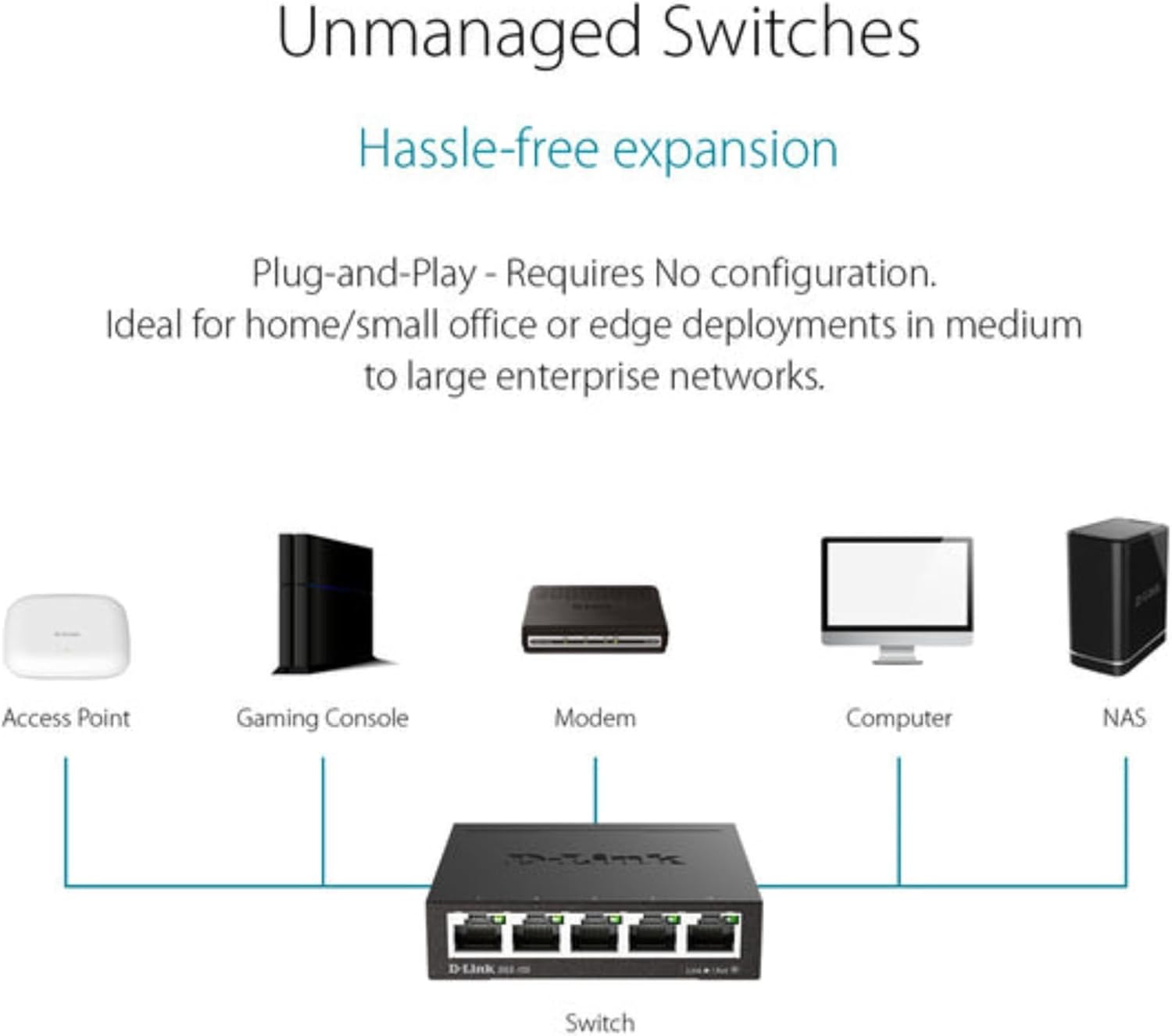
Typical network setup diagram showing the DGS-105 switch connecting multiple devices to a router.
5. പ്രവർത്തിക്കുന്നു
5.1. എൽഇഡി സൂചകങ്ങൾ
The DGS-105 switch features LED indicators to provide status information:
- പവർ എൽഇഡി: Illuminates when the switch is powered on.
- ലിങ്ക്/ആക്റ്റ് LED-കൾ (ഓരോ പോർട്ടിലും):
- Solid Green: Indicates a stable Gigabit (1000 Mbps) connection.
- Solid Amber: Indicates a stable Fast Ethernet (100 Mbps) connection.
- Blinking: Indicates data activity on the port.
- Off: No device is connected, or the connected device is powered off.
5.2. ഡാറ്റ കൈമാറ്റം
The DGS-105 supports Gigabit Ethernet speeds, allowing for fast data transfer rates of up to 2000 Mbps (full-duplex) per port. Quality of Service (QoS) prioritizes time-sensitive data, ensuring smooth performance for applications like video streaming, VoIP, and online gaming. Jumbo Frame support (9KB) further optimizes throughput for large file കൈമാറ്റങ്ങളും ബാക്കപ്പുകളും.
5.3. Green Ethernet Features
The switch incorporates Energy Efficient Ethernet (IEEE 802.3az) technology, which automatically detects cable length and link status to adjust power usage. This feature can significantly reduce power consumption by up to 80% when ports are idle or connected to shorter cables, contributing to energy savings without compromising performance.

Illustration of D-Link Green technology's energy saving capabilities.
6. പരിപാലനം
To ensure optimal performance and longevity of your DGS-105 switch, follow these maintenance guidelines:
- വൃത്തിയാക്കൽ: Use a soft, dry cloth to clean the exterior of the switch. Avoid using liquid or aerosol cleaners directly on the device.
- വെൻ്റിലേഷൻ: Ensure that the switch's ventilation openings are not blocked. Maintain adequate space around the device for proper airflow.
- പരിസ്ഥിതി: Operate the switch within its specified temperature and humidity ranges (refer to specifications). Avoid exposing the device to direct sunlight, excessive heat, or moisture.
- കേബിൾ മാനേജുമെന്റ്: പോർട്ടുകളിലെ ആയാസം തടയുന്നതിനും വൃത്തിയുള്ള സജ്ജീകരണം നിലനിർത്തുന്നതിനും നെറ്റ്വർക്ക് കേബിളുകൾ ക്രമീകരിക്കുക.
7. പ്രശ്നപരിഹാരം
If you encounter issues with your DGS-105 switch, refer to the following common troubleshooting steps:
പവർ ഇല്ല
- പവർ അഡാപ്റ്റർ സ്വിച്ചിലേക്കും പ്രവർത്തിക്കുന്ന ഒരു പവർ ഔട്ട്ലെറ്റിലേക്കും സുരക്ഷിതമായി ബന്ധിപ്പിച്ചിട്ടുണ്ടെന്ന് ഉറപ്പാക്കുക.
- മറ്റൊരു ഉപകരണം പ്ലഗ് ഇൻ ചെയ്ത് പവർ ഔട്ട്ലെറ്റ് പ്രവർത്തിക്കുന്നുണ്ടെന്ന് ഉറപ്പാക്കുക.
- Check the power LED on the switch. If it is off, try a different power adapter (if available and compatible).
No Link/Activity on a Port
- Confirm that the Ethernet cable is securely plugged into both the switch port and the connected device.
- ബന്ധിപ്പിച്ചിരിക്കുന്ന ഉപകരണം ഓണാക്കിയിട്ടുണ്ടെന്നും അതിന്റെ നെറ്റ്വർക്ക് അഡാപ്റ്റർ പ്രവർത്തനക്ഷമമാക്കിയിട്ടുണ്ടെന്നും ഉറപ്പാക്കുക.
- മറ്റൊരു ഇഥർനെറ്റ് കേബിൾ ഉപയോഗിക്കാൻ ശ്രമിക്കുക.
- സ്വിച്ചിലെ മറ്റൊരു പോർട്ടിലേക്ക് ഉപകരണം ബന്ധിപ്പിക്കുക.
- Check the status of the connected device's network adapter.
കുറഞ്ഞ നെറ്റ്വർക്ക് വേഗത
- ഒപ്റ്റിമൽ പ്രകടനത്തിനായി കണക്റ്റുചെയ്തിരിക്കുന്ന എല്ലാ ഉപകരണങ്ങളും കേബിളുകളും ഗിഗാബിറ്റ് ഇതർനെറ്റിനെ പിന്തുണയ്ക്കുന്നുണ്ടെന്ന് ഉറപ്പാക്കുക.
- Check for excessive network traffic or bandwidth-intensive applications running on connected devices.
- Verify that the Ethernet cables are not damaged and are of appropriate quality (e.g., Cat5e or Cat6).
- സ്വിച്ചും ബന്ധിപ്പിച്ച ഉപകരണങ്ങളും പുനരാരംഭിക്കുക.
8 സ്പെസിഫിക്കേഷനുകൾ
| ഫീച്ചർ | സ്പെസിഫിക്കേഷൻ |
|---|---|
| ഉൽപ്പന്ന അളവുകൾ (L x W x H) | 3.95" x 3.85" x 1.1" |
| ഇനത്തിൻ്റെ ഭാരം | 9.6 ഔൺസ് |
| വാല്യംtage | 5 വോൾട്ട് (DC) |
| നിലവിലെ റേറ്റിംഗ് | 1 Amps |
| കേസ് മെറ്റീരിയൽ | ലോഹം |
| ഇൻ്റർഫേസ് തരം | RJ45 |
| ഡാറ്റ കൈമാറ്റ നിരക്ക് | 2000 Megabits Per Second (Full Duplex) |
| തുറമുഖങ്ങളുടെ എണ്ണം | 5 |
| മോഡൽ നമ്പർ | 124889 |
| ASIN | B000BC7QMM |
| നിറം | കറുപ്പ് |
| അനുയോജ്യമായ ഉപകരണങ്ങൾ | ഡെസ്ക്ടോപ്പ് |
| ആദ്യം ലഭ്യമായ തീയതി | സെപ്റ്റംബർ 9, 2005 |
9. വാറൻ്റിയും പിന്തുണയും
The D-Link DGS-105 switch comes with Limited Lifetime Protection, ensuring long-term reliability. D-Link also provides US-based technical support to assist with any product-related inquiries or issues.
For detailed warranty information, technical support resources, and contact options, please refer to the official D-Link webസൈറ്റ് അല്ലെങ്കിൽ നിങ്ങളുടെ ഉൽപ്പന്നത്തിൽ ഉൾപ്പെടുത്തിയിരിക്കുന്ന ഡോക്യുമെന്റേഷൻ.
You can typically find support information at us.dlink.com/support.


