ആമുഖം
വാങ്ങിയതിന് നന്ദി.asing the Lexon Cubissimo Alarm Clock. This manual provides detailed instructions to help you set up, operate, and maintain your new alarm clock. Please read this manual thoroughly before use and keep it for future reference.
സുരക്ഷാ വിവരങ്ങൾ
- ഉപകരണത്തെ തീവ്രമായ താപനിലയിലോ, നേരിട്ടുള്ള സൂര്യപ്രകാശത്തിലോ, ഉയർന്ന ആർദ്രതയിലോ തുറന്നുകാട്ടരുത്.
- ശക്തമായ ആഘാതങ്ങൾക്ക് ഉപകരണം ഇടുകയോ ഇടുകയോ ചെയ്യുന്നത് ഒഴിവാക്കുക.
- കുട്ടികൾക്ക് ലഭ്യമാകാതെ സൂക്ഷിക്കുക.
- ഉപകരണം സ്വയം വേർപെടുത്താനോ നന്നാക്കാനോ ശ്രമിക്കരുത്. യോഗ്യതയുള്ള സേവന ഉദ്യോഗസ്ഥരെ ബന്ധപ്പെടുക.
- Dispose of used batteries according to local regulations. Do not mix old and new batteries or different types of batteries.
പാക്കേജ് ഉള്ളടക്കം
പാക്കേജിൽ ഇനിപ്പറയുന്ന ഇനങ്ങൾ ഉണ്ടോ എന്ന് പരിശോധിക്കുക:
- Lexon Cubissimo Alarm Clock (1 unit)
- നിർദ്ദേശ മാനുവൽ (ഈ പ്രമാണം)
Note: AAA batteries are required but not included in the package.
ഉൽപ്പന്നം കഴിഞ്ഞുview
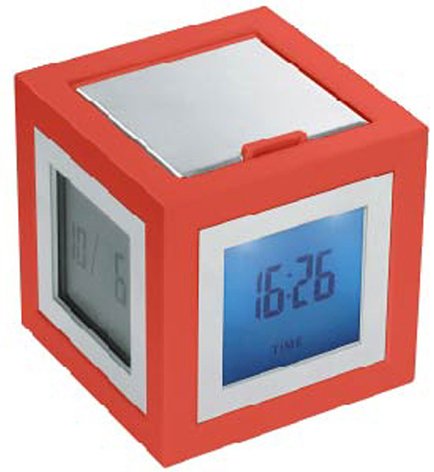
ചിത്രം 1: മുൻഭാഗം view of the Lexon Cubissimo Alarm Clock.
The Lexon Cubissimo Alarm Clock is a compact, cube-shaped device designed for timekeeping and alarm functions. It features a digital display and intuitive controls for setting time and alarm. Its minimalist design makes it suitable for various environments.
പ്രധാന ഘടകങ്ങളിൽ സാധാരണയായി ഇവ ഉൾപ്പെടുന്നു:
- Digital Display: Shows time and alarm status.
- Control Buttons: For setting time, alarm, and other functions.
- Battery Compartment: Located on the back or bottom.
സജ്ജമാക്കുക
1. ബാറ്ററി ഇൻസ്റ്റാളേഷൻ
- Locate the battery compartment cover on the back or bottom of the alarm clock.
- കവർ സ്ലൈഡുചെയ്തോ സൌമ്യമായി പുറത്തെടുത്തോ തുറക്കുക.
- കമ്പാർട്ടുമെന്റിനുള്ളിൽ സൂചിപ്പിച്ചിരിക്കുന്നതുപോലെ ശരിയായ പോളാരിറ്റി (+ ഉം - ഉം) ഉറപ്പാക്കിക്കൊണ്ട് രണ്ട് (2) AAA ബാറ്ററികൾ ഇടുക.
- ബാറ്ററി കമ്പാർട്ട്മെന്റ് കവർ സുരക്ഷിതമായി മാറ്റിസ്ഥാപിക്കുക.
2. പ്രാരംഭ പവർ-ഓൺ
Once batteries are installed, the clock should automatically power on and display the time (possibly 12:00 AM or a default time). If not, check battery installation or press any button to activate the display.
പ്രവർത്തന നിർദ്ദേശങ്ങൾ
1. സമയം ക്രമീകരിക്കുന്നു
- അമർത്തിപ്പിടിക്കുക ടൈം സെറ്റ് button (or similar, refer to device markings) until the hour digits begin to flash.
- ഉപയോഗിക്കുക മണിക്കൂർ ഒപ്പം മിനിറ്റ് ബട്ടണുകൾ (അല്ലെങ്കിൽ +/- buttons) to adjust the hour and minute respectively.
- അമർത്തുക ടൈം സെറ്റ് വീണ്ടും സ്ഥിരീകരിച്ച് സമയ ക്രമീകരണ മോഡിൽ നിന്ന് പുറത്തുകടക്കുക.
2. അലാറം സജ്ജമാക്കുന്നു
- അമർത്തിപ്പിടിക്കുക അലാറം സെറ്റ് button (or similar) until the alarm hour digits begin to flash.
- ഉപയോഗിക്കുക മണിക്കൂർ ഒപ്പം മിനിറ്റ് ബട്ടണുകൾ (അല്ലെങ്കിൽ +/- buttons) to adjust the desired alarm hour and minute.
- അമർത്തുക അലാറം സെറ്റ് അലാറം ക്രമീകരണ മോഡ് സ്ഥിരീകരിച്ച് പുറത്തുകടക്കാൻ വീണ്ടും.
3. Turning the Alarm On/Off
അമർത്തുക അലാറം ഓൺ / ഓഫ് ചെയ്യുക button (or similar) to toggle the alarm function. An alarm icon (e.g., a bell) will typically appear on the display when the alarm is active.
4. സ്നൂസ് ഫംഗ്ഷൻ
അലാറം മുഴങ്ങുമ്പോൾ, അമർത്തുക സ്നൂസ് ചെയ്യുക button (often a large button on top) to temporarily silence the alarm. The alarm will sound again after a few minutes (typically 5-10 minutes).
5. Stopping the Alarm
To stop the alarm completely, press any button other than the സ്നൂസ് ചെയ്യുക ബട്ടൺ, അല്ലെങ്കിൽ അമർത്തുക അലാറം ഓൺ / ഓഫ് ചെയ്യുക അത് നിർജ്ജീവമാക്കാനുള്ള ബട്ടൺ.
മെയിൻ്റനൻസ്
വൃത്തിയാക്കൽ
മൃദുവായതും ഉണങ്ങിയതുമായ തുണി ഉപയോഗിച്ച് ക്ലോക്ക് തുടയ്ക്കുക. അബ്രാസീവ് ക്ലീനറുകളോ ലായകങ്ങളോ ഉപയോഗിക്കരുത്, കാരണം അവ ഫിനിഷിന് കേടുവരുത്തും.
ബാറ്ററി മാറ്റിസ്ഥാപിക്കൽ
When the display dims or the clock functions erratically, it's time to replace the batteries. Follow the "Battery Installation" steps in the Setup section to replace the two AAA batteries.
ട്രബിൾഷൂട്ടിംഗ്
| പ്രശ്നം | സാധ്യമായ കാരണം | പരിഹാരം |
|---|---|---|
| ക്ലോക്ക് ഓണാക്കുന്നില്ല. | Batteries are not installed or are depleted. Incorrect battery polarity. | Ensure batteries are correctly installed with proper polarity. Replace with new AAA batteries. |
| അലാറം മുഴങ്ങുന്നില്ല. | Alarm function is not activated. Alarm volume is too low (if adjustable). | Ensure the alarm is turned ON (check for alarm icon on display). (Note: This model may not have adjustable volume). |
| ഡിസ്പ്ലേ മങ്ങിയതോ മിന്നിമറയുന്നതോ ആണ്. | കുറഞ്ഞ ബാറ്ററി പവർ. | ബാറ്ററികൾ പുതിയ AAA ബാറ്ററികൾ ഉപയോഗിച്ച് മാറ്റിസ്ഥാപിക്കുക. |
സ്പെസിഫിക്കേഷനുകൾ
- ബ്രാൻഡ്: ലെക്സൺ
- മോഡൽ നമ്പർ: lr79-DR 2910146
- മെറ്റീരിയൽ: അക്രിലോണിട്രൈൽ ബ്യൂട്ടാഡീൻ സ്റ്റൈറൈൻ (ABS), അലുമിനിയം
- ഭാരം: 6.4 ഔൺസ് (ഏകദേശം 157 ഗ്രാം)
- അളവുകൾ: 2.52 x 2.44 x 2.44 ഇഞ്ച് (6.4 x 6.2 x 6.2 സെ.മീ)
- ഊർജ്ജ സ്രോതസ്സ്: 2 x AAA ബാറ്ററികൾ (ഉൾപ്പെടുത്തിയിട്ടില്ല)
- മൗണ്ടിംഗ് തരം: ടേബിൾടോപ്പ്
- അലാറം പ്രവർത്തനം: അതെ
- പ്രവർത്തന രീതി: ഇലക്ട്രിക്കൽ
വാറൻ്റിയും പിന്തുണയും
Lexon products are designed for quality and reliability. For specific warranty information, please refer to the warranty card included with your purchase or visit the official Lexon website. If you encounter any issues or require technical assistance, please contact Lexon customer support through their official channels.
നിർമ്മാതാവിന്റെ വിലാസത്തിൽ നിങ്ങൾക്ക് പലപ്പോഴും പിന്തുണാ കോൺടാക്റ്റ് വിവരങ്ങൾ കണ്ടെത്താൻ കഴിയും. website or by searching for "Lexon customer support".


