1. ആമുഖം
The Logitech MX Revolution Cordless Laser Mouse is an advanced peripheral designed to enhance your computing experience with powerful controls and ergonomic comfort. It features innovative technologies for efficient navigation and precise control across various surfaces.
This manual provides detailed instructions for setting up, operating, and maintaining your MX Revolution mouse, ensuring optimal performance and longevity.
2. പാക്കേജ് ഉള്ളടക്കം
നിങ്ങളുടെ ഉൽപ്പന്ന പാക്കേജിൽ എല്ലാ ഇനങ്ങളും ഉണ്ടെന്ന് ഉറപ്പാക്കുക:
- Logitech MX Revolution Cordless Laser Mouse
- റീചാർജിംഗ് സ്റ്റേഷൻ
- എസി പവർ കോർഡ്
- USB മൈക്രോ റിസീവർ
- Logitech SetPoint software CD
- User's guide (this document)
- HQRP Coaster (additional item)
3. സജ്ജീകരണ ഗൈഡ്
3.1 പ്രാരംഭ ചാർജിംഗ്
Before first use, it is recommended to fully charge your mouse. Connect the AC power cord to the recharging station and plug it into a power outlet. Place the Logitech MX Revolution mouse onto the recharging station. The four-stage battery level meter on the mouse will indicate charging status.
The built-in rechargeable Li-ion battery provides extended use, typically several weeks, before requiring a recharge.
3.2 Connecting the USB Micro-Receiver
Insert the USB micro-receiver into an available USB port on your computer. The mouse utilizes full-speed USB wireless technology for a reliable connection.

വിവരണം: This image shows the Logitech MX Revolution Cordless Laser Mouse from a top-down perspective, highlighting its ergonomic shape and the main scroll wheel. The Logitech logo is visible on the palm rest.
3.3 സോഫ്റ്റ്വെയർ ഇൻസ്റ്റലേഷൻ
For full functionality and customization, install the Logitech SetPoint software from the included CD. This software allows you to configure mouse buttons, adjust sensitivity, and manage other advanced features.
- Insert the Logitech SetPoint software CD into your computer's CD-ROM drive.
- ഇൻസ്റ്റാളേഷൻ പൂർത്തിയാക്കാൻ ഓൺ-സ്ക്രീൻ നിർദ്ദേശങ്ങൾ പാലിക്കുക.
- ആവശ്യപ്പെടുകയാണെങ്കിൽ നിങ്ങളുടെ കമ്പ്യൂട്ടർ പുനരാരംഭിക്കുക.
4. പ്രവർത്തന നിർദ്ദേശങ്ങൾ
4.1 MicroGear Precision Scroll Wheel
The MX Revolution features an innovative MicroGear Precision Scroll Wheel that operates in two distinct modes:
- Free-spin mode: For hyper-fast, nearly frictionless scrolling. A single flick can scroll hundreds of pages or thousands of rows, ideal for long documents.
- Click-to-click mode: For detailed navigation. An ultra-precise ratchet-scrolling mechanism allows for line-by-line movement, useful for spreadsheets or slideshows.
SmartShift technology automatically detects your current application and applies the most suitable scrolling mode. You can also manually switch between modes using the scroll wheel button.
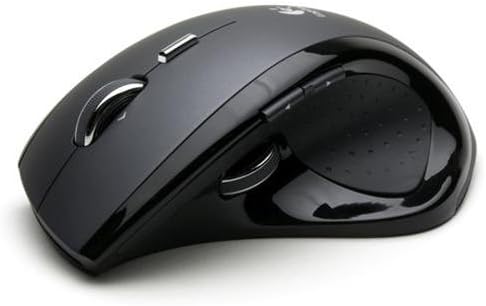
വിവരണം: This image displays the Logitech MX Revolution mouse from a side angle, emphasizing its contoured shape designed for right-handed users. The thumb rest and side buttons are visible.
4.2 Side-to-Side Scrolling
The scroll wheel also supports side-to-side scrolling, allowing you to navigate horizontally within documents, images, or spreadsheets that extend beyond the screen's width. This eliminates the need to move the mouse to the scrollbar.
4.3 Quick-Flip Thumb Wheel
Located on the side of the mouse, the convenient Quick-Flip thumb wheel allows you to effortlessly toggle between open documents and applications. This feature streamlines multitasking, enabling quick switching for cutting, pasting, comparing documents, or checking emails.
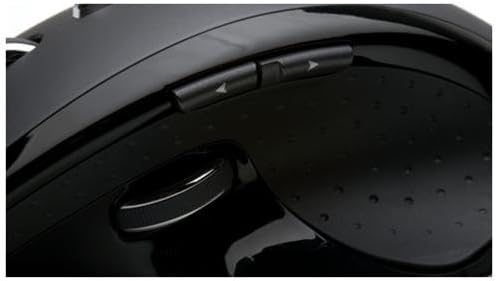
വിവരണം: This close-up image focuses on the left side of the Logitech MX Revolution mouse, clearly showing the two thin, customizable web buttons and the Quick-Flip thumb wheel, designed for easy access with the thumb.
4.4 ഇഷ്ടാനുസൃതമാക്കാവുന്ന ബട്ടണുകൾ
The MX Revolution includes customizable buttons that can be programmed using the SetPoint software to perform various functions, such as forward and back controls for web pages, or other shortcuts to enhance your workflow.
4.5 Integrated Search Button
Highlight a word or phrase and press the dedicated Search button to instantly display results from your preferred search engine. This feature provides quick access to information without interrupting your workflow.
4.6 Laser Tracking Technology
The mouse utilizes state-of-the-art laser engine technology, delivering absolute precision and control. This advanced tracking ensures smooth and accurate cursor movement on nearly all surfaces, unlike traditional optical sensors that may struggle on certain textures.
5. പരിപാലനം
5.1 Battery Recharging
The Logitech MX Revolution mouse features a rechargeable Li-ion battery. When the battery level is low, indicated by the battery level meter, simply place the mouse on its recharging station. Charging is quick and convenient, ensuring your mouse is always ready for use.
5.2 വൃത്തിയാക്കൽ
To maintain optimal performance, periodically clean your mouse. Use a soft, dry cloth to wipe down the exterior. For the laser sensor, ensure it is free from dust or debris. Avoid using harsh chemicals or abrasive materials.
6. പ്രശ്നപരിഹാരം
6.1 Cursor Jumps or Inaccurate Tracking
- Ensure the laser sensor on the bottom of the mouse is clean and free from obstructions.
- Verify that the mouse is being used on a suitable surface. While the laser sensor is highly accurate, extremely reflective or transparent surfaces may affect performance.
- മറ്റ് വയർലെസ് ഉപകരണങ്ങളിൽ നിന്നുള്ള ഇടപെടൽ പരിശോധിക്കുക.
6.2 No Response from Mouse
- Confirm the mouse is charged. Place it on the recharging station.
- Ensure the USB micro-receiver is securely plugged into an active USB port on your computer.
- റിസീവർ മറ്റൊരു യുഎസ്ബി പോർട്ടിലേക്ക് പ്ലഗ് ചെയ്യാൻ ശ്രമിക്കുക.
- Verify the mouse is turned on using the switch on its underside.
- Re-establish the connection between the mouse and receiver if necessary (refer to SetPoint software for pairing instructions).
7 സ്പെസിഫിക്കേഷനുകൾ
| ഫീച്ചർ | വിശദാംശങ്ങൾ |
|---|---|
| ഉൽപ്പന്ന അളവുകൾ | 1.18 x 3.54 x 3.54 ഇഞ്ച് |
| ഇനത്തിൻ്റെ ഭാരം | 1.45 പൗണ്ട് |
| ഇനം മോഡൽ നമ്പർ | 931689-0403 |
| ബാറ്ററികൾ | 1 ലിഥിയം അയോൺ ബാറ്ററി ആവശ്യമാണ് (ഉൾപ്പെടുത്തിയിരിക്കുന്നു) |
| കണക്റ്റിവിറ്റി ടെക്നോളജി | വയർലെസ്, യുഎസ്ബി |
| മൂവ്മെന്റ് ഡിറ്റക്ഷൻ ടെക്നോളജി | ലേസർ |
| നിറം | കറുപ്പ് |
| പ്രത്യേക ഫീച്ചർ | റീചാർജ് ചെയ്യാവുന്നത് |
| ആദ്യ തീയതി ലഭ്യമാണ് | ഓഗസ്റ്റ് 23, 2006 |
8. സിസ്റ്റം ആവശ്യകതകൾ
പിസി:
- Windows XP
- Windows Vista (requires Internet connection)
- യുഎസ്ബി പോർട്ട് ലഭ്യമാണ്
- സിഡി-റോം ഡ്രൈവ്
മാക്:
- Mac OS X 10.2.8+
- യുഎസ്ബി പോർട്ട് ലഭ്യമാണ്
- സിഡി-റോം ഡ്രൈവ്
- ഇൻ്റർനെറ്റ് കണക്ഷൻ
9. വാറൻ്റിയും പിന്തുണയും
9.1 ലിമിറ്റഡ് വാറൻ്റി
The Logitech MX Revolution Cordless Laser Mouse comes with a 3-year limited warranty. Please refer to the warranty card included in your package or visit the official Logitech webപൂർണ്ണ നിബന്ധനകൾക്കും വ്യവസ്ഥകൾക്കുമായി സൈറ്റ്.
നിയമപരമായ നിരാകരണം: No returns. Product tested before it shipped. (Note: This disclaimer is provided in the source data and included for informational purposes.)
9.2 ഉപഭോക്തൃ പിന്തുണ
For technical assistance, troubleshooting, or product inquiries, please visit the Logitech support webസൈറ്റിൽ ബന്ധപ്പെടുക അല്ലെങ്കിൽ അവരുടെ ഉപഭോക്തൃ സേവനവുമായി ബന്ധപ്പെടുക. കോൺടാക്റ്റ് വിവരങ്ങൾ സാധാരണയായി ലോജിടെക്കിൽ കാണാം website or in the user's guide.


