1. ആമുഖം
This manual provides essential instructions for the safe and efficient operation of your Sharp LC-37XD1E Full HD LCD Television. Please read this manual thoroughly before using the television and retain it for future reference. It covers setup, operation, maintenance, and troubleshooting.
2 സുരക്ഷാ വിവരങ്ങൾ
- ഊർജ്ജ സ്രോതസ്സ്: Connect the television only to an AC 220V-240V, 50Hz power supply.
- വെൻ്റിലേഷൻ: Ensure adequate ventilation around the television. Do not block ventilation openings.
- ജലവും ഈർപ്പവും: Do not expose the television to rain or moisture. Do not place objects filled with liquids on the television.
- വൃത്തിയാക്കൽ: Unplug the television from the power outlet before cleaning. Use a soft, dry cloth.
- സേവനം: ഈ ഉൽപ്പന്നം സ്വയം സേവിക്കാൻ ശ്രമിക്കരുത്. യോഗ്യതയുള്ള സേവന ഉദ്യോഗസ്ഥർക്ക് എല്ലാ സേവനങ്ങളും റഫർ ചെയ്യുക.
3. പാക്കേജ് ഉള്ളടക്കം
പാക്കേജിൽ എല്ലാ ഇനങ്ങളും ഉണ്ടെന്ന് ഉറപ്പാക്കുക:
- Sharp LC-37XD1E LCD Television
- റിമോട്ട് കൺട്രോൾ യൂണിറ്റ്
- പവർ കോർഡ്
- Table Stand (if included)
- ഉപയോക്തൃ മാനുവൽ (ഈ പ്രമാണം)
4. സജ്ജീകരണം
4.1. ഭൗതിക സ്ഥാനം
Place the television on a stable, level surface using the provided table stand, or mount it on a wall using a compatible VESA wall mount (sold separately). Ensure proper ventilation by leaving space around the unit.
4.2. പെരിഫറലുകൾ ബന്ധിപ്പിക്കുന്നു
Connect your external devices to the television's input ports. Ensure the television is powered off before making any connections.
- എച്ച്ഡിഎംഐ: For high-definition video and audio from devices like Blu-ray players, game consoles, or set-top boxes. The TV has 2 HDMI ports.
- സ്കാർട്ട്: For standard-definition video and audio from devices like DVD players or VCRs. The TV has 2 SCART ports.
- AV/S-Video In: For composite video and S-Video connections.
- PC In: ഒരു കമ്പ്യൂട്ടർ ബന്ധിപ്പിക്കുന്നതിന്.
- RS232C: സേവന അല്ലെങ്കിൽ നിയന്ത്രണ ആവശ്യങ്ങൾക്കായി.
- ഓഡിയോ Outട്ട്: ബാഹ്യ ഓഡിയോ സിസ്റ്റങ്ങൾ ബന്ധിപ്പിക്കുന്നതിന്.
4.3. പവർ കണക്ഷൻ
After all connections are made, plug the power cord into the television's power input, then into a wall outlet (AC 220V-240V, 50Hz).
4.4. പ്രാരംഭ സജ്ജീകരണ വിസാർഡ്
Upon first power-on, the television may guide you through an initial setup wizard to configure language, country, and channel scanning. Follow the on-screen instructions.
5. പ്രവർത്തന നിർദ്ദേശങ്ങൾ
5.1. അടിസ്ഥാന പ്രവർത്തനം
- പവർ ഓൺ/ഓഫ്: അമർത്തുക ശക്തി റിമോട്ട് കൺട്രോളിലോ ടിവിയിലോ ഉള്ള ബട്ടൺ.
- ചാനൽ തിരഞ്ഞെടുക്കൽ: ഉപയോഗിക്കുക CH +/- buttons or the number buttons on the remote.
- വോളിയം ക്രമീകരണം: ഉപയോഗിക്കുക വോൾ +/- റിമോട്ടിലെ ബട്ടണുകൾ.
5.2. റിമോട്ട് കൺട്രോൾ
The remote control allows full functionality of your Sharp LC-37XD1E television. Familiarize yourself with its buttons.
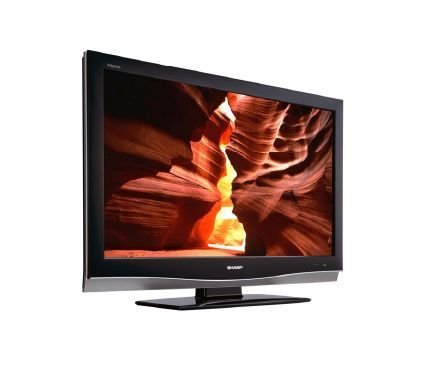
Image: Sharp LC-37XD1E Remote Control. This image displays the black remote control unit for the Sharp LC-37XD1E television, featuring various buttons for power, channel, volume, input selection, menu navigation, and numeric input.
- പവർ ബട്ടൺ: ടിവി ഓണാക്കുകയോ ഓഫാക്കുകയോ ചെയ്യുന്നു.
- നമ്പർ ബട്ടണുകൾ (0-9): ചാനലുകൾ നേരിട്ട് തിരഞ്ഞെടുക്കുക.
- DTV/EPG/ESD/RADIO: Buttons for digital TV functions, Electronic Program Guide, and radio.
- വോളിയം കൂട്ടുക/താഴ്ത്തുക (+/-): ശബ്ദ നില ക്രമീകരിക്കുന്നു.
- Channel Up/Down (P ^/v): ചാനലുകൾ ക്രമത്തിൽ മാറ്റുന്നു.
- AV MODE: Cycles through available AV modes.
- ചുറ്റളവ്: Activates or deactivates surround sound.
- മെനു: Opens the main menu for settings adjustments.
- നാവിഗേഷൻ ബട്ടണുകൾ (മുകളിലേക്ക്/താഴേക്ക്/ഇടത്/വലത്): Used to navigate through menus.
- ശരി ബട്ടൺ: മെനുകളിലെ തിരഞ്ഞെടുപ്പുകൾ സ്ഥിരീകരിക്കുന്നു.
- EXIT/RETURN: Exits menus or returns to the previous screen.
- വർണ്ണ ബട്ടണുകൾ (ചുവപ്പ്, പച്ച, മഞ്ഞ, നീല): Used for specific functions in certain menus or interactive services.
5.3. ഇൻപുട്ട് തിരഞ്ഞെടുക്കൽ
അമർത്തുക ഇൻപുട്ട് or ഉറവിടം button on the remote control to cycle through connected input sources (HDMI1, HDMI2, SCART1, SCART2, AV, S-Video, PC).
5.4. മെനു നാവിഗേഷനും ക്രമീകരണങ്ങളും
അമർത്തുക മെനു button to access the main settings menu. Use the navigation buttons to move between options and OK to select. Common settings include:
- ചിത്ര ക്രമീകരണങ്ങൾ: Adjust brightness, contrast, color, sharpness, and aspect ratio (16:9).
- ഓഡിയോ ക്രമീകരണങ്ങൾ: Adjust bass, treble, balance, and select audio modes (Nicam A2 / Surround).
- ചാനൽ ക്രമീകരണങ്ങൾ: Scan for channels, edit channel lists.
- സമയ ക്രമീകരണങ്ങൾ: Set current time and sleep timer.
6. പരിപാലനം
- സ്ക്രീൻ ക്ലീനിംഗ്: മൃദുവായ, ലിന്റ് രഹിത തുണി ഉപയോഗിച്ച് സ്ക്രീൻ സൌമ്യമായി തുടയ്ക്കുക. കഠിനമായ പാടുകൾക്ക്, ചെറുതായി dampതുണിയിൽ വെള്ളം അല്ലെങ്കിൽ ഒരു പ്രത്യേക സ്ക്രീൻ ക്ലീനർ ഉപയോഗിക്കുക. സ്ക്രീനിലേക്ക് നേരിട്ട് ദ്രാവകം സ്പ്രേ ചെയ്യരുത്.
- കാബിനറ്റ് ക്ലീനിംഗ്: Wipe the television cabinet with a soft, dry cloth.
- വെൻ്റിലേഷൻ: Periodically check that the ventilation openings on the back of the television are not obstructed by dust or debris.
- പവർ കോർഡ്: Inspect the power cord regularly for any damage. If damaged, replace it with an approved cord.
7. പ്രശ്നപരിഹാരം
ഉപഭോക്തൃ പിന്തുണയുമായി ബന്ധപ്പെടുന്നതിന് മുമ്പ്, പൊതുവായ പ്രശ്നങ്ങൾക്ക് ഇനിപ്പറയുന്ന പരിഹാരങ്ങൾ പരീക്ഷിക്കുക:
| പ്രശ്നം | സാധ്യമായ പരിഹാരം |
|---|---|
| ശക്തിയില്ല | പവർ കോർഡ് ടിവിയിലും വാൾ ഔട്ട്ലെറ്റിലും സുരക്ഷിതമായി പ്ലഗ് ചെയ്തിട്ടുണ്ടെന്ന് ഉറപ്പാക്കുക. വാൾ ഔട്ട്ലെറ്റ് പ്രവർത്തിക്കുന്നുണ്ടോയെന്ന് പരിശോധിക്കുക. |
| ചിത്രമില്ല, പക്ഷേ ശബ്ദം ഉണ്ട് | Check the input source selection. Ensure the connected device is powered on and sending a signal. |
| ശബ്ദമില്ല, പക്ഷേ ചിത്രം ഉണ്ട് | വോളിയം ലെവൽ പരിശോധിച്ച് ടിവി മ്യൂട്ട് ചെയ്തിട്ടില്ലെന്ന് ഉറപ്പാക്കുക. ബാഹ്യ ഉപകരണങ്ങൾക്കുള്ള ഓഡിയോ കേബിൾ കണക്ഷനുകൾ പരിശോധിക്കുക. |
| റിമോട്ട് കൺട്രോൾ പ്രവർത്തിക്കുന്നില്ല | റിമോട്ട് കൺട്രോളിലെ ബാറ്ററികൾ മാറ്റിസ്ഥാപിക്കുക. റിമോട്ടിനും ടിവിയുടെ ഐആർ സെൻസറിനും ഇടയിൽ തടസ്സങ്ങളൊന്നുമില്ലെന്ന് ഉറപ്പാക്കുക. |
| മോശം ചിത്ര നിലവാരം | Adjust picture settings (brightness, contrast, sharpness). Check antenna or cable connections. For external devices, ensure high-quality cables are used. |
8 സ്പെസിഫിക്കേഷനുകൾ
Technical specifications for the Sharp LC-37XD1E LCD Television:
| ഫീച്ചർ | വിശദാംശങ്ങൾ |
|---|---|
| മോഡലിൻ്റെ പേര് | LC-37XD1E |
| സ്ക്രീൻ വലിപ്പം | 37 ഇഞ്ച് (93.98 സെ.മീ) |
| ഡിസ്പ്ലേ ടെക്നോളജി | എൽസിഡി |
| റെസലൂഷൻ | 1920 x 1080 പിക്സലുകൾ (ഫുൾ എച്ച്ഡി) |
| വീക്ഷണാനുപാതം | 16:9 (1.78:1) |
| തെളിച്ചം | 450 cd/m² |
| കോൺട്രാസ്റ്റ് റേഷ്യോ | 1200:1 |
| പ്രതികരണ സമയം | 6 എം.എസ് |
| Viewആംഗിൾ (H/V) | 176° / 176° |
| ഓഡിയോ സിസ്റ്റം | Nicam A2 / Surround |
| സ്പീക്കർ ഔട്ട്പുട്ട് പവർ | 20 വാട്ട്സ് |
| HDMI പോർട്ടുകൾ | 2 |
| SCART Ports | 2 |
| മറ്റ് ഇൻപുട്ടുകൾ | AV/S-Video In, PC In, RS232C |
| ഓഡിയോ ഔട്ട്പുട്ട് | അതെ |
| പവർ ആവശ്യകതകൾ | AC 220V-240V, 50Hz |
| വൈദ്യുതി ഉപഭോഗം | 20 വാട്ട്സ് (സാധാരണ) |
| അളവുകൾ (W x H x D) | 92 cm x 60 cm x 11.5 cm (without stand) |
| ഭാരം | 21 കി.ഗ്രാം |
9. വാറൻ്റിയും പിന്തുണയും
വാറന്റി വിവരങ്ങൾക്ക്, ദയവായി നിങ്ങളുടെ ഉൽപ്പന്നത്തിനൊപ്പം ഉൾപ്പെടുത്തിയിരിക്കുന്ന വാറന്റി കാർഡ് പരിശോധിക്കുകയോ ഔദ്യോഗിക ഷാർപ്പ് സന്ദർശിക്കുകയോ ചെയ്യുക. website. For technical support or service inquiries, please contact Sharp customer service through their official channels.


