1. ആമുഖം
വാങ്ങിയതിന് നന്ദി.asing the Silverlit X-Twin 3D Air Acrobat 3D Remote Control Plane. This manual provides essential information for the safe and effective operation, maintenance, and troubleshooting of your new RC plane. Please read this manual thoroughly before first use and retain it for future reference.
The Silverlit X-Twin 3D Air Acrobat 3D is a 3-channel remote control plane designed for precision flight and acrobatic maneuvers. It features a durable, shock-resistant construction and an efficient I-Poly battery for extended flight times.

Figure 1.1: The Silverlit X-Twin 3D Air Acrobat 3D Remote Control Plane.
2 സുരക്ഷാ വിവരങ്ങൾ
Always prioritize safety when operating remote control aircraft. Failure to follow these guidelines may result in injury or damage to property.
- പ്രായം ശുപാർശ: ഈ ഉൽപ്പന്നം 8 വയസ്സും അതിൽ കൂടുതലുമുള്ള ഉപയോക്താക്കൾക്ക് അനുയോജ്യമാണ്. പ്രായം കുറഞ്ഞ ഉപയോക്താക്കൾക്ക് മുതിർന്നവരുടെ മേൽനോട്ടം ശുപാർശ ചെയ്യുന്നു.
- ഫ്ലൈറ്റ് പരിസ്ഥിതി: Operate the plane in open, clear areas away from people, animals, buildings, trees, power lines, and other obstacles. Avoid flying in strong winds or adverse weather conditions.
- ബാറ്ററി സുരക്ഷ:
- Do not attempt to disassemble, short-circuit, or modify batteries.
- തീവ്രമായ താപനിലയിലോ നേരിട്ടുള്ള സൂര്യപ്രകാശത്തിലോ ബാറ്ററികൾ തുറന്നുകാട്ടരുത്.
- Always use the recommended charging method for the plane's I-Poly battery.
- Remove batteries from the transmitter when not in use for extended periods.
- പ്രൊപ്പല്ലർ സുരക്ഷ: കറങ്ങുന്ന പ്രൊപ്പല്ലറുകളിൽ നിന്ന് വിരലുകൾ, മുടി, അയഞ്ഞ വസ്ത്രങ്ങൾ എന്നിവ അകറ്റി നിർത്തുക.
- ദൃശ്യരേഖ: Always maintain visual line of sight with the aircraft during flight.
- വിമാന യാത്രയ്ക്ക് മുമ്പുള്ള പരിശോധന: Before each flight, ensure all components are securely attached and functioning correctly.
3. പാക്കേജ് ഉള്ളടക്കം
Carefully unpack the box and ensure all items listed below are present. If any items are missing or damaged, please contact your retailer.
- Silverlit X-Twin 3D Air Acrobat 3D Plane (with built-in I-Poly battery)
- 3-Channel Remote Control Transmitter
- നിർദ്ദേശ മാനുവൽ (ഈ പ്രമാണം)

ചിത്രം 3.1: ഓവർview ഉൽപ്പന്ന ഘടകങ്ങളുടെയും സവിശേഷതകളുടെയും.
4. സജ്ജീകരണം
4.1 ട്രാൻസ്മിറ്റർ ബാറ്ററി ഇൻസ്റ്റാളേഷൻ
The remote control transmitter requires 6 x AA batteries (not included).
- ട്രാൻസ്മിറ്ററിന്റെ പിൻഭാഗത്ത് ബാറ്ററി കമ്പാർട്ട്മെന്റ് കണ്ടെത്തുക.
- ബാറ്ററി കമ്പാർട്ട്മെൻ്റ് കവർ തുറക്കുക.
- ശരിയായ പോളാരിറ്റി (+/-) ഉറപ്പാക്കിക്കൊണ്ട് 6 x AA ബാറ്ററികൾ ഇടുക.
- ബാറ്ററി കമ്പാർട്ട്മെൻ്റ് കവർ സുരക്ഷിതമായി അടയ്ക്കുക.
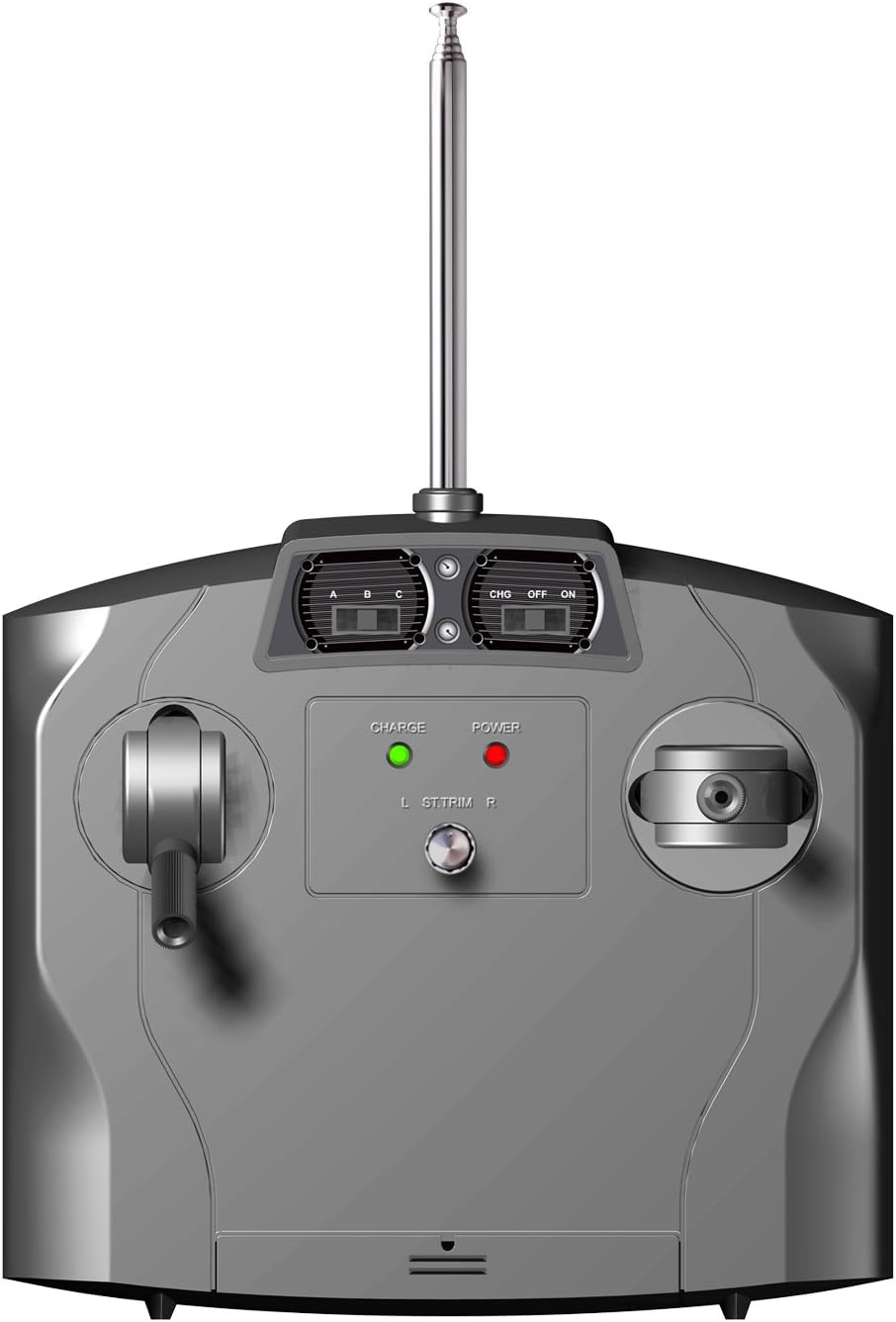
Figure 4.1: The remote control transmitter.
4.2 Charging the Plane's Battery
The plane is equipped with a built-in I-Poly battery. It must be charged before first use and after each flight.
- Ensure the transmitter has fresh batteries and is turned OFF.
- Connect the charging cable from the transmitter to the charging port on the plane. Refer to the transmitter diagram for the charging port location.
- Turn ON the transmitter. The charge indicator light on the transmitter will illuminate.
- ചാർജ് ചെയ്യാൻ സാധാരണയായി ഏകദേശം 30-45 മിനിറ്റ് എടുക്കും. അമിതമായി ചാർജ് ചെയ്യരുത്.
- Once charging is complete, the indicator light may change or turn off. Disconnect the plane from the transmitter and turn OFF the transmitter.
4.3 Binding the Plane and Transmitter
The plane and transmitter are typically pre-bound from the factory. If they do not connect, follow these steps:
- Ensure the plane's battery is charged and the plane is turned OFF.
- ട്രാൻസ്മിറ്റർ ഓണാക്കുക.
- Turn ON the plane.
- Place the plane on a flat surface. The indicator lights on both the plane and transmitter should become solid, indicating a successful connection.
- If binding fails, turn off both devices and repeat the process.
5. പ്രവർത്തന നിർദ്ദേശങ്ങൾ
5.1 പ്രീ-ഫ്ലൈറ്റ് ചെക്ക്
ഓരോ ഫ്ലൈറ്റിനും മുമ്പ്, ഇനിപ്പറയുന്ന പരിശോധനകൾ നടത്തുക:
- Ensure the plane's battery is fully charged.
- Verify the transmitter batteries are fresh.
- എല്ലാ പ്രൊപ്പല്ലറുകളും സുരക്ഷിതമായി ഘടിപ്പിച്ചിട്ടുണ്ടെന്നും കേടുപാടുകൾ സംഭവിച്ചിട്ടില്ലെന്നും പരിശോധിക്കുക.
- Confirm the rear rudder moves freely and responds to transmitter inputs.
- Select a suitable, open flying area free from obstacles.
5.2 അടിസ്ഥാന നിയന്ത്രണങ്ങൾ
The Silverlit X-Twin 3D Air Acrobat 3D uses a 3-channel control system:
- ത്രോട്ടിൽ (ഇടത് സ്റ്റിക്ക്): Controls the speed of the propellers, determining altitude and forward thrust. Push up to increase speed, pull down to decrease.
- ദിശ (വലത് സ്റ്റിക്ക്): Controls the rear rudder for turning left or right. Push left to turn left, push right to turn right.
- Trimmer (on Transmitter): Used to fine-tune the plane's straight flight. Adjust if the plane consistently drifts left or right without input.
5.3 Take-Off and Flight
- Place the plane on a flat, open surface, facing into the wind if possible.
- Slowly push the throttle stick forward to increase propeller speed. The plane will gain speed and lift off.
- Once airborne, gently adjust the throttle to maintain desired altitude.
- Use the right stick to steer the plane left or right.
- For acrobatic maneuvers like looping, rapidly increase throttle and pull back on the right stick (or follow specific instructions on the product packaging for stunt looping).
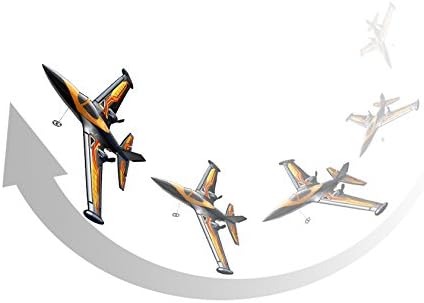
Figure 5.1: The plane performing a looping maneuver.
5.4 ലാൻഡിംഗ്
To land the plane, slowly reduce the throttle while maintaining control with the rudder. Guide the plane towards a clear, flat landing area. Allow it to gently descend and touch down. Once on the ground, fully reduce the throttle to stop the propellers.
6. പരിപാലനം
Proper maintenance will extend the lifespan of your Silverlit X-Twin 3D Air Acrobat 3D plane.
- വൃത്തിയാക്കൽ: Wipe the plane and transmitter with a soft, dry cloth. Do not use harsh chemicals or solvents.
- നാശനഷ്ട പരിശോധന: After each flight, inspect the plane for any signs of damage, especially to the propellers, wings, and rudder. The plane is made from a special shock-resistant material, but extreme impacts can still cause damage.
- ബാറ്ററി കെയർ: Store the plane's I-Poly battery and transmitter batteries in a cool, dry place. Do not store fully charged or fully depleted for long periods.
- സംഭരണം: Store the plane and transmitter in their original packaging or a protective case to prevent damage when not in use.
7. പ്രശ്നപരിഹാരം
If you encounter issues with your plane, refer to the following common problems and solutions:
| പ്രശ്നം | സാധ്യമായ കാരണം | പരിഹാരം |
|---|---|---|
| Plane does not respond to transmitter. | Low transmitter batteries; Plane battery depleted; Not properly bound. | Replace transmitter batteries; Charge plane battery; Re-bind plane and transmitter (see Section 4.3). |
| Plane does not take off or flies weakly. | Low plane battery; Damaged propellers; Obstruction. | Charge plane battery; Inspect and replace damaged propellers; Ensure no obstructions are blocking propellers. |
| Plane drifts to one side. | Trimmer setting incorrect; Damaged rudder. | Adjust the trimmer on the transmitter; Inspect rudder for damage and ensure free movement. |
| ചെറിയ ഫ്ലൈറ്റ് സമയം. | ബാറ്ററി പൂർണ്ണമായും ചാർജ് ചെയ്തിട്ടില്ല; പഴയ ബാറ്ററി. | Ensure full charge cycle; Battery lifespan decreases over time, consider replacement if available. |
8 സ്പെസിഫിക്കേഷനുകൾ
- മോഡൽ: Silverlit X-Twin 3D Air Acrobat 3D (85658)
- ചാനലുകൾ: 3-Channel R/C
- Plane Battery: Built-in I-Poly (Lithium Polymer)
- ട്രാൻസ്മിറ്റർ ബാറ്ററികൾ: 6 x AA (ഉൾപ്പെടുത്തിയിട്ടില്ല)
- മെറ്റീരിയൽ: Special shock-resistant plastic
- ശുപാർശ ചെയ്യുന്ന പ്രായം: 8 വർഷവും അതിൽ കൂടുതലും
- പാക്കേജ് അളവുകൾ: ഏകദേശം 42.6 x 40.4 x 9.2 സെ.മീ
- ഭാരം: ഏകദേശം 639.99 ഗ്രാം
9. വാറൻ്റിയും പിന്തുണയും
For information regarding warranty coverage, technical support, or replacement parts, please refer to the contact information provided on the product packaging or contact your retailer. Keep your proof of purchase for any warranty claims.


