ആമുഖം
This manual provides instructions for the Vivanco FMH 6050 Wireless Headphone Set. This stereo wireless headphone system operates on an 863 MHz transmission frequency and features manual tuning with PLL technology. It includes a compact transmitter with an integrated antenna, manual channel selection, and a charging function for the headphones. The system supports multi-device operation and is compatible with various audio sources such as TVs, PCs, and HiFi systems. The headphones offer approximately 8 hours of operating time and a reception range of up to 100 meters.
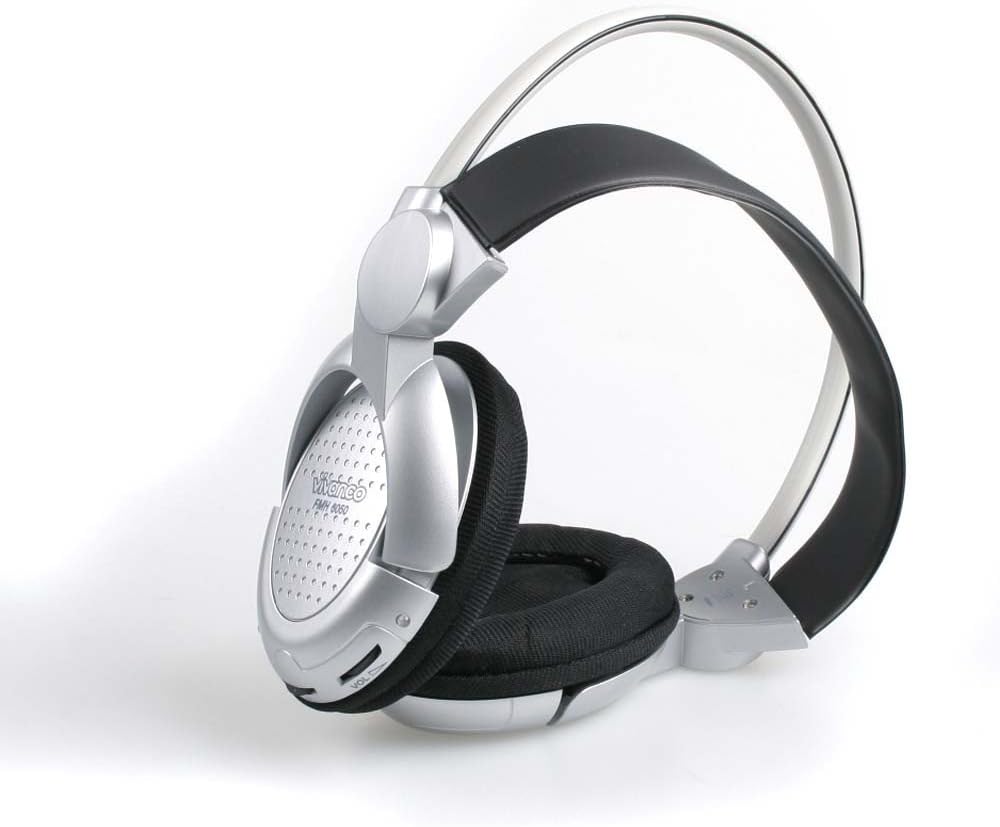
Image: Vivanco FMH 6050 Wireless Headphones, side view. This image shows the overall design of the headphones, highlighting the earcups and headband.
പാക്കേജ് ഉള്ളടക്കം
നിങ്ങളുടെ പാക്കേജിൽ താഴെ പറയുന്ന എല്ലാ ഇനങ്ങളും ഉണ്ടെന്ന് ഉറപ്പാക്കുക:
- 1 x Vivanco FMH 6050 Wireless Headphones
- 1 x Vivanco FMH 6050 Transmitter
- 1 x പവർ അഡാപ്റ്റർ
- 2 x AAA ബാറ്ററികൾ
- 1 x Adapter Set (for audio connections)
സജ്ജമാക്കുക
1. ട്രാൻസ്മിറ്റർ സജ്ജീകരണം
- പവർ ബന്ധിപ്പിക്കുക: Plug the supplied power adapter into the DC IN port on the back of the transmitter. Connect the other end to a power outlet. The 'CHARGE' or 'READY' LED on the front will illuminate.
- ഓഡിയോ ഉറവിടം ബന്ധിപ്പിക്കുക: Use the appropriate cable from the adapter set to connect your audio source (e.g., TV, PC, HiFi system) to the AUDIO IN port on the back of the transmitter.
- ചാനൽ തിരഞ്ഞെടുക്കുക: Choose one of the three available transmission channels (1, 2, or 3) using the CHANNEL switch on the back of the transmitter.
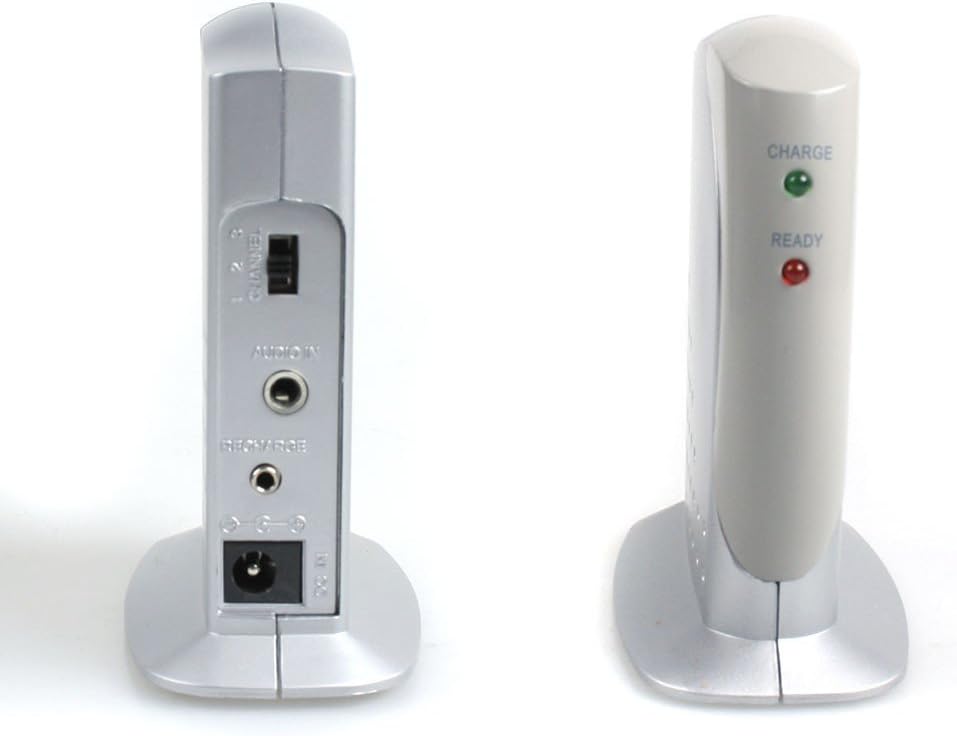
Image: Vivanco FMH 6050 Transmitter back view. This image displays the rear panel of the transmitter, showing the CHANNEL switch, AUDIO IN port, RECHARGE port, and DC IN power input.

Image: Vivanco FMH 6050 Transmitter front view. This image shows the front of the transmitter with the 'CHARGE' (green) and 'READY' (red) indicator LEDs.
2. Headphone Setup
- ബാറ്ററികൾ ചേർക്കുക: Open the battery compartment on one of the headphone earcups. Insert the two supplied AAA batteries, ensuring correct polarity (+/-).
- പ്രാരംഭ ചാർജ് (ഓപ്ഷണൽ): For optimal performance, place the headphones on the transmitter's charging cradle. The 'CHARGE' LED on the transmitter will indicate charging status.
പ്രവർത്തന നിർദ്ദേശങ്ങൾ
1. പവർ ഓൺ/ഓഫ്
Locate the ON/OFF switch on the right earcup of the headphones. Slide the switch to the 'ON' position to power on the headphones. Slide it to 'OFF' when not in use to conserve battery life.

Image: Vivanco FMH 6050 Headphones front view. This image shows the right earcup with the ON/OFF switch and the TUNE button.
2. Tuning and Channel Selection
- Ensure your audio source is playing and the transmitter is powered on and connected.
- Turn on the headphones using the ON/OFF switch.
- Press the 'TUNE' button on the headphones repeatedly until you find the clearest signal. You may need to adjust the CHANNEL switch on the transmitter (1, 2, or 3) if interference occurs or if you cannot find a clear signal.
3. വോളിയം നിയന്ത്രണം
Adjust the listening volume using the 'VOL' dial located on the left earcup of the headphones. Rotate the dial clockwise to increase volume and counter-clockwise to decrease it.

Image: Vivanco FMH 6050 Headphone earcup close-up. This image highlights the left earcup, showing the 'VOL' dial for volume adjustment and the Vivanco FMH 6050 branding.
4. Reception Range
The Vivanco FMH 6050 offers a reception range of approximately 100 meters in open areas. Obstacles such as walls, furniture, and other electronic devices may reduce this range. For best performance, ensure a clear line of sight between the transmitter and headphones.
മെയിൻ്റനൻസ്
1. വൃത്തിയാക്കൽ
- മൃദുവായതും ഉണങ്ങിയതുമായ തുണി ഉപയോഗിച്ച് ഹെഡ്ഫോണുകളും ട്രാൻസ്മിറ്ററും തുടയ്ക്കുക.
- Do not use liquid cleaners, solvents, or abrasive materials, as these can damage the surfaces.
2. ബാറ്ററി പരിചരണം
- If using rechargeable AAA batteries, ensure they are fully charged before each use for optimal operating time.
- Remove batteries from the headphones if they will not be used for an extended period to prevent leakage and damage.
- ഉപയോഗിച്ച ബാറ്ററികൾ പ്രാദേശിക നിയന്ത്രണങ്ങൾ അനുസരിച്ച് ഉത്തരവാദിത്തത്തോടെ നീക്കം ചെയ്യുക.
ട്രബിൾഷൂട്ടിംഗ്
If you experience issues with your Vivanco FMH 6050, refer to the following common problems and solutions:
- ശബ്ദമില്ല:
- Ensure the transmitter is powered on and its power adapter is securely connected.
- Verify that the audio source is playing and connected correctly to the transmitter's AUDIO IN port.
- Check that the headphones are powered on and have sufficient battery charge.
- Adjust the volume dial on the headphones.
- Press the 'TUNE' button on the headphones to find a clear signal.
- Ensure the transmitter's CHANNEL switch matches the tuned channel on the headphones.
- Poor Sound Quality / Interference:
- Re-tune the headphones using the 'TUNE' button.
- Try switching to a different channel (1, 2, or 3) on the transmitter and then re-tuning the headphones.
- Move the transmitter or headphones away from other electronic devices (e.g., Wi-Fi routers, cordless phones) that might cause interference.
- Ensure the headphones are within the reception range of the transmitter.
- Short Reception Range:
- Check the battery level of the headphones; low batteries can affect range.
- Ensure there are no significant obstacles (thick walls, metal objects) between the transmitter and headphones.
- Minimize other RF devices operating in the vicinity.
സ്പെസിഫിക്കേഷനുകൾ
| ഫീച്ചർ | സ്പെസിഫിക്കേഷൻ |
|---|---|
| മോഡൽ | FMH 6050 |
| ബ്രാൻഡ് | Vivanco |
| ട്രാൻസ്മിഷൻ ഫ്രീക്വൻസി | 863 MHz |
| Operating Time (Headphones) | ഏകദേശം 8 മണിക്കൂർ |
| സ്വീകരണ ശ്രേണി | Approx. 100 meters (open area) |
| ഫ്രീക്വൻസി പ്രതികരണം | 20 - 20000 ഹെർട്സ് |
| ഹെഡ്ഫോൺ ഭാരം | 160 ഗ്രാം |
| സിഗ്നൽ-ടു-നോയിസ് അനുപാതം | 45 ഡി.ബി |
| കണക്റ്റിവിറ്റി ടെക്നോളജി | Wireless (RF), 3.5 mm jack (transmitter input) |
| അനുയോജ്യമായ ഉപകരണങ്ങൾ | TV, PC, HiFi, Mobile phones, Tablets, Game consoles |
| ഹെഡ്ഫോൺ ഫോം ഫാക്ടർ | Over-ear, Half-open |
| Material (Earpads) | വ്യാജമായത് |
| ഉൾപ്പെടുത്തിയ ഘടകങ്ങൾ | Transmitter, Power adapter, AAA batteries (2), Adapter set |
വാറൻ്റിയും പിന്തുണയും
For warranty information and technical support, please refer to the documentation provided with your purchase or visit the official Vivanco webസൈറ്റ്. ഏതെങ്കിലും വാറന്റി ക്ലെയിമുകൾക്ക് നിങ്ങളുടെ വാങ്ങലിന്റെ തെളിവ് സൂക്ഷിക്കുക.


