ആമുഖം
This manual provides comprehensive instructions for the proper setup, operation, and maintenance of your RadioShack Telephone Recording Remote Control, Model 43-228. Please read this manual thoroughly before using the device to ensure correct functionality and to prevent damage. Keep this manual for future reference.
The RadioShack Telephone Recording Remote Control is designed to facilitate the recording of telephone conversations. It can also function as an adapter for connecting telephone audio to other devices, such as hearing aid amplifiers, via a 3.5mm jack.
സുരക്ഷാ വിവരങ്ങൾ
- ഈർപ്പം അല്ലെങ്കിൽ അങ്ങേയറ്റത്തെ താപനിലയിലേക്ക് ഉപകരണം തുറന്നുകാട്ടരുത്.
- ഉപകരണം താഴെയിടുകയോ ഗുരുതരമായ ആഘാതത്തിന് വിധേയമാക്കുകയോ ചെയ്യുന്നത് ഒഴിവാക്കുക.
- ഉപകരണം സ്വയം തുറക്കാനോ നന്നാക്കാനോ ശ്രമിക്കരുത്. എല്ലാ സേവനങ്ങളും യോഗ്യതയുള്ള ഉദ്യോഗസ്ഥരെ ഏൽപ്പിക്കുക.
- കുട്ടികൾക്ക് ലഭ്യമാകാതെ സൂക്ഷിക്കുക.
- പ്രവർത്തിക്കുന്നതിന് മുമ്പ് എല്ലാ കണക്ഷനുകളും സുരക്ഷിതമാണെന്ന് ഉറപ്പാക്കുക.
സജ്ജമാക്കുക
Follow these steps to set up your Telephone Recording Remote Control:
- ഘടകങ്ങൾ തിരിച്ചറിയുക: Unpack the device and identify the main unit, telephone line cord, and any audio output cables.
- Connect to Telephone Line: Disconnect your telephone from the wall jack. Connect one end of the provided telephone line cord to the "LINE" jack on the recording control unit. Connect the other end of this cord to the telephone wall jack.
- Connect Telephone: Connect your telephone's line cord to the "PHONE" jack on the recording control unit.
- Connect Recording Device (Optional): If you intend to record conversations, connect your recording device (e.g., tape recorder, digital voice recorder) to the "REC OUT" or "AUDIO OUT" jack on the recording control unit using an appropriate audio cable (typically 3.5mm).
- Connect External Audio Device (Optional): For use as an audio adapter, connect your external audio device (e.g., hearing aid amplifier) to the appropriate audio output jack on the recording control unit.
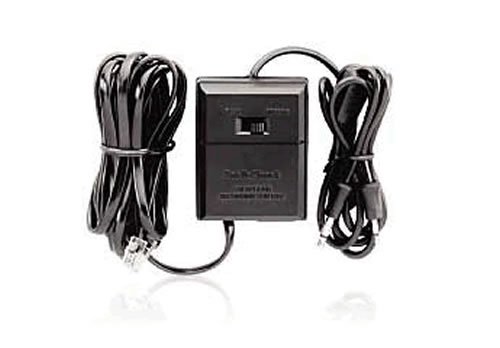
Figure 1: RadioShack Telephone Recording Remote Control showing connection ports.
പ്രവർത്തന നിർദ്ദേശങ്ങൾ
Once the device is properly connected, you can begin using it for telephone recording or audio adaptation.
Recording Telephone Conversations:
- Ensure your recording device is connected to the "REC OUT" or "AUDIO OUT" jack and is powered on.
- Initiate or answer a phone call as usual.
- To begin recording, activate the recording function on your external recording device. The audio from both sides of the conversation will be sent to your recording device.
- To stop recording, deactivate the recording function on your external recording device.
Using as an Audio Adapter:
- Ensure your external audio device (e.g., hearing aid amplifier) is connected to the appropriate audio output jack and is powered on.
- Initiate or answer a phone call.
- The telephone audio will be routed through the recording control unit to your connected audio device, allowing you to hear the conversation through your external device.
കുറിപ്പ്: Always ensure your external recording or audio device is correctly configured and powered for optimal performance.
മെയിൻ്റനൻസ്
- വൃത്തിയാക്കൽ: ഉപകരണത്തിന്റെ പുറംഭാഗം വൃത്തിയാക്കാൻ മൃദുവായതും ഉണങ്ങിയതുമായ തുണി ഉപയോഗിക്കുക. ലിക്വിഡ് ക്ലീനറുകളോ ഉരച്ചിലുകളുള്ള വസ്തുക്കളോ ഉപയോഗിക്കരുത്.
- സംഭരണം: ഉപയോഗത്തിലില്ലാത്തപ്പോൾ നേരിട്ട് സൂര്യപ്രകാശത്തിൽ നിന്ന് അകലെ തണുത്തതും വരണ്ടതുമായ സ്ഥലത്ത് ഉപകരണം സൂക്ഷിക്കുക.
- കേബിൾ കെയർ: Avoid bending or twisting cables excessively, as this can damage internal wiring. Ensure cables are not tightly wrapped for extended periods.
ട്രബിൾഷൂട്ടിംഗ്
| പ്രശ്നം | സാധ്യമായ കാരണം | പരിഹാരം |
|---|---|---|
| No audio output to recording/audio device. |
|
|
| Poor audio quality or intermittent sound. |
|
|
| Telephone not working after connection. |
|
|
സ്പെസിഫിക്കേഷനുകൾ
- മോഡൽ നമ്പർ: 43-228
- ബ്രാൻഡ്: റേഡിയോഷാക്ക്
- കണക്റ്റിവിറ്റി ടെക്നോളജി: റേഡിയോ ആവൃത്തി (Note: This specification is provided by the manufacturer and may refer to broader product category features.)
- അനുയോജ്യമായ ഉപകരണങ്ങൾ: സ്മാർട്ട്ഫോൺ (Note: This specification is provided by the manufacturer and may refer to broader product category features.)
- കൺട്രോളർ തരം: ബട്ടൺ നിയന്ത്രണം (Note: This specification is provided by the manufacturer and may refer to broader product category features.)
- പാക്കേജ് അളവുകൾ: 5.2 x 4.1 x 1.4 ഇഞ്ച്
- ഇനത്തിൻ്റെ ഭാരം: 1 പൗണ്ട്
- UPC: 040293114084
- നിർമ്മാതാവ്: റേഡിയോ ഷാക്ക്
- ആദ്യം ലഭ്യമായ തീയതി: ഡിസംബർ 12, 2007
വാറൻ്റിയും പിന്തുണയും
For warranty information or technical support, please refer to the documentation provided at the time of purchase or contact RadioShack customer service. Keep your proof of purchase for warranty claims.
For further assistance, please visit the official RadioShack webസൈറ്റ് ചെയ്യുക അല്ലെങ്കിൽ അവരുടെ ഉപഭോക്തൃ പിന്തുണ ചാനലുകളുമായി ബന്ധപ്പെടുക.


