1. ആമുഖം
The Westek SLC6CBC-4 Programmable Light Control is designed to convert any standard light socket into an automatic, programmable light source. This device enhances safety and security by automatically turning lights on in low-light conditions. It is suitable for both indoor and outdoor applications and is compatible with LED, incandescent, and CFL bulbs up to 100 watts.
The control offers flexible scheduling options, allowing the light to turn off after a selectable duration of 2, 5, or 8 hours, or at random times to simulate occupancy.
2. ഉൽപ്പന്ന സവിശേഷതകൾ
- Converts any light socket into an automatic night light.
- Works with LED, incandescent, and CFL bulbs up to 100 watts.
- Ideal for laundry rooms, garages, basements, attics, and other indoor/outdoor areas.
- Programmable off-times: 2, 5, or 8 hours.
- Random off-time feature to deter intruders.
- Integrated micro-processor for accurate off-time.
- Compact design fits most outdoor and indoor fixtures.
- Labeled buttons for intuitive programming.
- Housing Material: Plastic.
- Connection Type: Screw-In (E26 Medium base).
3 സുരക്ഷാ വിവരങ്ങൾ
- മുന്നറിയിപ്പ്: To avoid electric shock, always switch off power to the light fixture at the circuit breaker or fuse box before installation or servicing.
- പരമാവധി വാട്ട് കവിയരുത്tagഇ റേറ്റിംഗ് 100 വാട്ട്സ്.
- Ensure the light control is installed in a location where the photocell sensor is exposed to natural light and not obstructed by the fixture or artificial light sources.
- This device is designed for use with standard E26 medium base sockets.
- Avoid using with opaque or frosted glass fixtures that may block the light sensor.
4. സജ്ജീകരണവും ഇൻസ്റ്റാളേഷനും
Follow these steps to install your Westek SLC6CBC-4 Programmable Light Control:
- Switch off power: Before beginning installation, ensure the power to the lamp or desired lighting source is switched off at the circuit breaker.
- Screw in the control: Carefully screw the Westek SLC6CBC-4 control into the existing light socket.
- ബൾബ് സ്ഥാപിക്കുക: Screw a compatible bulb (LED, incandescent, or CFL, up to 100 watts) into the light control device.
- Position the photocell: Orient the light control so that the automatic photocell sensor faces natural light and is away from any artificial light sources that could interfere with its operation.
- പവർ പുനഃസ്ഥാപിക്കുക: സർക്യൂട്ട് ബ്രേക്കറിൽ പവർ വീണ്ടും ഓണാക്കുക.

ചിത്രം 1: ക്ലോസ് അപ്പ് view of the Westek SLC6CBC-4 Programmable Light Control, showing its screw-in base and bulb insertion port.
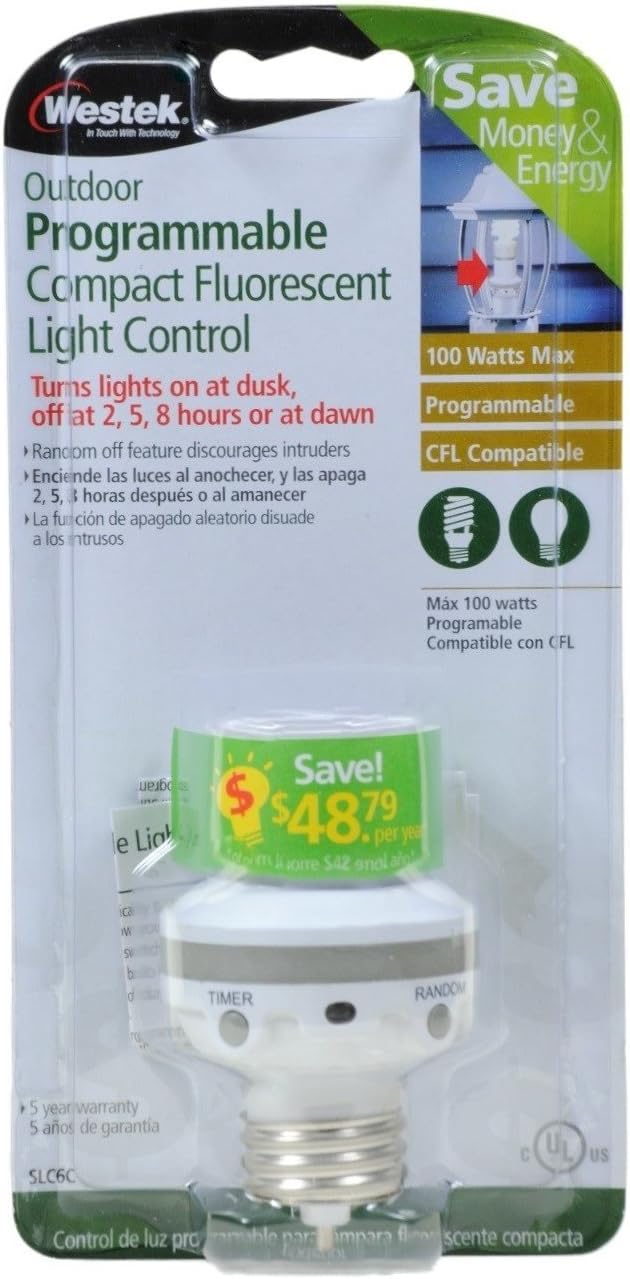
ചിത്രം 2: The Westek SLC6CBC-4 Programmable Light Control shown in its original retail packaging.
ഇൻസ്റ്റലേഷൻ വീഡിയോ
വീഡിയോ 1: An instructional video demonstrating the installation and basic features of the Westek Light Sensor Socket Control.
5. പ്രവർത്തന നിർദ്ദേശങ്ങൾ
The Westek SLC6CBC-4 features a photocell sensor that automatically turns the light on when ambient light levels are low (dusk). You can program the device to turn off after a specific duration or at random times.
Programming the Timer Function:
After installation and with power restored, the device will enter its default mode (dusk to dawn, or a previously set program). To set a specific timer:
- കണ്ടെത്തുക ടൈമർ ഉപകരണത്തിലെ ബട്ടൺ.
- അമർത്തുക ടൈമർ button once for the light to turn off after 2 മണിക്കൂർ. The bulb will blink once to confirm.
- അമർത്തുക ടൈമർ button twice for the light to turn off after 5 മണിക്കൂർ. The bulb will blink twice to confirm.
- അമർത്തുക ടൈമർ button three times for the light to turn off after 8 മണിക്കൂർ. The bulb will blink three times to confirm.
- അമർത്തുക ടൈമർ button four times to set the device to dusk to dawn light sensing. The bulb will blink four times to confirm. In this mode, the light will turn on at dusk and remain on until dawn.
Random Off-Time Feature:
To activate the random off-time feature, which helps deter intruders by varying the turn-off time:
- കണ്ടെത്തുക റാൻഡം ഉപകരണത്തിലെ ബട്ടൺ.
- അമർത്തുക റാൻഡം button to activate this mode. The light will turn on at dusk and turn off at random intervals within a set timeframe.
6. പരിപാലനം
The Westek SLC6CBC-4 Programmable Light Control requires minimal maintenance. Keep the photocell sensor clean and free from obstructions (dirt, dust, leaves, snow) to ensure proper operation. Periodically check the device for any signs of damage or wear. If any damage is observed, discontinue use and replace the unit.
7. പ്രശ്നപരിഹാരം
- Light does not turn on at dusk:
- ഫിക്ചറിലേക്കുള്ള പവർ ഓണാണെന്ന് ഉറപ്പാക്കുക.
- Check if the bulb is working correctly.
- Verify that the photocell sensor is not obstructed or covered.
- Ensure the photocell is not exposed to artificial light sources (e.g., streetlights, other lamps) that might prevent it from sensing darkness.
- Light does not turn off:
- Check if the photocell sensor is receiving sufficient natural light (dawn).
- Ensure no artificial light sources are shining directly onto the photocell, preventing it from sensing daylight.
- Verify the timer setting. If set to 'dusk to dawn', it will remain on until sufficient daylight is detected.
- Light turns on/off at incorrect times:
- Reposition the light control to ensure the photocell has an unobstructed view of natural light and is shielded from artificial light.
- Reset the timer program by cycling through the settings.
- Bulb flickers or does not illuminate:
- Ensure the bulb is securely screwed into the control.
- ബൾബ് വാട്ട് സ്ഥിരീകരിക്കുകtage 100 വാട്ടിൽ കൂടരുത്.
- Test the bulb in another fixture to ensure it is functional.
8 സ്പെസിഫിക്കേഷനുകൾ
| ബ്രാൻഡ് | വെസ്ടെക് |
| മോഡൽ നമ്പർ | SLC6CBC-4 |
| Light Type Compatibility | Incandescent, CFL, LED |
| പരമാവധി വാട്ട്tage | 100 വാട്ട്സ് |
| വാല്യംtage | 120 വോൾട്ട് |
| ബൾബ് ബേസ് | E26 മീഡിയം |
| ഇൻഡോർ/ഔട്ട്ഡോർ ഉപയോഗം | അതെ |
| മെറ്റീരിയൽ | പ്ലാസ്റ്റിക് |
| ഉൽപ്പന്ന അളവുകൾ | 1.95"ആംശം x 3.3"ആംശം |
| ഇനത്തിൻ്റെ ഭാരം | 0.8 ഔൺസ് |
9. വാറൻ്റിയും പിന്തുണയും
This Westek SLC6CBC-4 Programmable Light Control comes with a 1 വർഷത്തെ നിർമ്മാതാവിന്റെ വാറന്റി.
For technical support or warranty claims, please contact Westek customer service. Refer to the product packaging or the official Westek webഏറ്റവും പുതിയ ബന്ധപ്പെടാനുള്ള വിവരങ്ങൾക്കായി സൈറ്റ്.


