ആമുഖം
Thank you for choosing the Liberty Kentworth 224mm Cabinet Pull. This manual provides essential information for the proper installation, use, and care of your new cabinet hardware. The Kentworth Collection offers an artistic design with a classic finish, enhancing the aesthetic of your cabinets.
This pull features a weathered brass finish for an antique look and measures 8-13/16 inches (224mm) center to center between screws. Matching knobs are also available to complement your design.

Image: Visual comparison of cabinets with different pull styles and finishes, demonstrating the aesthetic impact of hardware changes.
സജ്ജീകരണവും ഇൻസ്റ്റാളേഷനും
Proper installation ensures the longevity and functionality of your cabinet pulls. Follow these steps carefully.
ആവശ്യമായ ഉപകരണങ്ങൾ:
- പെൻസിൽ
- അളക്കുന്ന ടേപ്പ് അല്ലെങ്കിൽ ഭരണാധികാരി
- 3/16 ഇഞ്ച് ഡ്രിൽ ബിറ്റ് ഉപയോഗിച്ച് തുരത്തുക
- സ്ക്രൂഡ്രൈവർ (ഫിലിപ്സ് ഹെഡ് ശുപാർശ ചെയ്യുന്നു)
- Optional: Alignright Template AN0251C-CL-U (sold separately) for precise hole marking.
ഇൻസ്റ്റലേഷൻ ഘട്ടങ്ങൾ:
- Measure Center-to-Center: Determine the desired placement for your pull. The Kentworth pull requires 8-13/16 inches (224mm) center-to-center spacing for the mounting screws.
- ഡ്രിൽ പോയിൻ്റുകൾ അടയാളപ്പെടുത്തുക: Using a pencil, accurately mark the two points on your cabinet door or drawer where the screws will be inserted. Ensure these marks are level and at the correct center-to-center distance. If using an Alignright Template, align it to the corner of the door and mark the desired base hole location, then locate and mark the corresponding center-to-center hole that matches your pull size.
- ഡ്രിൽ പൈലറ്റ് ദ്വാരങ്ങൾ: Using a 3/16 inch drill bit, carefully drill pilot holes through the marked points. Drill slowly and steadily to prevent splintering. Do not drill directly through any template.
- Attach the Pull: From the inside of the cabinet door or drawer, thread the mounting screws through the drilled holes. Align the pull on the exterior side and secure it by tightening the screws with a screwdriver until snug. Do not overtighten.
- ആവർത്തിക്കുക: Repeat the process for all remaining cabinet pulls, ensuring consistent placement for a uniform look.
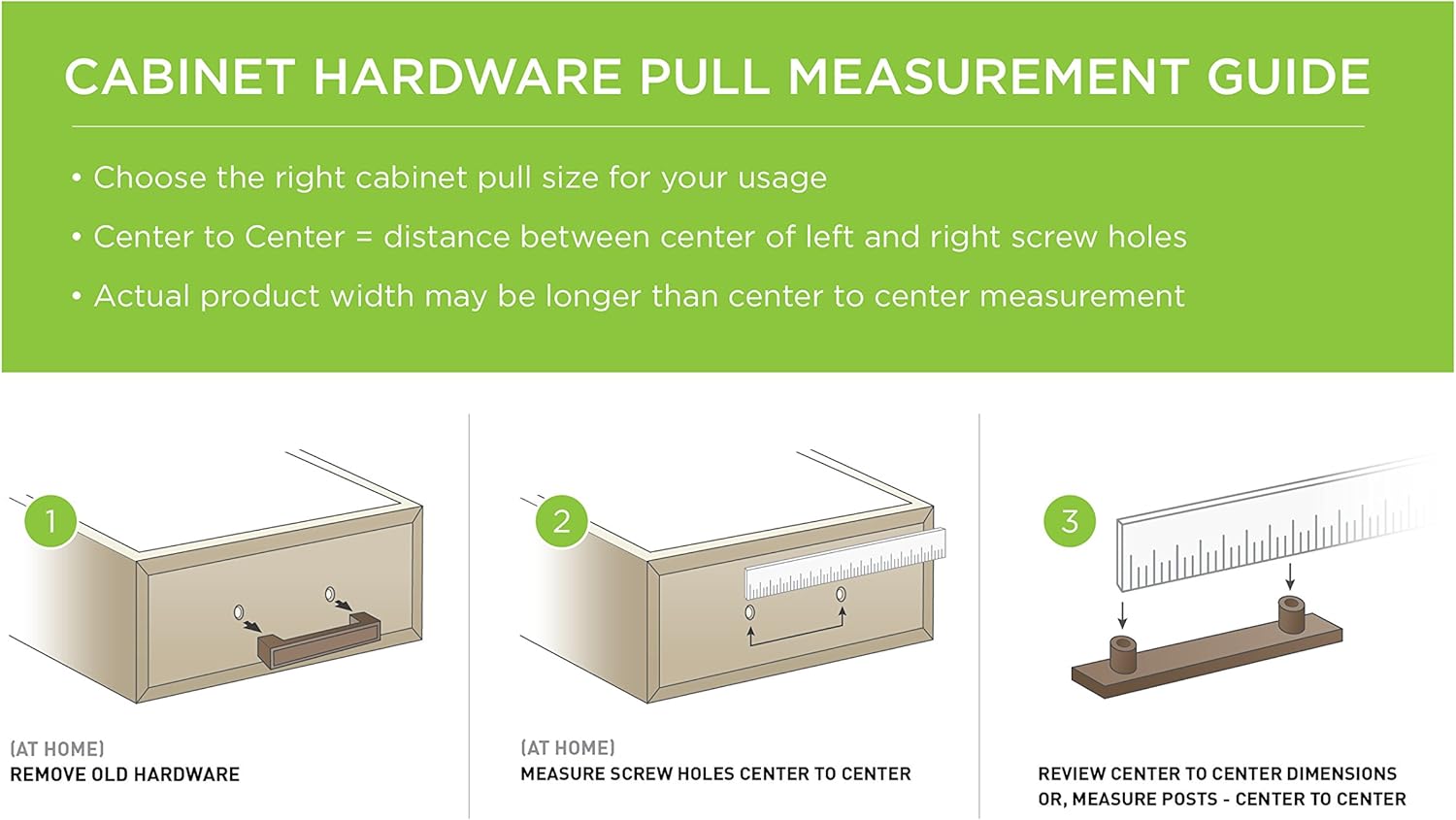
Image: A visual guide illustrating the process of measuring existing hardware and marking new drill points for cabinet pulls.
ഇൻസ്റ്റാളേഷൻ വീഡിയോ:
For a visual demonstration of cabinet hardware installation and styling ideas, please watch the official Liberty Cabinet Product Videos.
Video: Official Liberty Cabinet Product Videos demonstrating various cabinet hardware styles and installation tips.
പ്രവർത്തന നിർദ്ദേശങ്ങൾ
The Liberty Kentworth Cabinet Pull is designed for straightforward operation. Simply grasp the pull to open and close your cabinet doors or drawers. Ensure the pull is securely fastened to prevent wobbling or detachment during use.
പരിചരണവും പരിപാലനവും
To maintain the finish and appearance of your cabinet pull, follow these simple care instructions:
- വൃത്തിയാക്കൽ: മൃദുവായ, ഡി തുണി ഉപയോഗിച്ച് പുൾ പതിവായി തുടയ്ക്കുക.amp തുണി. ഫിനിഷിന് കേടുവരുത്തുന്ന അബ്രസീവ് ക്ലീനറുകൾ, കഠിനമായ രാസവസ്തുക്കൾ, അല്ലെങ്കിൽ പോളിഷുകൾ എന്നിവ ഉപയോഗിക്കുന്നത് ഒഴിവാക്കുക.
- പരിശോധന: Periodically check the mounting screws for tightness. If a pull feels loose, gently tighten the screws with a screwdriver. Do not overtighten.
- അമിതമായ ബലപ്രയോഗം ഒഴിവാക്കുക: While durable, avoid applying excessive force when opening or closing cabinets, as this can stress the hardware and cabinet.
ട്രബിൾഷൂട്ടിംഗ്
Most issues with cabinet pulls are minor and easily resolved.
- Loose Pull: If the pull feels loose, gently tighten the mounting screws from the inside of the cabinet door or drawer using a Phillips head screwdriver.
- പോറലുകൾ അല്ലെങ്കിൽ കേടുപാടുകൾ: Minor scratches may be touched up with a matching finish pen if available. For significant damage, consider replacing the pull.
- തുറക്കുന്നതിനോ അടയ്ക്കുന്നതിനോ ഉള്ള ബുദ്ധിമുട്ട്: Ensure the cabinet door or drawer itself is functioning correctly. The pull should not impede its movement.
സ്പെസിഫിക്കേഷനുകൾ
| ഫീച്ചർ | വിശദാംശങ്ങൾ |
|---|---|
| മോഡൽ നമ്പർ | P16680C-BAB-C |
| ബ്രാൻഡ് | സ്വാതന്ത്ര്യം |
| മെറ്റീരിയൽ | Metal (Zinc, Brass) |
| നിറം | പിച്ചള |
| എക്സ്റ്റീരിയർ ഫിനിഷ് | പിച്ചള |
| ഫിനിഷ് തരം | ബ്രഷ് ചെയ്തു |
| Center To Center Spacing | 8.81 ഇഞ്ച് (224 മിമി) |
| ഉൽപ്പന്ന അളവുകൾ | 14 x 3 x 1 ഇഞ്ച് |
| ഇനത്തിൻ്റെ ഭാരം | 11.2 ഔൺസ് (0.7 പൗണ്ട്) |
| പ്രത്യേക ഉപയോഗങ്ങൾ | കാബിനറ്റുകൾ |
| ഉൾപ്പെടുത്തിയ ഘടകങ്ങൾ | Pull, Screws |
| പ്രത്യേക ഫീച്ചർ | ഇൻസ്റ്റാൾ ചെയ്യാൻ എളുപ്പമാണ് |
വാറൻ്റി വിവരങ്ങൾ
This Liberty Kentworth Cabinet Pull is backed by a പരിമിതമായ ആജീവനാന്ത വാറൻ്റി. For specific details regarding coverage and claims, please refer to the warranty documentation included with your purchase or visit the official Liberty Hardware webസൈറ്റ്.
ഉപഭോക്തൃ പിന്തുണ
Should you have any questions, require assistance with installation, or need to report a defect, please contact Liberty Hardware customer service. Refer to the product packaging or the official Liberty Hardware webഏറ്റവും പുതിയ ബന്ധപ്പെടാനുള്ള വിവരങ്ങൾക്കായി സൈറ്റ്.
കൂടുതൽ ഉറവിടങ്ങൾക്കും ഉൽപ്പന്ന വിവരങ്ങൾക്കും, സന്ദർശിക്കുക ലിബര്ടി ഹാര്ഡ്വെര് webസൈറ്റ്.


