1. ആമുഖം
The Digi-Pas DWL80PRO is a compact, pocket-sized digital level designed for precise angle measurement. This electronic angle gauge provides digital readings in various units, making it suitable for a wide range of applications from professional engineering to DIY projects. Its features include a magnetic base for secure attachment to metal surfaces, an Alternate Zero function for relative angle measurements, and a Hold function to freeze readings.
This manual provides detailed instructions on the proper setup, operation, and maintenance of your DWL80PRO digital level to ensure accurate and reliable performance.

Figure 1: Digi-Pas DWL80PRO Pocket Size Digital Level. This image shows the front view of the black digital level with its display, ON/OFF, Alt.Zero, MODE, and CAL buttons, and a silver carabiner-style clip.
2 സുരക്ഷാ വിവരങ്ങൾ
- ഉപകരണം പ്രവർത്തിപ്പിക്കുന്നതിന് മുമ്പ് എല്ലാ നിർദ്ദേശങ്ങളും വായിക്കുക.
- ഉയർന്ന താപനില, ഈർപ്പം, നേരിട്ടുള്ള സൂര്യപ്രകാശം എന്നിവയ്ക്ക് ഉപകരണം ദീർഘനേരം വിധേയമാക്കരുത്.
- ഉപകരണം ഉപേക്ഷിക്കുകയോ ശക്തമായ ആഘാതങ്ങൾക്ക് വിധേയമാക്കുകയോ ചെയ്യരുത്.
- Keep the device away from strong magnetic fields, which may affect its accuracy.
- Use only the specified battery type (1 Lithium Metal battery).
- പ്രാദേശിക നിയന്ത്രണങ്ങൾ അനുസരിച്ച് ബാറ്ററികൾ നീക്കം ചെയ്യുക.
3. ഉൽപ്പന്നം കഴിഞ്ഞുview
3.1 പ്രധാന സവിശേഷതകൾ
- ഇരട്ട പ്രവർത്തനങ്ങൾ: Functions as a tilt/angle gauge and allows checking relative angles using the Alternate Zero feature.
- ഉയർന്ന കൃത്യത: Resolution of ±0.05° (at 0° & 90°), and ±0.2° (other angles).
- Multiple Display Units: Switchable display between degrees (°), slope (%), mm/M, and inch/FT.
- ശക്തമായ കാന്തിക അടിത്തറ: Securely attaches to metallic surfaces for hands-free operation.
- Auto Invert Display: The display automatically rotates for easy reading when the gauge is upside down.
- ഹോൾഡ് പ്രവർത്തനം: Freezes the current reading on the LCD.
- യാന്ത്രിക ഷട്ട്-ഓഫ്: Conserves battery life with a 3-minute auto shut-off feature.
- നീണ്ടുനിൽക്കുന്ന നിർമ്മാണം: Impact-resistant ABS polymer casing with a tough aluminum base.
3.2 ഘടകങ്ങൾ
The DWL80PRO consists of the following main components:
- എൽസിഡി ഡിസ്പ്ലേ
- ON/OFF Button (Red)
- Alt.Zero Button
- മോഡ് ബട്ടൺ
- CAL ബട്ടൺ
- മാഗ്നെറ്റിക് ബേസ്
- കാരാബിനർ ക്ലിപ്പ്
- Battery Compartment (on the back)

ചിത്രം 2: പിൻഭാഗം view of the DWL80PRO, highlighting the battery compartment with "Unscrew To Open" label and product markings.
4. സജ്ജീകരണം
4.1 ബാറ്ററി ഇൻസ്റ്റാളേഷൻ
The DWL80PRO requires one (1) Lithium Metal battery (included). To install or replace the battery:
- Locate the battery compartment on the back of the device (refer to Figure 2).
- Using a small screwdriver, unscrew the cover of the battery compartment.
- Insert the Lithium Metal battery, ensuring the correct polarity (+/-) as indicated inside the compartment.
- ബാറ്ററി കമ്പാർട്ട്മെന്റ് കവർ മാറ്റി സ്ക്രൂ ഉപയോഗിച്ച് സുരക്ഷിതമാക്കുക.
4.2 പ്രാരംഭ പവർ ഓൺ
ചുവപ്പ് അമർത്തുക ഓൺ/ഓഫ് button to power on the device. The LCD display will illuminate and show the current angle reading.
5. ഓപ്പറേഷൻ
5.1 Basic Angle Measurement
Place the magnetic base of the DWL80PRO firmly on the surface you wish to measure. The LCD will immediately display the angle relative to the horizontal plane. The display will automatically invert if the device is held upside down for easier reading.
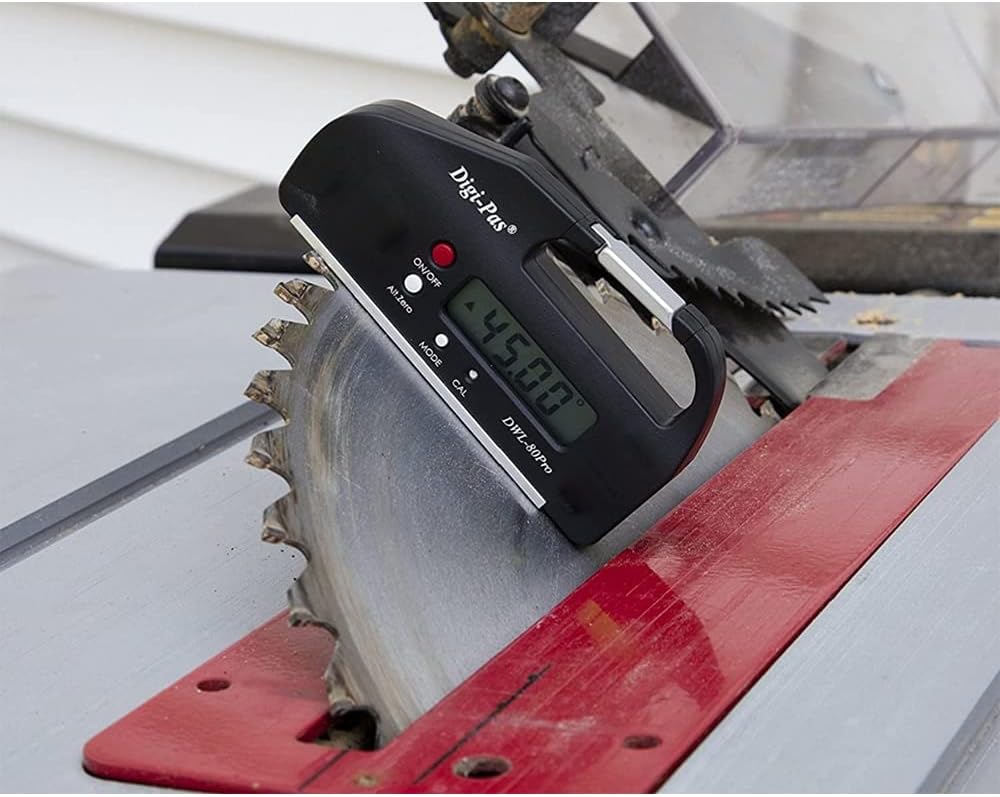
Figure 3: The DWL80PRO attached to a table saw blade, displaying an angle of 45.00 degrees.
5.2 Alternate Zero Function
ദി Alt.Zero function allows you to set any current surface as a new reference (0°) for relative angle measurements. This is useful for measuring the angle between two surfaces.
- Place the DWL80PRO on the first surface.
- അമർത്തുക Alt.Zero button. The display will show "0.00°" and an "ALT" indicator, signifying that this position is now the reference zero.
- Move the DWL80PRO to the second surface. The display will now show the angle relative to your set "Alternate Zero".
- To exit Alternate Zero mode, press the Alt.Zero button again. The "ALT" indicator will disappear, and the device will return to absolute angle measurement.
5.3 യൂണിറ്റ് പരിവർത്തനം
അമർത്തുക മോഡ് button to cycle through the available measurement units: degrees (°), slope (%), mm/M, and inch/FT. The active unit will be indicated on the LCD.
5.4 ഹോൾഡ് ഫംഗ്ഷൻ
To freeze the current reading on the display, press and hold the മോഡ് button briefly. The display will show "HOLD" and the reading will be locked. Press the മോഡ് button again to release the hold and resume live measurement.
5.5 കാലിബ്രേഷൻ
The DWL80PRO can be easily re-calibrated by the user to maintain factory accuracy. It is recommended to calibrate the device periodically or if you suspect accuracy issues.
- Place the DWL80PRO on a flat, stable surface.
- അമർത്തിപ്പിടിക്കുക CAL button until "CAL 1" appears on the display.
- Rotate the device 180 degrees on the same surface, ensuring the same edge is in contact with the surface.
- അമർത്തുക CAL button again. "CAL 2" will appear, followed by "CAL" and then the device will return to normal measurement mode. The calibration is complete.

Figure 4: The DWL80PRO placed on a centrifuge, indicating its use for precise leveling of equipment.
6. പരിപാലനം
6.1 വൃത്തിയാക്കൽ
- മൃദുവായ, ഉണങ്ങിയ തുണി ഉപയോഗിച്ച് ഉപകരണം തുടയ്ക്കുക.
- അബ്രാസീവ് ക്ലീനറുകളോ ലായകങ്ങളോ ഉപയോഗിക്കരുത്, കാരണം ഇവ സിക്ക് കേടുവരുത്തും.asinജി അല്ലെങ്കിൽ ഡിസ്പ്ലേ.
- Ensure the magnetic base is clean and free of debris for accurate readings and secure attachment.
6.2 സംഭരണം
- Store the DWL80PRO in a cool, dry place, away from direct sunlight and extreme temperatures.
- ദീർഘനേരം സൂക്ഷിക്കുകയാണെങ്കിൽ, ചോർച്ച തടയാൻ ബാറ്ററി നീക്കം ചെയ്യുക.
7. പ്രശ്നപരിഹാരം
| പ്രശ്നം | സാധ്യമായ കാരണം | പരിഹാരം |
|---|---|---|
| ഉപകരണം പവർ ഓണാക്കുന്നില്ല. | ഡെഡ് അല്ലെങ്കിൽ തെറ്റായി ഇൻസ്റ്റാൾ ചെയ്ത ബാറ്ററി. | ബാറ്ററി പോളാരിറ്റി പരിശോധിക്കുക. ആവശ്യമെങ്കിൽ ബാറ്ററി മാറ്റിസ്ഥാപിക്കുക. |
| കൃത്യമല്ലാത്ത വായനകൾ. | Needs calibration; dirty base; strong magnetic interference. | Perform calibration (Section 5.5). Clean the magnetic base. Move away from strong magnetic fields. |
| Display shows "HOLD". | Hold function is active. | അമർത്തുക മോഡ് റിലീസ് ചെയ്യാനുള്ള ബട്ടൺ. |
| ഡിസ്പ്ലേ ശൂന്യമാണ് അല്ലെങ്കിൽ മിന്നിമറയുന്നു. | കുറഞ്ഞ ബാറ്ററി. | ബാറ്ററി മാറ്റിസ്ഥാപിക്കുക. |
8 സ്പെസിഫിക്കേഷനുകൾ
- മോഡൽ: DWL-80Pro
- അളക്കൽ ശ്രേണി: 0° ~ ±90° x 4 (360°)
- റെസലൂഷൻ: ±0.05° (at 0° & 90°), ±0.2° (other angles)
- ഡിസ്പ്ലേ യൂണിറ്റുകൾ: Degrees (°), Slope (%), mm/M, inch/FT
- ഊർജ്ജ സ്രോതസ്സ്: 1 x Lithium Metal battery (3 Volts)
- യാന്ത്രിക ഷട്ട്-ഓഫ്: 3 മിനിറ്റ്
- പ്രവർത്തന താപനില: 32 ° F മുതൽ +122 ° F (0 ° C മുതൽ +50 ° C വരെ)
- മെറ്റീരിയൽ: Acrylonitrile Butadiene Styrene (ABS), Aluminum, Metal
- നിറം: കറുപ്പ്
- ഇനത്തിൻ്റെ ഭാരം: 62 ഗ്രാം (ഏകദേശം 2.19 ഔൺസ്)
- ഉൽപ്പന്ന അളവുകൾ: 4.21 x 0.71 x 2.17 ഇഞ്ച് (10.7 x 1.8 x 5.5 സെ.മീ)

Figure 5: The DWL80PRO held in a hand, illustrating its compact size and approximate dimensions (2.3 inches / 5 cm height).
9. വാറൻ്റിയും പിന്തുണയും
9.1 വാറൻ്റി വിവരങ്ങൾ
Digi-Pas levels are warranted to the original purchaser to be free from defects in workmanship and material. Digi-Pas will repair or replace any defective part which may malfunction under normal and proper use within a period of 18 months from the date of purchase.
9.2 ഉപഭോക്തൃ പിന്തുണ
For technical assistance, troubleshooting, or warranty claims, please contact Digi-Pas customer support through their official webഉൽപ്പന്നം വാങ്ങിയ സ്ഥലത്തോ റീട്ടെയിലറിലോ. പിന്തുണയുമായി ബന്ധപ്പെടുമ്പോൾ നിങ്ങളുടെ ഉൽപ്പന്ന മോഡലും വാങ്ങൽ തീയതിയും ലഭ്യമാക്കുക.