1. ആമുഖം
The Logisys RM06 12VDC Keychain Style Lighting Mode Remote Control Kit is designed to provide convenient wireless control over your 12V lighting projects. This kit allows you to adjust lighting brightness through 8 distinct grades, from dim to brightest, and offers various lighting modes. Its keychain-style remote ensures portability and ease of access. The system operates with a reliable receiving distance of up to 94.4 feet in clear line of sight, making it suitable for a wide range of applications.
2. പാക്കേജ് ഉള്ളടക്കം
നിങ്ങളുടെ പാക്കേജിൽ എല്ലാ ഇനങ്ങളും ഉണ്ടെന്ന് ദയവായി പരിശോധിക്കുക:
- 1 x RM06 Receiver Unit
- 2 x Keychain Style Remote Controls
3. ഉൽപ്പന്നം കഴിഞ്ഞുview
The RM06 kit consists of a receiver unit and two keychain-style remote controls. The receiver unit connects to your 12V power source and your lighting application. The remote controls transmit commands wirelessly to the receiver.
റിമോട്ട് കൺട്രോൾ ലേഔട്ട്
Each keychain remote features four buttons for controlling your lighting:
- Upper Left Button (Red): Activates solid ON mode with 8 grades of brightness (from dim to brightest).
- Upper Right Button (Grey): Activates ON in Stroke Mode.
- Lower Left Button (Grey): Activates solid ON mode with 8 grades of brightness (from dim to brightest).
- Lower Right Button (Grey): Turns OFF all modes.
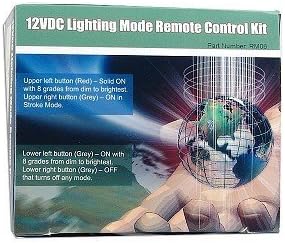
Figure 1: Logisys RM06 Remote Control Kit packaging, illustrating the functions of each button on the remote control.
4. സജ്ജീകരണം
This kit is designed for 12V DC lighting projects and applications. Proper wiring is essential for safe and correct operation.
വയറിംഗ് നിർദ്ദേശങ്ങൾ:
- Identify Power Source: Ensure you have a stable 12V DC power source. The system requires a power input of 12V DC/6 Amps.
- റിസീവറിനെ പവറുമായി ബന്ധിപ്പിക്കുക: Connect the positive (+) and negative (-) terminals of your 12V DC power source to the corresponding input terminals on the RM06 receiver unit. Observe polarity carefully.
- Connect Lighting Application: Connect your 12V lighting project (e.g., LED strips, accent lights) to the output terminals of the RM06 receiver unit. Ensure the total power consumption of your lighting does not exceed the maximum output of 36 Watts (3 Amp പരമാവധി).
- സുരക്ഷിത കണക്ഷനുകൾ: Double-check all wiring connections to ensure they are secure and insulated to prevent short circuits.
- Mount Receiver: Position the receiver unit in a location where it is protected from moisture and extreme temperatures, and where it has a clear line of sight to the area where the remote will be used for optimal signal reception.
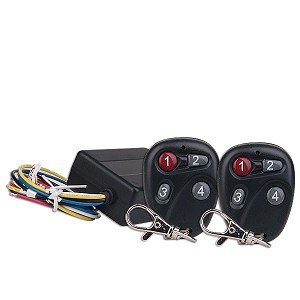
Figure 2: The Logisys RM06 12VDC Keychain Style Lighting Mode Remote Control Kit, showing the receiver and remote units.
5. പ്രവർത്തന നിർദ്ദേശങ്ങൾ
Once the RM06 receiver is properly installed and connected to your lighting, you can use the keychain remote control to operate your lights wirelessly.
- To Turn On (Solid Mode with Brightness Control): ഒന്നുകിൽ അമർത്തുക Upper Left (Red) or Lower Left (Grey) button. Each press will cycle through 8 grades of brightness, from the dimmest setting to the brightest. Continue pressing until you reach your desired brightness level.
- To Activate Stroke Mode: അമർത്തുക Upper Right (Grey) button. This will activate the lighting in a specific 'stroke' mode.
- ഓഫാക്കാൻ: അമർത്തുക Lower Right (Grey) button. This will turn off all active lighting modes.
Ensure you are within the effective receiving distance of approximately 94.4 feet (with clear line of sight) for optimal remote performance.
6. പരിപാലനം
To ensure the longevity and proper functioning of your Logisys RM06 kit, follow these simple maintenance guidelines:
- ഉണക്കി സൂക്ഷിക്കുക: Protect both the receiver and remote controls from water and excessive moisture.
- സൌമ്യമായി വൃത്തിയാക്കുക: Use a soft, dry cloth to clean the devices. Avoid harsh chemicals or abrasive cleaners.
- ബാറ്ററി മാറ്റിസ്ഥാപിക്കൽ: The keychain remote controls are powered by small batteries (type not specified, typically coin cell). If the remote's range decreases or it stops responding, replace the battery. Refer to the remote's casinബാറ്ററി തരത്തിനും മാറ്റിസ്ഥാപിക്കൽ നിർദ്ദേശങ്ങൾക്കും g.
- തീവ്രമായ താപനില ഒഴിവാക്കുക: Do not expose the devices to extremely high or low temperatures.
7. പ്രശ്നപരിഹാരം
If you encounter issues with your RM06 kit, please refer to the following common troubleshooting steps:
- Lights Not Responding to Remote:
- Check if the receiver unit is powered on and receiving 12V DC.
- Ensure all wiring connections between the power source, receiver, and lighting are secure and correct.
- റിമോട്ട് കൺട്രോളിൽ ബാറ്ററി മാറ്റിസ്ഥാപിക്കുക.
- Ensure you are within the effective operating range (approx. 94.4 feet clear line of sight) and there are no major obstructions between the remote and the receiver.
- Verify that the remote control's frequency (315 MHz) is not being interfered with by other devices.
- Lights Not Turning On/Off:
- Confirm the 12V lighting application itself is functional when directly connected to a 12V power source.
- Check the maximum output capacity (36 Watts / 3 Amps) of the receiver. Overloading the receiver can prevent proper operation.
- Inconsistent Brightness Control:
- Ensure the power supply to the receiver is stable and not fluctuating.
- Verify that the lighting connected is compatible with dimming functions.
8 സ്പെസിഫിക്കേഷനുകൾ
| മോഡൽ നമ്പർ | RM06 |
| ബ്രാൻഡ് | ലോജിസിസ് |
| ഇൻപുട്ട് പവർ | 12V DC / 6 Amps |
| പരമാവധി put ട്ട്പുട്ട് കറന്റ് | 3 Amps |
| പരമാവധി ഔട്ട്പുട്ട് വാട്ട്tage | 36 വാട്ട്സ് |
| സ്വീകരിക്കുന്ന ദൂരം | Up to 94.4 feet (approximate, clear line of sight) |
| ആവൃത്തി | 315 MHz |
| കണക്റ്റിവിറ്റി ടെക്നോളജി | റേഡിയോ ആവൃത്തി |
| കൺട്രോളർ തരം | ബട്ടൺ നിയന്ത്രണം |
| ഇനത്തിൻ്റെ ഭാരം | 3.04 ഔൺസ് |
9. വാറൻ്റിയും പിന്തുണയും
Specific warranty information for the Logisys RM06 kit is not provided in this manual. For details regarding warranty coverage, technical support, or service, please contact Logisys customer service directly or refer to the product packaging and purchase documentation.