1. ആമുഖം
This manual provides comprehensive instructions for the iLuv iSP100 Portable Speaker. This ultra-portable stereo speaker is designed for use with iPods, MP3 players, laptops, and any other audio devices equipped with a standard 3.5mm audio jack. Please read this manual carefully before using your speaker to ensure proper operation and longevity.
2. പാക്കേജ് ഉള്ളടക്കം
നിങ്ങളുടെ പാക്കേജിൽ എല്ലാ ഇനങ്ങളും ഉണ്ടെന്ന് ഉറപ്പാക്കുക:
- iLuv iSP100 Portable Speaker
- ചുമക്കുന്ന സഞ്ചി
3. ഉൽപ്പന്നം കഴിഞ്ഞുview
The iLuv iSP100 is engineered for portability and clear audio output. Key features include:
- Loud and high-quality stereo sound.
- Compatibility with any audio devices featuring a 3.5mm jack.
- A protective carrying pouch for transport.
- Powerful built-in speakers.
- A power indicator light for operational status.
- Operation using 2 AA batteries (not included).
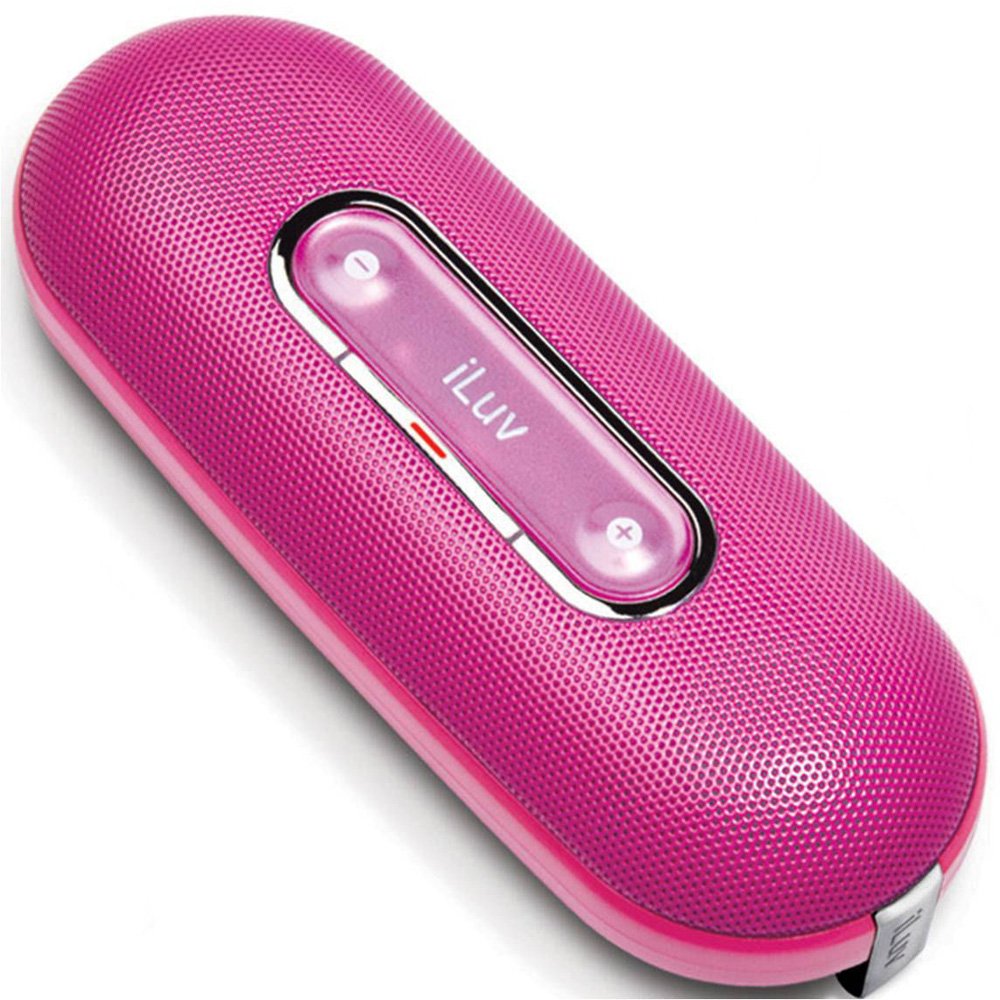
Image of the iLuv iSP100 portable speaker, showcasing its compact design and pink color.
4. സജ്ജീകരണം
4.1 ബാറ്ററി ഇൻസ്റ്റാളേഷൻ
- Locate the battery compartment on the speaker.
- കമ്പാർട്ട്മെന്റ് കവർ തുറക്കുക.
- ശരിയായ പോളാരിറ്റി (+/-) ഉറപ്പാക്കിക്കൊണ്ട് 2 AA ബാറ്ററികൾ ഇടുക.
- ബാറ്ററി കമ്പാർട്ട്മെൻ്റ് കവർ സുരക്ഷിതമായി അടയ്ക്കുക.
4.2 Connecting Your Audio Device
- Extend the integrated 3.5mm audio cable from the speaker.
- Plug the 3.5mm audio jack into the headphone or audio output port of your iPod, MP3 player, laptop, or other compatible audio device.
5. പ്രവർത്തന നിർദ്ദേശങ്ങൾ
5.1 പവർ ഓൺ/ഓഫ്
- To turn the speaker ON, slide the power switch to the 'ON' position. The power indicator light will illuminate.
- To turn the speaker ഓഫ്, slide the power switch to the 'OFF' position. The power indicator light will turn off.
5.2 വോളിയം നിയന്ത്രണം
Adjust the playback volume directly on your connected audio device (e.g., iPod, MP3 player, laptop).
6. പരിപാലനം
6.1 വൃത്തിയാക്കൽ
Wipe the speaker's exterior with a soft, dry cloth. Do not use liquid cleaners or abrasive materials.
6.2 സംഭരണം
When not in use, store the speaker in its protective carrying pouch to prevent dust and scratches. If storing for an extended period, remove the batteries to prevent leakage.
6.3 ബാറ്ററി മാറ്റിസ്ഥാപിക്കൽ
Replace the batteries when the sound quality degrades, the volume becomes low, or the speaker fails to power on. Always use fresh AA batteries.
7. പ്രശ്നപരിഹാരം
- ശബ്ദമില്ല:
- Ensure the speaker is powered on and the power indicator light is illuminated.
- Check that the 3.5mm audio jack is fully inserted into both the speaker and your audio device.
- Verify that your audio device's volume is turned up and not muted.
- ബാറ്ററികൾ കുറവാണെങ്കിൽ അല്ലെങ്കിൽ തീർന്നാൽ മാറ്റിസ്ഥാപിക്കുക.
- വികലമായ ശബ്ദം:
- നിങ്ങളുടെ ഓഡിയോ ഉപകരണത്തിൽ വോളിയം കുറയ്ക്കുക.
- ബാറ്ററികൾ പുതിയവ ഉപയോഗിച്ച് മാറ്റിസ്ഥാപിക്കുക.
- Ensure the audio cable is not damaged or kinked.
- Speaker Turns On/Off Accidentally During Transport:
- Ensure the power switch is in the 'OFF' position when transporting.
- Consider placing a small piece of non-conductive material (e.g., paper) between one of the battery terminals and the battery to break the circuit when not in use, especially during travel.
8 സ്പെസിഫിക്കേഷനുകൾ
| മോഡലിൻ്റെ പേര് | iSP100pnk |
| ബ്രാൻഡ് | iLuv |
| സ്പീക്കർ തരം | പോർട്ടബിൾ |
| ശുപാർശ ചെയ്യുന്ന ഉപയോഗങ്ങൾ | Music Players, Smartphones, Tablets |
| അനുയോജ്യമായ ഉപകരണങ്ങൾ | ലാപ്ടോപ്പ്, എംപി3 പ്ലെയർ, സ്മാർട്ട്ഫോൺ, ടാബ്ലെറ്റ് |
| നിറം | പിങ്ക് |
| ഉൾപ്പെടുത്തിയ ഘടകങ്ങൾ | ചുമക്കുന്ന സഞ്ചി |
| ഇനത്തിൻ്റെ ഭാരം | 7.5 ഔൺസ് |
| പവർ ഉറവിടം | ബാറ്ററി പവർ (2 AA ബാറ്ററികൾ ആവശ്യമാണ്) |
| കണക്റ്റിവിറ്റി ടെക്നോളജി | ഓക്സിലറി (3.5mm ജാക്ക്) |
| ഓഡിയോ put ട്ട്പുട്ട് മോഡ് | സ്റ്റീരിയോ |
| ഉൽപ്പന്ന അളവുകൾ | 2 x 4.5 x 7 ഇഞ്ച് |
| ആദ്യ തീയതി ലഭ്യമാണ് | 15 മാർച്ച് 2009 |
9. വാറൻ്റിയും പിന്തുണയും
9.1 വാറൻ്റി വിവരങ്ങൾ
ഈ ഉൽപ്പന്നം എ പരിമിത വാറൻ്റി. For specific terms and conditions, please refer to the warranty card included with your purchase or visit the official iLuv webസൈറ്റ്.
9.2 ഉപഭോക്തൃ പിന്തുണ
For technical assistance, product inquiries, or warranty claims, please visit the official iLuv webസൈറ്റിൽ ബന്ധപ്പെടുക അല്ലെങ്കിൽ അവരുടെ ഉപഭോക്തൃ സേവന വിഭാഗവുമായി ബന്ധപ്പെടുക. കോൺടാക്റ്റ് വിവരങ്ങൾ സാധാരണയായി നിർമ്മാതാവിന്റെ വെബ്സൈറ്റിൽ കാണാം. webസൈറ്റ് അല്ലെങ്കിൽ ഉൽപ്പന്ന പാക്കേജിംഗ്.


