1. ആമുഖം
This manual provides essential information for the safe and efficient use of your Panasonic Compact Stereo System D-dock, model SC-HC4-K. Please read these instructions thoroughly before operating the unit and retain them for future reference.
The SC-HC4-K is a compact audio system designed for versatile playback, featuring a CD player, an iPod/iPad dock, an SD card slot, and an AM/FM radio tuner. Its slim design integrates advanced audio technologies for clear sound reproduction.
2. സുരക്ഷാ മുൻകരുതലുകൾ
- ഊർജ്ജ സ്രോതസ്സ്: നിർദ്ദിഷ്ട പവർ സപ്ലൈ വോള്യത്തിലേക്ക് മാത്രം യൂണിറ്റ് ബന്ധിപ്പിക്കുക.tage. Ensure the power cord is securely plugged into an outlet.
- വെൻ്റിലേഷൻ: വെന്റിലേഷൻ തുറസ്സുകൾ തടയരുത്. അമിതമായി ചൂടാകുന്നത് തടയാൻ യൂണിറ്റിന് ചുറ്റും ശരിയായ വായുസഞ്ചാരത്തിന് മതിയായ ഇടം നൽകുക.
- ഈർപ്പവും ദ്രാവകവും: Do not expose the unit to rain, moisture, or dripping/splashing liquids. Keep objects filled with liquids, such as vases, away from the unit.
- വിദേശ വസ്തുക്കൾ: Do not insert any metallic objects or flammable materials into the unit.
- സേവനം: ഈ യൂണിറ്റ് സ്വയം നന്നാക്കാൻ ശ്രമിക്കരുത്. എല്ലാ സേവനങ്ങളും യോഗ്യതയുള്ള സേവന ഉദ്യോഗസ്ഥരെ ഏൽപ്പിക്കുക.
- പ്ലേസ്മെൻ്റ്: Place the unit on a flat, stable surface. Avoid placing it in direct sunlight, near heat sources, or in excessively dusty or humid environments.
3. പാക്കേജ് ഉള്ളടക്കം
പാക്കേജിൽ എല്ലാ ഇനങ്ങളും ഉണ്ടെന്ന് ഉറപ്പാക്കുക:
- Panasonic Compact Stereo System (SC-HC4-K)
- ബാറ്ററികളുള്ള റിമോട്ട് കൺട്രോൾ
- എസി പവർ കോർഡ്
- എഫ്എം ഇൻഡോർ ആന്റിന
- എഎം ലൂപ്പ് ആന്റിന
- പ്രവർത്തന നിർദ്ദേശങ്ങൾ (ഈ മാനുവൽ)
4. സജ്ജീകരണം
4.1 അൺപാക്കിംഗും പ്ലേസ്മെന്റും
Carefully remove the unit from its packaging. Choose a location that is flat, stable, and provides adequate ventilation. Ensure the unit is not exposed to extreme temperatures or humidity.
4.2 ബന്ധിപ്പിക്കുന്ന പവർ
- Insert the AC power cord into the AC IN terminal on the rear of the unit.
- പവർ കോർഡിന്റെ മറ്റേ അറ്റം ഒരു മതിൽ ഔട്ട്ലെറ്റിലേക്ക് പ്ലഗ് ചെയ്യുക.
4.3 ആന്റിന കണക്ഷൻ
For optimal radio reception, connect the supplied antennas:
- എഫ്എം ആന്റിന: Connect the FM indoor antenna to the FM ANT terminal. Extend the wire fully and position it for best reception.
- എഎം ആന്റിന: Connect the AM loop antenna to the AM ANT terminals. Position the loop antenna away from the main unit and other electronic devices to minimize interference.
4.4 iPod/iPad Docking
The unit features a motorized slide door for accessing the iPod/iPad dock. To dock your device:
- അമർത്തുക തുറക്കുക/അടയ്ക്കുക button to slide open the front panel.
- Carefully place your iPod or iPad onto the dock connector. Ensure it is seated firmly.
- The device will begin charging automatically when docked.
- അമർത്തുക തുറക്കുക/അടയ്ക്കുക button again to close the panel, protecting the docked device.
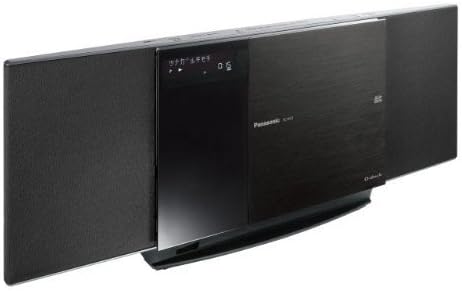
Image: The Panasonic SC-HC4-K Compact Stereo System. This image shows the main unit with its speakers on either side and the central panel, which includes the display and the motorized door for the CD player and iPod/iPad dock, slightly open to reveal the dock. The unit is black with a brushed metal finish on the central panel.
4.5 SD കാർഡ് ചേർക്കൽ
To insert an SD card:
- Locate the SD card slot, typically behind the motorized panel or on the side of the unit.
- കോൺടാക്റ്റുകൾ താഴേക്ക് അഭിമുഖമായി വരുന്ന വിധത്തിൽ SD കാർഡ് ഇടുക, അങ്ങനെ അത് ശരിയായ സ്ഥാനത്ത് ക്ലിക്ക് ചെയ്യപ്പെടുന്നു.
5. പ്രവർത്തന നിർദ്ദേശങ്ങൾ
5.1 അടിസ്ഥാന നിയന്ത്രണങ്ങൾ
- Power (ON/STANDBY): അമർത്തുക പവർ യൂണിറ്റ് ഓണാക്കാനോ ഓഫാക്കാനോ യൂണിറ്റിലെ ബട്ടൺ അല്ലെങ്കിൽ റിമോട്ട് കൺട്രോൾ.
- വോളിയം: ഉപയോഗിക്കുക വോളിയം +/- buttons on the unit or remote to adjust the sound level.
- ഇൻപുട്ട് തിരഞ്ഞെടുക്കുക: അമർത്തുക ഫങ്ഷൻ or ഉറവിടം button to cycle through available inputs (CD, iPod/iPad, SD, FM, AM).
5.2 സിഡി പ്ലേബാക്ക്
- അമർത്തുക തുറക്കുക/അടയ്ക്കുക സിഡി ട്രേ തുറക്കാൻ ബട്ടൺ.
- Place a CD with the label side up into the tray.
- അമർത്തുക തുറക്കുക/അടയ്ക്കുക വീണ്ടും ട്രേ അടയ്ക്കാൻ.
- Select the CD function using the ഫങ്ഷൻ ബട്ടൺ.
- അമർത്തുക കളിക്കുക to start playback. Use ഒഴിവാക്കുക buttons to navigate tracks and നിർത്തുക/താൽക്കാലികമായി നിർത്തുക നിയന്ത്രണത്തിനായി.
5.3 iPod/iPad Playback
- Dock your iPod/iPad as described in Section 4.4.
- Select the iPod/iPad function using the ഫങ്ഷൻ ബട്ടൺ.
- Use the remote control or your device's controls to select and play music or videos.
5.4 SD കാർഡ് പ്ലേബാക്ക്
- Insert an SD card with compatible audio file(ഉദാ. MP3).
- Select the SD function using the ഫങ്ഷൻ ബട്ടൺ.
- The unit will automatically detect and begin playing files, or you can navigate using the remote control.
5.5 റേഡിയോ പ്രവർത്തനം
- Select FM or AM function using the ഫങ്ഷൻ ബട്ടൺ.
- അമർത്തുക ട്യൂണിംഗ് +/- ഒരു സ്റ്റേഷനിലേക്ക് സ്വമേധയാ ട്യൂൺ ചെയ്യാനുള്ള ബട്ടണുകൾ.
- അമർത്തിപ്പിടിക്കുക ട്യൂണിംഗ് +/- for automatic station scanning.
- To preset a station, tune to the desired station, then press മെമ്മറി followed by a preset number button.
5.6 Recording (CD to SD)
The unit supports high-speed recording from CD to SD card (up to 8x speed).
- Insert a CD and an SD card.
- സിഡി ഫംഗ്ഷൻ തിരഞ്ഞെടുക്കുക.
- അമർത്തുക REC button. Follow the on-screen prompts to select recording options (e.g., entire CD, single track).
- അമർത്തുക ആരംഭിക്കുക റെക്കോർഡിംഗ് ആരംഭിക്കാൻ.
5.7 ടൈമർ പ്രവർത്തനങ്ങൾ
The unit includes alarm and sleep timer functions. Refer to the detailed instructions in the full manual for setting these features.
6. പരിപാലനം
- യൂണിറ്റ് വൃത്തിയാക്കൽ: Wipe the unit with a soft, dry cloth. For stubborn dirt, use a cloth lightly dampened with water and a mild detergent, then wipe dry. Do not use abrasive cleaners, benzene, thinner, or alcohol.
- സിഡി ലെൻസ് വൃത്തിയാക്കൽ: Use a commercially available CD lens cleaner.
- സംഭരണം: If the unit will not be used for an extended period, disconnect the power cord from the wall outlet.
7. പ്രശ്നപരിഹാരം
| പ്രശ്നം | പരിഹാരം |
|---|---|
| ശക്തിയില്ല | Ensure the AC power cord is securely connected to both the unit and the wall outlet. |
| ശബ്ദമില്ല | Check the volume level. Ensure the correct input source is selected. Check speaker connections if applicable (this model has integrated speakers). |
| സിഡി പ്ലേ ചെയ്യുന്നില്ല | ലേബൽ വശം മുകളിലായി സിഡി ശരിയായി ചേർത്തിട്ടുണ്ടെന്ന് ഉറപ്പാക്കുക. സിഡിയിൽ പോറലുകളോ വൃത്തികേടുകളോ ഉണ്ടോ എന്ന് പരിശോധിക്കുക. മറ്റൊരു സിഡി പരീക്ഷിക്കുക. |
| iPod/iPad not recognized | Ensure the device is properly docked. Try removing and re-docking the device. Update your device's software if necessary. |
| മോശം റേഡിയോ സ്വീകരണം | Adjust the position of the FM and AM antennas. Move the unit away from other electronic devices that may cause interference. |
8 സ്പെസിഫിക്കേഷനുകൾ
- മോഡൽ: SC-HC4-K
- ബ്രാൻഡ്: പാനസോണിക്
- അനുയോജ്യമായ മീഡിയ: CD, iPod/iPad, SD Card
- ട്യൂണർ: FM/AM ഡിജിറ്റൽ ട്യൂണർ
- റെക്കോർഡിംഗ്: CD to SD (Max 8x speed)
- അളവുകൾ (ഏകദേശം): 56 cm (W) x 25.2 cm (H) x 17.2 cm (D) (Note: Based on package dimensions)
- ഭാരം (ഏകദേശം): 4.12 കി.ഗ്രാം (Note: Based on package weight)
- ഊർജ്ജ സ്രോതസ്സ്: എസി 100-240V, 50/60Hz (Typical range, specific voltage not detailed in provided specifications)
9. വാറൻ്റിയും പിന്തുണയും
For warranty information and customer support, please refer to the warranty card included with your product or contact Panasonic customer service in your region. Keep your purchase receipt as proof of purchase for warranty claims.
Online resources and frequently asked questions may be available on the official Panasonic website. For technical assistance, please provide your model number (SC-HC4-K) and serial number.


