1. ആമുഖം
The Ohaus Scout Pro Digital Balance is a precision weighing instrument designed for accurate measurements in various laboratory and industrial settings. This manual provides essential information for the proper setup, operation, and maintenance of your balance, ensuring optimal performance and longevity.
Key features include a large stainless steel weighing surface, multiple weighing units (grams, kilograms, pounds, ounces, troy ounces, pennyweights), and connectivity options via USB or RS-232 interface.
2 സുരക്ഷാ വിവരങ്ങൾ
- Always operate the balance on a stable, level surface free from vibrations.
- Avoid exposing the balance to extreme temperatures, humidity, or direct sunlight.
- Do not overload the balance beyond its maximum capacity of 600g.
- Keep the balance clean and free from dust and corrosive substances.
- Use only the power adapter supplied with the balance.
- Do not attempt to disassemble or repair the balance yourself. Refer to qualified service personnel.
3. പാക്കേജ് ഉള്ളടക്കം
Carefully unpack the box and ensure all items are present and undamaged. The package should contain:
- Ohaus Scout Pro Digital Balance
- സ്റ്റെയിൻലെസ്സ് സ്റ്റീൽ വെയ്റ്റിംഗ് പാൻ
- എസി പവർ അഡാപ്റ്റർ
- ഉപയോക്തൃ മാനുവൽ (ഈ പ്രമാണം)
- ചുമക്കുന്ന കേസ്
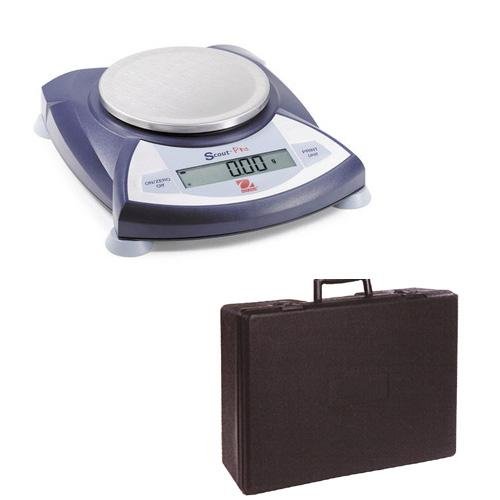
Image 3.1: The Ohaus Scout Pro Digital Balance shown with its included protective carrying case.
4. സജ്ജീകരണം
4.1. പ്ലേസ്മെന്റ്
Place the balance on a firm, level, and stable surface. Ensure the location is free from drafts, vibrations, and rapid temperature changes. Avoid placing it near heat sources or direct sunlight.
4.2. ലെവലിംഗ്
The balance must be level for accurate measurements. Adjust the leveling feet located at the bottom of the balance until the air bubble in the spirit level (usually located near the display) is centered within the circle.
4.3. പവർ കണക്ഷൻ
- Connect the AC power adapter to the power input port on the back of the balance.
- അനുയോജ്യമായ ഒരു ഇലക്ട്രിക്കൽ ഔട്ട്ലെറ്റിലേക്ക് അഡാപ്റ്റർ പ്ലഗ് ചെയ്യുക.
4.4. പ്രാരംഭ പവർ ഓണും പൂജ്യമാക്കലും
അമർത്തുക ഓൺ/സീറോ/ഓഫ് button to turn on the balance. Allow a brief warm-up period (typically 1-2 minutes) for the balance to stabilize. The display should show '0.00g' or '0.000g'. If not, press the ഓൺ/സീറോ/ഓഫ് button again to zero the display.
5. പ്രവർത്തന നിർദ്ദേശങ്ങൾ
5.1. അടിസ്ഥാന തൂക്കം
- Ensure the balance is level and displaying '0.00g'.
- Carefully place the item to be weighed onto the center of the stainless steel weighing pan.
- Wait for the display to stabilize. The stable weight will be shown on the display.
- Remove the item from the pan. The display should return to '0.00g'.
5.2. തൂക്ക യൂണിറ്റുകൾ മാറ്റൽ
The Scout Pro balance supports multiple weighing units. To change the unit:
- അമർത്തുക യൂണിറ്റ് button (or similar button labeled with unit symbols).
- Each press will cycle through the available units: grams (g), kilograms (kg), pounds (lb), ounces (oz), combined pound:ounce (lb:oz), troy ounces (ozt), and pennyweights (dwt).
- Stop at the desired unit. The display will show the current weight in the selected unit.
5.3. ടെയർ ഫംഗ്ഷൻ
To weigh an item in a container, use the tare function:
- ഒഴിഞ്ഞ പാത്രം തൂക്ക പാത്രത്തിൽ വയ്ക്കുക.
- അമർത്തുക ഓൺ/സീറോ/ഓഫ് ബട്ടൺ (അല്ലെങ്കിൽ ഒരു സമർപ്പിത TARE button if available). The display will reset to '0.00g'.
- Add the item to be weighed into the container. The display will show the net weight of the item.
5.4. Connectivity (USB/RS-232)
The balance is equipped with a USB or RS-232 interface for data communication with a computer or printer. For detailed instructions on connecting and configuring these interfaces, refer to the specific communication protocol documentation or the Ohaus website for driver and software information.
6. പരിപാലനം
6.1. വൃത്തിയാക്കൽ
- Always disconnect the balance from the power supply before cleaning.
- Wipe the exterior of the balance with a soft, damp തുണി. ആവശ്യമെങ്കിൽ വീര്യം കുറഞ്ഞ ഡിറ്റർജൻ്റ് ഉപയോഗിക്കാം.
- അബ്രാസീവ് ക്ലീനറുകളോ, ലായകങ്ങളോ, കഠിനമായ രാസവസ്തുക്കളോ ഉപയോഗിക്കരുത്, കാരണം ഇവ ഫിനിഷിനോ ആന്തരിക ഘടകങ്ങളോ നശിപ്പിക്കും.
- Ensure no liquids enter the balance housing or display.
- The stainless steel weighing pan can be removed and washed separately.
6.2. സംഭരണം
When not in use for extended periods, store the balance in its protective carrying case in a dry, dust-free environment. Ensure the balance is clean and disconnected from power.
7. പ്രശ്നപരിഹാരം
If you encounter issues with your Ohaus Scout Pro Digital Balance, refer to the following common problems and solutions:
| പ്രശ്നം | സാധ്യമായ കാരണം | പരിഹാരം |
|---|---|---|
| Display shows 'Err' or 'Overload' | Balance overloaded or damaged. | Remove excess weight. If persistent, contact support. |
| Inaccurate or unstable readings | Not level, vibrations, drafts, temperature changes, dirty pan. | Check leveling, move to a stable location, clean pan. |
| Balance does not turn on | No power, faulty adapter. | Check power connection, try a different outlet, ensure adapter is functional. |
| Display shows '0.00' but weight is not zero | Balance needs zeroing. | അമർത്തുക ഓൺ/സീറോ/ഓഫ് button to re-zero. |
If the problem persists after attempting these solutions, please contact Ohaus customer support.
8 സ്പെസിഫിക്കേഷനുകൾ
| ഫീച്ചർ | സ്പെസിഫിക്കേഷൻ |
|---|---|
| മോഡൽ | Scout Pro 600 X 0.01g |
| ശേഷി | 600 ഗ്രാം |
| വായനാക്ഷമത | 0.01 ഗ്രാം |
| വെയ്റ്റിംഗ് യൂണിറ്റുകൾ | grams (g), kilograms (kg), pounds (lb), ounces (oz), pound:ounce (lb:oz), troy ounces (ozt), pennyweights (dwt) |
| Weighing Surface Material | സ്റ്റെയിൻലെസ്സ് സ്റ്റീൽ |
| ഇൻ്റർഫേസ് | USB, RS-232 |
| ഇനത്തിൻ്റെ ഭാരം | 6.94 പൗണ്ട് (ഏകദേശം 3.15 കിലോഗ്രാം) |
| നിർമ്മാതാവ് | ഒഹാസ് |
| ASIN | B0027I6WPU |
9. വാറൻ്റിയും പിന്തുണയും
For information regarding the product warranty, please refer to the warranty card included with your purchase or visit the official Ohaus website. For technical support, service, or replacement parts, please contact Ohaus customer service directly. Contact details can typically be found on the Ohaus webസൈറ്റിലോ നിങ്ങളുടെ ഉൽപ്പന്ന പാക്കേജിംഗിലോ.
When contacting support, please have your product model number (Scout Pro 600 X 0.01g) and serial number (if applicable) ready.


