ആമുഖം
The Klipsch SW-350 subwoofer is designed to enhance your audio experience by providing deep, clear bass. Featuring a powerful 8-inch driver and a Class D amplifier, this subwoofer integrates seamlessly with various home audio systems. This manual provides detailed instructions for proper setup, operation, and maintenance to ensure optimal performance and longevity of your device.

ചിത്രം: മുൻവശം view of the Klipsch SW-350 Subwoofer, showcasing its sleek black finish and compact design.
പ്രധാന സവിശേഷതകൾ
- 8-inch High-Excursion Driver: Produces powerful bass response with minimal distortion.
- Built-in Digital Ampജീവപര്യന്തം: Delivers 350 watts of dynamic peak power.
- മിനുസമാർന്നതും ആധുനികവുമായ രൂപകൽപ്പന: Complements contemporary home entertainment setups.
- ഫ്ലെക്സിബിൾ കണക്റ്റിവിറ്റി: Includes line-level (RCA) inputs and speaker-level inputs.
- ക്രമീകരിക്കാവുന്ന നിയന്ത്രണങ്ങൾ: Features Auto-on/off, 0-180 degree phase adjustment, variable low-pass filter, and level adjustment for precise sound customization.
സജ്ജീകരണ ഗൈഡ്
1. പായ്ക്ക് ചെയ്യലും പ്ലേസ്മെന്റും
Carefully remove the subwoofer from its packaging. For optimal bass performance, place the SW-350 in a corner of your room. This placement typically maximizes the subwoofer's output. Placing it along the middle of a wall or out in the open room may decrease its effectiveness.
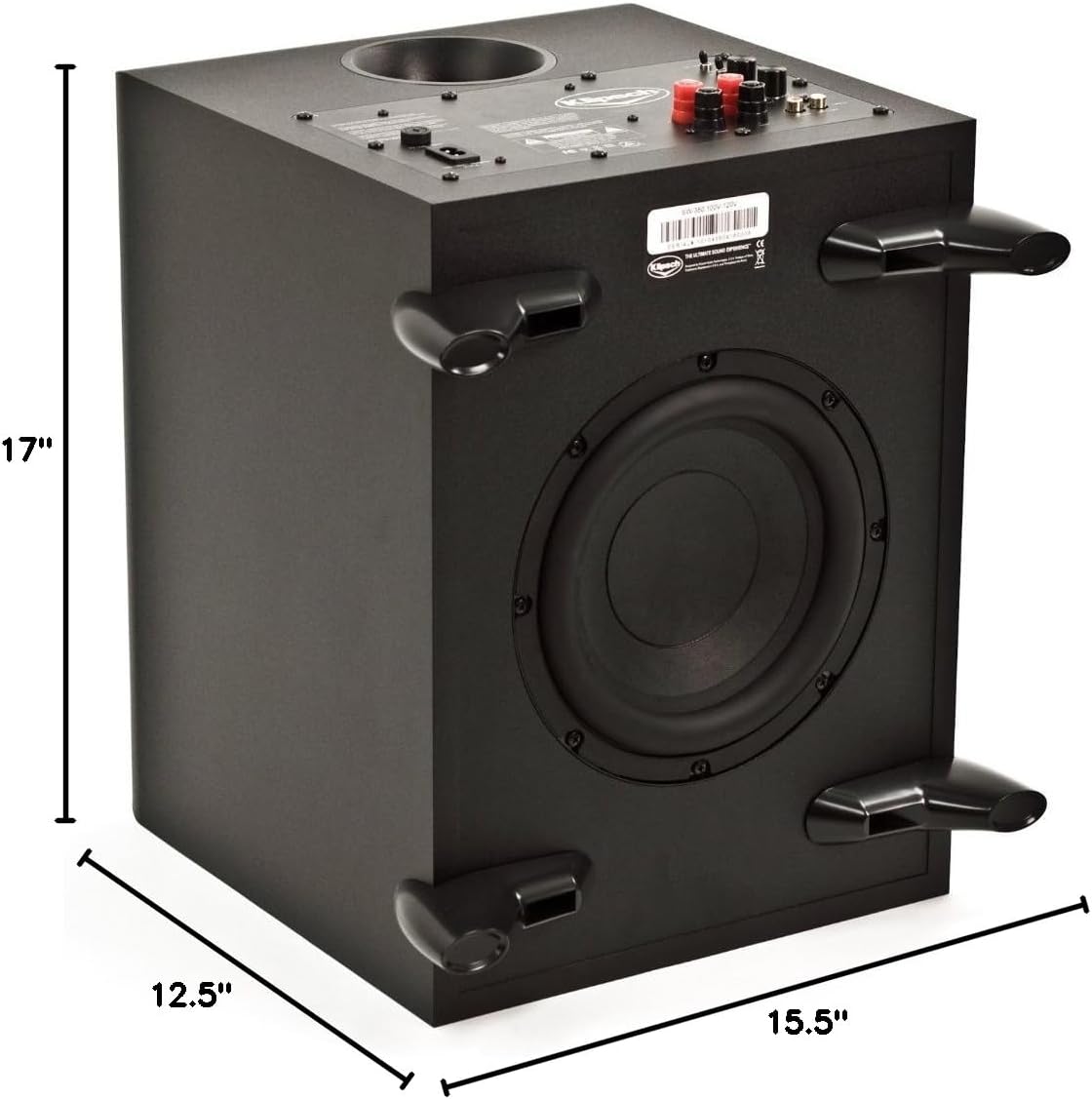
Image: Klipsch SW-350 Subwoofer with indicated dimensions (12.5"D x 17"W x 15.5"H), useful for planning placement.
2. കണക്ഷനുകൾ
The SW-350 offers two primary connection methods:
- Line-Level RCA Jacks: Use RCA cables to connect the subwoofer's L/R line-level inputs to the subwoofer output (LFE or Sub Out) of your receiver or pre-ampജീവൻ.
- High-Level Speaker Binding Posts: For receivers without a dedicated subwoofer output, connect the L/R high-level speaker binding posts to the speaker outputs of your ampലിഫയർ. ശരിയായ പോളാരിറ്റി ഉറപ്പാക്കുക (+ മുതൽ + വരെയും - മുതൽ - വരെയും).
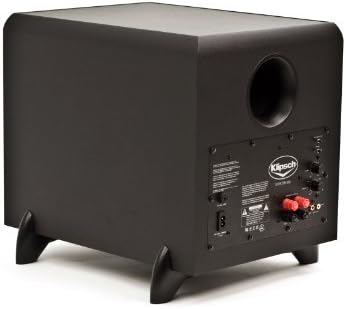
Image: Rear panel of the Klipsch SW-350 Subwoofer, highlighting the RCA and speaker-level input connections, along with control knobs.
3. പവർ കണക്ഷൻ
Connect the power cord to the subwoofer's AC input and then to a standard wall outlet. The subwoofer features an auto-on/off function, which will activate the unit when an audio signal is detected and put it into standby mode when no signal is present for a period.
പ്രവർത്തന നിർദ്ദേശങ്ങൾ
1. Level Adjustment
Use the "Level" control knob on the rear panel to adjust the subwoofer's volume relative to your main speakers. Start with a low setting and gradually increase until the bass blends smoothly with your system without overpowering it.
2. Low-Pass Crossover
The "Low-Pass" control allows you to set the upper frequency limit for the subwoofer. Frequencies above this setting will not be reproduced by the subwoofer. Adjust this to blend the subwoofer's output with your main speakers. A common starting point is 80-100 Hz, but it may vary depending on your main speakers' low-frequency capabilities.
3. Phase Control
The "Phase" switch (0 or 180 degrees) helps to acoustically match the subwoofer's output with your main speakers. Experiment with both settings to find the one that produces the most impactful and coherent bass at your listening position. This often involves listening for the strongest and clearest bass response.
മെയിൻ്റനൻസ്
To maintain the appearance and performance of your Klipsch SW-350 subwoofer, follow these guidelines:
- വൃത്തിയാക്കൽ: Use a soft, dry cloth to wipe down the cabinet. Avoid using abrasive cleaners, solvents, or strong detergents, as these can damage the finish.
- വെൻ്റിലേഷൻ: Ensure that the subwoofer's vents are not obstructed to prevent overheating.
- പരിസ്ഥിതി: Keep the subwoofer away from direct sunlight, heat sources, and excessive moisture.
ട്രബിൾഷൂട്ടിംഗ്
If you encounter issues with your SW-350 subwoofer, refer to the following common problems and solutions:
- ശബ്ദമില്ല:
- Check if the power cord is securely connected to both the subwoofer and the wall outlet.
- Verify that the subwoofer is powered on (the blue light on the front panel should be illuminated when active).
- Ensure that the audio input cables (RCA or speaker-level) are correctly connected to both the subwoofer and your receiver/ampജീവൻ.
- Confirm that your receiver's subwoofer output is enabled and the volume is not muted or set too low.
- If the blue light is on but there's no sound, try a different audio source or cable to rule out external issues.
- വികലമായ അല്ലെങ്കിൽ ബൂമി ബാസ്:
- Adjust the "Level" control on the subwoofer to a lower setting.
- Experiment with the "Low-Pass" crossover setting to find a better blend with your main speakers.
- Try adjusting the "Phase" switch (0 or 180 degrees) to see if it improves bass clarity and impact.
- Consider repositioning the subwoofer within the room; slight adjustments can significantly impact bass quality.
- Subwoofer Does Not Turn On/Off Automatically:
- Ensure the input signal from your receiver/amplifier is strong enough to trigger the auto-on feature. Increase the subwoofer output level from your receiver if necessary.
- Verify that the subwoofer is not connected to a switched outlet that turns off with your main system.
സ്പെസിഫിക്കേഷനുകൾ
| ഫീച്ചർ | വിശദാംശങ്ങൾ |
|---|---|
| മോഡലിൻ്റെ പേര് | അങ്ങിനെ-350 |
| സ്പീക്കർ തരം | ഫ്ലോർ സ്റ്റാൻഡിംഗ് |
| സബ് വൂഫർ വ്യാസം | 8 ഇഞ്ച് |
| Ampജീവിത തരം | ക്ലാസ് ഡി |
| സ്പീക്കർ പരമാവധി ഔട്ട്പുട്ട് പവർ | 350 വാട്ട്സ് (പീക്ക്) |
| ഫ്രീക്വൻസി പ്രതികരണം | 31-120 Hz +/-3 decibels |
| പരമാവധി അക്കോസ്റ്റിക് ഔട്ട്പുട്ട് | 110 decibels @ 30 Hz (1/8 space, 1 meter) |
| ഘട്ടം | 0-180 ഡിഗ്രി വരെ മാറാം |
| ഇൻപുട്ടുകൾ | L/R line-level RCA jacks, L/R high level speaker binding posts |
| ഉൽപ്പന്ന അളവുകൾ (H x W x D) | 15.5 ഇഞ്ച് (39.4 സെ.മീ) x 12.5 ഇഞ്ച് (31.8 സെ.മീ) x 17 ഇഞ്ച് (43.2 സെ.മീ) |
| ഇനത്തിൻ്റെ ഭാരം | 27 പൗണ്ട് (12.2 കി.ഗ്രാം) |
| നിറം | കറുപ്പ് |
ബോക്സിൽ എന്താണുള്ളത്
The Klipsch SW-350 Subwoofer package typically includes:
- Klipsch SW-350 Subwoofer Unit
- പവർ കോർഡ്
- RCA or speaker-level cables (may vary by region/retailer)
- ഉപയോക്തൃ മാനുവൽ (ഈ പ്രമാണം)
വാറൻ്റിയും പിന്തുണയും
The Klipsch SW-350 Subwoofer comes with a limited warranty. Please refer to the warranty card included with your product or visit the official Klipsch website for detailed warranty terms and conditions. For technical support, service, or replacement parts, please contact Klipsch customer service directly.
കൂടുതൽ വിവരങ്ങൾക്ക്, നിങ്ങൾക്ക് സന്ദർശിക്കാവുന്നതാണ് ആമസോണിലെ ക്ലിപ്ഷ് സ്റ്റോർ.


