ആമുഖം
This manual provides comprehensive instructions for setting up, operating, and maintaining your Pure Siesta FLOW digital radio alarm clock. Please read this manual thoroughly before using the device to ensure proper functionality and to maximize your user experience.

ഫ്രണ്ട് view of the Pure Siesta FLOW digital radio alarm clock, showcasing its display and front controls.
സജ്ജമാക്കുക
1. പായ്ക്ക് ചെയ്യലും പ്ലേസ്മെന്റും
- Carefully remove the Siesta FLOW from its packaging.
- Place the unit on a stable, flat surface, away from direct sunlight, heat sources, or excessive moisture.
- യൂണിറ്റിന് ചുറ്റും മതിയായ വായുസഞ്ചാരം ഉറപ്പാക്കുക.
2. പവർ കണക്ഷൻ
Connect the supplied power adapter to the DC input port on the back of the Siesta FLOW, then plug the adapter into a wall outlet. The unit will power on automatically.
3. പ്രാരംഭ സജ്ജീകരണ വിസാർഡ്
Upon first power-on, the Siesta FLOW will guide you through an initial setup wizard. Use the navigation buttons (Up/Down/Select) to configure the following:
- ഭാഷ: നിങ്ങൾ ഇഷ്ടപ്പെടുന്ന ഭാഷ തിരഞ്ഞെടുക്കുക.
- സമയവും തീയതിയും: The unit can synchronize time via DAB or internet. You may set it manually if needed.
- നെറ്റ്വർക്ക് കണക്ഷൻ (വൈ-ഫൈ):
- ലിസ്റ്റിൽ നിന്ന് നിങ്ങളുടെ വൈഫൈ നെറ്റ്വർക്ക് തിരഞ്ഞെടുക്കുക.
- Enter your Wi-Fi password using the navigation controls. The touch-sensitive buttons on the front panel require a light touch for input.
- കണക്ഷൻ സ്ഥിരീകരിക്കുക.

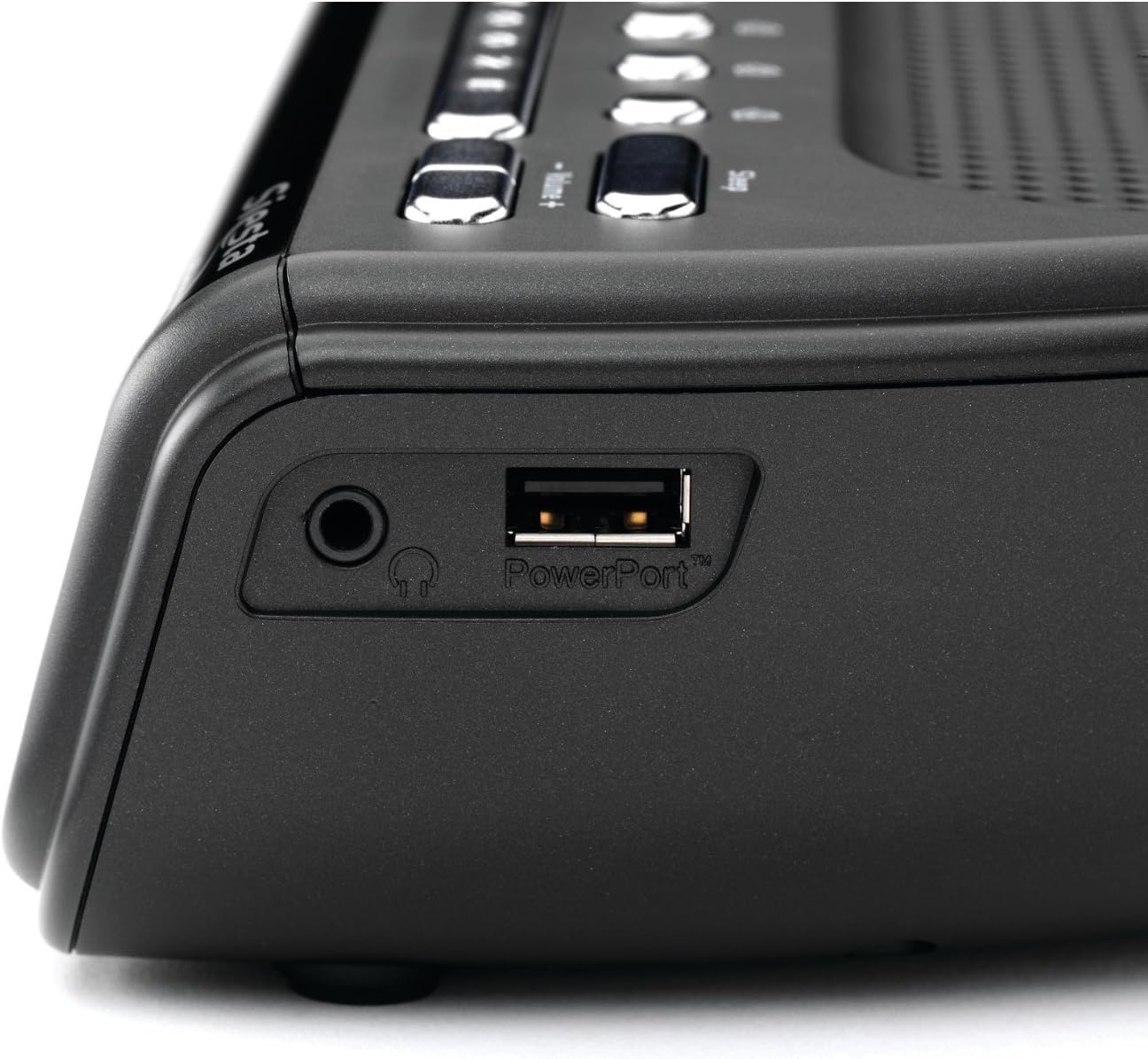
വശം view of the Pure Siesta FLOW, highlighting the headphone jack and the PowerPort USB connection for charging external devices.
4. ആന്റിന ക്രമീകരണം
Extend the telescopic antenna fully for optimal DAB and FM radio reception. Adjust its position to improve signal strength if necessary.
പ്രവർത്തന നിർദ്ദേശങ്ങൾ
1. നിയന്ത്രിക്കുന്നുview

മുകളിൽ view of the Pure Siesta FLOW, illustrating the layout of the control buttons including Standby, Source, Presets, Snooze, and Volume.
- സ്റ്റാൻഡ്ബൈ ബട്ടൺ: യൂണിറ്റ് ഓൺ അല്ലെങ്കിൽ ഓഫ് ചെയ്യുന്നു (സ്റ്റാൻഡ്ബൈ മോഡിലേക്ക്).
- ഉറവിട ബട്ടൺ: Cycles through available audio sources (DAB, FM, Internet Radio, Aux In).
- പ്രീസെറ്റ് ബട്ടണുകൾ (1-4): Quick access to saved radio stations.
- സ്നൂസ് ബട്ടൺ: Temporarily silences an active alarm.
- വോളിയം +/- ബട്ടണുകൾ: ഓഡിയോ ഔട്ട്പുട്ട് ലെവൽ ക്രമീകരിക്കുന്നു.
- Navigation Buttons (Up/Down/Select) & Back Button: Used for menu navigation and selection on the front panel. These are touch-sensitive.
2. Radio Functions
- DAB/FM റേഡിയോ:
- അമർത്തുക ഉറവിടം button to select DAB or FM.
- The unit will scan for available stations. Use navigation buttons to browse and select.
- To save a preset, tune to the desired station, then press and hold one of the പ്രീസെറ്റ് buttons (1-4) until "Preset Saved" appears.
- ഇൻ്റർനെറ്റ് റേഡിയോ:
- Ensure the unit is connected to Wi-Fi.
- Select "Internet Radio" as the source.
- Browse stations by location, genre, or search. You can also manage favorites via the Pure Lounge webസൈറ്റ്.
3. അലാറം പ്രവർത്തനങ്ങൾ
The Siesta FLOW supports multiple alarms (up to 4). Access alarm settings via the main menu.
- ഒരു അലാറം സജ്ജീകരിക്കുന്നു:
- Select an alarm slot (e.g., Alarm 1).
- അലാറം സമയം സജ്ജമാക്കുക.
- Choose the alarm source: DAB, FM, Internet Radio, or built-in tones/sounds.
- Select the alarm frequency (Daily, Weekdays, Weekends, Once).
- അലാറം വോളിയം ക്രമീകരിക്കുക.
- Ensure the alarm is set to "On".
- സ്നൂസ്: അലാറം മുഴങ്ങുമ്പോൾ, അമർത്തുക സ്നൂസ് ചെയ്യുക button to temporarily pause it. The snooze duration can be configured in settings.
- ഒരു അലാറം നിർത്തൽ: Press any button other than Snooze to turn off the active alarm.
The display of the Pure Siesta FLOW, showing the selection of a built-in sound, "Forest Birds," as an alarm or relaxation option.
4. സ്ലീപ്പ് ടൈമർ
The sleep timer allows the radio to play for a set duration before automatically turning off. Access the Sleep Timer option from the main menu and select your desired duration.
5. ഡിസ്പ്ലേ ക്രമീകരണങ്ങൾ
The Siesta FLOW features an auto-dimming display that adjusts to ambient light. You can also manually adjust the brightness or set a minimum brightness level in the display settings menu.
6. USB PowerPort
The USB PowerPort on the side of the unit (labeled "PowerPort") can be used to charge compatible external devices, such as smartphones or MP3 players. This port is for charging only and does not support data transfer.
മെയിൻ്റനൻസ്
1. വൃത്തിയാക്കൽ
- വൃത്തിയാക്കുന്നതിന് മുമ്പ് പവർ അഡാപ്റ്റർ വിച്ഛേദിക്കുക.
- Wipe the unit with a soft, dry, lint-free cloth.
- അബ്രാസീവ് ക്ലീനറുകൾ, മെഴുക് അല്ലെങ്കിൽ ലായകങ്ങൾ എന്നിവ ഉപയോഗിക്കരുത്, കാരണം അവ ഫിനിഷിന് കേടുവരുത്തും.
2. സോഫ്റ്റ്വെയർ അപ്ഡേറ്റുകൾ
Periodically check for software updates via the system settings menu. Updates can provide new features and performance improvements. Follow the on-screen instructions to install any available updates.
ട്രബിൾഷൂട്ടിംഗ്
| പ്രശ്നം | സാധ്യമായ കാരണം | പരിഹാരം |
|---|---|---|
| No power / Unit unresponsive | പവർ അഡാപ്റ്റർ ബന്ധിപ്പിച്ചിട്ടില്ല അല്ലെങ്കിൽ ഔട്ട്ലെറ്റ് തകരാറിലാണ്. | Ensure power adapter is securely connected and try a different power outlet. |
| മോശം റേഡിയോ റിസപ്ഷൻ (DAB/FM) | ആന്റിന വികസിതമല്ല അല്ലെങ്കിൽ മോശം സിഗ്നൽ ഏരിയ. | Fully extend and adjust the telescopic antenna. Try relocating the unit to an area with better reception. |
| Internet radio buffering or disconnecting | Weak Wi-Fi signal or network congestion. | Ensure the unit is within range of your Wi-Fi router. Restart your router. Check for other devices consuming bandwidth. |
| Touch buttons unresponsive or slow | Incorrect touch technique or temporary software glitch. | Use a light, firm touch. Restart the unit by unplugging and re-plugging the power. |
| യൂണിറ്റ് മരവിക്കുന്നു അല്ലെങ്കിൽ പ്രതികരിക്കുന്നില്ല. | സോഫ്റ്റ്വെയർ പിശക്. | Disconnect the power adapter for 10 seconds, then reconnect it to perform a soft reset. If issues persist, consider a factory reset (see manual for specific steps). |
ഫാക്ടറി റീസെറ്റ്
If problems persist, a factory reset may resolve them. This will erase all saved settings, presets, and alarms. Refer to the system settings menu on your device for the "Factory Reset" option.
സ്പെസിഫിക്കേഷനുകൾ
| ഫീച്ചർ | വിശദാംശങ്ങൾ |
|---|---|
| ബ്രാൻഡ് | ശുദ്ധമായ |
| മോഡൽ നമ്പർ | വിഎൽ-61220 |
| അളവുകൾ (L x W x H) | 16.6 x 18 x 6.6 സെ.മീ |
| ഭാരം | 420 ഗ്രാം |
| പവർ ഔട്ട്പുട്ട് | 4.6 വാട്ട്സ് |
| പ്രത്യേക സവിശേഷതകൾ | Alarm, Snooze, Radio (DAB/FM/Internet), Timer, USB PowerPort |
| പവർ ഉറവിടം | കോർഡഡ് ഇലക്ട്രിക് |
| മൗണ്ടിംഗ് തരം | ടേബിൾടോപ്പ് |
വാറൻ്റിയും പിന്തുണയും
For warranty information and technical support, please refer to the documentation provided with your purchase or visit the official Pure webസൈറ്റ്. വാറന്റി ക്ലെയിമുകൾക്കായി നിങ്ങളുടെ വാങ്ങലിന്റെ തെളിവ് സൂക്ഷിക്കുക.