1. ആമുഖം
This manual provides detailed instructions for the setup, operation, and maintenance of your Astak CM-MOLE Pan/Tilt Wi-Fi IP Surveillance Camera. This camera is designed for remote monitoring, featuring pan and tilt capabilities, motion detection, night vision, and audio functionality, accessible via web browsers and mobile devices.
2 സുരക്ഷാ വിവരങ്ങൾ
- Use only the power adapter supplied with the camera.
- Ensure the camera is installed in a stable location to prevent falls.
- While rated IP65 for outdoor use, avoid direct exposure to heavy rain or submersion in water.
- Do not operate the camera in extreme temperatures outside its specified operating range.
- ശക്തമായ കാന്തികക്ഷേത്രങ്ങളിൽ നിന്ന് ക്യാമറ അകറ്റി നിർത്തുക.
- Do not attempt to disassemble or repair the camera yourself. Contact support for assistance.
3. പാക്കേജ് ഉള്ളടക്കം
നിങ്ങളുടെ പാക്കേജിൽ എല്ലാ ഇനങ്ങളും ഉണ്ടെന്ന് ഉറപ്പാക്കുക:
- Astak CM-MOLE IP Camera Unit
- പവർ അഡാപ്റ്റർ
- ഇഥർനെറ്റ് കേബിൾ
- മൗണ്ടിംഗ് ബ്രാക്കറ്റും സ്ക്രൂകളും
- ദ്രുത ആരംഭ ഗൈഡ്
4. ഉൽപ്പന്നം കഴിഞ്ഞുview
Familiarize yourself with the components of your Astak CM-MOLE camera.
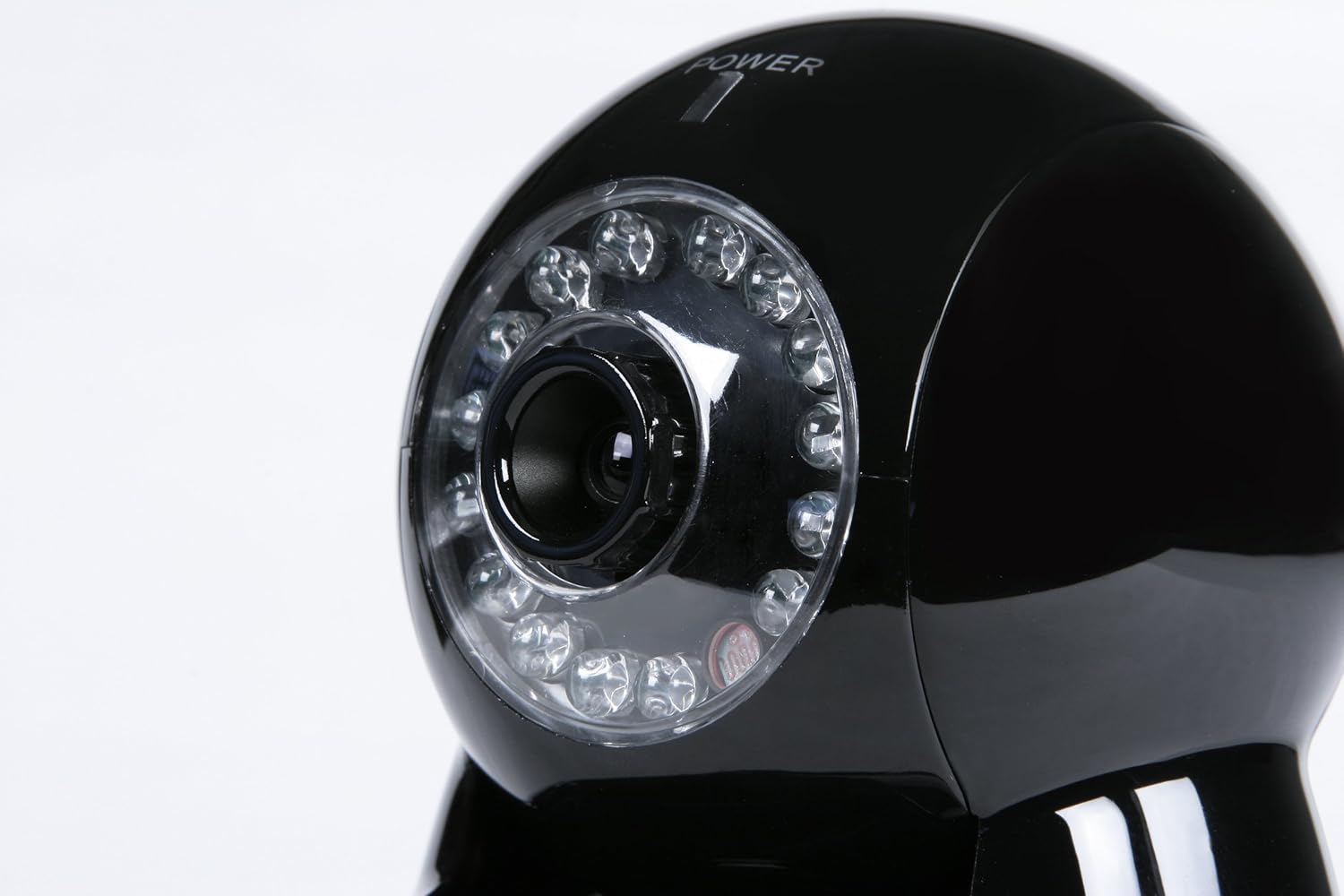
ചിത്രം 4.1: മുൻഭാഗം View. This image displays the front of the Astak CM-MOLE camera, highlighting the central camera lens and the array of infrared LEDs for night vision capabilities.

Figure 4.2: Full Unit View. ഒരു സമ്പൂർണ്ണ view of the Astak CM-MOLE camera, including its base and the attached Wi-Fi antenna on the rear, providing a sense of its overall size and design.

ചിത്രം 4.3: പിൻഭാഗം View. This image shows the back of the Astak CM-MOLE camera, detailing the Ethernet port, audio input/output jacks, power input, and the connection point for the Wi-Fi antenna.

Figure 4.4: Port Detail. ഒരു ക്ലോസപ്പ് view of the connectivity ports on the rear of the Astak CM-MOLE camera, including the Ethernet port, audio input, audio output, power input, and the antenna connector.
5. സജ്ജീകരണം
5.1 പ്രാരംഭ സജ്ജീകരണം
- പവർ ബന്ധിപ്പിക്കുക: Plug the power adapter into the camera's power input port and then into a wall outlet. The camera will power on.
- നെറ്റ്വർക്ക് കണക്ഷൻ:
- വയർഡ് കണക്ഷൻ: For initial setup or if Wi-Fi is not preferred, connect one end of the Ethernet cable to the camera's Ethernet port and the other end to your router or network switch.
- വയർലെസ് കണക്ഷൻ: If using Wi-Fi, ensure the antenna is securely attached. Wi-Fi configuration will be performed through the setup software or mobile application.
- Software/App Installation: Install the Astak surveillance software on your computer or download the compatible mobile application (for iOS/Android) from your device's app store.
5.2 SD കാർഡ് ഇൻസ്റ്റലേഷൻ
The camera supports local recording to an SD card (not included).
- ക്യാമറയിൽ SD കാർഡ് സ്ലോട്ട് കണ്ടെത്തുക.
- Gently insert the SD card into the slot until it clicks into place. Ensure the card is oriented correctly.
- Format the SD card through the camera's software interface for optimal performance.
6. ക്യാമറ പ്രവർത്തിപ്പിക്കുക
6.1 Remote Access and Viewing
Access your camera's live feed and settings from various devices:
- Web ബ്രൗസർ: എ തുറക്കുക web browser on your computer and enter the camera's IP address. Log in with your credentials.
- മൊബൈൽ ആപ്പ്: Use the dedicated mobile application on your iPhone or other compatible smartphone/tablet. Follow the app's instructions to add and view നിങ്ങളുടെ ക്യാമറ.
6.2 പാൻ, ടിൽറ്റ് നിയന്ത്രണം
The camera offers remote pan (270 degrees) and tilt (125 degrees) functionality.
- ഉള്ളിൽ web interface or mobile app, locate the directional controls (up, down, left, right).
- Click or tap these controls to adjust the camera's viewing ആംഗിൾ.
6.3 മോഷൻ ഡിറ്റക്ഷനും അലേർട്ടുകളും
The camera features sophisticated motion detection to monitor activity.
- കോൺഫിഗറേഷൻ: Access the motion detection settings in the camera's software. You can define detection zones and sensitivity levels.
- അറിയിപ്പുകൾ: When motion is detected, the camera can send immediate notifications with image attachments via email or Twitter. Configure these alert settings in the camera's interface.
6.4 വീഡിയോ റെക്കോർഡിംഗ്
വീഡിയോ ഫൂ റെക്കോർഡ് ചെയ്യുകtage to an installed SD card or a network storage location.
- മാനുവൽ റെക്കോർഡിംഗ്: Initiate recording directly from the live view ഇൻ്റർഫേസ്.
- ഷെഡ്യൂൾഡ് റെക്കോർഡിംഗ്: Set up recording schedules based on time or motion detection events.
- പ്ലേബാക്ക്: റെക്കോർഡ് ചെയ്ത foo ആക്സസ് ചെയ്യുകtage through the camera's software or mobile app.
7. പരിപാലനം
7.1 വൃത്തിയാക്കൽ
- മൃദുവായതും ഉണങ്ങിയതുമായ ഒരു തുണി ഉപയോഗിച്ച് ക്യാമറ ലെൻസും ബോഡിയും സൌമ്യമായി തുടയ്ക്കുക.
- കഠിനമായ രാസവസ്തുക്കളോ ഉരച്ചിലുകൾ ഉപയോഗിക്കരുത്.
7.2 ഫേംവെയർ അപ്ഡേറ്റുകൾ
നിർമ്മാതാവിന്റെ website for firmware updates. Firmware updates can improve performance, add features, or address security vulnerabilities. Follow the provided instructions carefully when performing an update.
8. പ്രശ്നപരിഹാരം
| പ്രശ്നം | സാധ്യമായ കാരണം | പരിഹാരം |
|---|---|---|
| ക്യാമറ ഓണാക്കുന്നില്ല | Power adapter not connected; faulty outlet | Ensure power adapter is securely connected and the outlet is functional. Try a different outlet. |
| Cannot connect to camera (wired) | Ethernet cable loose; network issue; incorrect IP address | Check Ethernet cable connection. Verify network settings. Ensure correct IP address is used. |
| Cannot connect to camera (Wi-Fi) | Incorrect Wi-Fi password; camera out of range; Wi-Fi interference | Re-enter Wi-Fi password. Move camera closer to router. Reduce Wi-Fi interference. |
| ചലന കണ്ടെത്തൽ അലേർട്ടുകൾ ലഭിച്ചില്ല. | Incorrect email/Twitter settings; email server security (SSL) issues; low sensitivity | Verify alert settings and credentials. Note that some modern email services (e.g., Gmail, Yahoo) may have increased security (SSL) that older camera firmware might not support, preventing email alerts. Adjust motion sensitivity. |
| മോശം വീഡിയോ നിലവാരം | Low bandwidth; dirty lens; poor lighting | Check network bandwidth. Clean the camera lens. Ensure adequate lighting or verify night vision is active. |
| Pan/Tilt not responding | Network lag; mechanical obstruction; software issue | Check network connection for stability. Ensure no physical obstructions. Restart camera and software. |
9 സ്പെസിഫിക്കേഷനുകൾ
| ഫീച്ചർ | വിശദാംശങ്ങൾ |
|---|---|
| മോഡൽ നമ്പർ | മുഖ്യമന്ത്രി-മോൾ |
| ബ്രാൻഡ് | അസ്താക് |
| കണക്റ്റിവിറ്റി ടെക്നോളജി | വയർലെസ് (വൈ-ഫൈ) |
| പവർ ഉറവിടം | കോർഡഡ് ഇലക്ട്രിക് |
| ബാറ്ററികൾ ആവശ്യമാണ് | Yes (for internal clock/backup, if applicable) |
| അനുയോജ്യമായ ഉപകരണങ്ങൾ | സ്മാർട്ട്ഫോൺ, ടാബ്ലെറ്റ് |
| കൺട്രോളർ തരം | Vera, iOS (App Control) |
| വീഡിയോ ക്യാപ്ചർ റെസല്യൂഷൻ | 1080p |
| വീഡിയോ ക്യാപ്ചർ ഫോർമാറ്റ് | MP4 |
| നിറം | കറുപ്പ് |
| ഫോം ഫാക്ടർ | താഴികക്കുടം |
| അളവുകൾ (L x W x H) | 7 x 6 x 7 ഇഞ്ച് |
| ഇനത്തിൻ്റെ ഭാരം | 2.25 പൗണ്ട് |
| ലോ ലൈറ്റ് ടെക്നോളജി | പകൽ/രാത്രി |
| അലേർട്ട് തരം | ചലനം മാത്രം |
| അന്താരാഷ്ട്ര സംരക്ഷണ റേറ്റിംഗ് | IP65 |
| പ്രത്യേക ഫീച്ചർ | Adjustable Panning, Audio Recording |
| ഇൻഡോർ/ഔട്ട്ഡോർ ഉപയോഗം | ഇൻഡോർ, ഔട്ട്ഡോർ |
10. വാറൻ്റിയും പിന്തുണയും
For warranty information and technical support, please refer to the documentation included with your purchase or visit the official Astak webസൈറ്റ്. വാറന്റി ക്ലെയിമുകൾക്കായി നിങ്ങളുടെ വാങ്ങലിന്റെ തെളിവ് സൂക്ഷിക്കുക.


