1. ആമുഖം
The Kodak Easyshare M530 is a 12-megapixel digital camera designed for ease of use and efficient photo sharing. It features a 3x optical zoom lens, a 2.7-inch LCD with KODAK Color Science Technology, and intelligent shooting modes to simplify photography.
പ്രധാന സവിശേഷതകളിൽ ഇവ ഉൾപ്പെടുന്നു:
- 12-megapixel resolution: Enables stunning prints up to 30 x 40 inches.
- 3x optical zoom: For capturing distant subjects with clarity.
- 2.7 ഇഞ്ച് എൽസിഡി: Features KODAK Color Science Technology for vibrant image display.
- Kodak Smart Capture feature: Automatically adjusts camera settings for optimal results in various environments.
- Face Recognition feature: Automatically identifies and optimizes settings for faces in a scene, and helps organize photos.
- SD/SDHC memory card compatibility: For expandable storage (memory card not included).
2. സജ്ജീകരണം
2.1. ബാറ്ററി ഇൻസ്റ്റാളേഷനും ചാർജിംഗും
The Kodak Easyshare M530 uses a Kodak Rechargeable Li-Ion Battery KLIC-7006. Ensure the battery is fully charged before initial use.
- ക്യാമറയുടെ അടിയിൽ സ്ഥിതിചെയ്യുന്ന ബാറ്ററി കമ്പാർട്ട്മെന്റ് കവർ തുറക്കുക.
- Insert the KLIC-7006 Li-Ion battery, ensuring correct orientation according to the diagram inside the compartment.
- ബാറ്ററി കമ്പാർട്ട്മെൻ്റ് കവർ സുരക്ഷിതമായി അടയ്ക്കുക.
- Connect the camera to the Kodak USB AC adapter using the provided USB cable for in-camera charging. The charging indicator will illuminate.
2.2. മെമ്മറി കാർഡ് ഇൻസ്റ്റാളേഷൻ
The camera supports SD/SDHC memory cards. A memory card is required to store a significant number of photos and videos.
- സാധാരണയായി ബാറ്ററി കമ്പാർട്ടുമെന്റിന് സമീപം സ്ഥിതി ചെയ്യുന്ന മെമ്മറി കാർഡ് സ്ലോട്ട് കവർ തുറക്കുക.
- Insert the SD or SDHC memory card into the slot with the metal contacts facing the correct direction (refer to the camera's internal diagram). Push until it clicks into place.
- മെമ്മറി കാർഡ് സ്ലോട്ട് കവർ സുരക്ഷിതമായി അടയ്ക്കുക.
3. ക്യാമറ പ്രവർത്തിപ്പിക്കുക
3.1. പവർ ഓൺ/ഓഫ്
Press the power button located on the top of the camera to turn it on or off. The lens will extend when powered on.
3.2. ഫോട്ടോ എടുക്കൽ
- ക്യാമറ ഓണാക്കുക.
- Frame your shot using the 2.7-inch LCD screen.
- Press the shutter button halfway down to focus. The focus indicator will confirm focus.
- Press the shutter button all the way down to capture the image.
3.3. Smart Capture Feature
Kodak's Smart Capture feature automatically detects the scene and adjusts camera settings for optimal exposure, focus, and ISO. This ensures clear, sharp pictures even in challenging lighting conditions.
3.4. Face Recognition Feature
The camera can automatically recognize up to 20 pre-tagged faces and up to five faces in a single image. This feature optimizes focus and exposure for faces and aids in organizing photos later.
3.5. സൂം പ്രവർത്തനം
Use the zoom controls (typically a rocker switch) to adjust the 3x optical zoom for closer shots or wider views.
3.6. ഫ്ലാഷ് മോഡുകൾ
The camera features various flash modes including Auto, On, Off, Slow Synch, and Rear Curtain Synch. Select the appropriate mode based on lighting conditions and desired effect.
3.7. വീഡിയോ റെക്കോർഡിംഗ്
The Kodak Easyshare M530 can record continuous VGA video (640 x 480) at 30 frames per second with audio. Video print options include 1- and 9-up prints.
3.8. പ്ലേബാക്ക്
വീണ്ടുംview captured images and videos, switch the camera to playback mode. Use the navigation buttons to browse through your media.
3.9. Sharing Images
The dedicated Share button allows you to tag pictures directly from your camera for easy uploading to platforms like YouTube, Facebook, Flickr, and Kodak Gallery sites, or for emailing. Connect the camera to your computer, and the Kodak Share button app will automatically upload your tagged pictures.
4. പരിപാലനം
4.1. ക്യാമറ വൃത്തിയാക്കൽ
Use a soft, lint-free cloth to clean the camera body and LCD screen. For the lens, use a specialized lens cleaning cloth and solution if necessary, avoiding abrasive materials.
4.2. ബാറ്ററി പരിചരണം
To prolong battery life, avoid extreme temperatures. Store the battery in a cool, dry place when not in use. Recharge the battery using only the specified Kodak charger.
5. പ്രശ്നപരിഹാരം
For common issues, refer to the full user guide. Ensure the battery is charged and the memory card is correctly inserted. If the camera is unresponsive, try removing and reinserting the battery.
6 സ്പെസിഫിക്കേഷനുകൾ
| ഫീച്ചർ | സ്പെസിഫിക്കേഷൻ |
|---|---|
| ഫോട്ടോ സെൻസർ റെസല്യൂഷൻ | 12 എം.പി |
| ഒപ്റ്റിക്കൽ സൂം | 3x |
| സ്ക്രീൻ വലിപ്പം | 2.7 ഇഞ്ച് |
| ഡിസ്പ്ലേ തരം | എൽസിഡി |
| വീഡിയോ റെസല്യൂഷൻ | 480p (VGA) at 30 FPS |
| ഫ്ലാഷ് മെമ്മറി തരം | SD/SDHC card, Internal (32 MB) |
| ബാറ്ററി തരം | Rechargeable Li-Ion Battery KLIC-7006 |
| ഇനത്തിൻ്റെ ഭാരം | 5.28 ഔൺസ് |
| കണക്റ്റിവിറ്റി ടെക്നോളജി | USB |
7. ബോക്സിൽ എന്താണുള്ളത്?
- Kodak EasyShare M530 Digital Camera
- Kodak Rechargeable Li-Ion Battery KLIC-7006
- Kodak USB AC adapter for in-camera charging
- റിസ്റ്റ് സ്ട്രാപ്പ്
- USB കേബിൾ
- ഉപയോക്തൃ ഗൈഡ്
8. പ്രധാനപ്പെട്ട വിവരങ്ങൾ
8.1. നിയമപരമായ നിരാകരണം
Camera has NO Flaws, therefore NO returns will be accepted.
9. ഉൽപ്പന്ന ദൃശ്യങ്ങൾ

ചിത്രം 1: ഫ്രണ്ട് view of the Kodak Easyshare M530 Digital Camera in red, highlighting the lens and flash.

ചിത്രം 2: കോണാകൃതിയിലുള്ളത് view of the Kodak Easyshare M530 Digital Camera in red, showing the compact design.
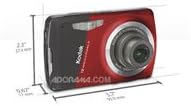
ചിത്രം 3: Diagram illustrating the dimensions of the Kodak Easyshare M530 Digital Camera.
10. ഔദ്യോഗിക ഉൽപ്പന്ന വീഡിയോകൾ
How To Use Your Kodak M530
വീഡിയോ 1: A short video demonstrating the basic usage and features of the Kodak Easyshare M530 camera.
Introducing Kodak Easyshare M-Series Cameras
വീഡിയോ 2: An introductory video showcasing the features and benefits of the Kodak Easyshare M-Series cameras, including the M530.


