1. ഉൽപ്പന്നം കഴിഞ്ഞുview
The StarTech.com DB92422 is an adapter designed to convert an RS-422 or RS-485 DB9 male serial connector to a 5-pin terminal block connector. This adapter facilitates industrial wiring applications by providing a secure, screw-type connection for serial communication lines.

Image: StarTech.com DB92422 adapter showing the DB9 male connector and the 5-pin terminal block.
പ്രധാന സവിശേഷതകൾ:
- Converts a DB9 male RS422/485 port to a 5-pin terminal block.
- Supports four-wire RS422, RS485, and two-wire RS485 modes.
- Features a 3.5mm 5-pin terminal block.
- Supports signal ground over terminal blocks.
- Meets screw-type industrial wiring standards.
2. സജ്ജീകരണവും ഇൻസ്റ്റാളേഷനും
This adapter provides a direct connection between a DB9 serial port and a 5-pin terminal block. No software or drivers are required for its operation.
അഡാപ്റ്റർ ബന്ധിപ്പിക്കുന്നു:
- Connect the DB9 Side: Plug the DB9 male connector of the adapter into the female DB9 serial port of your RS422 or RS485 device (e.g., computer, industrial equipment). Secure the connection using the thumbscrews on the DB9 connector.
- Wire the Terminal Block: Identify the appropriate wires from your serial communication cable. The 5-pin terminal block provides access to the first five pins of the DB9 connector.
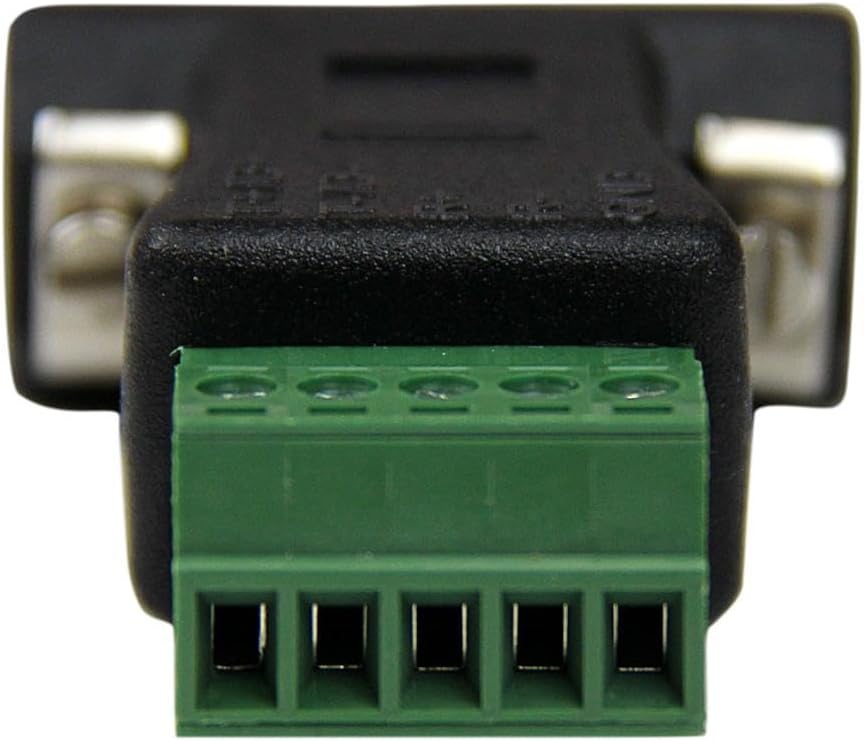
ചിത്രം: ക്ലോസ്-അപ്പ് view of the 5-pin terminal block on the StarTech.com DB92422 adapter.
Important Pinout Information: The DB92422 adapter utilizes pins 1-5 of the DB9 connector for its terminal block connections. It is crucial to consult the documentation for your specific RS422/RS485 device to determine the correct pin assignments (e.g., TxD+, TxD-, RxD+, RxD-, GND) for these DB9 pins. Standard RS422/RS485 pinouts can vary, and this adapter provides direct access to the first five pins.
To connect wires to the terminal block:
- Loosen the screws on the terminal block for the desired pin.
- Insert the stripped end of your wire into the corresponding terminal opening.
- Tighten the screw to secure the wire firmly. Ensure no loose strands are present that could cause short circuits.
3. പ്രവർത്തന നിർദ്ദേശങ്ങൾ
Once the adapter is physically connected and wired correctly, it functions as a passive pass-through for serial data. The adapter itself does not require any power or configuration. Data transmission will occur according to the RS422 or RS485 protocol established by the connected devices.
Ensure that the serial communication settings (e.g., baud rate, data bits, parity, stop bits) on both connected devices are identical for successful data exchange.
4. പരിപാലനം
The DB92422 adapter is a durable, low-maintenance device. To ensure optimal performance and longevity:
- അഡാപ്റ്റർ വൃത്തിയായും പൊടിയും അവശിഷ്ടങ്ങളും ഇല്ലാതെ സൂക്ഷിക്കുക. വൃത്തിയാക്കാൻ മൃദുവായതും ഉണങ്ങിയതുമായ തുണി ഉപയോഗിക്കുക.
- അഡാപ്റ്ററിനെ തീവ്രമായ താപനിലയിലോ ഈർപ്പത്തിലോ തുറന്നുകാട്ടുന്നത് ഒഴിവാക്കുക.
- Periodically check the terminal block screw connections to ensure they remain tight and secure.
- ഭൗതികമായ കേടുപാടുകൾ തടയാൻ ഉപയോഗത്തിലില്ലാത്തപ്പോൾ അഡാപ്റ്റർ സുരക്ഷിതമായ സ്ഥലത്ത് സൂക്ഷിക്കുക.
5. പ്രശ്നപരിഹാരം
If you encounter issues with your DB92422 adapter, consider the following troubleshooting steps:
- ആശയവിനിമയം ഇല്ല:
- Verify that the DB9 connector is securely attached to your device's serial port.
- Double-check all wiring connections on the terminal block. Ensure wires are correctly inserted and screws are tightened.
- Confirm that the pinout from your device's DB9 port matches the pins used by the adapter (pins 1-5). Incorrect pin mapping is a common cause of communication failure. Refer to your device's manual for its specific RS422/RS485 DB9 pin assignments.
- Ensure that the serial communication settings (baud rate, data bits, parity, stop bits) are correctly configured and match on both connected devices.
- Test the serial port of your device directly, if possible, to rule out issues with the port itself.
- ഇടവിട്ടുള്ള ആശയവിനിമയം:
- Check for loose wiring connections at the terminal block.
- Inspect the serial cable for damage or kinks.
- Ensure proper grounding if required by your RS422/RS485 setup.
6 സ്പെസിഫിക്കേഷനുകൾ
| ആട്രിബ്യൂട്ട് | മൂല്യം |
|---|---|
| മോഡൽ നമ്പർ | DB92422 |
| കണക്റ്റർ തരം | DB9 Male to 5-pin Terminal Block |
| പിന്തുണയ്ക്കുന്ന മോഡുകൾ | RS422, RS485 (2-wire and 4-wire) |
| ഉൽപ്പന്ന അളവുകൾ (L x W x H) | 2.25 x 1.72 x 3.6 ഇഞ്ച് |
| ഇനത്തിൻ്റെ ഭാരം | 0.811 ഔൺസ് |
| നിറം | കറുപ്പ് |
| നിർമ്മാതാവ് | സ്റ്റാർടെക്.കോം |
| അനുയോജ്യമായ ഉപകരണങ്ങൾ | Bar Code Scanners, CNC, Process Control Equipment, Serial Printers |
7. വാറൻ്റിയും പിന്തുണയും
വാറന്റി വിവരങ്ങൾക്കും സാങ്കേതിക പിന്തുണയ്ക്കും, ദയവായി ഔദ്യോഗിക StarTech.com കാണുക. website or contact their customer service directly. StarTech.com provides resources and assistance for their products to ensure customer satisfaction.
സന്ദർശിക്കുന്നതിലൂടെ നിങ്ങൾക്ക് സാധാരണയായി പിന്തുണാ ഉറവിടങ്ങൾ, പതിവുചോദ്യങ്ങൾ, ബന്ധപ്പെടാനുള്ള വിവരങ്ങൾ എന്നിവ കണ്ടെത്താൻ കഴിയും www.startech.com.


