ആമുഖം
The LeapFrog My Own Leaptop is an interactive learning toy designed to introduce young children to letters, numbers, and basic computer literacy skills. Featuring a larger screen and four engaging learning modes, this device offers a fun and portable way for children to explore and learn.
ബോക്സിൽ എന്താണുള്ളത്
- LeapFrog My Own Leaptop
- ദ്രുത ആരംഭ ഗൈഡ്
സജ്ജമാക്കുക
ബാറ്ററി ഇൻസ്റ്റാളേഷൻ
The Leaptop requires 3 AA batteries. Batteries are included for demonstration purposes only. For regular use, new batteries are recommended to ensure optimal performance.
- Locate the battery compartment on the underside of the Leaptop.
- ഒരു സ്ക്രൂഡ്രൈവർ ഉപയോഗിച്ച്, ബാറ്ററി കമ്പാർട്ട്മെന്റ് കവർ തുറക്കുക.
- ശരിയായ പോളാരിറ്റി (+/-) ഉറപ്പാക്കിക്കൊണ്ട് 3 പുതിയ AA ബാറ്ററികൾ ഇടുക.
- ബാറ്ററി കമ്പാർട്ട്മെന്റ് കവർ മാറ്റി സ്ക്രൂ ശക്തമാക്കുക.
വ്യക്തിഗതമാക്കൽ
To personalize the Leaptop with your child's name and custom content, connect the device to a computer and visit the LeapFrog Learning Path website. Follow the on-screen instructions to download songs and set up pretend emails.
ഉൽപ്പന്നം കഴിഞ്ഞുview
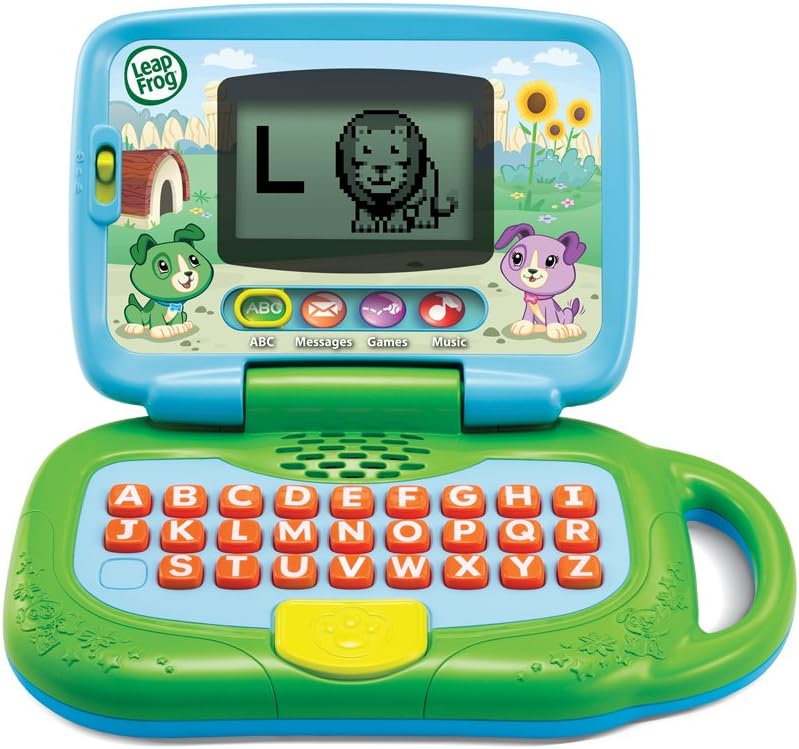
ചിത്രം 1: മുൻഭാഗം view of the LeapFrog My Own Leaptop.
The Leaptop features a durable, child-friendly design with a large screen for engaging animations. The keyboard includes all letters of the alphabet, along with dedicated buttons for different learning modes. A convenient handle allows for easy portability.
നിയന്ത്രണങ്ങളും സവിശേഷതകളും
- ഓൺ/ഓഫ്/വോളിയം സ്വിച്ച്: Located on the side, this switch controls power and adjusts the sound level.
- Alphabet Keyboard: Features large, easy-to-press buttons for each letter.
- മോഡ് ബട്ടണുകൾ: Dedicated buttons for ABCs, Messages, Games, and Music modes.
- സ്ക്രീൻ: Displays letters, animations, and interactive content.
- കൈകാര്യം ചെയ്യുക: Integrated for easy carrying.
ഓപ്പറേറ്റിംഗ് മോഡുകൾ

Figure 2: Child engaging with the Leaptop in learning mode.
The Leaptop offers four interactive learning modes to keep children engaged:
- ABCs Mode: Press any letter button to hear the letter name, its sound, and a word that starts with that letter. The screen displays corresponding animal animations (26 in total).
- Messages Mode: Engage in pretend email exchanges with characters like Scout or Violet. This mode encourages imaginative role-play and early communication skills.
- ഗെയിംസ് മോഡ്: Play fun animal trivia and letter games designed to reinforce learning.
- സംഗീത മോഡ്: Enjoy 16 songs and melodies. Children can bop along and explore musical sounds.

Figure 3: Child interacting with the Leaptop's keyboard.
പരിചരണവും പരിപാലനവും
- Keep the Leaptop clean by wiping it with a slightly damp തുണി. വെള്ളത്തിൽ മുക്കരുത്.
- തീവ്രമായ താപനിലയിലോ നേരിട്ടുള്ള സൂര്യപ്രകാശത്തിലോ ഉപകരണം തുറന്നുകാട്ടുന്നത് ഒഴിവാക്കുക.
- ചോർച്ച തടയാൻ യൂണിറ്റ് ദീർഘനേരം ഉപയോഗിക്കുന്നില്ലെങ്കിൽ ബാറ്ററികൾ നീക്കം ചെയ്യുക.
ട്രബിൾഷൂട്ടിംഗ്
If the Leaptop does not function as expected, please try the following:
- Ensure batteries are correctly installed and are not depleted. Replace with fresh batteries if necessary.
- Turn the unit off and then on again to reset it.
- If issues persist, refer to the LeapFrog support webകൂടുതൽ സഹായത്തിനുള്ള സൈറ്റ്.
സ്പെസിഫിക്കേഷനുകൾ
| സ്പെസിഫിക്കേഷൻ | മൂല്യം |
|---|---|
| ഉൽപ്പന്ന അളവുകൾ | 3.8 x 11.5 x 11.4 ഇഞ്ച് |
| ഇനത്തിൻ്റെ ഭാരം | 1.56 പൗണ്ട് |
| ഇനം മോഡൽ നമ്പർ | 80-19150ഇ |
| നിർമ്മാതാവ് ശുപാർശ ചെയ്യുന്ന പ്രായം | 24 മാസം - 4 വർഷം |
| ബാറ്ററികൾ | 3 AA ബാറ്ററികൾ ആവശ്യമാണ് (ഡെമോയ്ക്കായി ഉൾപ്പെടുത്തിയിരിക്കുന്നു) |
| റിലീസ് തീയതി | മെയ് 1, 2018 |
| നിർമ്മാതാവ് | വിടെക് |
വാറൻ്റിയും പിന്തുണയും
For warranty information or technical support, please visit the official LeapFrog webസൈറ്റിൽ ബന്ധപ്പെടുക അല്ലെങ്കിൽ അവരുടെ ഉപഭോക്തൃ സേവന വിഭാഗവുമായി ബന്ധപ്പെടുക. വാങ്ങിയതിന്റെ തെളിവായി നിങ്ങളുടെ വാങ്ങൽ രസീത് സൂക്ഷിക്കുക.


