1. ആമുഖം
The Behringer Europower PMP4000 is a powerful and versatile 16-channel powered mixer designed for various audio applications, from live sound reinforcement to studio recording. It integrates a high-efficiency Class-D amplifier, a comprehensive 24-bit Multi-FX processor, and a precise FBQ Feedback Detection System to deliver exceptional sound quality and performance.
This manual provides essential information for setting up, operating, maintaining, and troubleshooting your PMP4000 mixer. Please read it thoroughly before use to ensure safe and optimal performance.
2. പ്രധാന സുരക്ഷാ നിർദ്ദേശങ്ങൾ
Always observe the following basic precautions when using this product:
- ഈ നിർദ്ദേശങ്ങൾ വായിക്കുക.
- ഈ നിർദ്ദേശങ്ങൾ സൂക്ഷിക്കുക.
- എല്ലാ മുന്നറിയിപ്പുകളും ശ്രദ്ധിക്കുക.
- എല്ലാ നിർദ്ദേശങ്ങളും പാലിക്കുക.
- വെള്ളത്തിനടുത്ത് ഈ ഉപകരണം ഉപയോഗിക്കരുത്.
- ഉണങ്ങിയ തുണി ഉപയോഗിച്ച് മാത്രം വൃത്തിയാക്കുക.
- വെൻ്റിലേഷൻ ഓപ്പണിംഗുകളൊന്നും തടയരുത്. നിർമ്മാതാവിൻ്റെ നിർദ്ദേശങ്ങൾക്കനുസൃതമായി ഇൻസ്റ്റാൾ ചെയ്യുക.
- റേഡിയറുകൾ, ഹീറ്റ് രജിസ്റ്ററുകൾ, സ്റ്റൗകൾ, അല്ലെങ്കിൽ മറ്റ് ഉപകരണങ്ങൾ (ഉൾപ്പെടെ) പോലെയുള്ള താപ സ്രോതസ്സുകൾക്ക് സമീപം ഇൻസ്റ്റാൾ ചെയ്യരുത്. ampലൈഫയറുകൾ) ചൂട് ഉത്പാദിപ്പിക്കുന്നത്.
- പോളറൈസ്ഡ് അല്ലെങ്കിൽ ഗ്രൗണ്ടിംഗ്-ടൈപ്പ് പ്ലഗിൻ്റെ സുരക്ഷാ ഉദ്ദേശ്യത്തെ പരാജയപ്പെടുത്തരുത്. ധ്രുവീകരിക്കപ്പെട്ട പ്ലഗിന് രണ്ട് ബ്ലേഡുകൾ ഉണ്ട്, ഒന്ന് മറ്റൊന്നിനേക്കാൾ വീതിയുള്ളതാണ്. ഒരു ഗ്രൗണ്ടിംഗ് ടൈപ്പ് പ്ലഗിന് രണ്ട് ബ്ലേഡുകളും മൂന്നാമത്തെ ഗ്രൗണ്ടിംഗ് പ്രോംഗും ഉണ്ട്. നിങ്ങളുടെ സുരക്ഷയ്ക്കായി വിശാലമായ ബ്ലേഡ് അല്ലെങ്കിൽ മൂന്നാമത്തെ പ്രോംഗ് നൽകിയിരിക്കുന്നു. നൽകിയിരിക്കുന്ന പ്ലഗ് നിങ്ങളുടെ ഔട്ട്ലെറ്റിലേക്ക് യോജിക്കുന്നില്ലെങ്കിൽ, കാലഹരണപ്പെട്ട ഔട്ട്ലെറ്റ് മാറ്റിസ്ഥാപിക്കുന്നതിന് ഒരു ഇലക്ട്രീഷ്യനെ സമീപിക്കുക.
- പ്രത്യേകിച്ച് പ്ലഗുകൾ, കൺവീനിയൻസ് റിസപ്റ്റക്കിളുകൾ, ഉപകരണത്തിൽ നിന്ന് പുറത്തുകടക്കുന്ന പോയിൻ്റ് എന്നിവയിൽ നടക്കുകയോ പിഞ്ച് ചെയ്യുകയോ ചെയ്യുന്നതിൽ നിന്ന് പവർ കോർഡ് സംരക്ഷിക്കുക.
- നിർമ്മാതാവ് വ്യക്തമാക്കിയ അറ്റാച്ച്മെൻ്റുകൾ/ആക്സസറികൾ മാത്രം ഉപയോഗിക്കുക.
- നിർമ്മാതാവ് വ്യക്തമാക്കിയ കാർട്ട്, സ്റ്റാൻഡ്, ട്രൈപോഡ്, ബ്രാക്കറ്റ് അല്ലെങ്കിൽ ടേബിൾ എന്നിവയ്ക്കൊപ്പം മാത്രം ഉപയോഗിക്കുക, അല്ലെങ്കിൽ ഉപകരണം ഉപയോഗിച്ച് വിൽക്കുക. ഒരു കാർട്ട് ഉപയോഗിക്കുമ്പോൾ, ടിപ്പ്-ഓവറിൽ നിന്നുള്ള പരിക്ക് ഒഴിവാക്കാൻ വണ്ടി/ഉപകരണ കോമ്പിനേഷൻ നീക്കുമ്പോൾ ജാഗ്രത പാലിക്കുക.
- മിന്നൽ കൊടുങ്കാറ്റുകളുടെ സമയത്തോ ദീർഘനേരം ഉപയോഗിക്കാത്ത സമയത്തോ ഈ ഉപകരണം അൺപ്ലഗ് ചെയ്യുക.
- എല്ലാ സേവനങ്ങളും യോഗ്യതയുള്ള സേവന ഉദ്യോഗസ്ഥർക്ക് റഫർ ചെയ്യുക. പവർ സപ്ലൈ കോർഡ് അല്ലെങ്കിൽ പ്ലഗ് കേടാകുക, ദ്രാവകം ഒഴുകുകയോ ഉപകരണങ്ങൾ ഉപകരണത്തിലേക്ക് വീഴുകയോ ചെയ്യുക, ഉപകരണം മഴയോ ഈർപ്പമോ സമ്പർക്കം പുലർത്തുക, സാധാരണയായി പ്രവർത്തിക്കാത്തത് എന്നിങ്ങനെയുള്ള ഏതെങ്കിലും വിധത്തിൽ ഉപകരണത്തിന് കേടുപാടുകൾ സംഭവിക്കുമ്പോൾ സേവനം ആവശ്യമാണ്. , അല്ലെങ്കിൽ ഉപേക്ഷിച്ചു.
3. പാക്കേജ് ഉള്ളടക്കം
Upon unpacking your Behringer Europower PMP4000, please ensure all components are present and in good condition:
- Behringer Europower PMP4000 Powered Mixer
- പവർ കേബിൾ
- ഉപയോക്തൃ മാനുവൽ (ഈ പ്രമാണം)
- Multi-FX Processor and FBQ Feedback Detection System (integrated)
എന്തെങ്കിലും സാധനങ്ങൾ നഷ്ടപ്പെടുകയോ കേടുപാടുകൾ സംഭവിക്കുകയോ ചെയ്താൽ, ദയവായി നിങ്ങളുടെ ഡീലറെ ഉടൻ ബന്ധപ്പെടുക.
4. സജ്ജീകരണ ഗൈഡ്
Follow these steps to set up your PMP4000 mixer:
4.1 അൺപാക്കിംഗും പരിശോധനയും
Carefully remove the mixer from its packaging. Inspect the unit for any signs of physical damage that may have occurred during transit. Retain the original packaging for future transport or storage.
4.2 പവർ കണക്ഷൻ
Connect the supplied power cable to the mixer's power inlet on the rear panel and then to a suitable AC power outlet. Ensure the mixer's power switch is in the OFF position before connecting to power.
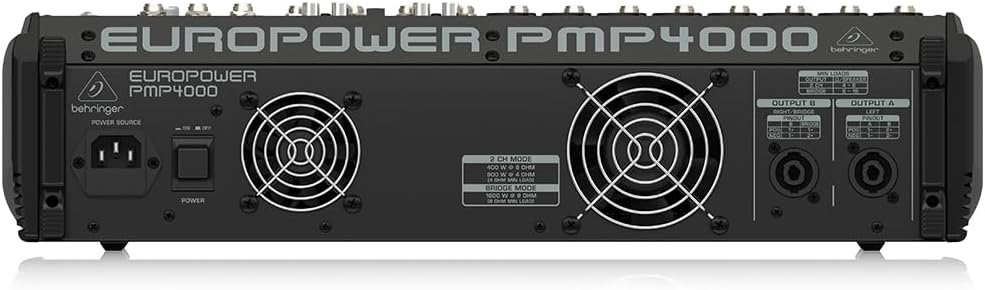
Figure 4.1: Rear panel of the PMP4000, highlighting the power input and speaker outputs.
4.3 ഇൻപുട്ടുകൾ ബന്ധിപ്പിക്കുന്നു
The PMP4000 features 8 mono channels with XENYX mic preamps and 4 stereo channels. Connect your microphones, instruments, and line-level sources to the appropriate input jacks.
- മൈക്രോഫോണുകൾ: Use XLR cables for condenser or dynamic microphones. Activate +48V phantom power for condenser microphones using the dedicated switch.
- Instruments/Line-Level: Use 1/4" TRS or TS cables for instruments (e.g., keyboards, guitars with DI boxes) or other line-level devices.
- സിഡി/ടേപ്പ് ഇൻപുട്ട്: Use the dedicated stereo RCA input for connecting external signal sources like CD players or media devices.

ചിത്രം 4.2: മുകളിൽ view of the PMP4000, showing input channels and main controls.
4.4 ഔട്ട്പുട്ടുകൾ ബന്ധിപ്പിക്കുന്നു
The PMP4000 offers various output options for connecting to speakers and monitors.
- പ്രധാന p ട്ട്പുട്ടുകൾ: Connect your main PA speakers to the main L/R speaker outputs using speakON or 1/4" TS cables.
- Monitor Outputs: കണക്ട് ചെയ്യുകtage monitors to the monitor outputs.
- പ്രീamp ഔട്ട്പുട്ടുകൾ: Use the multi-functional stereo Preamp outputs for connecting to external power ampലൈഫയറുകൾ അല്ലെങ്കിൽ റെക്കോർഡിംഗ് ഉപകരണങ്ങൾ.
4.5 പ്രാരംഭ പവർ-ഓൺ
Once all connections are secure, switch the power ON. The power LED will illuminate. Gradually raise the main fader and individual channel faders to a comfortable listening level.
5. Operating the PMP4000
This section details the primary controls and functions of your mixer.
5.1 Channel Controls (Mono Channels 1-8)
- ഗെയിൻ: Adjusts the input sensitivity for each channel. Set this to achieve a healthy signal level without clipping.
- EQ (ഉയർന്നത്, ഇടത്തരം, താഴ്ന്നത്): 3-band equalizer for shaping the tone of each channel.
- കുറഞ്ഞ കട്ട്: Activates a high-pass filter to remove unwanted low-frequency rumble.
- FX അയയ്ക്കുക: Controls the amount of signal sent to the internal effects processor.
- MON SEND: Controls the amount of signal sent to the monitor mix.
- പാൻ: ചാനലിന്റെ സിഗ്നൽ സ്റ്റീരിയോ ഫീൽഡിനുള്ളിൽ (ഇടത്തുനിന്ന് വലത്തോട്ട്) സ്ഥാപിക്കുന്നു.
- മ്യൂട്ട്: ചാനലിനെ നിശബ്ദമാക്കുന്നു.
- PFL (Pre-Fader Listen): Sends the channel's signal to the headphones for monitoring before the fader.
- CHANNEL FADER: Adjusts the output level of the individual channel to the main mix.
- ക്ലിപ്പ് LED: Illuminates when the input signal is too high, indicating potential distortion. Reduce the GAIN if this LED lights up frequently.
5.2 Channel Controls (Stereo Channels 9/10 - 15/16)
These channels are designed for stereo line-level sources and feature simplified controls suitable for stereo instruments or playback devices.
5.3 മാസ്റ്റർ വിഭാഗം
- പ്രധാന മിക്സ് ഫേഡർ: Controls the overall output level of the main stereo mix.
- MONITOR FADERS: Adjust the output level for the monitor mixes.
- FX റിട്ടേൺ: Controls the overall level of the effects processor's output returning to the main mix.
- 7-ബാൻഡ് ഗ്രാഫിക് ഇക്യു: Allows precise frequency correction for the monitor or main outputs. Use the EQ switch to select which output is affected.
- FBQ ഫീഡ്ബാക്ക് കണ്ടെത്തൽ സംവിധാനം: This system instantly reveals critical frequencies that are causing feedback, allowing you to cut them using the graphic EQ.
5.4 24-bit Multi-FX Processor
The PMP4000 includes a studio-grade 24-bit stereo FX processor with 100 awesome presets. These include various reverbs, delays, chorus, flanger, pitch shifter, and multi-effects. Use the PROGRAM knob to select the desired effect and the FX SEND controls on individual channels to apply the effect.
5.5 Amplifier Operation Modes
The PMP4000 offers selectable ampലിഫയർ പ്രവർത്തന രീതികൾ:
- STEREO (MAIN L/R): Delivers 2 x 800 Watts to separate left and right main speakers.
- DOUBLE MONO (MAIN/MONITOR): Provides 800 Watts to the main output and 800 Watts to the monitor output, allowing for separate mixes.
- ബ്രിഡ്ജ്ഡ് മോണോ: Combines the power to deliver 1600 Watts into a single, powerful mono output.
5.6 പ്രത്യേക സവിശേഷതകൾ
- വോയ്സ് ക്യാൻസലർ: Removes the singer's voice from recordings for karaoke applications.
- XPQ 3D സ്റ്റീരിയോ സറൗണ്ട് ഇഫക്റ്റ്: Enhances the stereo image and adds vitality to the sound.
6. പരിപാലനം
Proper care and maintenance will extend the life of your PMP4000 mixer.
6.1 വൃത്തിയാക്കൽ
Clean the unit regularly with a soft, dry cloth. Do not use liquid cleaners or solvents. Ensure no dust or debris accumulates in the ventilation openings.
6.2 സംഭരണവും കൈകാര്യം ചെയ്യലും
Store the mixer in a cool, dry place away from direct sunlight and extreme temperatures. When transporting the unit, use appropriate protective cases to prevent damage.
7. പ്രശ്നപരിഹാരം
If you encounter issues with your PMP4000, refer to the following common problems and solutions:
| പ്രശ്നം | സാധ്യമായ കാരണം | പരിഹാരം |
|---|---|---|
| ശബ്ദ ഔട്ട്പുട്ട് ഇല്ല | Power off; cables disconnected; faders down; MUTE engaged; incorrect ampലൈഫയർ മോഡ്. | Check power, all cable connections, raise faders, disengage MUTE, verify ampലൈഫയർ മോഡ്. |
| വികലമായ ശബ്ദം | Input GAIN too high; output level too high; faulty cable. | Reduce input GAIN and output levels. Check and replace cables if necessary. |
| ഫീഡ്ബാക്ക് (ഓലിക്കുന്ന ശബ്ദം) | Microphone too close to speakers; high frequencies boosted; room acoustics. | Use FBQ Feedback Detection to identify and cut problematic frequencies on the graphic EQ. Reposition microphones or speakers. |
| No phantom power (+48V) | Phantom power switch off. | +48V ഫാന്റം പവർ സ്വിച്ച് ഓണാണെന്ന് ഉറപ്പാക്കുക. |
ഈ പരിഹാരങ്ങൾ പരീക്ഷിച്ചതിന് ശേഷവും പ്രശ്നം നിലനിൽക്കുകയാണെങ്കിൽ, ദയവായി യോഗ്യതയുള്ള സേവന ഉദ്യോഗസ്ഥരെ ബന്ധപ്പെടുക.
8 സാങ്കേതിക സവിശേഷതകൾ
- മോഡൽ: പിഎംപി4000
- ചാനലുകൾ: 16 (8 മോണോ, 4 സ്റ്റീരിയോ)
- Ampആജീവനാന്ത ശക്തി: 2 x 800 Watts stereo / 1600 Watts bridged mode
- വാട്ട്tage: 1050 വാട്ട്സ്
- വാല്യംtage: 48 വോൾട്ട്
- ഊർജ്ജ സ്രോതസ്സ്: കോർഡഡ് ഇലക്ട്രിക്
- മൈക്ക് പ്രീamps: 8 x XENYX with +48V phantom power
- Effects Processor: 24-bit Multi-FX with 100 presets
- EQ: 3-band per channel, 7-band stereo graphic EQ with FBQ Feedback Detection
- കണക്റ്റിവിറ്റി ടെക്നോളജി: എക്സ്എൽആർ, ടിആർഎസ്, ആർസിഎ
- നിറം: കറുപ്പ്
- ഇനത്തിൻ്റെ ഭാരം: 28.3 പൗണ്ട് (12.84 കി.ഗ്രാം)
- ഉൽപ്പന്ന അളവുകൾ: 18.74 x 18.11 x 4.8 ഇഞ്ച് (47.6 x 46 x 12.2 സെ.മീ)
- മാതൃരാജ്യം: ചൈന
- ആദ്യം ലഭ്യമായ തീയതി: ഏപ്രിൽ 30, 2010
9. വാറൻ്റിയും പിന്തുണയും
Behringer products are built to high standards and come with a limited warranty. For detailed warranty terms and conditions, please refer to the warranty information provided with your purchase or visit the official Behringer webസൈറ്റ്.
സാങ്കേതിക പിന്തുണ, സേവനം അല്ലെങ്കിൽ സ്പെയർ പാർട്സ് എന്നിവയ്ക്കായി, ദയവായി നിങ്ങളുടെ അംഗീകൃത ബെഹ്രിംഗർ ഡീലറെ ബന്ധപ്പെടുക അല്ലെങ്കിൽ ബെഹ്രിംഗറിന്റെ പിന്തുണ വിഭാഗം സന്ദർശിക്കുക. website. Ensure you have your product model number (PMP4000) and serial number ready when seeking support.


