ലോജിടെക് Z623 400 വാട്ട് ഹോം സ്പീക്കർ സിസ്റ്റം യൂസർ മാനുവൽ
മോഡൽ: 980-000402
ആമുഖം
The Logitech Z623 400 Watt Home Speaker System is a THX-certified 2.1 speaker system engineered to deliver powerful, immersive audio for your music, movies, and games. This manual provides essential information for setting up, operating, and maintaining your speaker system to ensure optimal performance and longevity.
ബോക്സിൽ എന്താണുള്ളത്
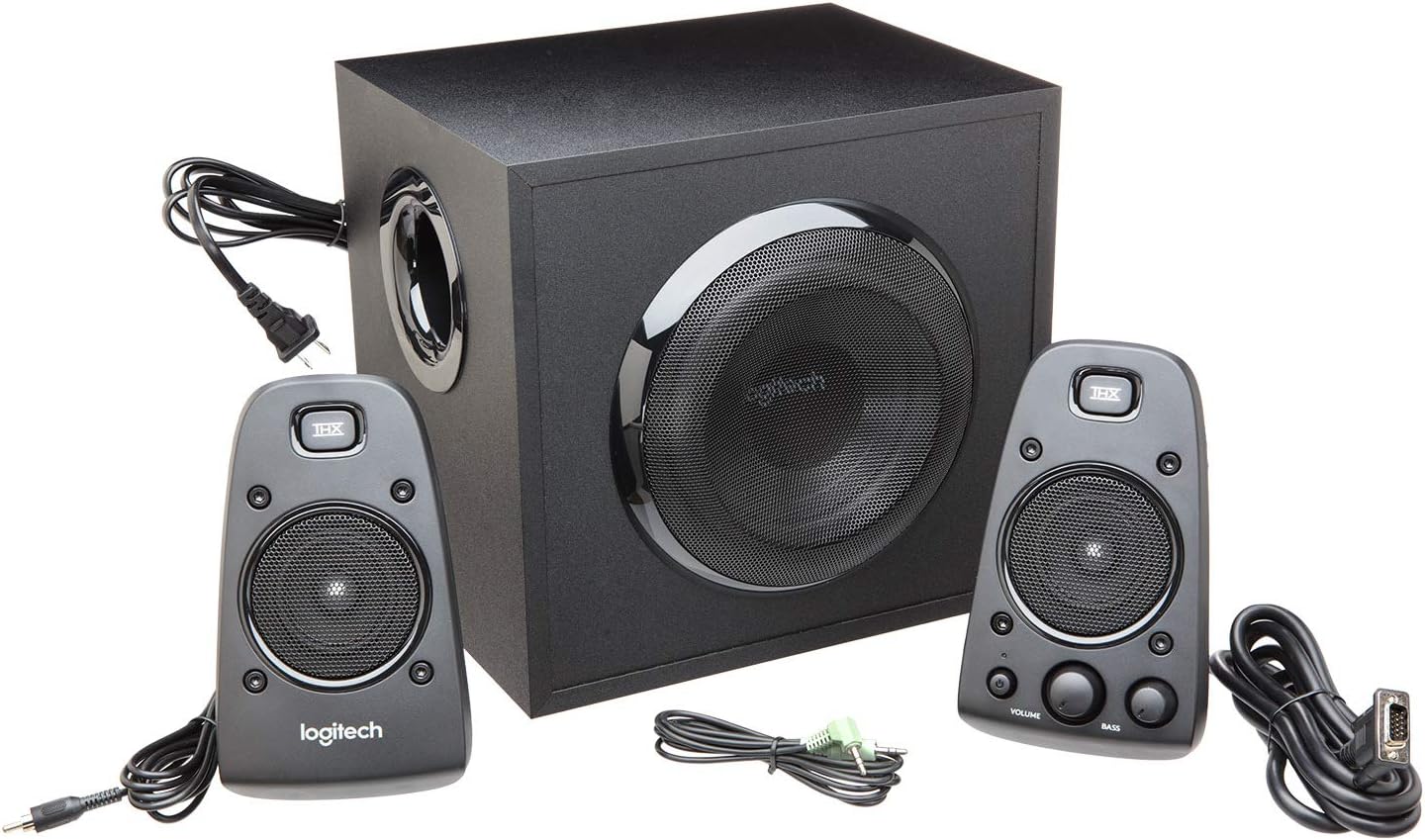
Your Logitech Z623 speaker system package includes the following components:
Speakers (2 satellite speakers and 1 subwoofer)
3.5 എംഎം ഓഡിയോ ഇൻപുട്ട് കേബിൾ
സ്പീക്കർ കണക്റ്റർ കേബിളുകൾ
ഉപയോക്തൃ ഡോക്യുമെൻ്റേഷൻ
ചിത്രം 1: ലോജിടെക് Z623 പാക്കേജിൽ ഉൾപ്പെടുത്തിയിരിക്കുന്ന എല്ലാ ഘടകങ്ങളും.
സജ്ജീകരണവും ഇൻസ്റ്റാളേഷനും
നിങ്ങളുടെ ലോജിടെക് Z623 സ്പീക്കർ സിസ്റ്റം സജ്ജീകരിക്കാൻ ഈ ഘട്ടങ്ങൾ പാലിക്കുക:
ഘടകങ്ങൾ അൺപാക്ക് ചെയ്യുക: പാക്കേജിംഗിൽ നിന്ന് എല്ലാ ഇനങ്ങളും ശ്രദ്ധാപൂർവ്വം നീക്കം ചെയ്യുക.
സ്ഥാനം സ്പീക്കർമാർ: Place the subwoofer on the floor or a sturdy surface near your computer or entertainment system. Position the two satellite speakers on either side of your monitor or TV for optimal stereo sound.
സാറ്റലൈറ്റ് സ്പീക്കറുകൾ സബ് വൂഫറുമായി ബന്ധിപ്പിക്കുക: The right satellite speaker (with controls) connects to the subwoofer via a proprietary VGA-style connector. The left satellite speaker connects to the subwoofer via an RCA-style cable.
ഓഡിയോ ഉറവിടത്തിലേക്ക് കണക്റ്റുചെയ്യുക: Use the included 3.5mm audio input cable to connect the subwoofer to your computer's audio output (headphone jack) or other compatible devices. Alternatively, use RCA cables for devices with RCA outputs. The Z623 also supports optical input for digital audio sources.
പവർ ബന്ധിപ്പിക്കുക: സബ് വൂഫറിന്റെ പവർ കേബിൾ ഒരു മതിൽ ഔട്ട്ലെറ്റിൽ പ്ലഗ് ചെയ്യുക.
ചിത്രം 2: ഉദാample setup of the Logitech Z623 with a television.
വീഡിയോ 1: വീണ്ടുംview demonstrating the unboxing and basic setup of the Logitech Z623 speaker system, including connections.
നിയന്ത്രണങ്ങളും കണക്റ്റിവിറ്റിയും
The primary controls for your Z623 system are located on the right satellite speaker:
പവർ ബട്ടൺ: Turns the speaker system on or off. An orange LED indicates power status.
വോളിയം ഡയൽ: Adjusts the overall volume of the system.
Bass Dial: Controls the bass level of the subwoofer.
ഹെഡ്ഫോൺ ജാക്ക് (3.5 മിമി): ഹെഡ്ഫോണുകൾ ഉപയോഗിച്ച് സ്വകാര്യ ശ്രവണത്തിനായി.
സഹായ ഇൻപുട്ട് (3.5 മിമി): For connecting additional audio devices like smartphones or MP3 players.
ചിത്രം 3: വിശദമായി view of the control speaker with power, volume, bass, and input options.
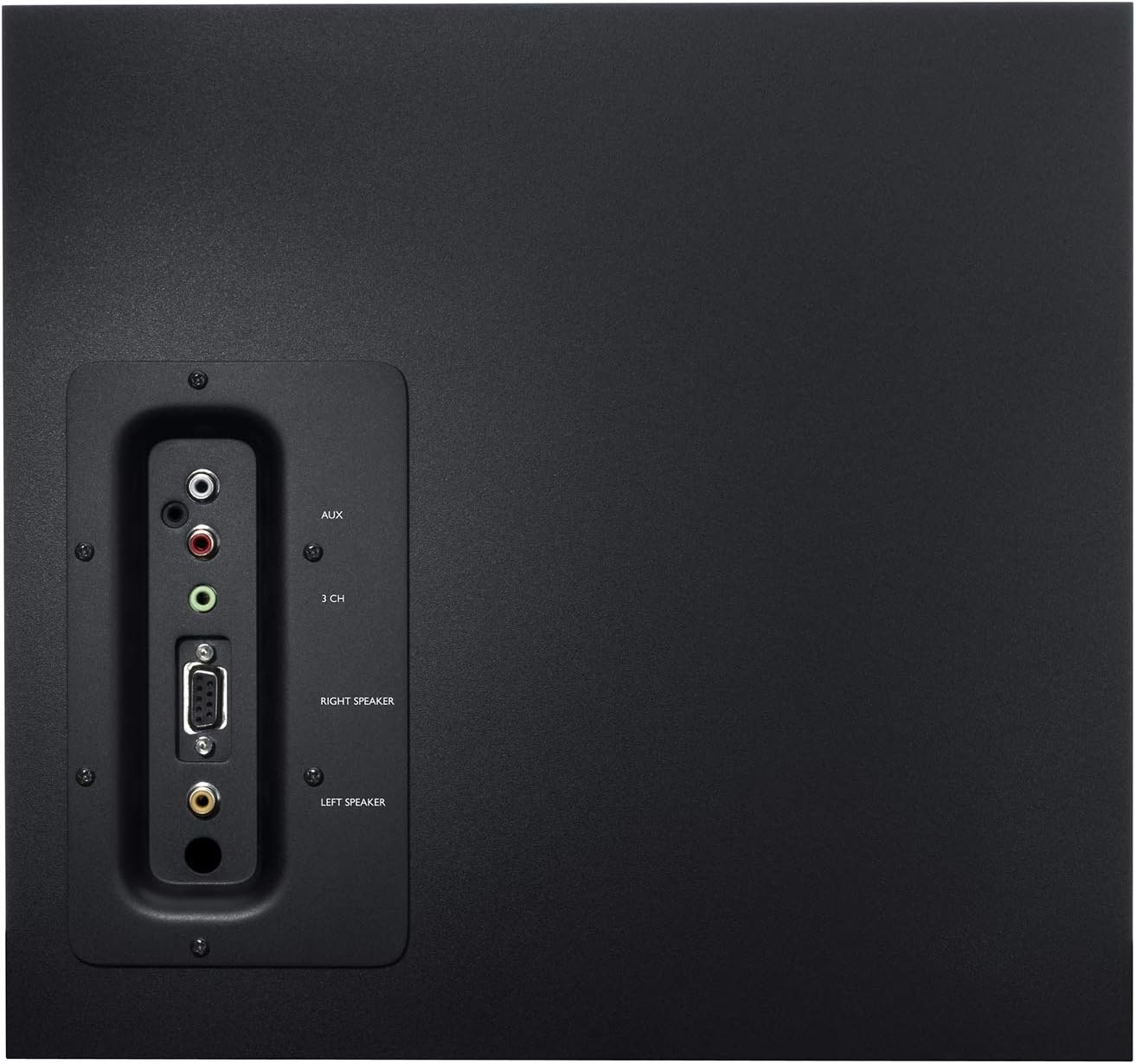
The subwoofer's rear panel provides the main connection points for the satellite speakers and audio sources:
Right Speaker Input: Proprietary connector for the right satellite speaker.
Left Speaker Input: RCA connector for the left satellite speaker.
Auxiliary/RCA Inputs: Red and white RCA jacks for connecting various audio devices.
ഒപ്റ്റിക്കൽ ഇൻപുട്ട്: For digital audio connections (available on some Z623 variants, though this model is Analog).
Figure 4: Rear panel of the subwoofer detailing connectivity options.
Video 2: An unboxing and test video for the Logitech Z625, which shares similar connectivity features with the Z623, demonstrating the rear panel connections.
ഓപ്പറേഷൻ
Once connected, power on the system using the power button on the right satellite speaker. Adjust the volume and bass levels to your preference. The THX certification ensures studio-quality audio for an immersive experience.
Video 3: Official product video highlighting the sound quality and immersive experience of the Logitech Z623 system.
മെയിൻ്റനൻസ്
To ensure the longevity and optimal performance of your Logitech Z623 speaker system, follow these maintenance tips:
വൃത്തിയാക്കൽ: സ്പീക്കർ പ്രതലങ്ങൾ വൃത്തിയാക്കാൻ മൃദുവായതും ഉണങ്ങിയതുമായ തുണി ഉപയോഗിക്കുക. ദ്രാവക ക്ലീനറുകളോ ഉരച്ചിലുകളുള്ള വസ്തുക്കളോ ഉപയോഗിക്കുന്നത് ഒഴിവാക്കുക.
വെൻ്റിലേഷൻ: Ensure the subwoofer and satellite speakers have adequate ventilation to prevent overheating. Do not block the subwoofer's port or speaker grilles.
കേബിൾ മാനേജുമെന്റ്: Keep cables organized and untangled to prevent damage and ensure proper connectivity.
തീവ്രമായ അവസ്ഥകൾ ഒഴിവാക്കുക: Do not expose the speakers to extreme temperatures, humidity, or direct sunlight.
ട്രബിൾഷൂട്ടിംഗ്
If you encounter issues with your speaker system, try the following troubleshooting steps:
ശബ്ദമില്ല:
Ensure the power cable is securely plugged in and the system is powered on.
Check all audio connections (3.5mm, RCA, optical) to ensure they are firmly seated in the correct ports.
Verify that the volume on the speaker system and your audio source (computer, TV, etc.) is turned up and not muted.
Test with a different audio source or cable to rule out external issues.
വികലമായ ശബ്ദം:
Lower the volume on both the speaker system and your audio source.
Adjust the bass dial on the control speaker.
സ്പീക്കർ കേബിളുകൾ കേടായിട്ടില്ല അല്ലെങ്കിൽ അയഞ്ഞ രീതിയിൽ ബന്ധിപ്പിച്ചിട്ടില്ലെന്ന് ഉറപ്പാക്കുക.
Static or Buzzing:
Check for loose cable connections, especially the proprietary speaker cable.
Ensure the speaker system is not placed too close to other electronic devices that may cause interference.
Try plugging the speaker system into a different power outlet.
സ്പെസിഫിക്കേഷനുകൾ
ഫീച്ചർ
സ്പെസിഫിക്കേഷൻ
മോഡലിൻ്റെ പേര്
Z623
സ്പീക്കർ തരം
സാറ്റലൈറ്റ്, സബ് വൂഫർ
കണക്റ്റിവിറ്റി ടെക്നോളജി
ആർസിഎ, ഓക്സിലറി
സ്പീക്കർ പരമാവധി ഔട്ട്പുട്ട് പവർ
400 വാട്ട്സ് പീക്ക് / 200 വാട്ട്സ് ആർഎംഎസ്
ഓഡിയോ put ട്ട്പുട്ട് മോഡ്
സ്റ്റീരിയോ
നിറം
കറുപ്പ്
മെറ്റീരിയൽ
ലോഹം
ഇനത്തിൻ്റെ ഭാരം
8.2 കിലോഗ്രാം (18.04 പൗണ്ട്)
ഉൽപ്പന്ന അളവുകൾ
17.31"D x 11.87"W x 12.25"H
യു.പി.സി
097855066466
വാറൻ്റിയും പിന്തുണയും
Logitech provides a limited warranty for the Z623 speaker system. For detailed warranty information and support, please refer to the official User Guide (PDF) available online or contact Logitech customer support directly.
Please note: As per the legal disclaimer, returns may not be accepted if the unit is fully functional, due to shipping complexities.
സബ്വൂഫറുള്ള ലോജിടെക് Z313 സ്പീക്കർ സിസ്റ്റം: പൂർണ്ണമായ സജ്ജീകരണ ഗൈഡ് ലോജിടെക് Z313 2.1 സ്പീക്കർ സിസ്റ്റം സബ് വൂഫർ ഉപയോഗിച്ച് സജ്ജീകരിക്കുന്നതിനും ഉപയോഗിക്കുന്നതിനുമുള്ള സമഗ്രമായ ഗൈഡ്. സ്പീക്കറുകളും ഹെഡ്ഫോണുകളും ബന്ധിപ്പിക്കുന്നതിനും വോളിയം ക്രമീകരിക്കുന്നതിനുമുള്ള നിർദ്ദേശങ്ങൾ ഇതിൽ ഉൾപ്പെടുന്നു.
Logitech Z120 Compact Stereo Speakers: Complete Setup Guide Get started with your Logitech Z120 Compact Stereo Speakers. This guide provides clear instructions for setup, connection, volume adjustment, and cable management for these compact, high-quality audio devices.
സബ്വൂഫറുള്ള ലോജിടെക് Z333 സ്പീക്കർ സിസ്റ്റം: പൂർണ്ണമായ സജ്ജീകരണ ഗൈഡ് നിങ്ങളുടെ ലോജിടെക് Z333 സ്പീക്കർ സിസ്റ്റം സബ്വൂഫറുമായി എങ്ങനെ സജ്ജീകരിക്കാമെന്നും ബന്ധിപ്പിക്കാമെന്നും അറിയുക. സ്പീക്കറുകൾ, ഓഡിയോ ഉറവിടങ്ങൾ എന്നിവ ബന്ധിപ്പിക്കുന്നതിനും വോളിയവും ബാസും ക്രമീകരിക്കുന്നതിനുമുള്ള ഘട്ടം ഘട്ടമായുള്ള നിർദ്ദേശങ്ങൾ ഈ ഗൈഡ് നൽകുന്നു.