1. ആമുഖം
Thank you for choosing the SilverCrest SR-1400 Compact Scanning Radio. This manual provides essential information for the safe and efficient operation of your device. Please read it thoroughly before use and keep it for future reference.
1.1 ഉൽപ്പന്ന സവിശേഷതകൾ
- Compact FM radio (87.5 to 108 MHz) with digital frequency and time display.
- Automatic channel search (scanning radio) function.
- Speaker unit with telescopic antenna and detachable stand for desktop use.
- Detachable radio unit with practical belt clip for mobile use.
- Headphone cable with antenna function for mobile use.
- Integrated clock function.
- സ്നൂസ് പ്രവർത്തനം.
1.2 പാക്കേജ് ഉള്ളടക്കം
എല്ലാ ഇനങ്ങളും നിലവിലുണ്ടോ എന്നും നല്ല നിലയിലാണെന്നും ദയവായി പരിശോധിക്കുക:
- SilverCrest SR-1400 Compact Scanning Radio (main unit and speaker unit)
- ഹെഡ്ഫോണുകൾ
- 2 x AAA ആൽക്കലൈൻ ബാറ്ററികൾ
- ചുമക്കുന്ന സ്ട്രാപ്പ്
- ഉപയോക്തൃ മാനുവൽ
2. സജ്ജീകരണം
2.1 ബാറ്ററി ഇൻസ്റ്റാളേഷൻ
- Locate the battery compartment on the back of the main radio unit.
- ബാറ്ററി കമ്പാർട്ട്മെൻ്റ് കവർ തുറക്കുക.
- Insert 2 x AAA alkaline batteries, ensuring correct polarity (+/-).
- ബാറ്ററി കമ്പാർട്ട്മെൻ്റ് കവർ സുരക്ഷിതമായി അടയ്ക്കുക.
2.2 ഹെഡ്ഫോണുകൾ ബന്ധിപ്പിക്കുന്നു
For private listening or mobile use, connect the provided headphones to the 3.5mm audio jack on the main radio unit. The headphone cable also functions as an antenna when the radio unit is detached from the speaker unit.
2.3 Attaching the Speaker Unit
To use the radio with its speaker, align the main radio unit with the speaker unit and slide them together until they click into place. Ensure the connection is firm.

Image: The SilverCrest SR-1400 radio unit (right) detached from its speaker unit (left). The radio unit features a digital display and control buttons, while the speaker unit has a grid of speaker holes.
2.4 Using as a Table Unit
The speaker unit includes a detachable stand. Attach this stand to the speaker unit to position the radio upright on a flat surface for stable desktop use. Extend the telescopic antenna for optimal reception.
2.5 Mobile Use with Belt Clip
For mobile use, detach the main radio unit from the speaker unit. The radio unit features a practical belt clip on its back. Attach the unit to your belt or clothing for convenient, portable listening with headphones.
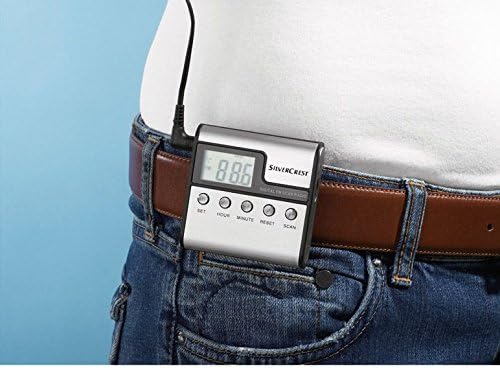
Image: The SilverCrest SR-1400 radio unit, detached from its speaker, is shown clipped to a brown leather belt on a person wearing blue jeans. The digital display shows "88.6".
3. ഓപ്പറേഷൻ
3.1 പവർ ഓൺ/ഓഫ്
To turn the radio on, press the പവർ button (if available) or a designated button. To turn it off, press and hold the same button. The digital display will illuminate when powered on.
3.2 ക്രമീകരണ സമയം
The radio unit features സെറ്റ്, മണിക്കൂർ, ഒപ്പം മിനിറ്റ് buttons for time adjustment.
- അമർത്തുക സെറ്റ് സമയ ക്രമീകരണ മോഡിൽ പ്രവേശിക്കാൻ ഒരിക്കൽ ബട്ടൺ അമർത്തുക. മണിക്കൂർ അക്കങ്ങൾ മിന്നിമറയും.
- ഉപയോഗിക്കുക മണിക്കൂർ മണിക്കൂർ ക്രമീകരിക്കാനുള്ള ബട്ടൺ.
- അമർത്തുക സെറ്റ് വീണ്ടും. മിനിറ്റുകണക്കുകൾ മിന്നിമറയും.
- ഉപയോഗിക്കുക മിനിറ്റ് മിനിറ്റ് ക്രമീകരിക്കാനുള്ള ബട്ടൺ.
- അമർത്തുക സെറ്റ് a third time to confirm and exit time setting mode.
3.3 എഫ്എം റേഡിയോ ട്യൂണിംഗ്
The radio operates on the FM frequency band (87.5 to 108 MHz).
3.3.1 Automatic Channel Search (Scanning)
അമർത്തുക സ്കാൻ ചെയ്യുക button. The radio will automatically scan for available FM stations and store them in memory. The display will show the frequency as it scans.
3.3.2 മാനുവൽ ട്യൂണിംഗ്
While specific manual tuning buttons are not explicitly detailed, typically you would use മുകളിലേക്ക് / താഴേക്ക് or ട്യൂൺ +/- buttons to manually adjust the frequency. A brief press usually adjusts by small increments, while holding the button may initiate a quick scan to the next strong station.
3.4 വോളിയം നിയന്ത്രണം
ഉപയോഗിച്ച് വോളിയം ക്രമീകരിക്കുക വോളിയം കൂട്ടുക ഒപ്പം വോളിയം ഡൗൺ buttons (or a rotary dial, if present on your model). Ensure the volume is at a comfortable level before placing headphones on.
3.5 സ്നൂസ് ഫംഗ്ഷൻ ഉപയോഗിക്കൽ
If an alarm is set (functionality not explicitly detailed but mentioned as a feature), the snooze function can be activated by pressing the സ്നൂസ് ചെയ്യുക button (or a designated button) when the alarm sounds. This will temporarily pause the alarm for a set period.
3.6 ഉപകരണം പുനഃസജ്ജമാക്കുന്നു
If the device malfunctions or becomes unresponsive, you can perform a reset. Press the പുനഃസജ്ജമാക്കുക button, usually located in a small recess, using a pointed object like a paperclip. This will restore the radio to its factory default settings.
4. പരിപാലനം
4.1 വൃത്തിയാക്കൽ
Wipe the radio's exterior with a soft, dry cloth. Do not use abrasive cleaners, solvents, or strong chemicals, as these can damage the surface. Avoid getting moisture into any openings.
4.2 ബാറ്ററി മാറ്റിസ്ഥാപിക്കൽ
When the display dims or the radio's performance decreases, it's time to replace the batteries. Follow the battery installation steps in Section 2.1. Always use new AAA alkaline batteries and dispose of old batteries responsibly.
4.3 സംഭരണം
If the radio will not be used for an extended period, remove the batteries to prevent leakage and damage. Store the device in a cool, dry place, away from direct sunlight and extreme temperatures.
5. പ്രശ്നപരിഹാരം
If you encounter issues with your SilverCrest SR-1400, please refer to the following table before seeking professional assistance:
| പ്രശ്നം | സാധ്യമായ കാരണം | പരിഹാരം |
|---|---|---|
| റേഡിയോ ഓൺ ആകുന്നില്ല. | ബാറ്ററികൾ തീർന്നിരിക്കുന്നു അല്ലെങ്കിൽ തെറ്റായി ചേർത്തിരിക്കുന്നു. | ബാറ്ററികൾ പുതിയവ ഉപയോഗിച്ച് മാറ്റിസ്ഥാപിക്കുക, ശരിയായ ധ്രുവത ഉറപ്പാക്കുക. |
| മോശം എഫ്എം സ്വീകരണം. | Telescopic antenna not extended; weak signal area; headphone cable not acting as antenna (mobile use). | Fully extend the telescopic antenna. Move to an area with better signal. Ensure headphones are plugged in for mobile use. |
| സ്പീക്കറിൽ നിന്നോ/ഹെഡ്ഫോണുകളിൽ നിന്നോ ശബ്ദമില്ല. | Volume is too low; headphones not properly connected; speaker unit not properly attached. | Increase volume. Re-plug headphones firmly. Ensure speaker unit is securely attached to the main radio unit. |
| ഡിജിറ്റൽ ഡിസ്പ്ലേ മങ്ങിയതോ ശൂന്യമോ ആണ്. | കുറഞ്ഞ ബാറ്ററി പവർ. | ബാറ്ററികൾ മാറ്റിസ്ഥാപിക്കുക. |
6 സാങ്കേതിക സവിശേഷതകൾ
| ഫീച്ചർ | വിശദാംശങ്ങൾ |
|---|---|
| ബ്രാൻഡ് | SilverCrest (Manufactured by Targa GmbH) |
| മോഡൽ | SR-1400 |
| ട്യൂണർ ടെക്നോളജി | FM |
| പിന്തുണയ്ക്കുന്ന റേഡിയോ ബാൻഡുകൾ | FM (87.5 - 108 MHz) |
| ഹാർഡ്വെയർ ഇന്റർഫേസ് | 3.5 എംഎം ഓഡിയോ |
| അനുയോജ്യമായ ഉപകരണങ്ങൾ | ഹെഡ്ഫോണുകൾ |
| പ്രത്യേക സവിശേഷതകൾ | Snooze, Automatic Channel Search, Digital Display, Clock Function |
| ഡിസ്പ്ലേ തരം | ഡിജിറ്റൽ |
| പവർ സോഴ്സ് തരം | ബാറ്ററി പവർ |
| ബാറ്ററികൾ | 2 x AAA ആൽക്കലൈൻ (ഉൾപ്പെടുത്തിയിരിക്കുന്നു) |
| നിറം | Silver (or Black, depending on variant) |
| കണക്റ്റിവിറ്റി ടെക്നോളജി | ഓക്സ് |
7. വാറൻ്റിയും പിന്തുണയും
വാറന്റി വിവരങ്ങൾക്കും ഉപഭോക്തൃ പിന്തുണയ്ക്കും, വാങ്ങുന്ന സമയത്ത് നൽകിയിരിക്കുന്ന ഡോക്യുമെന്റേഷൻ പരിശോധിക്കുകയോ നിങ്ങളുടെ റീട്ടെയിലറെ ബന്ധപ്പെടുകയോ ചെയ്യുക. ഏതെങ്കിലും വാറന്റി ക്ലെയിമുകൾക്കായി നിങ്ങളുടെ വാങ്ങിയതിന്റെ തെളിവ് സൂക്ഷിക്കുക.


