1. ആമുഖം
This manual provides essential instructions for the safe and effective operation of your Nikon Coolpix S8100 digital camera. Please read this manual thoroughly before using your camera and keep it in a safe place for future reference.
2. ക്യാമറ ഘടകങ്ങൾ
Familiarize yourself with the main components of your Nikon Coolpix S8100 camera.
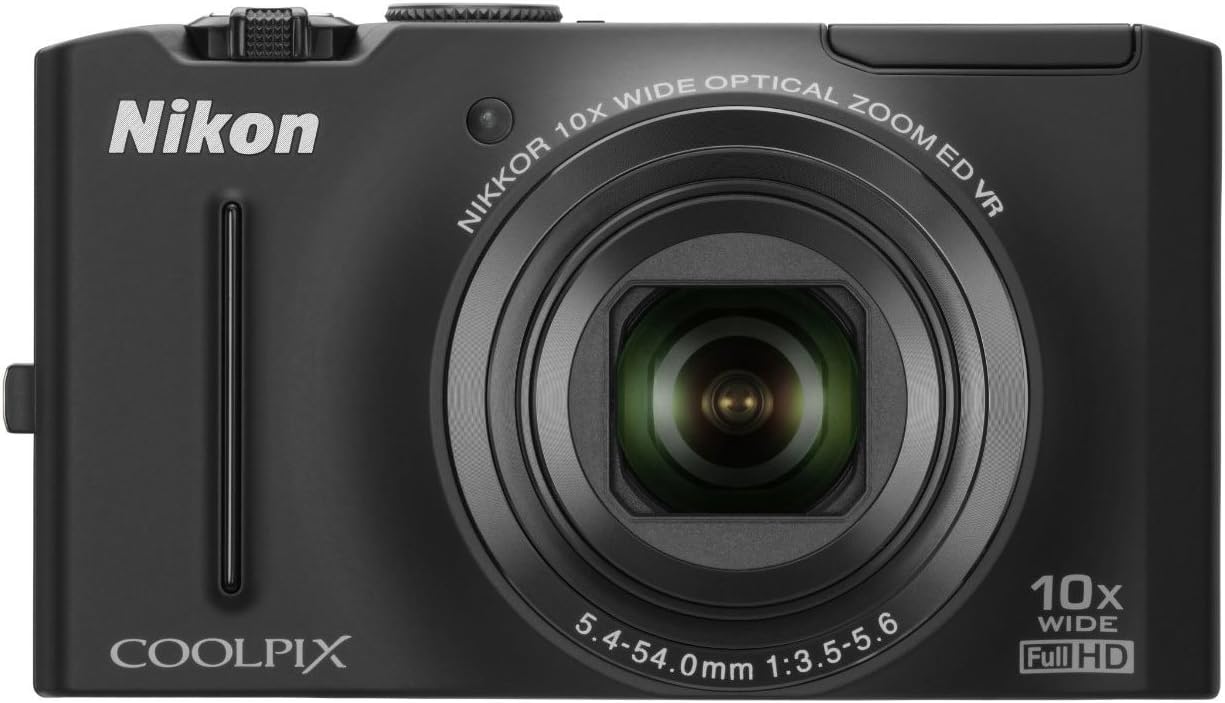
ചിത്രം 2.1: മുൻഭാഗം view of the Nikon Coolpix S8100 camera, showing the lens, flash, and brand logo.

ചിത്രം 2.2: കോണാകൃതിയിലുള്ളത് view of the Nikon Coolpix S8100 camera, highlighting the top controls and LCD screen.
2.1. ഫ്രണ്ട് പാനൽ
- ലെൻസ്: 10x Optical Zoom-Nikkor ED Glass Lens.
- ഫ്ലാഷ്: കുറഞ്ഞ വെളിച്ചത്തിൽ ഉപയോഗിക്കാൻ ബിൽറ്റ്-ഇൻ ഫ്ലാഷ്.
- സെൽഫ്-ടൈമർ എൽamp: Indicates self-timer operation.
2.2. പിൻ പാനൽ
- LCD മോണിറ്റർ: 3-inch Ultra-High Resolution (921,000-dot) Clear Color Display.
- നിയന്ത്രണ ബട്ടണുകൾ: Navigation, menu, playback, and delete functions.
2.3. ടോപ്പ് പാനൽ
- പവർ ബട്ടൺ: ക്യാമറ ഓൺ/ഓഫ് ചെയ്യുന്നു.
- ഷട്ടർ ബട്ടൺ: നിശ്ചല ചിത്രങ്ങൾ പകർത്തുന്നു.
- സൂം നിയന്ത്രണം: Adjusts optical zoom.
3. പ്രാരംഭ സജ്ജീകരണം
3.1. ബാറ്ററി ചേർക്കുന്നു
The camera uses an EN-EL12 Li-ion rechargeable battery. Ensure the battery is fully charged before first use.
- Open the battery chamber cover located on the bottom of the camera.
- Insert the EN-EL12 battery with the correct orientation, matching the polarity indicators.
- ബാറ്ററി ചേമ്പർ കവർ സുരക്ഷിതമായി അടയ്ക്കുക.
3.2 ഒരു മെമ്മറി കാർഡ് ചേർക്കുന്നു
The Nikon Coolpix S8100 supports SD/SDHC memory cards (not included).
- Open the memory card slot cover, usually located next to the battery chamber.
- Insert the SD/SDHC card into the slot until it clicks into place. Ensure the card is oriented correctly.
- മെമ്മറി കാർഡ് സ്ലോട്ട് കവർ അടയ്ക്കുക.
3.3 ബാറ്ററി ചാർജ് ചെയ്യുന്നു
Use the supplied EH-68P Charging AC Adapter and UC-E6 USB Cable to charge the battery while it is in the camera.
- Connect the UC-E6 USB Cable to the camera's USB port.
- Connect the other end of the USB cable to the EH-68P Charging AC Adapter.
- Plug the AC adapter into a power outlet. The charging indicator will light up.
- Charging is complete when the indicator turns off.
4. അടിസ്ഥാന പ്രവർത്തനം
4.1. ക്യാമറ ഓൺ/ഓഫ് ചെയ്യുന്നു
അമർത്തുക പവർ ബട്ടൺ on the top panel to turn the camera on or off.
4.2. നിശ്ചല ചിത്രങ്ങൾ എടുക്കൽ
- ക്യാമറ ഓണാക്കുക.
- എൽസിഡി മോണിറ്റർ ഉപയോഗിച്ച് നിങ്ങളുടെ ഷോട്ട് ഫ്രെയിം ചെയ്യുക.
- അമർത്തുക ഷട്ടർ ബട്ടൺ halfway down to focus. The focus indicator will light up.
- അമർത്തുക ഷട്ടർ ബട്ടൺ ചിത്രം പകർത്താൻ താഴേക്ക് പോകുക.
4.3. Recording Full HD Movies
The Coolpix S8100 supports Full HD (1080p) movie recording with stereo sound.
- ക്യാമറ ഓണാക്കുക.
- സമർപ്പിച്ചിരിക്കുന്നത് അമർത്തുക Movie Record button (usually marked with a red dot) to start recording.
- അമർത്തുക Movie Record button റെക്കോർഡിംഗ് നിർത്താൻ വീണ്ടും.
- During recording, you can use the zoom control to adjust the optical zoom.
Video 4.1: Official product video demonstrating the Nikon Coolpix S8100's features, including its fast operation and Full HD movie recording capabilities.
4.4. പ്ലേബാക്ക്
ലേക്ക് view പകർത്തിയ ചിത്രങ്ങളും വീഡിയോകളും:
- അമർത്തുക പ്ലേബാക്ക് ബട്ടൺ (usually marked with a play icon).
- നിങ്ങളുടെ ഫോട്ടോകളിലൂടെയും വീഡിയോകളിലൂടെയും സ്ക്രോൾ ചെയ്യാൻ നാവിഗേഷൻ ബട്ടണുകൾ ഉപയോഗിക്കുക.
- അമർത്തുക OK/SET button ഒരു വീഡിയോ പ്ലേ ചെയ്യാൻ.
5. വിപുലമായ സവിശേഷതകൾ
5.1. Scene Modes
The camera offers 17 scene modes, including Scene Auto Selector, which automatically recognizes the scene and selects the most appropriate mode.
- Access scene modes via the മോഡ് ഡയൽ or മോഡ് ബട്ടൺ.
- Select a scene mode that matches your shooting environment for optimized results.
5.2. Image Stabilization (VR)
The 4-way VR Image Stabilization System minimizes camera shake for sharper images and smoother videos.
- Optical VR: Lens shift technology.
- ചലനം കണ്ടെത്തൽ: Adjusts shutter speed and ISO for moving subjects.
5.3. Smart Portrait System
Enhance your portraits with features like:
- Smile Timer: ഒരു പുഞ്ചിരി കണ്ടെത്തുമ്പോൾ ഷട്ടർ യാന്ത്രികമായി പുറത്തിറക്കുന്നു.
- ക്യാമറയിലെ റെഡ്-ഐ ഫിക്സ്: Corrects red-eye automatically.
- Face-Priority AF: Detects up to 12 faces for optimal focus.
- Skin Softening: Smoothes skin tones.
- Blink Warning: Alerts if a subject has blinked.
6. പരിപാലനവും പരിചരണവും
6.1. ക്യാമറ വൃത്തിയാക്കൽ
- ക്യാമറ ബോഡി വൃത്തിയാക്കാൻ മൃദുവായ, ലിന്റ് രഹിത തുണി ഉപയോഗിക്കുക.
- ലെൻസിനും എൽസിഡി സ്ക്രീനിനും, ഒരു പ്രത്യേക ലെൻസ് ക്ലീനിംഗ് തുണിയും ലായനിയും ഉപയോഗിക്കുക.
- കഠിനമായ രാസവസ്തുക്കളോ ഉരച്ചിലുകളോ ഉപയോഗിക്കുന്നത് ഒഴിവാക്കുക.
6.2. ബാറ്ററി പരിചരണം
- ഉപയോഗത്തിലില്ലാത്തപ്പോൾ തണുത്തതും ഉണങ്ങിയതുമായ സ്ഥലത്ത് ബാറ്ററികൾ സൂക്ഷിക്കുക.
- ബാറ്ററികൾ തീവ്രമായ താപനിലയിലേക്ക് തുറന്നുകാട്ടരുത്.
- ദീർഘിപ്പിച്ച സംഭരണത്തിന് മുമ്പ് ബാറ്ററികൾ പൂർണ്ണമായും ചാർജ് ചെയ്യുക.
7. പ്രശ്നപരിഹാരം
| പ്രശ്നം | സാധ്യമായ കാരണം | പരിഹാരം |
|---|---|---|
| ക്യാമറ ഓണാകുന്നില്ല. | ബാറ്ററി തീർന്നു അല്ലെങ്കിൽ തെറ്റായി ചേർത്തിരിക്കുന്നു. | Charge the battery or reinsert it correctly. |
| ചിത്രങ്ങൾ അവ്യക്തമാണ്. | ക്യാമറ കുലുക്കം, വിഷയ ചലനം, അല്ലെങ്കിൽ തെറ്റായ ഫോക്കസ്. | Hold the camera steady, use a faster shutter speed, or ensure proper focus. |
| വീഡിയോ റെക്കോർഡ് ചെയ്യാൻ കഴിയില്ല. | Memory card is full or too slow. | അനാവശ്യമായി ഇല്ലാതാക്കുക files or use a faster SDHC card (Class 6 or higher recommended). |
8 സ്പെസിഫിക്കേഷനുകൾ
- ഇമേജ് സെൻസർ: 12.1-മെഗാപിക്സൽ CMOS സെൻസർ
- ലെൻസ്: 10x Optical Zoom-Nikkor ED Glass Lens (30-300mm equivalent)
- ഡിസ്പ്ലേ: 3-inch Ultra-High Resolution (921,000-dot) Clear Color LCD
- ഇമേജ് സ്റ്റെബിലൈസേഷൻ: 4-way Optical VR Image Stabilization
- വീഡിയോ റെക്കോർഡിംഗ്: Full HD (1080p) with Stereo Sound
- ഐഎസ്ഒ സംവേദനക്ഷമത: ISO 160 - 3200
- സ്റ്റോറേജ് മീഡിയ: SD/SDHC മെമ്മറി കാർഡുകൾ
- കണക്റ്റിവിറ്റി: HDMI, USB
- ഊർജ്ജ സ്രോതസ്സ്: EN-EL12 Li-ion rechargeable battery
- അളവുകൾ: Approximately 103.7 x 59.2 x 27.2 mm (4.1 x 2.3 x 1.1 in.)
- ഭാരം: Approximately 150 g (5.3 oz) including battery and SD memory card
9. വാറൻ്റിയും പിന്തുണയും
9.1. ലിമിറ്റഡ് വാറൻ്റി
This product is covered by a limited warranty. Please refer to the warranty card included in the product packaging for full details regarding coverage, duration, and conditions. The warranty typically covers defects in materials or workmanship under normal use.
Note: Warranty may be voided by misuse, abuse, negligence, sand, liquids, impact, current fluctuations, or failure to follow operating instructions.
9.2. ഉപഭോക്തൃ പിന്തുണ
For technical assistance, product inquiries, or service requests, please visit the official Nikon support website or contact their customer service. Contact information can typically be found on the warranty card or the Nikon webസൈറ്റ്.


