ആമുഖം
This manual provides comprehensive instructions for the installation, operation, and maintenance of your ALFA NETWORK AOA-2415 15dBi Omni-Directional Outdoor Antenna. Designed for the 2.4GHz ISM band, this antenna supports IEEE 802.11b/g WiFi and Bluetooth applications, offering reliable performance in outdoor environments. Please read this manual thoroughly before installation and use to ensure proper setup and optimal performance.
സുരക്ഷാ വിവരങ്ങൾ
ഇൻസ്റ്റാളേഷനും പ്രവർത്തനവും നടത്തുമ്പോൾ ഇനിപ്പറയുന്ന സുരക്ഷാ മുൻകരുതലുകൾ പാലിക്കുക:
- മൗണ്ടിംഗ് ലൊക്കേഷൻ: Choose a mounting location that is clear of power lines, trees, and other obstructions. Ensure the mast is securely anchored.
- കാലാവസ്ഥാ സാഹചര്യങ്ങൾ: Avoid installing the antenna during lightning storms or strong winds.
- ഗ്രൗണ്ടിംഗ്: Proper grounding of the antenna and mast is recommended to protect against lightning strikes and static discharge. Consult local electrical codes.
- കേബിൾ മാനേജുമെന്റ്: പാരിസ്ഥിതിക ഘടകങ്ങളിൽ നിന്നുള്ള നാശവും അപകടങ്ങളും തടയാൻ എല്ലാ കേബിളുകളും സുരക്ഷിതമാക്കുക.
- കണക്റ്റർ സംരക്ഷണം: Always use weatherproof tape or sealant on exposed coaxial connections to prevent water ingress.
പാക്കേജ് ഉള്ളടക്കം
നിങ്ങളുടെ പാക്കേജിൽ എല്ലാ ഇനങ്ങളും ഉണ്ടെന്ന് ഉറപ്പാക്കുക:
- ALFA NETWORK AOA-2415 Omni-Directional Outdoor Antenna
- മൌണ്ടിംഗ് ബ്രാക്കറ്റ്
- U-bolts, nuts, and washers for mast mounting
- Weatherproof tape (may be included)

Image: The ALFA NETWORK AOA-2415 Omni-Directional Outdoor Antenna, approximately 4.8 feet long, shown with its base.

Image: Included U-bolts, nuts, and washers for securing the antenna to a mast.
സജ്ജീകരണവും ഇൻസ്റ്റാളേഷനും
1. മൗണ്ടിംഗ് സ്ഥലം തിരഞ്ഞെടുക്കൽ
Select a high, unobstructed location for the antenna to maximize signal range and minimize interference. Ensure the chosen mast or pole is sturdy enough to support the antenna's length and weight, and can withstand local wind conditions. The antenna is designed for outdoor use and is weatherproof.
2. Assembling the Mounting Bracket
Attach the provided mounting bracket to the base of the antenna. The bracket is designed to secure the antenna to a mast up to 2 inches in outer diameter (OD).
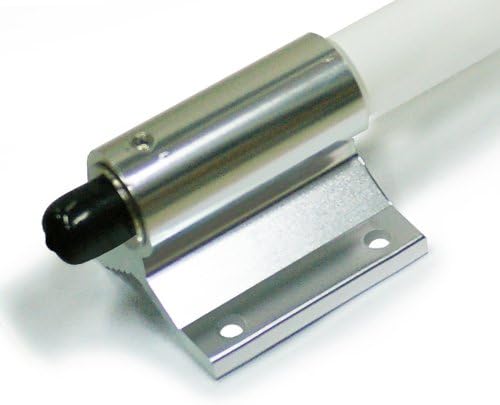
ചിത്രം: ഒരു ക്ലോസ്-അപ്പ് view of the antenna's base, showing the integrated mounting bracket.
3. Mounting the Antenna to a Mast
- Position the antenna's mounting bracket against the mast.
- Use the U-bolts, nuts, and washers to firmly secure the bracket to the mast. Ensure the antenna is vertical and stable.

Image: The antenna shown mounted vertically on a pole, with the coaxial cable connected to the N-Female connector at the base.
4. Connecting the Coaxial Cable
The AOA-2415 antenna features an N-Female connector at its base. Connect a compatible N-Male coaxial cable (not included) from the antenna to your WiFi access point, router, or adapter.

ചിത്രം: വിശദമായ ഒരു ചിത്രം view of the N-Female connector located at the bottom of the antenna, ready for coaxial cable attachment.
5. Weatherproofing the Connection
After connecting the coaxial cable, it is crucial to weatherproof the N-Female connector. Use high-quality weatherproof tape (such as self-amalgamating tape) to seal the connection completely, protecting it from moisture and environmental elements. This prevents signal degradation and extends the lifespan of your antenna and cable.
ഓപ്പറേഷൻ
The ALFA NETWORK AOA-2415 is an omni-directional antenna, meaning it transmits and receives signals in a 360-degree horizontal pattern. It is designed for use with 2.4GHz WiFi (IEEE 802.11b/g) and Bluetooth devices.
Optimal Performance Considerations:
- വീക്ഷണരേഖ: For best results, ensure a clear line of sight between the antenna and the devices it is communicating with. Obstructions like buildings, dense foliage, or terrain can significantly reduce signal strength.
- Coaxial Cable Quality and Length: Use the shortest possible length of high-quality, low-loss coaxial cable (e.g., LMR-400 or better for longer runs) to minimize signal attenuation.
- ആൻ്റിന ഉയരം: Mounting the antenna higher can improve range by clearing local obstructions, but consider the vertical beamwidth. For omni-directional antennas, a higher mount might mean a weaker signal for very close, ground-level devices.
- ഇടപെടൽ: The 2.4GHz band can be susceptible to interference from other devices (e.g., cordless phones, microwaves, other WiFi networks). If experiencing issues, consider adjusting WiFi channel settings on your access point.
മെയിൻ്റനൻസ്
The AOA-2415 antenna is designed for durability and minimal maintenance. However, periodic checks are recommended to ensure continued optimal performance.
- വിഷ്വൽ പരിശോധന: Periodically inspect the antenna, mounting hardware, and coaxial cable for any signs of physical damage, corrosion, or wear.
- കണക്ഷൻ സമഗ്രത: Check the weatherproof seal on the N-Female connector. Reapply weatherproof tape if it shows signs of degradation or cracking.
- മൗണ്ടിംഗ് സെക്യൂരിറ്റി: Ensure all mounting bolts and nuts remain tight, especially after severe weather conditions.
- വൃത്തിയാക്കൽ: If necessary, gently clean the antenna's fiberglass casinഗ്രാം വിത്ത് എ സോഫ്റ്റ്, ഡിamp cloth to remove dirt or debris that might accumulate. Avoid abrasive cleaners.
ട്രബിൾഷൂട്ടിംഗ്
നിങ്ങളുടെ ആന്റിനയിൽ പ്രശ്നങ്ങൾ അനുഭവപ്പെടുകയാണെങ്കിൽ, ഇനിപ്പറയുന്ന ട്രബിൾഷൂട്ടിംഗ് ഘട്ടങ്ങൾ പരിഗണിക്കുക:
- സിഗ്നൽ ഇല്ല അല്ലെങ്കിൽ ദുർബലമായ സിഗ്നൽ:
- Verify all cable connections are secure and properly weatherproofed.
- Check the coaxial cable for damage (kinks, cuts).
- Ensure the antenna is mounted in a location with minimal obstructions.
- Confirm your WiFi access point or adapter is correctly configured and operating on the 2.4GHz band.
- Test with a shorter or different coaxial cable if possible.
- ഇടയ്ക്കിടെയുള്ള കണക്റ്റിവിറ്റി:
- Check for sources of interference in the 2.4GHz band (e.g., microwaves, cordless phones, neighboring WiFi networks).
- Ensure the antenna is securely mounted and not swaying in the wind, which could cause signal fluctuations.
- Inspect the weatherproof seal for any signs of water ingress into the connector.
- ശാരീരിക ക്ഷതം:
- If the antenna or mounting hardware is physically damaged, replace the affected components immediately to prevent further issues or safety hazards.
സ്പെസിഫിക്കേഷനുകൾ
| മോഡൽ | AOA-2415 |
| ഫ്രീക്വൻസി റേഞ്ച് | 2.4 - 2.5 ജിഗാഹെർട്സ് |
| നേട്ടം | 15 dBi |
| പ്രതിരോധം | 50 ഓം |
| കണക്റ്റർ തരം | എൻ-പെൺ |
| അപേക്ഷകൾ | IEEE 802.11b/g WiFi, Bluetooth |
| ആൻ്റിന നീളം | ഏകദേശം 4.8 അടി (1.46 മീറ്റർ) |
| മെറ്റീരിയൽ | Fiberglass (radome) |
| മൗണ്ടിംഗ് | Mast mount (up to 2" OD) |
വാറൻ്റി വിവരങ്ങൾ
ALFA NETWORK products are manufactured to high quality standards. For specific warranty terms and conditions, please refer to the warranty card included with your product or visit the official ALFA NETWORK webസൈറ്റ്. ഏതെങ്കിലും വാറന്റി ക്ലെയിമുകൾക്ക് വാങ്ങിയതിന്റെ തെളിവായി നിങ്ങളുടെ വാങ്ങൽ രസീത് സൂക്ഷിക്കുക.
ഉപഭോക്തൃ പിന്തുണ
If you require technical assistance or have questions regarding your ALFA NETWORK AOA-2415 antenna, please contact ALFA NETWORK customer support through their official website or the contact information provided with your product documentation. Please have your model number (AOA-2415) and purchase details ready when contacting support.


