1. ആമുഖം
Thank you for choosing the Vestal MCW027 Analog-Digital Watch. This timepiece combines classic analog hands with a modern digital display, offering versatility and functionality. This manual provides essential information for setting up, operating, and maintaining your watch to ensure its longevity and accurate performance.
2. സജ്ജീകരണം
2.1 അൺബോക്സിംഗ്
Carefully remove your Vestal MCW027 watch from its packaging. Inspect the watch for any signs of damage. The package should contain the watch and this instruction manual.

Image: The Vestal watch box, black with the Vestal logo in white.
2.2 അനലോഗ് സമയം ക്രമീകരിക്കൽ
- Pull the crown (the small knob on the side of the watch case) out to its furthest position.
- മണിക്കൂർ, മിനിറ്റ് സൂചികൾ ആവശ്യമുള്ള സമയത്തേക്ക് സജ്ജമാക്കാൻ കിരീടം ഘടികാരദിശയിലോ എതിർ ഘടികാരദിശയിലോ തിരിക്കുക.
- Once the time is set, push the crown back into its original position to start the analog movement.
2.3 ഡിജിറ്റൽ സമയവും തീയതിയും സജ്ജീകരിക്കൽ
The Vestal MCW027 features a digital display with multiple functions. Specific button labels may vary, but typically:
- Locate the 'MODE' button (usually on the left side) to cycle through display modes (Time, Date, Alarm, Stopwatch).
- When in Time mode, press and hold the 'ADJUST' or 'SET' button (usually on the right side) until the digits begin to flash.
- Use the 'FORWARD' or 'REVERSE' buttons (often top-right and bottom-right) to change the flashing digits (hours, minutes, year, month, day).
- Press the 'MODE' button to move to the next setting.
- Once all settings are correct, press the 'ADJUST' or 'SET' button again to exit the setting mode.
2.4 വാച്ച് ധരിക്കുന്നു
Adjust the leather strap to fit comfortably around your wrist. The watch should be snug enough not to slide freely but not so tight as to restrict circulation.
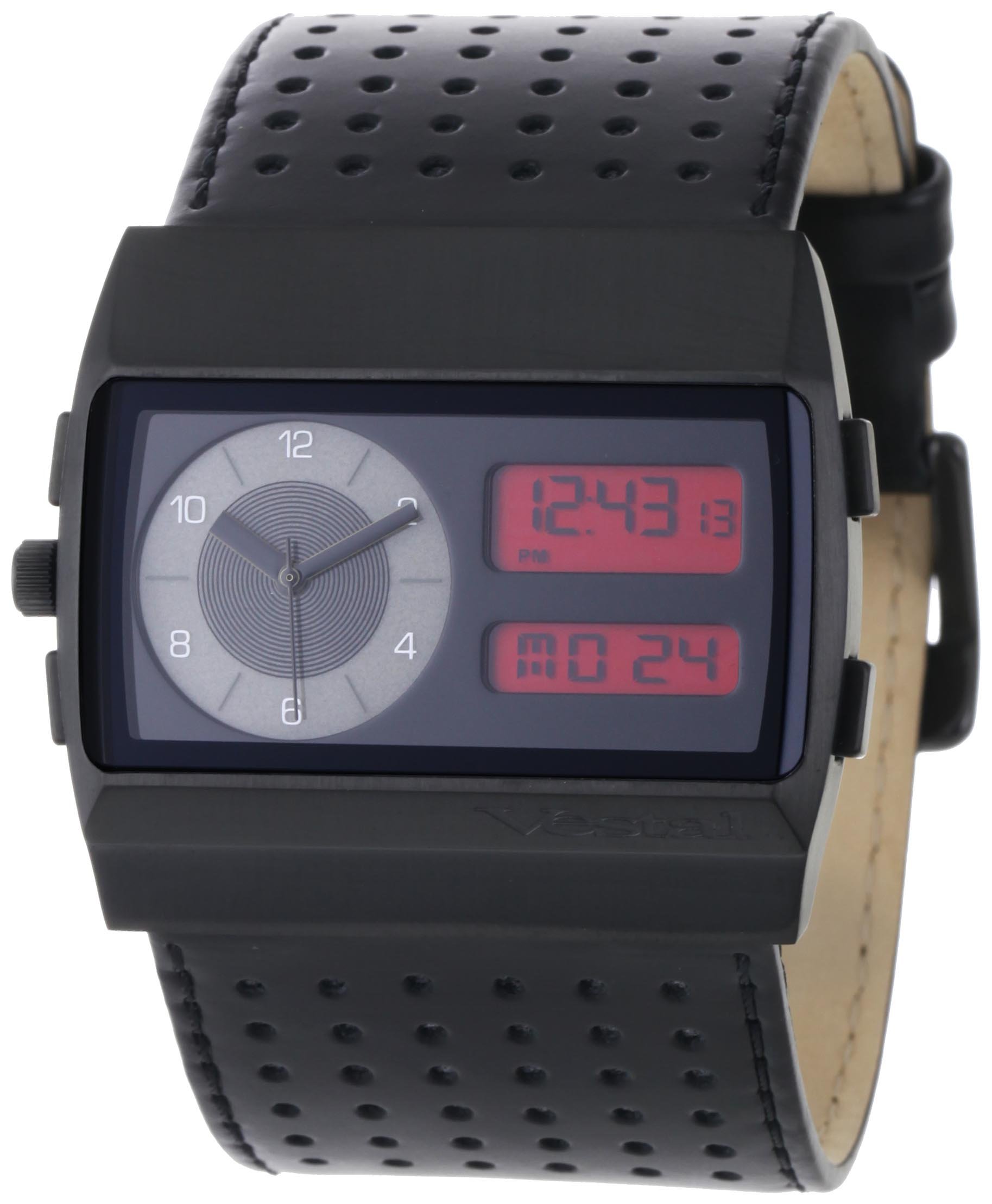
Image: The Vestal MCW027 watch displayed on a wrist, highlighting its analog and digital features.
3. വാച്ച് പ്രവർത്തിപ്പിക്കൽ
3.1 മോഡ് തിരഞ്ഞെടുക്കൽ
Press the 'MODE' button repeatedly to cycle through the available digital display functions. These typically include:
- സമയ പ്രദർശനം: Shows current digital time (hours, minutes, seconds).
- തീയതി പ്രദർശനം: Shows current date (month, day, year).
- അലാറം: ഒരു അലാറം സജ്ജീകരിക്കാനും സജീവമാക്കാനും അനുവദിക്കുന്നു.
- സ്റ്റോപ്പ് വാച്ച്: കഴിഞ്ഞുപോയ സമയം അളക്കുന്നതിന്.
3.2 Using Digital Functions
- അലാറം: In Alarm mode, use the 'ADJUST' button to enable/disable the alarm. Use 'SET' and 'FORWARD/REVERSE' buttons to set the alarm time.
- സ്റ്റോപ്പ് വാച്ച്: In Stopwatch mode, press 'START/STOP' (often the top-right button) to begin and end timing. Press 'RESET' (often the bottom-right button) to clear the stopwatch.
4. പരിപാലനം
4.1 നിങ്ങളുടെ വാച്ച് വൃത്തിയാക്കൽ
- കേസ്: വാച്ച് കേസ് മൃദുവായതും ഉണങ്ങിയതുമായ തുണി ഉപയോഗിച്ച് തുടയ്ക്കുക. കഠിനമായ അഴുക്കിന്, അല്പം ഡി.amp തുണി ഉപയോഗിക്കാം, തുടർന്ന് ഉടനടി ഉണക്കാം.
- തുകൽ സ്ട്രാപ്പ്: Avoid prolonged exposure to water, direct sunlight, and harsh chemicals. Clean with a specialized leather cleaner or a very slightly damp തുണി, പിന്നീട് വായുവിൽ പൂർണ്ണമായും ഉണങ്ങാൻ അനുവദിക്കുക.
4.2 ജല പ്രതിരോധം
The Vestal MCW027 watch has a certain level of water resistance, but it is generally not suitable for swimming, diving, or showering unless explicitly stated otherwise on the watch case back. Avoid operating buttons or the crown when the watch is wet to prevent water ingress.
4.3 ബാറ്ററി മാറ്റിസ്ഥാപിക്കൽ
When the watch's battery runs low, the digital display may dim or the analog hands may stop. Battery replacement should be performed by a qualified watch technician to ensure proper sealing and function. Attempting to replace the battery yourself may void the warranty and compromise water resistance.
5. പ്രശ്നപരിഹാരം
| പ്രശ്നം | സാധ്യമായ കാരണം | പരിഹാരം |
|---|---|---|
| അനലോഗ് കൈകൾ ചലിക്കുന്നില്ല | ബാറ്ററി തീർന്നു; ക്രൗൺ ഊരിമാറ്റി. | ബാറ്ററി മാറ്റിസ്ഥാപിക്കുക (പ്രൊഫഷണൽ സേവനം ശുപാർശ ചെയ്യുന്നു); ക്രൗൺ പിന്നിലേക്ക് തള്ളുക. |
| Digital display blank or dim | Battery depleted; Extreme temperature. | Replace battery; Allow watch to return to normal operating temperature. |
| Incorrect digital time/date | സമയം/തീയതി ശരിയായി സജ്ജീകരിച്ചിട്ടില്ല. | Refer to Section 2.3 to reset digital time and date. |
| ബട്ടണുകൾ പ്രതികരിക്കുന്നില്ല | Watch in locked mode; Internal malfunction. | Check manual for specific button lock features (if any); Contact customer support if issue persists. |
6 സ്പെസിഫിക്കേഷനുകൾ
- മോഡൽ നമ്പർ: MCW027
- ബ്രാൻഡ്: Vestal
- ഡിസ്പ്ലേ തരം: അനലോഗ്-ഡിജിറ്റൽ
- സ്ട്രാപ്പ് മെറ്റീരിയൽ: തുകൽ
- പ്രസ്ഥാനം: ക്വാർട്സ്
- പാക്കേജ് അളവുകൾ: 11.4 x 10 x 10 സെ.മീ
- പാക്കേജ് ഭാരം: 258.55 ഗ്രാം

Image: A visual guide demonstrating various watch case sizes, from 14-16mm up to 50-54mm, for reference.
7. വാറൻ്റി വിവരങ്ങൾ
Your Vestal MCW027 watch is covered by a manufacturer's warranty against defects in materials and workmanship. The duration and terms of the warranty may vary by region. Please refer to the official Vestal website or contact Vestal customer support for detailed warranty information specific to your purchase.
8. ഉപഭോക്തൃ പിന്തുണ
If you encounter any issues not covered in this manual or require further assistance, please contact Vestal customer support. Contact details can typically be found on the official Vestal webസൈറ്റ് അല്ലെങ്കിൽ നിങ്ങളുടെ ഉൽപ്പന്ന പാക്കേജിംഗിൽ.


