ആമുഖം
This manual provides essential information for the safe and effective use of your PICO 16 AWG Purple Primary Wire, model 81169PT. This high-quality primary wire is designed for various electrical applications, particularly in automotive systems, offering reliable conductivity and durability.
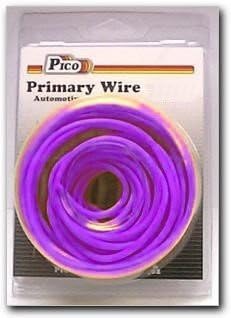
This image shows the PICO 16 AWG Purple Primary Wire, coiled and packaged in clear plastic, with the 'Pico Primary Wire Automotive' label visible at the top.
ഉൽപ്പന്ന സവിശേഷതകൾ
- ഗേജ്: 16 AWG (American Wire Gauge) for standard electrical applications.
- നിറം: Distinctive purple insulation for easy identification in complex wiring systems.
- അപേക്ഷ: Universal fit, suitable for a wide range of automotive and general electrical wiring needs.
- ഈട്: Designed for reliable performance and longevity.
സജ്ജീകരണവും സുരക്ഷയും
Before beginning any electrical work, ensure you understand the circuit and take appropriate safety measures. Improper wiring can lead to damage, fire, or injury.
സുരക്ഷാ മുൻകരുതലുകൾ:
- Always disconnect power from the circuit before working with electrical wires.
- ഇൻസുലേറ്റഡ് കയ്യുറകൾ, സുരക്ഷാ ഗ്ലാസുകൾ പോലുള്ള ഉചിതമായ വ്യക്തിഗത സംരക്ഷണ ഉപകരണങ്ങൾ (പിപിഇ) ഉപയോഗിക്കുക.
- ഷോർട്ട് സർക്യൂട്ടുകൾ തടയുന്നതിന് എല്ലാ കണക്ഷനുകളും സുരക്ഷിതമാണെന്നും ശരിയായി ഇൻസുലേറ്റ് ചെയ്തിട്ടുണ്ടെന്നും ഉറപ്പാക്കുക.
- Consult a qualified electrician or automotive technician if you are unsure about any wiring procedure.
- Verify the wire gauge is appropriate for the current load to prevent overheating.
തയ്യാറാക്കൽ:
- Identify Circuit Needs: Determine the required length and gauge of wire for your specific application.
- ഉപകരണങ്ങൾ ശേഖരിക്കുക: Have wire strippers, crimpers, connectors, and heat shrink tubing (if needed) readily available.
- Plan Routing: Map out the path for the wire to ensure it is protected from abrasion, heat, and moving parts.
Operating (Wiring Procedures)
This section outlines general steps for using primary wire in electrical circuits. Specific applications may require additional steps or specialized techniques.
- അളക്കലും മുറിക്കലും: Measure the required length of wire and cut it cleanly using wire cutters. Allow for some extra length for connections.
- Strip Insulation: Carefully strip approximately 1/4 to 1/2 inch of insulation from the ends of the wire using a wire stripper set to the 16 AWG setting. Avoid nicking the copper strands.
- കണക്ഷനുകൾ ഉണ്ടാക്കുക:
- ക്രിമ്പിംഗ്: Insert the stripped wire into the appropriate crimp connector (e.g., spade, ring, butt connector) and crimp securely with a crimping tool. Tug gently to ensure a strong connection.
- സോൾഡറിംഗ്: If soldering, ensure the connection is clean and apply heat evenly to the wire and component before introducing solder. Allow to cool without disturbance.
- ഇൻസുലേറ്റ് കണക്ഷനുകൾ: After making a connection, insulate it using electrical tape, heat shrink tubing, or appropriate terminal covers to prevent accidental contact and short circuits.
- സുരക്ഷിത വയറിംഗ്: Use cable ties or clips to secure the wire along its path, preventing it from dangling, rubbing against sharp edges, or interfering with moving parts.
- ടെസ്റ്റ് സർക്യൂട്ട്: Once all connections are made and secured, carefully reapply power and test the circuit to ensure proper functionality.
പരിപാലനവും സംഭരണവും
Proper maintenance and storage will ensure the longevity and performance of your primary wire.
- പരിശോധന: Periodically inspect exposed sections of wire for signs of wear, fraying, or damage to the insulation. Replace damaged sections immediately.
- ശുചിത്വം: Keep the wire free from dirt, oil, and corrosive substances, which can degrade insulation over time.
- സംഭരണം: Store unused wire in a cool, dry place away from direct sunlight and extreme temperatures. Keep it coiled neatly to prevent kinks and tangles.
- സംരക്ഷണം: When installed, ensure the wire is protected from physical damage, excessive heat, and moisture.
ട്രബിൾഷൂട്ടിംഗ്
This section addresses common issues related to electrical wiring. Always ensure power is disconnected before troubleshooting.
- പവർ ഇല്ല/ഇടവിട്ട പവർ:
- Check all connections for looseness or corrosion. Re-crimp or re-solder as necessary.
- Inspect the wire for breaks or damage along its length.
- Verify the power source (e.g., battery, fuse) is functioning correctly.
- Short Circuit/Blown Fuse:
- Look for exposed wire strands touching metal or other wires.
- Ensure insulation is intact and not chafed or melted.
- Confirm the wire gauge is sufficient for the current draw of the connected device.
- Overheating Wire:
- This indicates the wire is carrying too much current for its gauge. Immediately disconnect power.
- Replace with a heavier gauge wire (lower AWG number) suitable for the load.
- Check for any unintended resistance in the circuit.
സ്പെസിഫിക്കേഷനുകൾ
| ആട്രിബ്യൂട്ട് | വിശദാംശങ്ങൾ |
|---|---|
| ബ്രാൻഡ് | PICO |
| മോഡൽ നമ്പർ | 81169PT |
| വയർ ഗേജ് | 16 AWG |
| നിറം | പർപ്പിൾ |
| ഫിറ്റ് തരം | യൂണിവേഴ്സൽ ഫിറ്റ് |
| ഇനത്തിൻ്റെ ഭാരം | Approximately 5.3 ounces (0.33 Pounds) |
| യു.പി.സി | 035704511699 |
| നിർമ്മാതാവ് | PICO |
| പാക്കേജ് അളവുകൾ | ഏകദേശം 6 x 4 x 3 ഇഞ്ച് |
വാറൻ്റിയും പിന്തുണയും
Specific warranty information for the PICO 16 AWG Purple Primary Wire is not provided within this manual. For details regarding product warranty, returns, or technical support, please refer to the manufacturer's official webസൈറ്റ് അല്ലെങ്കിൽ അവരുടെ ഉപഭോക്തൃ സേവനവുമായി നേരിട്ട് ബന്ധപ്പെടുക.
നിർമ്മാതാവ്: PICO
For further assistance, please visit the official PICO webസൈറ്റ് ചെയ്യുക അല്ലെങ്കിൽ അവരുടെ ഉപഭോക്തൃ പിന്തുണ ചാനലുകളുമായി ബന്ധപ്പെടുക.
പ്രധാനപ്പെട്ട കുറിപ്പുകൾ
ഈ മാനുവലിൽ ഉൾപ്പെടുത്തുന്നതിനായി വിൽപ്പനക്കാരന്റെ ഔദ്യോഗിക ഉൽപ്പന്ന വീഡിയോകളൊന്നും ലഭ്യമായിരുന്നില്ല.
Always adhere to local electrical codes and regulations when installing or modifying electrical systems.


